Thermalright Phantom Spirit Cooler: Budget-to-Mid Air Cooler Buying Guide
The Thermalright Phantom Spirit is one of the most talked-about air coolers in the budget-to-mid range. It offers a large heatsink and a sizeable fan for a price that is often well below premium coolers, which makes it a popular choice for builders who want solid cooling without a pump. This article reviews the Phantom Spirit as a product class, explains the trade-offs of its design and helps you decide whether it fits your build. It is a spec-based buying review, and we have not run our own thermal or noise testing for it.
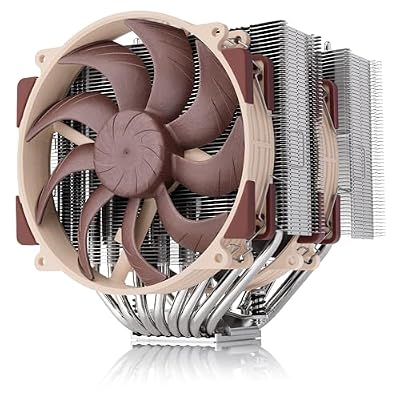
The hero listing was matched to the query “Thermalright Phantom Spirit” and may be a close match rather than the exact variant you want. The Phantom Spirit name covers more than one configuration, so check the card for the tower layout, fan count, dimensions and compatibility list before ordering.
What the Phantom Spirit Design Brings
The Phantom Spirit belongs to the family of tower-style air coolers that combine a large aluminium or copper heatsink with one or more fans. Air coolers in this class use a stack of fins to spread heat, and the fans push air through those fins. The result is a cooler with good thermal capacity, few moving parts and no pump to maintain.
The main appeal is value. You get a large heatsink and a substantial fan for a price that undercuts many premium options. The trade-off is that budget-oriented designs often use simpler fans and mounting hardware, so the noise and build quality may not match a premium dual-tower cooler at the top end. Read the fan specifications and the mounting instructions carefully before you buy.
Tower Layout and Fan Count
Phantom Spirit listings can differ in tower count, fan count and fan size. A single-tower layout is smaller and easier to fit in compact cases, while a larger configuration gives more cooling capacity. Check the listing for the exact layout and whether a second fan is included or optional. Those details decide how much headroom the cooler gives you and how much space it needs.
Mounting and Compatibility
Confirm that the mounting kit covers your socket. Mounting kits differ between AM4, AM5 and Intel sockets, and some listings include only part of the hardware. If your board is an AM5 model, check that the bracket is included or purchase it separately. Compatibility is one of the most common issues with budget coolers, so do not skip this check.
Who the Phantom Spirit Suits
This cooler suits builders on a moderate budget who want strong cooling for a mid-range processor, low maintenance and a quiet fan at moderate speed. It works well in mid-tower cases with good airflow and in builds where a pump is not needed. It is a sensible option for a first custom build or a budget upgrade from a stock cooler.
It is less suitable for very hot high-core-count processors, for systems that need the absolute lowest noise, or for cases with tight height limits. Measure the cooler and check RAM clearance before buying. If your CPU runs very hot under load, a larger dual-tower cooler or a 360mm AIO may be a better match.
Comparison Table: Phantom Spirit and Similar Air Coolers
The table compares the main cooler classes you will see when shopping in this range. Ranges are broad, and the exact model and price should be confirmed on the live listing.
| Cooler class | Design | Best for | Main trade-off | Typical price range |
|---|---|---|---|---|
| Phantom Spirit style tower (this review’s class) | Large heatsink, one or two fans | Budget-to-mid builds with a mainstream CPU | Simpler fans; check mounting kit | Check current price |
| Compact single-tower | Smaller heatsink, one fan | Small cases and lower-power chips | Less headroom under load | Check current price |
| Premium dual-tower air | Two fin stacks, large fans | High-end cooling with low noise | Higher cost and larger footprint | Check current price |
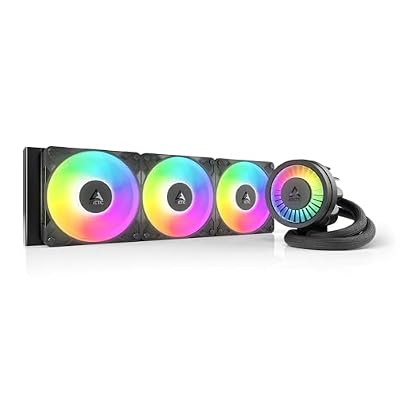
| Budget 240mm AIO | Pump, 240mm radiator | Builds that prefer liquid cooling | Pump, maintenance and mounting | Check current price |
For a broader comparison of budget and mid-range choices, our best air CPU coolers for gaming guide covers the main options, and the best CPU cooler for gaming article matches coolers to processors.
Fit and Installation Checks
Case Height and RAM Clearance
Tower coolers need height room above the motherboard. Measure from the socket to the top of the fins, including the fan, and compare it with your case’s CPU cooler height limit. Check RAM height too, because tall memory heatsinks can clash with the fins or fan. Low-profile RAM is the easiest solution if clearance is tight.
Thermal Paste and Mounting Pressure
Apply a small, even amount of thermal paste and tighten the mounting hardware in a cross pattern. Uneven pressure can reduce contact quality. If you are unsure which paste to use, our best thermal paste guide covers the main options for different builds.
Airflow Through the Case
Tower coolers depend on case airflow. A front intake and a rear exhaust give the fan air to work with. In a case with poor airflow, the cooler will run hotter and the fan may need to spin faster, which increases noise. Plan the fans so intake air reaches the cooler.
Thermal and Noise Expectations
We have not measured this cooler’s performance for this article. Results depend on the processor, the fan speed, the case and the ambient temperature. A large tower cooler with a decent fan can handle mainstream gaming processors well, but it will have less headroom than a premium dual-tower or a 360mm AIO under sustained all-core load. Noise depends heavily on fan quality and speed, so set a fan curve that keeps the CPU comfortable without running the fan at full speed all the time.
Maintenance and Upgrade Path
Air coolers have few parts that wear out. Clean the fins and the fan periodically, check the mounting for tightness and listen for changes in fan noise. If your CPU runs hotter over time, reapply thermal paste as part of routine maintenance. When you upgrade the processor, confirm that the cooler’s mounting kit supports the new socket before you change the board.
If you are building a complete system, our step-by-step gaming PC build guide covers the install order, and the best PSU for gaming guide helps you choose a power supply that suits the rest of the build.
If you are building on a budget, the $1000 gaming PC build guide shows how a value cooler fits into a complete system. For the processor, the best budget CPU for gaming list and the best CPU for gaming guide help you match the chip to the cooler. The best mid-tower gaming cases article is the next stop if you need a case with good airflow.
Top Picks for Thermalright Air Coolers
Thermalright offers several tower coolers that share a similar approach: large heatsinks, multiple heat pipes and quiet PWM fans. These models span different budgets and looks, so you can match one to your case and CPU.
Thermalright Phantom Spirit 120 EVO CPU Cooler, 7x6mm Heat Pipes, Dual PWM Fans
A twin-tower design built around seven heat pipes and two PWM fans. It is the closest relative of the cooler discussed above and suits builders who want strong cooling with a distinctive look.
As an Amazon Associate we earn from qualifying purchases at no extra cost to you.

Thermalright Phantom Spirit 120 SE Black CPU Cooler, Dual TL-C12B V2 PWM Fans
A lower-priced variation in black with two fans and a double-tower layout. It is a practical option for midrange processors when you want to keep the build budget in check.

Thermalright Peerless Assassin 120 SE CPU Cooler, 6 Heat Pipes, Dual 120mm PWM
A well-known twin-tower cooler with six heat pipes and dual fans. It is a straightforward pick for anyone who wants capable air cooling without a liquid loop.
Thermalright Peerless Assassin 120 Vision MAX ARGB Black CPU Air Cooler
This version adds a lighting display and a premium finish. It is for builders with a windowed case who care about appearance as much as cooling performance.

Thermalright Assassin X120 Refined SE CPU Air Cooler, 4 Heat Pipes
A smaller single-tower cooler with four heat pipes. It suits entry-level builds and compact cases where a large twin tower would not fit.
Frequently Asked Questions
Is the Phantom Spirit good enough for gaming?
For mainstream gaming processors in a well-ventilated case, a large tower cooler like this is usually sufficient. For very hot or high-core-count chips under sustained load, a larger cooler or a 360mm AIO gives more headroom.
Do I need a separate mounting kit?
Check the listing. Some configurations include the mounting kit for common sockets, while others need a separate bracket for newer platforms. Confirm the kit for your socket before buying.
Will it fit in a small case?
Only if the total height fits your case’s CPU cooler limit and the cooler does not clash with the RAM or front panel. Measure before buying, and consider a compact single-tower model for tight cases.
Is it quieter than a stock cooler?
In most cases a large tower cooler with a decent fan runs quieter than a basic stock cooler at the same temperature, because the larger heatsink lets the fan spin more slowly. Check user reports for noise on your specific platform.
Final Verdict
The Thermalright Phantom Spirit class is a strong value pick for builders who want solid air cooling for a mainstream processor without paying for a premium dual-tower model. Its strengths are a large heatsink, low maintenance and a competitive price. Its limits are simpler fans, the need to confirm the mounting kit and the exact tower layout, and less headroom for very hot processors. Check the listing for the exact variant, measure your case and RAM, and confirm the socket compatibility. For a budget-to-mid build, it is a practical and capable choice.