Sentinels Valorant Team Setup & Gear
Team setups in Valorant are about more than one player’s preferences. A roster has to share practice spaces, travel to events and swap seats on LAN, and it needs gear that behaves the same way on every machine. The Sentinels-style setup is a useful model for this, because the team approach is easier to copy than any single player’s rig. This guide explains how a competitive team standardises its gear, what a home player can take from that approach, and how to build a setup that stays consistent across sessions.
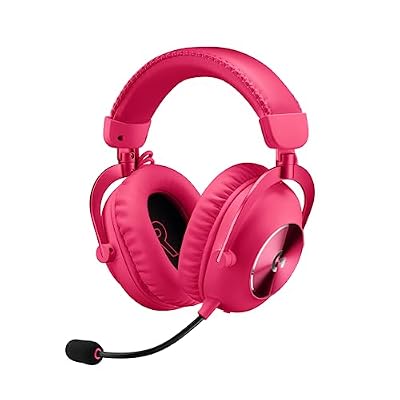
The listing above is a close match for the type of peripheral or accessory this topic points to. It is not confirmed as the exact gear any roster uses today, and team gear changes between seasons. Check the card for the model, connection type and current price before you order. The planning advice below holds whichever listing you choose.


What a Team Setup Is Designed to Do
A team setup has three jobs. It must feel the same on every machine, so a player can sit at any seat and keep their aim and timing. It must be easy to replace, so a broken mouse or cable does not stop a practice block. And it must be easy to move, because LAN events and bootcamps require packing and travel. Those goals shape what a team buys far more than the latest product launch does.
Consistency is the most important of the three. Teams often lock in a mouse model, a keyboard layout and a headset, then keep them for a full season. Changing gear mid-season can disrupt muscle memory, and that cost is hard to measure but easy to feel. A home player can apply the same rule. Pick a setup that you can keep for a long period and change it only with a clear reason.
Standardising the Core Kit
Teams usually standardise four items: the mouse, the keyboard, the headset and the monitor. The same model across the roster makes practice fair and makes it easier to diagnose a fault. If one player has a problem with a mouse, the team can swap it with a spare that matches. Standardisation also helps coaches because they can judge a player’s play without the hardware changing the result.
For a home player, standardisation can be simpler. Choose one mouse you like, one keyboard layout you trust, and one headset that suits your room. Keep spares of the parts that fail most often, such as cables and mouse feet. For a broader look at mice, see the best gaming mouse in 2026.
Spares, Cables and Travel
Teams keep spare cables, a second mouse and a second headset in their event bag. These items cost little compared with a missed match. At home you can keep a similar kit in a drawer. Plan for the single failure that would stop you playing for a day, and keep the spare ready. Our guide to gaming setup accessories covers small items worth keeping on hand.

INNOCN 24.5" QHD 2K 1440P 240Hz Gaming Monitor for PS5, Xbox Console, PC Computer, IPS HDR400 1Ms HDMI 2.1, DisplayPort, Low Blur, Height/Pivot Adjustable Stand, Black - 25G2S Plus


As an Amazon Associate we earn from qualifying purchases. Product prices and availability are accurate as of the date/time indicated.
Comparison Table: Team and Home Setup Priorities
The table compares what a team needs with what a home player should prioritise. The prices are not listed because they change often. Use the cards in this article, or the live listing, for current figures.
| Item | Team priority | Home priority | Typical price range |
|---|---|---|---|
| Mouse | Same model across the roster, plus spares | One model you can keep for a year | Check current price |
| Keyboard | Same layout and switch feel for everyone | Layout that fits your hands | Check current price |
| Headset | Clear comms and quick swap | Comfort and clear positional audio | Check current price |
| Monitor | Matched refresh and colour across seats | Refresh rate that matches your frame rate | Check current price |
| Spares | Full backup kit for events | Cables and one spare mouse | Check current price |
The gap between team and home is mostly about spares and travel. A home player who never leaves the room needs fewer backups, but the same principle of consistency still applies.
Monitors, Refresh Rate and Matching Screens
Matching monitors across a team means matching refresh rate, panel type and brightness as closely as possible. A mismatch can make one player’s view look different, which affects crosshair visibility and target tracking. A high refresh panel helps motion look smoother, but only if the computer can reach high frame rates. Our guide to choosing refresh rate for gaming explains the trade-offs, and the best 240Hz gaming monitor covers competitive options.
Desk, Chair and Posture for Long Blocks
Team practice often runs for several hours a day. Poor posture adds fatigue, and fatigue lowers focus. Teams usually standardise desks and chairs too, so that each seat gives the same height and support. For a home setup, look for a desk that puts your forearms at a comfortable level and a chair with lumbar support. For options, see the best gaming desk and ergonomic gaming chairs.
Mousepads and Surfaces
A team needs mousepads that behave the same way on every seat. Cloth or hard surfaces both work, but the whole roster should use the same one. Mismatched pads change glide and control, and that makes practice harder to compare. A home player can pick one surface and keep it. Our comparison of cloth versus hard gaming mousepads covers the choice, and the best esports mousepads lists options sized for competitive play.
Headsets and Team Comms
Clear voice communication is central to team play. Headsets should be comfortable for long sessions and should have a microphone that picks up a clear voice without picking up keyboard noise. If you are building a team kit or a home setup, check the microphone first. For a microphone option that suits voice comms, see the best gaming microphones.
Budget Path for a Team-Style Home Setup
You do not need a full team kit to practise well. Start with one mouse, one keyboard and one headset that fit your hands. Add a spare cable and a second mouse once your schedule grows. If you are building a PC as well, our overview of gaming PC builds for every budget helps you split money between the computer and the peripherals. For the room plan, see the best gaming setup guide.

INNOCN 24.5" 1440P 240Hz Gaming Monitor Fast IPS HDMI 2.1, DP, Black, 25G2S | FreeSync & G-SYNC Compatible, Work with N / A Graphic Card, Work with PS5 Console, Gaming Laptop, Up to 0.5ms, Speaker


As an Amazon Associate we earn from qualifying purchases. Product prices and availability are accurate as of the date/time indicated.
Frequently Asked Questions
Do I need the same gear as a Valorant team to improve?
No. Team gear helps with consistency across seats, but your results depend on practice, comfort and settings that suit your hands. Use the team approach as a model for consistency, not as a shopping list.
Why do teams standardise their peripherals?
Standard gear makes practice fair, makes faults easier to find and keeps muscle memory steady across seats. Swapping to a matched spare is quicker than adjusting to a new model.
What spares should a home player keep?
A spare cable for your mouse and headset is the most useful item. A second mouse is worth it if your main one is your only pointing device during matches. Keep the spares where you can reach them quickly.
Is a team-style monitor setup worth it at home?
Only if your PC can reach high frame rates and you care about motion clarity. A matched pair of monitors is useful for multi-screen setups, but a single well-chosen monitor covers most home needs.