
Aspas Valorant Setup Guide 2026: How to Build a Pro-Style Valorant Rig
Players who look up an aspas Valorant setup are usually trying to answer a practical question: what makes a competitive Valorant rig feel right, and how much of it is worth copying? Valorant rewards quick, precise aim and fast reactions, so the gear and the settings around it matter. Yet a setup that works for a top player may not suit your desk, your hand size or your budget.
This guide explains the logic behind a pro-style Valorant setup. It covers the mouse, monitor, keyboard, headset, network connection and the PC parts that keep the game smooth. It also shows how to test each piece so you can decide what to keep. The aim is a setup you can trust in ranked games, not a copy of someone else’s desk.

The listing above may be a close match for the type of gear used in a pro-style Valorant setup, rather than the exact kit of any one player. Check the card for the exact model, specifications and current price before buying. The advice below applies to any model you choose.
What a Competitive Valorant Setup Has to Do
Valorant is a tactical shooter with short rounds and sharp fights. Three things matter most. You need precise aim, so the mouse and sensitivity must feel predictable. You need to read the screen quickly, so the monitor must show motion clearly. And you need a stable frame rate and network connection, so the game responds when you press a key. A good setup supports all three without drawing attention to itself.
Many competitive players also value consistency over novelty. They keep the same mouse for years, use the same sensitivity and rarely change the crosshair during a season. That stability is part of the setup, because muscle memory builds on repeated feel.
Core Gear Choices
Mouse and Sensitivity
Start with the mouse. Shape, weight and grip style matter more than any single specification. A claw, palm or fingertip grip each suits different hands, and a mouse that fits your grip reduces fatigue over long sessions. Wired and wireless options both work well in modern designs, so choose based on feel and reliability. Our guide to the best gaming mouse in 2026 compares the main categories, and the best wireless gaming mouse roundup covers cordless options.
Sensitivity should feel comfortable at a moderate setting. Test a value for a week and avoid changing it after every bad round. Many players also prefer a lower in-game sensitivity paired with a mouse setting that remains constant across games. Keep notes on what you change so you can roll back if accuracy drops.
Monitor and Refresh Rate
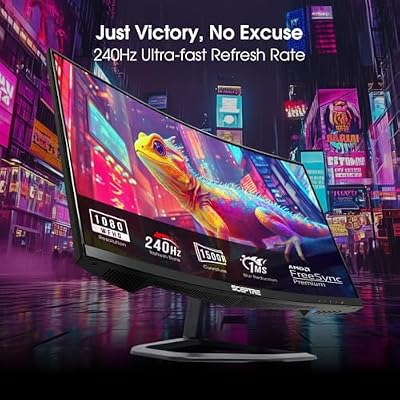
A fast monitor helps you track moving targets and read the minimap at a glance. Refresh rate is the headline number, but response time and the panel type also affect how clear motion looks. Our guide to the best 240Hz monitor for gaming explains why many competitive players choose this tier. If you want to compare other options, the best monitor for gaming roundup covers the wider market.

New! Sceptre Curved 24.5-inch Gaming Monitor up to 240Hz 1080p R1500 1ms DisplayPort x2 HDMI x2 Eye Care Build-in Speakers, Machine Black 2026 (C255B-FWT240 Series)




As an Amazon Associate we earn from qualifying purchases. Product prices and availability are accurate as of the date/time indicated.
Keyboard and Headset
Your keyboard handles movement, abilities and utility keys. A layout you can reach without looking keeps your hands steady during fights. Switch feel is personal, so try a few before you commit. The best gaming keyboard in 2026 guide explains the trade-offs, and the best keyboard switches for gaming article compares switch types.
A headset matters because Valorant relies heavily on sound. Footsteps and ability cues tell you where enemies are. Choose a headset with a clear, comfortable sound profile and a microphone that picks up your voice without background noise. Our best gaming headset in 2026 guide covers the main options.
Comparison: Valorant Setup Components
| Component | Main benefit | Key trade-off | Typical price range |
|---|---|---|---|
| Wired mouse | No battery or wireless latency concerns | Cable drag on some pads | Check current price |
| Wireless mouse | Clean desk and freedom of movement | Requires charging or battery care | Check current price |
| 240Hz monitor | Clearer motion and faster feedback | Needs a GPU that can drive high frame rates | Check current price |
| Mechanical keyboard | Responsive, consistent key feel | Noise and switch preference | Check current price |
| Gaming headset | Clear audio cues and voice comms | Comfort over long sessions | Check current price |
The table shows where to start. Most players benefit most from a comfortable mouse and a monitor that matches their GPU. Keyboard and headset choices depend more on personal preference.
PC Performance and Network Settings
Hardware That Keeps Frames Steady
Valorant is not the most demanding game, but a stable frame rate still matters. Consistent frame times make aim feel more predictable. If you are building or upgrading, the best CPU for Valorant and the best GPU for Valorant guides explain which parts give the best return for competitive play.
Network Connection
A stable connection matters as much as a fast monitor. Wired Ethernet is usually more consistent than Wi-Fi for online play. Our guide to the best Ethernet settings for gaming covers the options on your PC, and the best router settings for gaming article shows what to check on the router itself.

New! Sceptre 24.5-inch Gaming Monitor 240Hz 1ms DisplayPort x2 HDMI x2 100% sRGB AMD FreeSync Premium Build-in Speakers, Machine Black 2026 (E255B-FWD240 Series)


As an Amazon Associate we earn from qualifying purchases. Product prices and availability are accurate as of the date/time indicated.
How to Test Your Valorant Setup
Change one part of the setup at a time. If you switch mouse and sensitivity together, you cannot tell which change helped. Play a block of practice or unrated games, then rate the change in your notes. Look for consistent results over several sessions rather than one good or bad match.
Check the refresh rate in the game and in the display settings after any monitor change. Confirm that the frame rate cap or vsync setting does what you expect. These small checks prevent the common problem of running a fast monitor at its default slower rate.
Common Mistakes With Pro-Style Setups
The most common mistake is buying every item a player uses without first checking what you need. A second mistake is copying a sensitivity value without adjusting for your mouse, desk and monitor size. A third is focusing on lighting and aesthetics before the basics work. Build the setup around comfort and consistency, then add extras later.
Frequently Asked Questions
Can I copy an aspas Valorant setup exactly?
You can use it as a reference, but exact copies often feel different in practice. Grip, desk height and monitor distance all change how gear behaves. Build a version that fits your body and test it.
Is a 240Hz monitor necessary for Valorant?
It is not required, but many competitive players find it helpful for motion clarity. Your GPU must also deliver high frame rates for the monitor to matter. Check both before you buy.
Should I use a wired or wireless mouse?
Both can work well. Choose the one that feels best and keep batteries or cables in good condition. Consistency matters more than the connection type.
What should I upgrade first for Valorant?
For most players the mouse and monitor give the most noticeable change. PC upgrades come next if frame rates are unstable. Audio and keyboard choices come after that.


