
Curved vs Flat Gaming Monitor Comparison
The curved-or-flat question divides gamers more sharply than almost any other monitor choice. Curved panels promise immersion, a wrap-around view that fills more of your peripheral vision and makes racing games and flight sims feel bigger. Flat panels offer straight lines, simpler mounting and a sharper sense of geometry for work and general use. Both shapes are now common, and neither is a universal upgrade. The right answer depends on the screen size, your viewing distance and the games you play most.
This comparison explains how curvature is specified, what it changes in practice and which buyers gain the most from each shape. It is a buying guide, not a detailed research. We have not sat with these monitors for extended sessions, so the advice draws on the product class, the common curvature ratings and the general trade-offs that apply to each format. The hero listing above is the closest match for the query “curved gaming monitor”, and the four cards in the list show related options. Check each card for the exact model, curvature rating and current price.


How Monitor Curvature Is Specified
Curvature is usually expressed as a radius in millimetres, such as 1000R, 1500R or 1800R. The lower the number, the tighter the curve. A 1000R panel bends more sharply than a 1800R panel, and that sharper bend changes how the image wraps around your field of view. Manufacturers often choose the rating to match the screen size, because a large panel needs a gentler curve to avoid distorting the edges. Some curved models are sold in a single rating, and others offer a choice of curvature at the same size.
The curve also changes the distance at which the image looks correct. A tight curve is designed for a close viewing distance, where the edges stay in a consistent relationship with your eyes. If you sit farther back, the curve may feel less pronounced. Check the recommended viewing distance on the product page or in reviews before deciding a specific rating suits you.
Why the Radius Matters More Than the Label
The word “curved” covers a wide range of shapes. A gentle 1800R panel on a 27-inch screen will feel different from a tight 1000R panel on a 34-inch ultrawide. Compare the radius and the screen size together, and ignore the marketing phrase that suggests every curved model delivers the same effect. The label tells you the shape. The radius tells you how strong that shape is.
What Curvature Changes in Practice
On a curved panel, the edges of the screen sit closer to the same distance from your eyes as the centre. This reduces the sense that the corners are farther away, and it can make peripheral details feel more connected to the main view. In racing games and flight simulators, where the horizon and the sides of the screen matter, the effect can feel natural. In first-person shooters, the same effect can help you track movement near the edge of the view.
Curvature also has downsides. Straight lines near the edge of a curved panel can look slightly bent, which some people find distracting in spreadsheets, text documents and design work. Reflections can differ across the surface, and the curve can make it harder to mount the monitor on certain stands or wall arms. If you switch between tasks all day, a flat panel is often easier to live with.
Immersion and Eye Comfort
Immersion is the main reason buyers choose curved screens, but comfort is a separate question. Some users report that a strongly curved display feels more natural after a short adjustment period, while others find the edges less comfortable for long sessions. There is no reliable rule here. If possible, test a curved panel in a shop or on a friend’s desk before buying, and watch how your eyes feel after an hour of use.
Curved and Flat Options Compared
The table compares curved and flat choices by use case. Price ranges are broad, because curved models are common at several sizes and flat models span a wide range. Use the table to decide which shape fits your desk, then compare specific listings.
| Format | Strength | Trade-off | Best for | Typical price range |
|---|---|---|---|---|
| Gentle curve (1800R class) | Subtle immersion with few distortion concerns | Less dramatic effect | Mixed use and moderate immersion | Mid-range; check current price |
| Tight curve (1000R to 1500R class) | Strong wrap-around view | Straight lines can look bent at the edge | Racing, flight and open-world games | Mid to upper range; check current price |
| Flat panel | True straight lines and easy mounting | Less peripheral immersion | Work, editing and mixed desks | Wide range; check current price |
| Flat ultrawide | Wide canvas with straight geometry | Edges may feel far at close range | Productivity with some gaming | Mid to upper range; check current price |
Treat the table as a fit guide. The right row depends on your viewing distance and the tasks that take up most of your screen time.
Which Buyers Gain the Most From a Curve
Curved panels suit players who spend many hours in driving, flight or exploration games, where the sides of the view carry useful information. They also suit buyers who sit close to a wide screen and want the image to fill more of their field of view. Competitive players who rely on a stable centre view may prefer a flat panel, because the centre geometry is simpler and the edges do not change perspective.
Buyers who mostly write, code, edit or browse may find a flat panel more comfortable. Straight lines help in layout work, and the monitor is easier to share with colleagues or family members who do not want a curve. Our guide to the best monitor size for gaming covers the size question that often comes before curvature, and the best monitors for gaming roundup shows flat and curved models side by side.
How Size and Resolution Affect the Decision
Curvature matters most on larger screens. On a 24-inch panel, the curve has little room to work, and a flat model usually feels just as immersive. On a 32-inch or wider screen, the curve becomes more noticeable, and the rating matters more. Resolution also plays a role, because a high-resolution curved panel needs enough graphics performance to stay smooth. Check the frame rate your system reaches at the resolution you plan to use before paying for a large curved display.
Ultrawide panels are the most common curved format for gaming. Their extra width is the reason curvature works so well, because the edges would otherwise sit far from the centre. If you want a wide screen, a curve is often the more comfortable choice. If you want a standard 16:9 screen, the benefit is smaller and a flat panel may be the simpler option. Our best ultrawide gaming monitor guide covers the wide-format options in more detail.
Buying Checklist
Before you buy, measure your desk depth and check the distance from your eyes to the screen. Look up the recommended viewing distance for the curvature rating. Confirm the stand or mount can hold the monitor, and check whether it supports a wall arm if you plan to use one. Read at least one review that discusses curvature in real games, rather than only in product photos.
Then decide what you will do most. If the answer is games with wide views, a curved panel is a sound choice. If the answer is mixed work and games, a flat panel of the same size may be more useful day to day. Our monitor buying checklist walks through the other specs to weigh alongside shape.
For a curved shortlist, start with the best curved gaming monitor roundup and the best curved monitor for gaming page, which compare curvature ratings across sizes. The curved monitors for gaming guide adds more options for buyers who want a second opinion. If you lean flat, the best IPS gaming monitor list covers flat panels with strong viewing angles, and the best 34-inch gaming monitor page shows which wide sizes come in both shapes.

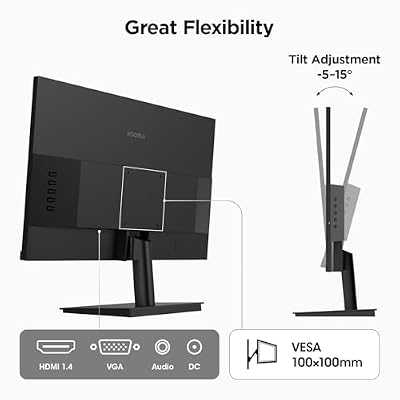
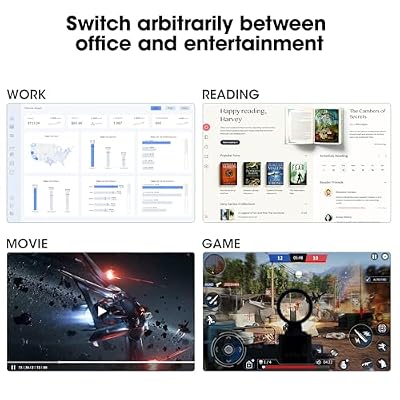
KOORUI 24 Inch Gaming Monitor 144Hz Full HD 1920 x 1080p VA Ultra-Slim Display with HDMI VGA, Adaptive Sync, 99% SRGB, VESA 100x100mm, Eye Care, Tilt, HDMI 2.0, Black, E2412K




As an Amazon Associate we earn from qualifying purchases. Product prices and availability are accurate as of the date/time indicated.
Frequently Asked Questions
Is a curved monitor better for gaming?
It can be, especially for racing, flight and open-world games where the edges of the view matter. For competitive shooters and mixed use, a flat monitor is often just as good. The benefit depends on the games and the viewing distance.
What curve rating should I choose?
A gentle rating such as 1800R suits most buyers who want a subtle effect. A tighter rating such as 1000R gives a stronger wrap-around view but can make straight lines look bent. Match the rating to the screen size and your viewing distance, and test one in person if you can.
Do curved monitors cause eye strain?
Some people find them comfortable, while others find the edges less natural for long sessions. There is no universal answer. Take regular breaks, set the screen at a comfortable distance and consider a flat panel if the curve bothers you after an hour of use.
Are flat monitors cheaper than curved ones?
Often, but not always. Price depends more on size, resolution, refresh rate and panel type than on shape alone. Compare curved and flat listings of the same size and specification to see the real difference.





