
Gaming Monitor Size Guide 24 27 32 Inch
Screen size is the decision that shapes everything else on a gaming monitor. A 24-inch panel fits a small desk and a tight budget, a 27-inch panel is the most common middle ground, and a 32-inch panel fills more of your view for immersive games and media. Size interacts with resolution, viewing distance and graphics power, so a bigger screen is not automatically better. A large panel at a close distance can look coarse, while a small panel far away can feel cramped.
This guide compares 24, 27 and 32-inch gaming monitors, shows how size and resolution combine, and explains how to choose based on your desk and habits. It is a buying guide, not a test report. We have not measured these monitors in our own setup, so the advice relies on the product class, the geometry of common screen sizes and the usual viewing distances for each. The hero listing above is the closest match for the query “gaming monitor size”, and the four cards in the list show related options. Check each card for the exact diagonal size, resolution and current price.


How Monitor Size Is Measured
Monitor size is quoted as the diagonal measurement of the visible panel. A 27-inch screen is 27 inches corner to corner, not 27 inches wide. Because widescreen panels are wider than they are tall, the width and height are smaller than the diagonal suggests. A 27-inch 16:9 screen is roughly 23.5 inches wide, and a 32-inch screen is roughly 27.9 inches wide. Measure the width of your desk and your stand before you commit, because the diagonal figure hides the real footprint.
Check the bezel as well. Thin bezels make a monitor look larger without changing its size, and they matter most in multi-screen setups. A monitor with thick bezels may take up more visual space than a thinner model of the same diagonal. Compare the outer dimensions in the spec table if you plan to place two panels side by side.
Viewing Distance and Perceived Size
The apparent size of a screen depends on how far away you sit. A 24-inch monitor at arm’s length can fill a typical field of view, while a 32-inch monitor at the same distance can feel too large and force you to move your head. Most desk setups place the screen roughly an arm’s length away, so size should be chosen with that distance in mind. If you sit farther back, a larger panel becomes more comfortable.

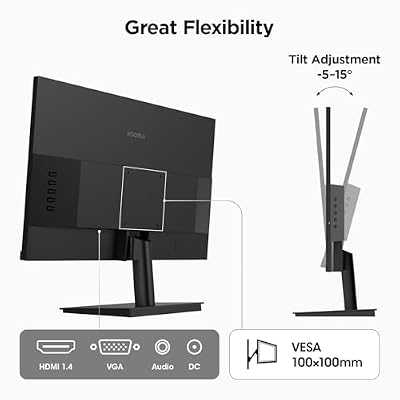
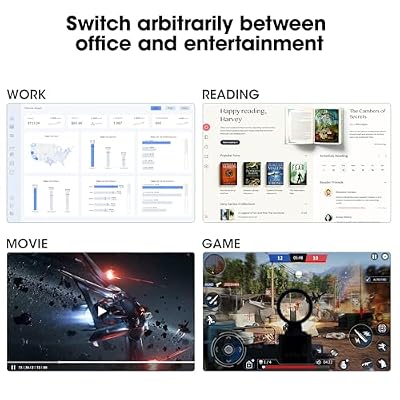
KOORUI 24 Inch Gaming Monitor 144Hz Full HD 1920 x 1080p VA Ultra-Slim Display with HDMI VGA, Adaptive Sync, 99% SRGB, VESA 100x100mm, Eye Care, Tilt, HDMI 2.0, Black, E2412K




As an Amazon Associate we earn from qualifying purchases. Product prices and availability are accurate as of the date/time indicated.
24-Inch, 27-Inch and 32-Inch Compared
A 24-inch monitor is compact and affordable. It suits small desks, shared spaces and secondary screens. At 1080p, its pixel density is high enough to look sharp at normal distances, although it offers less workspace than larger panels. Many competitive players choose 24-inch screens because they are easy to keep in a fixed view and because they often pair with high refresh rates at modest prices.
A 27-inch monitor is the most popular gaming size for good reason. At 1440p, it has a pixel density around 109 pixels per inch, which gives crisp text and detail at a typical desk distance. It leaves enough room for games and window layouts without demanding a very deep desk. For most players, 27 inches is the balanced choice between sharpness, space and cost.
A 32-inch monitor offers a large, immersive view and more workspace. At 1440p, its density drops to about 92 pixels per inch, which can look softer than a 27-inch screen at the same resolution. A 32-inch panel at 4K is much sharper, but it asks more of the graphics card. Choose this size if you sit farther back, enjoy cinematic games, or want to watch video on the same screen.
Size and Resolution Trade-Offs
Size and resolution must be chosen together. The pixel density figure shows how crisp the image looks at a normal distance. Approximate values help: a 24-inch 1080p panel is about 92 pixels per inch, a 27-inch 1440p panel is about 109, a 27-inch 4K panel is about 163, and a 32-inch 1440p panel is about 92. A 32-inch 1440p screen is therefore similar in density to a 24-inch 1080p screen, but it covers more area.
A larger screen at the same resolution can look softer, and that softness can be noticeable in text. If you buy a big panel, consider raising the resolution, provided your graphics card can handle it. Our best resolution for gaming guide explains how to weigh resolution against frame rate, and the 4K monitor for gaming guide covers the top end of that trade-off.
Comparison Table
The table compares common sizes by what they suit best. Price ranges are broad because they depend on resolution, refresh rate and panel type. Use the table to narrow your choice before reading specific listings.
| Size | Best for | Desk need | Resolution note | Typical price range |
|---|---|---|---|---|
| 24-inch | Esports, small desks, secondary screens | Compact desk | 1080p is sharp at this size | Lower cost; check current price |
| 27-inch | Most all-round gaming and work | Standard desk | 1440p gives a good balance | Mid-range; check current price |
| 32-inch | Immersive games and media | Deeper desk or longer viewing distance | 1440p is softer, 4K is sharper | Mid to upper range; check current price |
The table is a fit guide rather than a ranking. A 27-inch panel is the default for many people, but a 24-inch or 32-inch screen can be the better answer for specific rooms and habits.
Choosing the Right Size for Your Desk
Start by measuring the space available. Allow for the stand and the depth needed to keep the screen at a comfortable distance. If the desk is shallow, a 24-inch or 27-inch panel is usually easier to place. If you have a deep desk and sit well back, a 32-inch panel can make the most of the space.
Then consider what you do most. Competitive players often prefer a smaller screen that stays inside a fixed view. Players of open-world and cinematic games may prefer a larger screen. Mixed users who write, browse and game often do well with 27 inches. Our best monitor size for gaming guide goes deeper into these trade-offs, and the 27-inch monitor under 300 dollars roundup shows what budget buyers can expect at that size.
Buying Checklist
Confirm the diagonal size and the resolution in the spec table. Check the panel’s width and height against your desk. Look for the stand’s height and tilt range, and check whether a wall mount or arm is available if you need one. Read a review that discusses text clarity at the size you are considering, because sharpness is the most common complaint about larger screens at lower resolutions.
Then consider whether a bigger screen will change your habits. A larger monitor can encourage you to sit back, which may be more comfortable. It can also make you turn your head more to see corners. If possible, test the size in a shop or at a friend’s desk before buying, especially if you are moving up from a smaller panel.
To narrow the size decision further, compare the category pages. The best monitors for gaming roundup lists models across sizes, and the best budget gaming monitor page shows what a 24-inch or 27-inch panel costs at the entry level. Players who want a sharp 1080p screen can read the best 1080p monitor for gaming guide, and the TV vs monitor for gaming comparison explains when a larger screen makes more sense than a desk monitor. The best 34-inch gaming monitor page covers the wide alternative.

KTC 32 Inch Curved Gaming Monitor, FHD 1080p 165Hz Curve Monitor, H32S17C | 1500R, 1ms MPRT, Adaptive Sync, 122% sRGB, DP/HDMI, Tiltable, Eye Care, VESA, HDR10 for Gaming Home Office Business


As an Amazon Associate we earn from qualifying purchases. Product prices and availability are accurate as of the date/time indicated.
Frequently Asked Questions
Is 27 inches or 32 inches better for gaming?
Neither is better in every case. A 27-inch panel is sharper at 1440p and easier to fit on most desks. A 32-inch panel offers more immersion and workspace, but it can look softer at the same resolution. Choose based on your desk depth, viewing distance and resolution.
Is 24 inches too small for gaming?
No. A 24-inch monitor is a good choice for competitive play, small desks and secondary screens. It is sharp at 1080p and often pairs well with high refresh rates. It offers less workspace than larger panels, which matters most for productivity.
What size monitor is best for 4K?
A 27-inch 4K panel gives very high pixel density and sharp text. A 32-inch 4K panel is also sharp, but it needs a deeper desk and a strong graphics card to run demanding games. Check the frame rate your system reaches at 4K before buying a large panel.
How far should I sit from a gaming monitor?
A common starting point is about an arm’s length away. Larger panels may need a slightly greater distance to stay comfortable. Adjust your distance so the top of the screen sits near eye level and you can see the corners without moving your head much.


