
Linear vs Clicky Switch Gaming Keyboard
Choosing between linear and clicky switches is one of the most personal decisions in a gaming keyboard purchase. Both are mechanical, both register keys reliably, and both can be fitted to a serious gaming board. The difference is what you feel and hear with every press. A linear switch moves smoothly from top to bottom. A clicky switch adds an audible click at the point of actuation. This guide explains how each family behaves in games and at the desk, so you can decide which suits your hands, your room and your playstyle. The listing above is a useful place to start, but the advice here applies to any switch you compare.
The listing above may be a close match for the switch type you want rather than the exact product. Check the card for the exact switch name, board layout and price before you buy. The criteria in this guide hold whichever model you choose.
How Linear and Clicky Switches Differ
A linear switch has no tactile bump and no click. The stem slides straight down through the housing, and the force needed to press it stays fairly even from the top of the travel to the point where the key registers. Many players describe the feel as smooth or quiet, and it is the most common switch family among gamers who press keys repeatedly and rest their fingers on the board.
A clicky switch has a click mechanism inside the housing. When the key passes the actuation point, a small metal or plastic component creates an audible click and a slight tactile response. The sound is the defining feature. Clicky switches are satisfying for typing and easy to hear, which is why some people love them and others find them too loud for shared spaces.
Why the Choice Matters in Games
In gaming, the main effect of switch type is how comfortable you feel holding and tapping keys. Linear switches suit players who hold movement keys for long periods, because there is no bump to interrupt the press. Clicky switches suit players who like clear feedback, because the click tells you a key has been pressed even in a noisy game.
Held Keys and Movement
Shooter and action players often hold keys such as W, A, S and D for long stretches. A linear switch does not interrupt that hold with a bump, and many players find it less tiring over long sessions. The lack of a click also means fewer distractions when the room is quiet.
Rapid Taps and Abilities
MOBA, fighting and some MMO players tap ability keys very quickly. Some find the click helpful for confirming each press, while others prefer the smooth motion of a linear switch for rapid repetition. There is no single correct answer, so test both types with the games you play most.
Linear vs Clicky Comparison Table
| Factor | Linear | Clicky | Typical price range |
|---|---|---|---|
| Feel | Smooth, no bump | Defined click at actuation | Check current price |
| Noise | Quiet | Audible, can carry | Check current price |
| Feedback | Minimal | Audible and tactile | Not applicable |
| Best for | Held keys, shared rooms | Typing and clear confirmation | Mid tier for most boards |
| Fatigue | Often lower over long holds | Varies with personal preference | Not applicable |
The table describes general patterns. Individual switches in the same family can differ in weight and feel, so check the listing for the exact switch name.

Redragon K582 Wired RGB Mechanical Gaming Keyboard, 104-Key Standard Layout | 16.8M Color Immersive eSports Lighting Vibe, N-Key Rollover for Accurate Combos, 50M-Keystroke Durability, Customize Software
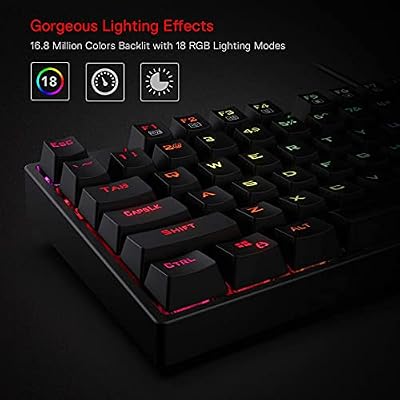


As an Amazon Associate we earn from qualifying purchases. Product prices and availability are accurate as of the date/time indicated.
Who Should Pick Linear Switches
Linear switches are a strong choice for players who live in a shared home, play late into the night, or hold movement keys for long periods. They also suit people who want a consistent press without distraction. If your priority is comfort during marathon sessions and you dislike sudden feedback, linear is the logical starting point. For a wider look at switch choices, the best keyboard switches for gaming article compares the main families.
Linear boards are also common in compact layouts. If you want a smaller board for more mouse room, the best mechanical keyboards under 150 guide lists options at different price points.
Who Should Pick Clicky Switches
Clicky switches suit players who enjoy audible feedback, type a lot for work and study, and do not share a room with light sleepers. The click gives a clear signal that a key has registered, which some find reassuring when they are learning a new board or using many keys at once. A clicky board can also be part of a satisfying desk setup, especially if you enjoy the sound.
If you are weighing noise against the rest of your setup, the best gaming keyboard 2026 overview explains how switch type fits into the wider choice of board.
Practical Tips Before You Buy
Test the Feel if You Can
Try a store display or a friend’s keyboard if you can. Press keys slowly and quickly, and listen to how the board sounds. A quick test tells you more than any description.
Consider the Room
A clicky board in a bedroom at night can disturb others. A linear board is usually quieter, though the case, keycaps and desk surface also affect noise. Plan for the environment you actually use.
Think About Future Changes
Some boards let you swap switches without soldering, which makes it easier to try the other family later. If you are unsure, a board with hot-swappable sockets gives you room to experiment. Check that feature in the listing before you buy.
Keep Your Setup in Balance
Your keyboard should match your mouse, your chair and your desk. The best wireless keyboard and mouse for gaming guide shows how a keyboard and mouse can work as a pair, and the best gaming mice and keyboards roundup covers combinations that fit different budgets.
Matching Switch Feel to Your Games
Start by listing the three games you play most. For each one, ask whether you hold keys for long periods, tap abilities quickly, or type chat messages between rounds. A linear board tends to suit held keys and quiet rooms. A clicky board tends to suit players who want audible confirmation during typing and rapid input. If your games mix both demands, a tactile switch may be the middle path, and the mechanical keyboard guide covers tactile boards alongside the other families.
Budget matters too. Mechanical boards can be found at many price points, and the best cheap mechanical gaming keyboard article shows what you can expect from a lower-cost board. For a mechanical option with a broader feature set, the best mechanical keyboard for gaming guide and the best keyboards for gaming roundup compare the main choices.
Frequently Asked Questions
Are clicky switches better for competitive gaming?
Not necessarily. The click gives feedback but does not register a key faster than a linear switch. Competitive players choose based on how the switch feels under their hands. Test both families before you decide.
Do linear switches feel less accurate?
Accuracy depends on the player more than the switch family. Some players feel more precise with a bump or click, and others feel more precise with a smooth press. Both can be accurate in practice.
Which is better for a shared apartment?
A linear board is usually the safer choice because it is quieter. If you want a clicky board, consider the case, keycaps and any dampening features that reduce sound.
Can I switch from clicky to linear later?
Only on boards with replaceable switch sockets. Many fixed-switch keyboards cannot be changed without replacing the board, so check the listing for hot-swap support.





