
Wireless Gaming Keyboard Latency Guide
Wireless gaming keyboards have improved a great deal, and many players now use them without a second thought. The question that still comes up is latency: how much delay a wireless connection adds between a key press and the action on screen. This guide explains where latency comes from, how the common wireless connection types compare, and what to check on a listing before you buy. The listing above is a good example of a wireless board, though it may be a close match for the model you have in mind rather than the exact product. The advice below applies across models.
The listing above may be a close match for the kind of wireless keyboard you are considering. Check the card for the exact model, connection type, battery specification and price. The guidance in this article is written to stay true whichever model you select.
Where Wireless Latency Comes From
Input delay is the time between a physical key press and the signal reaching the PC. For a wired keyboard, that delay is mainly the switch, the keyboard’s scan and the USB polling interval. A wireless keyboard adds the radio link, the receiver and the communication protocol. Each step can add small amounts of delay, and the total depends on how the board and receiver are designed.
In most gaming contexts the total difference between a well built wireless board and a wired one is small. The bigger factors are usually the game itself, your display’s refresh rate and your system’s overall performance. Still, a poorly designed wireless link can add noticeable delay or instability, so it is worth checking the connection type.
Polling Rate
Polling rate is how often the keyboard reports its state to the PC. A rate of 1000 Hz means updates every millisecond. Many gaming keyboards advertise this rate, and it is a useful baseline. Confirm that the wireless mode supports the same rate as wired mode, because some boards reduce polling over a radio link.
Connection Type
Wireless gaming keyboards usually connect in one of two ways: a dedicated 2.4 GHz receiver that plugs into a USB port, or Bluetooth. Dedicated receivers tend to offer lower and more consistent latency than Bluetooth, which is designed for broad compatibility and can add more delay. Many boards also support a wired mode for use when the battery is low.
Wireless Keyboard Comparison Table
The table below compares the factors that matter most for wireless gaming use. Latency figures are general, because real results vary with the board, receiver, environment and PC. Check the current price on each card.
| Factor | What to look for | Best for | Typical price range |
|---|---|---|---|
| Dedicated 2.4 GHz receiver | Low, consistent link | Competitive and fast-paced play | Check current price |
| Bluetooth only | Good for multiple devices | Typing and casual use | Entry to mid tier |
| Polling rate | 1000 Hz in wireless mode | Players who want the fastest reports | Check current price |
| Battery life | Hours of use on one charge | Long sessions and travel | Check current price |
| Wired fallback | USB cable mode | Charging while playing | Usually included |
Use the table to shortlist boards, then check the specification for each one. Wireless performance is a combination of several factors.

Logitech G515 LIGHTSPEED TKL Wireless Gaming Keyboard, Low Profile Keyboard | LIGHTSYNC RGB, Thin Tenkeyless Design, double-shot PBT Keycaps, Tactile (Brown) Mechanical Keyboard - Black


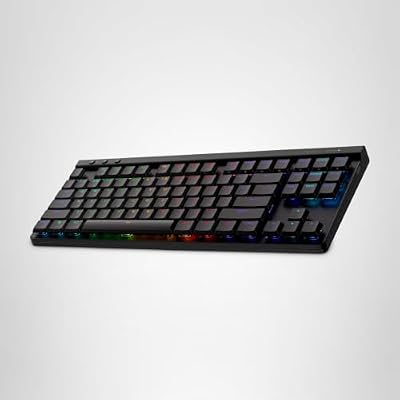
As an Amazon Associate we earn from qualifying purchases. Product prices and availability are accurate as of the date/time indicated.
What to Check on a Wireless Keyboard Listing
Stated Polling Rate in Wireless Mode
Look for the polling rate in wireless mode specifically. Some listings quote the wired rate only. A board that supports 1000 Hz wirelessly is a strong option for gaming.
Receiver Design and Pairing
A dedicated receiver that stores in the base of the keyboard is convenient for travel. Check whether the receiver is easy to lose, and whether the keyboard can pair with more than one device. Multi-device support is useful if you switch between a PC and a laptop.
Battery and Charging
Battery life varies with lighting, connection type and how often you use the board. Bright RGB lighting shortens battery life, so you may prefer a model with lighting control. Check whether the board charges over USB while you play, which avoids downtime.
Reducing Wireless Latency in Practice
Even a good wireless board works best with a clean setup. Keep the receiver close to the keyboard, use a USB extension cable to place the receiver near the board rather than behind the PC tower, and avoid placing it behind metal objects. Interference from other 2.4 GHz devices, such as some routers and wireless headsets, can affect the link, so test with the devices you normally use.
Your network connection is a separate matter. Wireless keyboard latency is not the same as online ping. For guidance on the network side, the best wireless router for gaming guide explains what to look for, and the best ethernet for gaming article covers wired options that many players prefer for stable online play.
Choosing Between Wireless and Wired
A wired keyboard has no battery and no radio link, which makes it simple. A wireless keyboard gives a cleaner desk and more flexibility. For most players, a well designed wireless board is perfectly suitable. If you play at a professional level or have a very tight budget for any hardware, a wired board remains the most straightforward option. The best wireless gaming keyboard article compares wireless choices, and the best wireless gaming mouse guide covers the matching mouse side.
For players who want a full wireless desk, the best wireless gaming headset guide covers headsets that often share the same 2.4 GHz space, which is worth checking for interference.
Checking Your Wireless Setup Before a Match
A short check before a ranked session catches most problems. Confirm that the keyboard is on the dedicated receiver, that the battery is above a comfortable level and that the receiver is in a clear line of sight. Run a quick typing test and a few presses in your usual game. If the board feels consistent, you are ready. If not, move the receiver and retest before blaming the keyboard.
Wireless choices extend beyond the keyboard. A matching mouse should share the same connection standard and battery routine, so the best wireless gaming mice roundup is worth reading alongside this guide. Players who use a wireless headset should also check interference, and the best wireless headset for gaming article covers how those devices compare. For a broader view of the desk, the best gaming keyboard 2026 guide places wireless models in the wider market.
Frequently Asked Questions
Is a wireless gaming keyboard laggy?
A well designed wireless keyboard with a dedicated receiver can perform very close to a wired one in most games. Bluetooth connections can add more delay, so choose the connection type that suits your play.
Is 1000 Hz polling important on a keyboard?
It is a useful specification because it means the keyboard reports its state every millisecond. Check that the rate applies in wireless mode, not only over USB.
Does Bluetooth work for gaming?
Bluetooth is usable for casual gaming and typing. For fast-paced play, a dedicated 2.4 GHz receiver is generally the better choice because it is designed for lower and more consistent latency.
How do I know if my wireless keyboard is causing delay?
Test with a wired connection and compare. If the difference is noticeable, check the receiver position, interference and battery level. Persistent problems may need a different board or a wired model.





