
Gaming Case Airflow Guide & Selection Tips
A gaming case does more than hold the parts together. Its airflow decides how cool your graphics card and processor run, how loud the fans get under load, and how stable your clock speeds stay during long sessions. Many builders focus on glass panels and RGB, then discover that their card runs hot because the case was never designed to move air through it. This gaming case airflow guide explains how to judge airflow on a spec sheet, which layouts work best, and how to pick a case that matches your components and your room.
The hero listing above is a gaming PC case, and the four alternatives represent different sizes and airflow approaches. The listing may be a closest-match substitute rather than the exact case you searched for, so check the card for the precise dimensions, fan support and included fans before you buy. The airflow principles below apply whichever case you choose.


How Airflow Works Inside a Gaming Case
Airflow is a simple idea. Cool air comes in through the front and bottom, passes over the components, and leaves through the rear and top. A case with a clear path for that air keeps temperatures under control. A case where air has to fight through a solid front panel or a crowded cable mess will run hotter, even if it has many fans. The goal is a consistent pressure path, with intake and exhaust sized to match.
Most gaming cases use one of two broad approaches. Mesh-front designs let air flow straight through the front to the graphics card, which is usually the most effective method for keeping components cool. Solid-front designs with glass or dense panels can look cleaner, but they rely on fans and filters that restrict flow, so they often need more fans to deliver similar temperatures. Neither is wrong, but the layout you pick should match your priorities. A solid-front example worth reading is the be quiet! Pure Base 500DX review, which shows how a quiet-focused design trades some raw intake for noise control.
Positive, Negative and Balanced Pressure
Pressure describes how many fans push air into the case compared with how many pull it out. Positive pressure, with more intake than exhaust, keeps dust out through filters and gaps but can slow internal exhaust. Negative pressure pulls more air out, which can help exhaust heat but draws dust in through every gap. Balanced pressure, with intake and exhaust roughly matched, is a common and sensible target for most gaming builds with filtered intake.
Choosing a Case Size and Layout
Mid-Tower Cases for Most Builds
Mid-tower cases give the best balance for most gaming PCs. They fit ATX and micro-ATX boards, offer room for long graphics cards and large air coolers, and leave space for good cable routing. Most mid-tower designs support several front, top and rear fans. If you are unsure where to start, a mid-tower with a mesh front is a safe default. For a wider look at the category, our best gaming PC case guide covers the main picks by price and style. Our mid-tower gaming case roundup lists the strongest options in that size class.
Compact and ITX Cases
Small-form-factor cases look striking and save desk space, but they demand more care. Heat from the graphics card and processor has less room to escape, and long GPUs may not fit. Check the maximum GPU and cooler height before you buy, and plan for a card with a moderate power draw. Our mini-ITX gaming case guide covers the compact options in detail.

darkFlash ATX Mid-Tower PC Case, Pre-Install 4 PWM ARGB Fans Computer Case, Full View Dual Tempered Glass Gaming PC Case, Type C Port, Supports up to 360mm Water Cooling Radiator, Black(DS900)


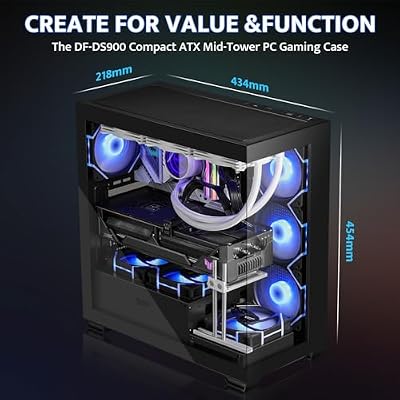

As an Amazon Associate we earn from qualifying purchases. Product prices and availability are accurate as of the date/time indicated.
Full-Size Towers and Airflow Headroom
Large cases offer the most room for radiators, long cards and extra fans. They suit high-end builds with big air coolers or custom loops. They also take up more space and sometimes make cable routing more tedious. The Corsair 5000D Airflow review is a useful example of a case built around airflow first, with a mesh front and a wide internal layout.
Fan Setup and Cooling Components
Front, Top and Rear Fans
A typical setup uses intake fans at the front and bottom, and exhaust fans at the rear and top. The front fans bring cool air to the graphics card, the rear fan removes hot air from the back of the case, and the top fans vent heat that rises. Check the case’s fan mounting positions before buying extra fans, because not every case supports the same sizes at every mount point. Fans are a cheap way to improve cooling, but more fans also means more noise, so match the fan count to the heat you expect.
CPU Cooler Clearance
The CPU cooler must fit the case height and the socket. Tower air coolers can be tall, and a case that clears a small cooler may not clear a large dual-tower model. AIO liquid coolers need radiator space at the top or front, and the mounting position affects how much fan space remains. Our best air CPU coolers for gaming guide explains how cooler size and case fit interact, and the CPU cooler buying guide covers AIO options as well.
Graphics Card Length and Clearance
Modern graphics cards can be very long and thick, and the case must allow enough clearance for the card and its power connector. Check the maximum GPU length listed by the case, and leave room for the cable bend at the connector. A case that fits your card with a few centimetres to spare is easier to build in and easier to service later.
Testing Temperatures After the Build
Once the system is assembled, the real test is temperature under load. Run a demanding game or a stress test, then monitor the graphics card and processor temperatures and fan speeds. If the GPU runs hot or the fans spin up loudly, check the airflow path, the filters and the fan directions before blaming the components. Our guide to checking GPU and CPU temperatures explains which readings to watch and how to interpret them.
Comparing Case Options
The table below lists the hero case and four alternatives by the role they play in a buying decision. It does not state exact prices, because they change often and vary between sellers. Confirm dimensions, fan support and the current price on the live listing before you buy.
| Option | Case role | Best for | Spec to confirm | Price |
|---|---|---|---|---|
| Hero listing | Primary pick for the query | Mainstream airflow builds | Front mesh, fan mounts, GPU length | Check current price |
| Alternative 1 | Mid-tower value option | Budget builds | Included fans and filters | Check current price |
| Alternative 2 | Compact option | Small-form-factor builds | Maximum GPU and cooler height | Check current price |
| Alternative 3 | Large tower option | Radiators and big coolers | Radiator support and cable space | Check current price |
| Alternative 4 | Glass-panel option | Showcase builds | Airflow restriction from panels | Check current price |

darkFlash DY470 Full-Tower ATX Gaming PC Case with 4 PWM ARGB Fans, Black | Back Plug-in Motherboard, Vertical GPU Mounting, Dual-Chamber, Panoramic Glass, Up to 2 x 360mm Radiators, RTX 40 Compatible


As an Amazon Associate we earn from qualifying purchases. Product prices and availability are accurate as of the date/time indicated.
Our Ranked Recommendation
For most gaming readers, the ranked order is practical. First, a mid-tower case with a mesh front, space for at least three intake fans and clearance for your graphics card and cooler. Second, a large tower if you run a big radiator, a long card or a high-heat processor and have the space. Third, a compact case only when size is the priority, with careful checks on GPU and cooler height. Fourth, a solid-front or glass-heavy case when looks matter most, accepting that you may need extra fans. The hero listing and the mid-tower alternatives suit the first choice. For budget picks, see our gaming PC cases under $200 guide, and for showcase builds that prioritise glass, the tempered glass case roundup lists the options to compare.
Frequently Asked Questions
Is a mesh front panel always better for airflow?
For most builds, a mesh front gives the least restricted intake and the best GPU temperatures. Solid or glass fronts can work well too if you add enough fans and keep the filters clean.
Should I run positive or negative pressure?
Many builders choose slightly positive pressure with filtered intake to limit dust. Balanced pressure is also a sensible target. Choose the setup that matches your filters and your dust tolerance.
How do I know if my cooler fits the case?
Check the maximum CPU cooler height in the case specifications and compare it with the cooler’s stated height. For AIO coolers, confirm the radiator sizes the case supports at the top and front.
Do more fans always mean better cooling?
Not always. Fan placement and airflow path matter more than the raw count. Extra fans add noise and cost, so add them only where they improve airflow through the components.





