Cherry MX vs Optical Switches Gaming Comparison
When you compare gaming keyboards, the switch underneath each key does more to shape how the board feels than almost any other feature. Cherry MX switches have been the reference point for mechanical keyboards for decades, and optical switches use a light beam instead of metal contacts to register a keypress. Both designs can be excellent for gaming, but they differ in actuation, durability, price and how they feel under the finger. This Cherry MX vs optical switches gaming comparison explains how each design works, where each one wins, and which checks matter before you buy. It is a buying guide built around the switch types rather than a test of individual keyboards.
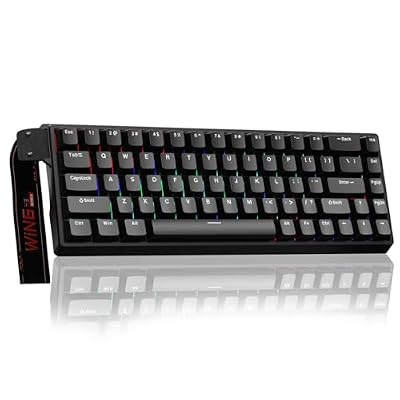
The hero listing was selected for the query “mechanical keyboard gaming switches” and may be a close match rather than the exact keyboard you choose. Check the card for the switch type, layout, connection method and current price. The alternatives in the list show other keyboards in the same category.
How Each Switch Works
A Cherry MX style mechanical switch uses a metal leaf or contact pair inside the housing. When you press the key, the contacts close and send a signal to the keyboard. This design has been used across the industry for a long time, and many switches are compatible with the same keycap and mounting standards. Cherry MX is a brand name, and many third-party switches copy the same mechanical layout, so check the switch name on the listing rather than assuming the brand.
An optical switch uses a light beam inside the housing. Pressing the key blocks or passes the light, and a sensor reads the change. Because there is no metal contact, optical switches can register input faster and avoid some contact bounce. Manufacturers often promote optical designs for speed and durability, and they are a common choice in gaming keyboards from several major brands.
Actuation, Feel and Durability
Actuation Point and Speed
Actuation point is the depth at which a key registers a press. Many mechanical switches sit around the middle of the key’s travel, while some optical and magnetic designs can be set to a shallower point. A shallower actuation point can feel faster in fast games, but it also takes practice to avoid accidental presses. Choose the actuation depth that suits the games you play and your typing habits.
Feel and Sound
Switch feel falls into three main groups: linear, tactile and clicky. Linear switches press smoothly with no bump. Tactile switches have a noticeable bump at the actuation point. Clicky switches add an audible click. Both Cherry MX and optical switches come in all three categories, so feel is a matter of choosing the right type rather than the switch technology alone.
Durability
Durability ratings are useful, but they are often measured by the manufacturer under specific conditions. Mechanical switches with metal contacts can wear over time, and optical designs avoid that contact wear. Real-world lifespan also depends on how hard you press and how often you clean the board. Read long-term reviews that report switch wear rather than relying on a single headline number.
Comparison Table: Cherry MX vs Optical
The table compares the two switch designs across the criteria that matter most for gaming. Prices are broad ranges, and the exact figure should be checked on the card before you buy.
| Option | Key feature | Best for | Main trade-off | Typical price range |
|---|---|---|---|---|
| Cherry MX style linear | Smooth press with metal contacts | Fast gaming with a familiar feel | Contact wear over long periods | Check current price |
| Cherry MX style tactile | Bump at actuation point | Mixed gaming and typing | Bump can feel tiring in long sessions | Check current price |
| Optical linear | Light-based sensing with fast actuation | Competitive gaming and durability focus | Often priced above standard mechanical | Check current price |
| Optical tactile or clicky | Light-based sensing with feedback | Typing-heavy users who game too | Fewer options in some layouts | Check current price |
If you are still choosing a keyboard type, our best mechanical keyboard for gaming guide covers the main options, and the best keyboard switches for gaming roundup compares switch choices in more detail.
Which Switch Suits Which Player
Competitive players who value fast, consistent input often prefer linear switches with a shallow actuation point. Optical linear designs are popular in this group, because their speed and durability match the demands of frequent, rapid presses. Players who type as much as they game may prefer tactile switches, which give a clear signal at the actuation point and reduce the chance of pressing a key by mistake while typing.
Players on a budget can get an excellent mechanical keyboard without paying for optical switches. A standard mechanical board with well-regarded switches will serve most gamers well. Our best budget gaming keyboard guide shows what a lower price buys, and the best cheap mechanical gaming keyboard roundup covers affordable boards.
Layout, Connection and Build Quality
Switch type is only one part of the decision. Layout matters for desk space and for the keys you use. A full-size board includes a number pad, a tenkeyless board removes it, and compact layouts go further. Connection matters too. Wired keyboards avoid battery concerns and latency questions, while wireless boards add convenience at a higher price and need charging. Check the keycap material, the case construction and whether the switches can be swapped. Swappable switches let you change feel later without buying a new board.
For a wider view of the keyboard market, the best gaming keyboard in 2026 guide compares several categories, and the best wireless gaming keyboard roundup covers cordless options. If you use a keyboard and mouse together, the best gaming mouse in 2026 guide helps complete the setup.
Cleaning, Maintenance and Long-Term Ownership
Both designs benefit from regular cleaning. Dust and crumbs can affect key feel, and keycaps should be removed periodically for a deep clean. Lubricating switches is an option for enthusiasts who want a smoother feel, but it takes time and care. Optical switches do not wear the same way, but dust can still affect performance, so keep the board clean whatever the switch type. For desk planning, the best gaming PC desks roundup helps match the board to your space.
Frequently Asked Questions
Are optical switches better than Cherry MX for gaming?
Optical switches can offer faster actuation and avoid contact wear, which suits competitive gaming. Cherry MX style switches remain a strong choice with a familiar feel and a wide range of options. The better switch depends on how you play and what you prefer under your fingers.
Is linear or tactile better for gaming?
Many gamers prefer linear switches because they press smoothly without a bump. Tactile switches can help if you type a lot as well, since the bump signals the actuation point. Try both if you can before deciding.
Do optical switches last longer?
They avoid the metal contact wear found in some mechanical switches, so manufacturers often promote longer life. Real lifespan depends on use and care, so check long-term reviews for the specific model you plan to buy.
Is a Cherry MX keyboard necessary for gaming?
No. Many mechanical switches from different brands perform well for gaming. Check the switch name and reviews rather than assuming a brand name guarantees a better experience.
Final Recommendation
For most gamers, a quality mechanical keyboard with well-reviewed switches is the best starting point, and the choice between a Cherry MX style switch and an optical switch matters less than the feel you prefer. Choose an optical linear switch if you want fast, consistent actuation and value durability for competitive play. Choose a Cherry MX style linear or tactile switch if you want a familiar feel, a wide choice of models and a lower price. Before buying, confirm the exact switch type on the card, check whether the board is wired or wireless, and make sure the layout fits your desk. Test the feel in person if you can, because switch choice is personal.