
RAM Buying Guide Gaming DDR5 Amount & Speed
Memory is one of the cheapest places to get a gaming PC wrong. Buy too little and you will see stutters when a game loads new assets or when a browser and a stream run in the background. Buy too much, or pay for speed the platform cannot use, and the money would have gone further on a better graphics card. For a broader primer on the memory standards, see our DDR4 vs DDR5 gaming comparison. This RAM buying guide for gaming covers the two decisions that matter most in 2026: how much DDR5 capacity you need, and which speed and timings are worth paying for on your platform.
The hero listing above is a DDR5 memory kit, and the four alternatives are similar kits at different capacities and speeds. The listing may be a closest-match substitute rather than the exact kit you searched for, so check the card for the precise capacity, speed, timings and kit configuration before you order. The advice below applies whichever kit you choose.


How Much RAM a Gaming PC Needs in 2026
Capacity is the first decision and the one with the biggest effect on day-to-day smoothness. Sixteen gigabytes was the common baseline for years, and it still runs many games, but modern titles, browsers with many tabs, launchers and background software now use more of it. For most gamers in 2026, 32GB is the sensible default. It gives a comfortable margin for demanding games, streaming and multitasking without paying for capacity most builds never touch.
Sixty-four gigabytes makes sense for a narrower group: people who run heavy creative workloads such as video editing or large 3D projects alongside gaming, people who run local AI models, and people who keep many virtual machines or large applications open at once. For a pure gaming build, 64GB is usually more than you need. Our guide to the right amount of RAM for gaming explains how to decide between the two, and our 64GB DDR5 roundup covers kits for heavier workloads.
Why 16GB Is Now a Minimum, Not a Target
Sixteen gigabytes still works for lighter games and older titles, and it is a reasonable starting point for a very tight budget. The risk is that you run out of headroom quickly. When a game or a background app pushes past available memory, the system starts paging to storage, and that shows up as hitches rather than a clean error. If you can spend a little more, moving to a 32GB kit is one of the most noticeable upgrades for smoothness.
Speed and Timings: What Actually Matters
DDR5 Speed on AMD AM5
Memory speed matters more on AMD platforms than many buyers expect, because the memory controller and the processor’s internal fabric interact closely. Many builders find that DDR5 kits around 6000 MT/s with tight timings give the best balance of performance and stability on AM5. Faster kits can run well, but they are not always stable without manual tuning, and the gain may be modest. Our DDR5 6000 vs 7200 comparison looks at whether the extra speed is worth the price.
DDR5 Speed on Intel Platforms
Intel platforms handle a wider range of memory speeds, and the performance difference between a well-chosen kit and a faster one can be smaller. Check the motherboard’s memory support list and the processor’s supported speeds before you buy a fast kit. Enabling the kit’s XMP or EXPO profile in the BIOS is usually the simplest way to reach its rated speed. Our DDR5 6000MT/s kit roundup lists options in the speed class most AM5 builders target.

Patriot Viper Venom RGB DDR5 RAM 32GB (2X16GB) 6000MHz CL30 RGB Memory | Voltage: 1.35v; Supports Intel XMP and AMD EXPO; Module type: UDIMM.


As an Amazon Associate we earn from qualifying purchases. Product prices and availability are accurate as of the date/time indicated.
Timings and Kit Quality
Lower CAS latency at the same speed means lower delay before data is returned. The difference is real but usually small in games, so do not pay a large premium for a few timing points. Kit quality, stability ratings and the quality of the memory chips underneath matter more than a marketing speed number. Reviews such as the Corsair Vengeance DDR5 6000 review and the G.Skill Ripjaws S5 DDR5 6400 review show how two mainstream kits compare on the points that matter. Reputable kits from major memory makers tend to be safer choices for a build you plan to keep for years.
Dual-Channel Setup and Kit Configuration
Most desktop platforms run memory in dual-channel mode when you install two matched sticks in the correct slots. That usually means a 2x16GB or 2x32GB kit rather than mixing sticks. Motherboard manuals show which slots to use, and using the right pair often matters more than a small speed difference. Four sticks can reduce the maximum speed a board will run stably, so a 2x32GB kit is usually a better choice than buying two separate 2x16GB kits to reach 64GB.
If you plan to push speeds beyond the rated profile, read our guide to overclocking DDR5 safely first. Check the QVL, or qualified vendor list, in the motherboard manual or support page. A kit on that list is more likely to run at its rated speed without manual tweaking. If you are buying a new kit for an existing board, look up the motherboard’s supported speeds first, then pick a kit that fits within them.
Comparing Memory Options
The table below groups the hero kit and four alternatives by the role they play in a buying decision. Prices change often and vary by retailer, so the table does not show exact figures. Check capacity, speed and current price on the live listing before you buy.
| Option | Capacity role | Best for | Spec to confirm | Price |
|---|---|---|---|---|
| Hero listing | 32GB class | Most gaming builds | Speed, CAS latency, EXPO or XMP | Check current price |
| Alternative 1 | 16GB class | Budget builds and lighter games | Capacity and speed rating | Check current price |
| Alternative 2 | 32GB class | Value-focused gaming | Kit configuration (2x16GB or 2x32GB) | Check current price |
| Alternative 3 | 64GB class | Creative work alongside gaming | Motherboard support for the total | Check current price |
| Alternative 4 | 32GB class | Enthusiast speed builds | QVL listing and stability notes | Check current price |

G.SKILL Trident Z5 Series DDR5 RAM (Intel XMP 3.0) 64GB (2x32GB) 6000MT/s CL32-38-38-96 1.40V Desktop Computer Memory U-DIMM - Matte Black (F5-6000J3238G32GX2-TZ5K)


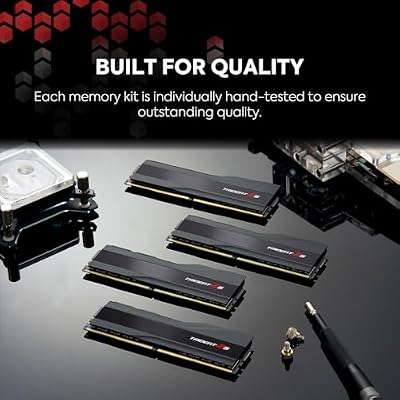


As an Amazon Associate we earn from qualifying purchases. Product prices and availability are accurate as of the date/time indicated.
Our Ranked Recommendation
For most gaming readers, the ranked order is straightforward. First, a 32GB DDR5 kit in a 2x16GB or 2x32GB configuration with a mainstream speed rating that your motherboard lists as supported, which covers the majority of builds. Second, a 32GB kit at a faster speed only if your platform rewards it and your budget allows the premium. Third, a 16GB kit for a tight budget, with a plan to upgrade the capacity later. Fourth, 64GB only for creative or AI workloads that actually fill the memory. The hero listing and the 32GB alternatives fit the first choice. For a shortlist across price bands, see our best RAM for gaming PC guide. For more buying detail, our best 32GB DDR5 RAM roundup lists the strongest options in that class.
Frequently Asked Questions
Is 16GB of RAM enough for gaming in 2026?
It can run many games, but it leaves little headroom. For a smoother experience with modern titles and background apps, 32GB is the safer target for most gamers.
Should I buy 32GB or 64GB for a gaming PC?
For pure gaming, 32GB is usually enough. Choose 64GB if you regularly run heavy creative software, local AI models or many large applications alongside your games.
Is faster DDR5 always better for gaming?
Not always. Speed matters more on some platforms than others, and the gain can be modest. A stable kit at a sensible speed that your motherboard supports is often a better choice than the fastest kit on the shelf.
Can I mix two different RAM kits?
Mixing kits is risky. Mismatched speeds, timings or chip types can prevent the system from running dual-channel mode or cause instability. Buy a matched kit where possible.





