
Motherboard Chipset Guide AM5 LGA 2026
The motherboard is the foundation of a gaming PC, and it is easy to treat as an afterthought. The socket decides which processors you can install, the chipset decides which features and upgrade paths you get, and the board’s power delivery decides whether a high-end chip can run at full speed without throttling. This motherboard chipset guide focuses on the two platforms most builders are choosing between in 2026: AMD’s AM5 socket and Intel’s LGA socket family. It explains what each chipset tier means in practice, and how to pick a board that fits your processor, memory and budget.
The hero listing above is a current gaming motherboard, and the four alternatives cover other boards in the same general class. The listing may be a closest-match substitute rather than the exact board named in your search, so check the card for the exact socket, chipset, memory support and form factor before you buy. The chipset logic below holds whichever board you choose.


Start With the Socket: AM5 or LGA
The socket is the physical and electrical interface between the motherboard and the processor, and it is fixed. An AM5 board takes AMD’s Ryzen 7000 and 9000 series processors and carries forward to later AM5 chips, which makes it a strong long-term platform. Intel’s current desktop socket for the Core Ultra 200S series is LGA1851, while LGA1700 serves the 12th, 13th and 14th generation Intel chips. Pick the socket first, then choose a chipset within that socket, because the processor you want will narrow the list quickly.
If you already own a processor or plan to buy one, check its socket before you look at boards. A motherboard that does not match the socket cannot be used, and a board that supports the socket but not the newest chip may need a BIOS update before it can boot with that processor. Our best AM5 motherboard for gaming guide covers the AMD side in more detail.
Understanding Chipset Tiers on AM5
On AM5, chipsets are grouped into tiers that mostly differ in features and the number of extra connectivity and overclocking options. The entry tier suits compact or budget builds that do not need extensive tuning. The mainstream B-series boards are the most common choice for gaming, because they cover a PCIe 5.0 graphics slot, strong memory support and enough storage connections for most players. The X-series boards add more features, more USB and storage options, and better tuning support, which mainly matter to enthusiasts. Check the exact chipset name on the card and confirm which features the board includes.
Why B-Series Covers Most Gaming Builds
For most gaming readers, a B-series board hits the right balance. It handles current processors, supports fast DDR5 memory and gives you the graphics slot and M.2 storage you need. The main reasons to step up to an X-series board are heavy overclocking, more storage and expansion, or a need for extra USB and networking. If you do not plan those uses, the price difference often buys more value in a better graphics card or memory kit. Our ASRock B650M Pro review shows how a mainstream board of this kind is built.

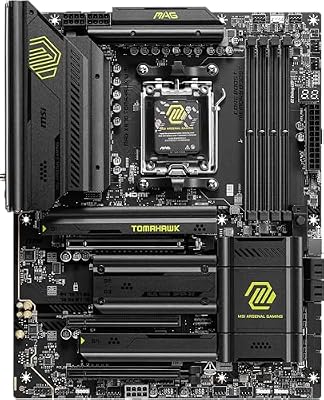
MSI MAG X870 Tomahawk WiFi Gaming Motherboard (AMD Ryzen 9000/8000/7000 Series Processors, AM5, DDR5, PCIe 5.0, M.2 Gen5, SATA 6Gb/s, USB 40Gbps, HDMI/DP, Wi-Fi 7, Bluetooth 5.4, 5Gbps LAN, ATX)


As an Amazon Associate we earn from qualifying purchases. Product prices and availability are accurate as of the date/time indicated.
When an X-Series Board Makes Sense
X-series boards are a good fit for builders who want a board with extensive power delivery, many M.2 slots, rich networking and the most tuning options. They are also a natural match for very high-end processors that draw a lot of power. The ASRock X870E Taichi review and the ASUS TUF X870 Plus review show two different takes on the high-end and mainstream ends of the X870 range.
Intel LGA Chipsets: What to Know
Intel’s current platforms use chipsets such as Z-series for enthusiast boards with overclocking support, and B-series and H-series for mainstream and budget builds. Like AM5, the tiers differ mainly in tuning options, storage and connectivity. Intel boards also depend more heavily on BIOS support for specific processor generations, so check the motherboard’s compatibility list before you buy. If you are weighing Intel against AMD for the processor itself, our best Intel motherboard for gaming guide covers the boards that suit current Intel chips.
Power Delivery, Memory Support and Storage
Power Delivery and VRM Quality
The voltage regulator module, or VRM, converts power for the processor. A board with a weak VRM can throttle a high-end chip under sustained load, which shows up as lower clock speeds and more heat. You do not need a massive VRM for a midrange processor, but if you plan to run a high-core-count chip at full power, look for reviews that test power delivery under load. The best X870 board for the 9950X3D shows how power delivery matters for a demanding processor.
Memory Support
Check the board’s supported memory speeds and capacities before you buy RAM. Most current AM5 and LGA1851 boards use DDR5, and the QVL and speed tables in the manual show which kits have been tested. Four-slot boards can be less stable at the fastest speeds, so a two-stick configuration is often the easiest path. Our best DDR5 RAM for gaming guide covers the kit side of the decision.
Storage and Expansion
Count the M.2 slots and check whether they support PCIe 5.0 or PCIe 4.0 SSDs. Storage is now one of the main differences between boards in the same tier. A board with two or three M.2 slots and good heatsinks gives you room to grow without a second adapter. The ATX vs micro-ATX vs mini-ITX comparison explains how form factor limits expansion slots and storage.
Form Factor and Case Fit
ATX boards offer the most slots and connectors, micro-ATX boards trim the size and cost, and mini-ITX boards suit very compact builds. Form factor also decides which cases fit the board. Measure your case’s motherboard support list before you buy, and remember that smaller boards often have fewer M.2 slots and PCIe slots. For a shortlist of budget options in the mainstream class, see our best budget gaming motherboard guide.
Comparing Motherboard Options
The table below lists the hero board and four alternatives by the role they play in a buying decision. Prices change often and vary between sellers, so the table does not show exact figures. Confirm the socket, chipset, memory support and current price on the live listing before you order.
| Option | Platform role | Best for | Spec to confirm | Price |
|---|---|---|---|---|
| Hero listing | Primary pick for the query | Mainstream gaming builds | Socket, chipset and memory support | Check current price |
| Alternative 1 | Same platform, value tier | Budget AM5 builds | M.2 slots and VRM notes | Check current price |
| Alternative 2 | Micro-ATX option | Compact gaming builds | Case fit and expansion slots | Check current price |
| Alternative 3 | High-end tier | Overclocking and high-core chips | Power delivery and cooling | Check current price |
| Alternative 4 | Intel platform option | Current Intel gaming builds | Socket and BIOS support | Check current price |

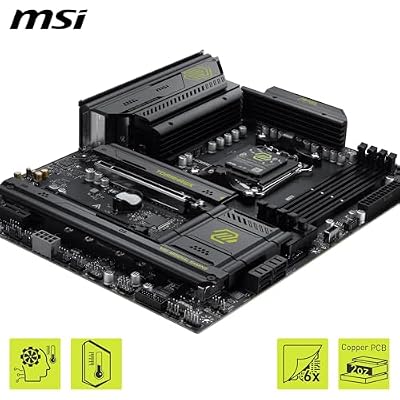
MSI MAG B850 Tomahawk WiFi Motherboard, ATX - Supports AMD Ryzen 9000/8000 / 7000 Processors, AM5-80A SPS VRM, DDR5 Memory Boost 8200+ MT/s (OC), PCIe 5.0 x16, M.2 Gen5, Wi-Fi 7, 5G LAN




As an Amazon Associate we earn from qualifying purchases. Product prices and availability are accurate as of the date/time indicated.
Our Ranked Recommendation
For most gaming readers, the ranked order is clear. First, a B-series board on the socket that matches your processor, with DDR5 support, at least two M.2 slots and a PCIe 5.0 graphics slot. Second, an X-series board if you plan to overclock, run a high-core processor at full power or need extra storage and networking. Third, a micro-ATX or mini-ITX board only when the case size demands it, accepting fewer slots. Fourth, an older platform only when you already own compatible parts. The hero listing and the mainstream alternatives cover the first choice for most builds.
Frequently Asked Questions
Which AM5 chipset is best for gaming?
For most gaming builds, a B-series board offers the best balance of features and cost. X-series boards suit enthusiasts who want extensive tuning, more storage and extra connectivity.
Do I need a BIOS update before using a new processor?
Sometimes. Check the motherboard support list for the processor you plan to install. Some boards need a BIOS update before they will boot with newer chips.
Is a micro-ATX board good enough for gaming?
Yes, if the case and your storage needs fit. Micro-ATX boards usually have fewer expansion slots and M.2 slots than ATX boards, but they still run gaming hardware well.
Does the motherboard affect gaming performance?
Directly, only a little. The board matters more for stability, power delivery under heavy load, memory support and upgrade options. A weak board can limit a strong processor, so pick one that matches your chip.


