
Gaming Headset Mic Quality Guide 2026
Teammates forgive a lot, but they rarely forgive a microphone that crackles, echoes or picks up every keystroke in the room. Gaming headset microphones vary widely, and the spec sheet alone rarely tells you how a mic will sound in your room with your voice. This guide explains what drives microphone quality on a headset, how to read the specifications that matter and how to set up a mic so it sounds clear in voice chat. It is a buying guide, and we have not recorded or tested any headset ourselves.
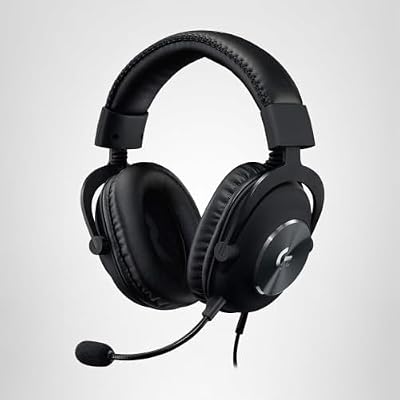
The hero listing above is our primary pick for the query “gaming headset microphone”. It sits in the boom-mic headset class discussed below, but it is a closest-match listing and not a guaranteed model for every reader. Check the card for the exact model, microphone design and included cables before you buy. The alternatives beside it use different mic designs, so you can apply the same checklist to each of them.
What Makes a Headset Mic Sound Good
Microphone quality comes from four things working together: the capsule that turns sound into an electrical signal, the position of the capsule relative to your mouth, the processing built into the headset or software, and the room you record in. A good capsule placed poorly sounds worse than an average capsule placed well. Processing can clean up noise, but it can also make voice sound thin if it is set too aggressively. The room sets the baseline, because hard walls and noisy fans add sound that the mic must fight.
Most players judge a mic by how clear they sound to teammates. That is a useful test, but it depends on the other players’ hardware too. Focus on the parts you control: placement, gain, noise handling and room.

Logitech G Pro X Wired Gaming Headset With Detachable Boom Mic - Black | Wired headset has Blue VO!CE, DTS 7.1, 50 mm drivers, USB/3.5mm, spare memory foam pads, USB DAC & bag, PC, Xbox, PS5, PS4


As an Amazon Associate we earn from qualifying purchases. Product prices and availability are accurate as of the date/time indicated.
Boom Mic Design and Placement
Boom Length and Distance
A boom mic on a headset sits near the mouth, which usually gives a cleaner voice than a mic placed far from the face. The distance from the mouth to the capsule is a key factor. A boom that is too far away picks up more room sound, while a boom that touches the face can pick up breath and pops. Look for a boom that can be adjusted to sit a few centimetres from the corner of the mouth.
Detachable and Fixed Mics
Detachable booms let you swap in a different mic later and make cleaning or replacement simpler. Fixed mics are less likely to fall off but offer fewer options. If you plan to use a headset for several years, a detachable boom gives more flexibility, although it adds a joint that can loosen over time.
Mute Feedback and Controls
A mute button or a flip-to-mute boom helps you avoid sending sound by accident. Check whether the mute indicator is visible in the chat software or on the headset itself, since a silent mic with no visible status can cause confusion during team calls.
Reading Microphone Specifications
Polar Pattern
Most gaming headset mics use a directional pattern, usually described as cardioid or unidirectional. A directional mic favours sound from the front and rejects some sound from the sides and rear. This is helpful in a noisy room. A mic with an omnidirectional pattern picks up sound from every direction, which can make voice sound more open but also picks up more room noise.
Sample Rate and Bit Depth
Sample rate and bit depth describe the digital detail of the recording. Higher figures can capture more detail, but voice chat codecs often limit the final quality. Do not expect a large audible difference from sample specifications alone. Focus on capsule position, noise handling and gain instead.
Noise Cancellation and Software Processing
Noise suppression can be built into the headset, into the audio driver or into the chat application. Each approach can remove background sound, but aggressive settings can clip the start and end of words or make voice sound robotic. Test suppression at a low level first, then increase it only if the room noise remains a problem.
Headset Mic Comparison Table
| Mic factor | What to look for | Why it matters | Typical buyer |
|---|---|---|---|
| Boom design | Adjustable, detachable or fixed | Placement drives voice clarity | Players who want flexibility or simplicity |
| Pattern | Cardioid or unidirectional | Reduces room noise | Players in shared or noisy rooms |
| Noise handling | Built-in or software suppression | Cleans up fans and keyboards | Players with background noise |
| Mute indicator | Visible status | Prevents accidental open mic | Team players |
| Typical price tier | Budget to premium; check current price | Mic quality varies by design | Value comparison |
The table lists mic factors rather than ranking specific products. Use the card for the exact design and the live price. If you are weighing a headset against a separate microphone, our overview of gaming mics for PC compares the two approaches, and budget gaming mics covers low-cost desk options.
Room, Fans and Keyboard Noise
Fix the Room First
Soft furnishings absorb sound and reduce echo. A rug, curtains and a couch can make a bigger difference than a new headset. Hard floors and bare walls reflect sound back into the mic, which sounds like echo to your teammates. Test your voice recording before and after a simple change to see the effect.
Keyboard and Mouse Clicks
A mechanical keyboard can add clicks to voice chat, especially with heavy switches. Place the keyboard away from the boom, use a mic arm that keeps the boom steady and consider a softer keyboard if clicks are a problem. A mouse with loud clicks can also add noise, so check that the mouse does not sit near the mic arm.
Fans and Ambient Noise
PC fans, room fans and air conditioners add a constant hum. Noise suppression can reduce it, but the cleanest fix is to reduce the source. Point case fans away from the desk where possible, and close doors or windows when you play.
Setup Steps for Clearer Voice
Set the Gain Correctly
Gain sets how loud the mic signal is before it reaches the chat app. Too high and the signal clips or distorts. Too low and teammates struggle to hear you. Speak at your normal game volume, watch the level meter and keep peaks below the red zone. Adjust in small steps.
Set the Input Device
Choose the correct input device in your operating system and chat app. Many players find that the wrong device is selected, especially when a webcam or another headset is connected. Check the input selection each time you connect a new device.
Test With a Friend
Record a short clip or join a private voice call and ask a friend for honest feedback. Listen for echo, breath pops, background noise and clipping. Repeat the test after each change so you know which fix made a difference.
Buying Checklist
Check the Boom and Mute Design
Confirm whether the boom is adjustable, detachable and easy to reposition. Check the mute control and whether the mute state is visible.
Check Connection and Software
A headset with a USB connection may have better mic processing than a 3.5mm jack, depending on the model. Confirm whether the headset needs software for noise handling and whether that software works on your system.
Check Comfort for Long Sessions
A microphone that sits well during a short test can feel different after two hours. Check the headband, clamp force and boom position, since a boom that slips out of place can change your voice level and clarity during play.
Common Mistakes With Headset Mics
The first mistake is placing the boom too far from the mouth to avoid breath noise, which often makes the voice sound distant. The second mistake is turning on every noise filter at maximum, which can make the voice sound robotic. The third mistake is ignoring the room. A high-end mic in an echoing room can sound worse than a modest mic in a treated space. For a broader look at headset choices, read our guide to wired gaming headsets, and for cheaper options see budget gaming headsets.
Related Guides Before You Decide
Before you commit, these related guides cover the next questions on this topic: microphone roundup gaming microphones mic guide PC headset picks.
Frequently Asked Questions
Is a boom mic better than a desk mic for gaming?
A boom mic is usually closer to the mouth and picks up less room noise, which suits most gamers. A desk mic can sound richer in a treated room but needs more setup and space.
How do I stop my headset mic picking up keyboard noise?
Move the keyboard away from the boom, reduce the gain if the signal is high and test a moderate noise suppression setting. A softer keyboard or a stable mic arm also helps.
Do I need noise cancellation on a headset mic?
It helps in noisy rooms, but start with room changes and placement first. Use suppression at a moderate level so your voice stays natural.
What is the most important mic feature?
Placement and room control matter most. A well-placed boom in a quiet room often beats a more expensive mic in a poor setup.





