
Ninja Fortnite Pro Setup Gaming Gear
Ninja built a large audience on Fortnite, and many players want to know what gear sits behind his fast building and aim. The question is reasonable, but a public setup is a snapshot of one player’s preferences. Fortnite rewards quick building, accurate shooting and reliable keybinds, and each of those depends on how the gear fits your hands and your habits. This guide uses a Ninja-style Fortnite setup as a reference for a gear buying plan, with attention to the parts that matter most in a build-heavy battle royale.
The listing above is a close match for the type of mouse, keyboard or accessory this topic points to. It is not confirmed as the exact model any player uses today, and product lines change regularly. Check the card for the model, connection type and current price before you order. The advice below holds whichever listing you pick.


What Fortnite Asks From Your Gear
Fortnite mixes building, shooting and movement at the same time. Players switch between wall, ramp and floor builds in a fraction of a second, and they aim while they move. That puts pressure on the keyboard and the mouse. The keyboard must let you press build keys quickly without mistakes, and the mouse must let you aim and turn without losing control. A setup that suits a slow shooter may feel wrong in a build battle royale.
Comfort also matters. Fortnite sessions can be long, especially in a ranked or tournament grind. A grip that tires your hand after an hour will cost you more than a missed build. Good gear should feel steady for the whole session, not just the first match.
Keyboard Layout and Build Keys
Most Fortnite players use a standard or tenkeyless keyboard, with the build keys close to the movement keys. Some players move build keys to the mouse side, and that choice depends on how far your hand can reach without stretching. Test your keybinds on a few lobbies before you change anything major. A key that is hard to reach in a calm lobby will be harder in a live match.
Switch feel affects how quickly you press. Linear switches allow smooth repeated presses, while tactile switches give a clear point of activation. Many players prefer a quiet switch in a shared room. For a wider look at keyboards that suit fast games, see the best gaming keyboards in 2026.
Mouse Shape and Grip for Aim and Movement
Choose the mouse shape that fits your grip. Palm grip players often like larger bodies, while claw and fingertip grip players often prefer medium or small shapes. Fortnite also rewards good wrist and arm control, since you need to turn quickly and then settle on a target. A mouse that is too light can feel twitchy, while one that is too heavy can slow your flicks. For mouse options across shapes, see the best FPS gaming mouse.

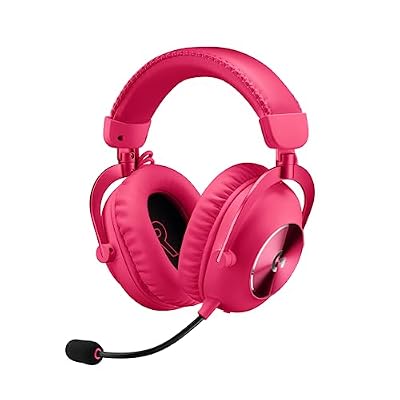
Logitech G PRO X 2 Lightspeed Wireless Gaming Headset: Detachable Boom Mic, 50mm Graphene Drivers, DTS:X Headphone 2.0—7.1 Surround, Bluetooth/USB/3.5mm Aux, for PC, PS5, PS4 - White (Renewed)


As an Amazon Associate we earn from qualifying purchases. Product prices and availability are accurate as of the date/time indicated.
Comparison Table: Fortnite Gear Options
The table compares common routes for a Fortnite setup. It focuses on fit and function, because the best choice depends on your hands and your keybinds.
| Gear type | Best for | What to check | Typical price range |
|---|---|---|---|
| Tenkeyless keyboard | Players who want fast build reach and desk space | Layout, key feel, cable quality | Check current price |
| Full-size keyboard | Players who use extra keys for binds | Key count, software, desk room | Check current price |
| Medium mouse with claw grip fit | Aim and movement balance | Shape, weight, button placement | Check current price |
| Light mouse for fingertip grip | Quick turns and small adjustments | Weight, sensor reviews, cable drag | Check current price |
In most cases the mouse shape and the keyboard layout decide how the setup feels. Once those fit, the rest is a matter of taste.
Sensitivity and Keybind Tuning
Fortnite sensitivity should be comfortable and stable. Many players set a number that lets them turn quickly without overshooting, then keep it for weeks. Changing sensitivity often makes your aim harder to judge. If you want a system for testing your range, our article on the best DPI for gaming explains how to compare settings without copying someone else’s numbers.
Keybinds deserve the same care. Put the most used actions in the easiest reach, and keep extra binds to a small number. A large bind list can look impressive, but it only helps if you can press it under pressure.
Monitor, Refresh Rate and Frame Rate
Fortnite plays well on a high refresh rate monitor when your PC can reach high frame rates. A 144Hz panel is a sensible target for many players, and a 240Hz panel can help if your system delivers the frames. Our guide to choosing refresh rate for gaming explains the trade-offs, and 1440p 240Hz gaming monitors covers options for higher-end setups.
Mousepad and Desk Space
Your mousepad should give stable, predictable movement. Cloth surfaces give more control, while hard surfaces give faster glide. Pick based on your style. If you are comparing options, see cloth versus hard gaming mousepads. For a full-desk surface, the best gaming desk mat guide covers larger options.
Make sure your desk gives you room to move the mouse in a wide arc. A cramped desk pushes you to lower your sensitivity or to move with your wrist alone, which can strain your hand over time.
Headset and Communication
Fortnite has positional audio and a lot of noise, so a headset with clear sound helps you hear footsteps and builds. A comfortable headset also matters for long sessions. For budget options that still work well for team play, see the best budget gaming headset.
Budget Path for a Fortnite Setup
You do not need a premium rig to play well. A comfortable keyboard, a mouse that fits your grip and a monitor that matches your frame rate will do most of the work. Spend first on fit, then on extras. If you are building a PC as well, our overview of the best gaming PC for Fortnite helps you match the computer to your target frame rate. For a full desk layout, see the best gaming setup.

Logitech G PRO X 2 Lightspeed Wireless Gaming Headset: Wireless Gaming Headphones with Mic, 50mm Graphene Drivers, 2.02.0—7.1 Bluetooth/USB/3.5mm Aux for PS4/PS5/PC/Nintendo Switch - White (Renewed)


As an Amazon Associate we earn from qualifying purchases. Product prices and availability are accurate as of the date/time indicated.
Frequently Asked Questions
Can I copy a pro Fortnite setup and play like that player?
Not by copying gear alone. Build speed and aim come from practice and from keybinds that suit your hands. Use the setup as a reference, then test your own binds and grip before you commit.
Is a tenkeyless keyboard better for Fortnite?
Many players prefer it because it frees desk space for the mouse and keeps build keys close to the movement keys. If you use many extra binds on the number row, a full-size board may suit you better.
What mouse weight is best for building and aiming?
There is no single answer. Lighter mice give quick turns, while heavier mice give more control. Choose the weight that lets you flick and settle without overshooting, and test it over several sessions.
Do I need a high refresh rate monitor for Fortnite?
It helps if your PC can reach high frame rates. A 144Hz monitor is a good target for most players. A higher refresh panel is only worth it when your frame rate supports it.


