
Gen.G CS2 Team Setup Configurations: How Team Gear and Configs Come Together
Fans searching for Gen.G CS2 team setup configurations want to know how a professional Counter-Strike 2 team arranges its gear and settings. Team setups are different from a single player’s kit. They must suit several players with different grips, eye preferences and routines, while still giving the team a common baseline for callouts, positioning and practice. This guide explains how that baseline works, and how a buyer can apply the same logic to a small team or a practice group.
Team configurations change with rosters, sponsors and coaching staff. Anything you read about a specific org should be treated as a snapshot. The useful part is the reasoning: standardise what must match, let individuals choose what should fit them, and keep the rest of the setup simple enough to repeat in every practice block.


The listing above may be a close match for the type of gear found in a competitive CS2 team setup, rather than the exact kit used by any org or player. Check the card for the exact model, specifications and current price. The advice here holds whichever model you choose.
What Should Be Standard Across a Team
Some things in a team setup should match across every player, because they affect shared information. Frame rate targets, display resolution and aspect ratio are the main ones. If one player plays at a different resolution, their screen can look different from teammates, and small visual differences can change how fast someone reads a corner. Teams often choose a common resolution and a common frame target, then let each player fine-tune the rest.
Network setup also needs to be consistent. Wired connections are the norm at the professional level, and teams usually standardise router settings and server routes. For practice groups, the best Ethernet settings for gaming guide covers the PC side, and the best router settings for gaming article covers the network side.
What Should Be Personal
Other things should belong to the player. Mouse sensitivity, grip and mousepad surface are personal, because they match the hand. Crosshair colour and size, and the viewmodel position, are personal too, because they match the eye. Headset fit and comfort vary between players. The team baseline should leave room for these choices, not force one configuration on everyone.

INNOCN 24.5" 1440P 240Hz Gaming Monitor Fast IPS HDMI 2.1, DP, Black, 25G2S | FreeSync & G-SYNC Compatible, Work with N / A Graphic Card, Work with PS5 Console, Gaming Laptop, Up to 0.5ms, Speaker


As an Amazon Associate we earn from qualifying purchases. Product prices and availability are accurate as of the date/time indicated.
Core Gear for a CS2 Team Setup
Mouse and Mousepad
A mouse should fit the player’s grip and be used consistently. Many competitive players prefer a lightweight mouse with a stable sensor and a comfortable shape. The mousepad should match the sensitivity and surface the player likes, because the two work together. Our guide to the best gaming mouse in 2026 and the best esports mousepads roundup help with the choice.
Monitor and Refresh Rate
A fast monitor helps players track motion and spot enemies at a distance. Teams often prefer high refresh rate panels so that everyone sees motion with similar clarity. Our guide to the best 240Hz monitor for gaming explains why that tier is common, and the best refresh rate for gaming article shows when higher rates matter.

New! Sceptre Curved 24.5-inch Gaming Monitor up to 240Hz 1080p R1500 1ms DisplayPort x2 HDMI x2 Eye Care Build-in Speakers, Machine Black 2026 (C255B-FWT240 Series)


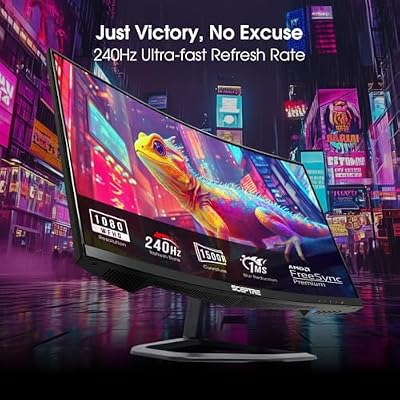


As an Amazon Associate we earn from qualifying purchases. Product prices and availability are accurate as of the date/time indicated.
Keyboard and Headset
Keyboard layout and switch feel are personal, but the team should agree on the key bindings for utility and communication, so that everyone reacts the same way. Headsets matter for callouts, footsteps and voice comms. Choose a headset with a clear sound profile and a microphone that suits the room. The best gaming keyboard in 2026 and the best headset for gaming guides cover the main options.
Comparison: Shared Versus Personal Settings
| Setting or gear | Standardise across team? | Why | Typical price range |
|---|---|---|---|
| Resolution and aspect ratio | Yes | Keeps visual information consistent | Not applicable |
| Frame rate target | Yes | Keeps performance predictable | Not applicable |
| Network connection | Yes | Reduces variance between players | Check current price |
| Mouse sensitivity | No | Depends on grip and desk | Not applicable |
| Mouse and mousepad | No | Depends on hand and surface preference | Check current price |
| Crosshair | Partly | Team agrees on rules, player chooses style | Not applicable |
| Headset | No | Comfort and fit vary | Check current price |
The table shows that teams should standardise technical limits and let individuals choose physical gear. That keeps the team consistent without forcing discomfort on anyone.
Building a Practice Group Setup
Agree the Baseline First
Before buying anything, agree on the shared settings. Pick a resolution, a frame target and a network approach. Write them down so new players can match the baseline quickly. Changing the baseline mid-season creates confusion and lost practice time.
Let Each Player Test Their Own Gear
Give each player time to test their mouse, mousepad and headset in scrimmage-style play. Ask them to note comfort and accuracy over several sessions. Gear that feels good on day one may tire a player by day five, so keep testing.
Review Once a Week
A short weekly review helps the group spot problems early. Check whether anyone has changed settings without telling the group, and whether frame rates or network issues are affecting play. Small, regular checks prevent larger problems later.
Common Mistakes in Team Configurations
The first mistake is copying a published org config without asking whether it suits your group’s hardware. The second is letting players change shared settings freely, which breaks the baseline. The third is buying identical gear for everyone without checking comfort. A team setup works when shared limits are clear and personal choices are respected.
Frequently Asked Questions
Do all pro CS2 players use the same settings?
No. Teams usually share a baseline for resolution, frame rate and network, but sensitivity, crosshair and gear often vary from player to player.
Should a practice group copy a team’s config?
Use it as a reference, but test it on your own hardware. Hardware, screen size and grip differ, so the values that work for a pro team may not suit your group.
What team setting matters most?
A consistent frame rate target and a stable network connection matter most. Consistent visuals come next, because they keep information the same for everyone.
How often should a team change its setup?
Change it only when there is a clear reason, such as a new monitor, a roster change or a repeated technical problem. Frequent changes make it hard to know what helped.


