
TenZ Valorant Pro Setup & Crosshair 2026
TenZ is one of the best-known Valorant players, and many viewers want to copy his mouse, sensitivity and crosshair. The crosshair and sensitivity are personal settings, and the mouse is a hardware choice that depends on your grip. This guide uses a TenZ-style Valorant setup as a reference for building your own plan. It explains how sensitivity and eDPI work, how to pick a mouse and monitor, and why copying a pro’s crosshair often adds no value.
The listing above is a close match for the type of mouse or accessory this topic points to. It is not confirmed as the exact model any player uses today. Check the card for the model, sensor details and current price before you buy. The buying advice below holds whichever listing you choose.


What Valorant Rewards in Hardware and Settings
Valorant is a tactical shooter where precise aim, stable crosshair placement and quick reactions matter. A player spends a lot of time holding angles and making small adjustments. That makes the mouse, the sensitivity and the monitor important, while the crosshair style is mostly a matter of visibility on your screen. Good hardware helps you keep consistent aim, and good settings help you read the screen quickly.
Many viewers focus on crosshair codes, but the most useful change is often sensitivity. A crosshair that suits one player may be hard to see on another monitor, and a sensitivity that suits one hand may feel too slow or too fast for yours. Test your settings on the map you play most.
Sensitivity and eDPI in Valorant
Your effective sensitivity is DPI multiplied by in-game sensitivity, often called eDPI. For example, 800 DPI at 0.4 in-game sensitivity gives an eDPI of 320. Two setups with the same eDPI should feel similar, which lets you compare a friend’s settings with your own on paper. In practice, a comfortable eDPI matters more than matching a famous player’s number. Keep the number steady for weeks so you can judge your progress.
For a deeper look at sensor settings, our article on the best DPI for gaming explains how to test a range. For Valorant-specific mouse advice, see the best gaming mouse in 2026.
Crosshair: Visibility Over Imitation
A crosshair should be easy to see against your map and your agents. Thin lines suit some players, while a dot or a short line suits others. Change the colour and outline until the crosshair stands out on your monitor. Copying a crosshair from a stream can look good on that stream and still hide your target on your own screen. Test the crosshair in a practice range with your real monitor brightness.

Logitech G PRO X Superlight 2 Lightspeed Wireless Gaming Mouse, Lightweight, LIGHTFORCE Hybrid Switches, Hero 2 Sensor, 32,000 DPI, 5 Programmable Buttons, USB-C Charging, PC & Mac - Magenta


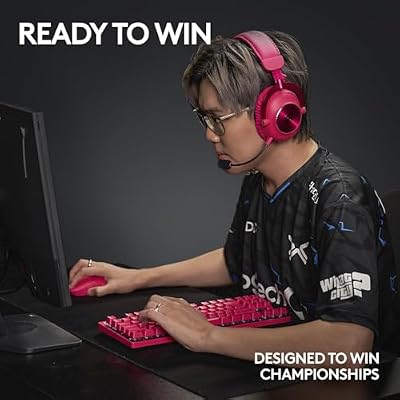


As an Amazon Associate we earn from qualifying purchases. Product prices and availability are accurate as of the date/time indicated.
Comparison Table: Valorant Mouse Options
The table compares common mouse routes for Valorant. The best choice depends on your grip, your desk and how you play.
| Mouse type | Best for | What to check | Typical price range |
|---|---|---|---|
| Lightweight wired mouse | Quick flicks and fast tracking | Cable drag, shape, sensor reviews | Check current price |
| Medium wireless mouse | Players who want no cable drag | Battery life, connection reviews, dongle placement | Check current price |
| Larger ergonomic mouse | Palm grip players | Body size, hump, button placement | Check current price |
In practice, the grip fit matters more than the spec sheet. If a mouse makes you grip tightly, it will hurt your aim over long sessions.
Monitor, Refresh Rate and Frame Rate
A high refresh rate monitor makes fast movement easier to read. A 240Hz panel gives smoother motion than a 144Hz panel, but only if your PC can reach high frame rates in Valorant. Valorant is generally light, so many systems can reach high frames, which makes a high refresh monitor more useful. Our guide to choosing refresh rate for gaming explains the trade-offs, and the best 240Hz gaming monitor covers options for competitive play.
Desk, Mousepad and Surface
Your mousepad should give stable control. A cloth surface suits players who want precision, while a hard surface suits players who want speed. Pick based on your movement and your sensitivity. Our comparison of cloth versus hard gaming mousepads covers the trade-offs. For a full-desk option, the best gaming desk mat guide lists larger surfaces.
Check that your desk gives you room to move the mouse in a wide arc. Running out of mat forces you to lift the mouse or slow down, both of which change your aim.
Headset and Audio for Valorant
Valorant depends on sound. Footsteps, abilities and gunfire tell you where enemies are, so a headset with clear, directional audio helps. Comfort matters too, since many players play long sessions. For a budget option that still sounds clear, see the best budget gaming headset. For the full comparison, the best gaming headset in 2026 covers higher-end choices.
Practice Routine Over Gear Hunting
Many players spend more time changing gear than practising. A better routine is to pick one mouse, one sensitivity and one crosshair, then practise on a range for twenty minutes before ranked. Track your results over a month. If your aim improves, the setup is working. If it does not, look at practice habits before you change hardware again.
Budget Path for a Valorant Setup
You do not need a pro-level rig to play well. A comfortable mouse, a stable mousepad and a monitor that matches your frame rate will do most of the work. Spend first on the mouse and the monitor, then on the rest. For a complete desk plan, see the best gaming setup guide. For a PC that can reach high Valorant frame rates, the best GPU for Valorant and the best CPU for Valorant explain what to look for.

Logitech PRO X Superlight 2 Wireless Gaming Mouse, Black | Ultra-Lightweight, Hero 2 Sensor, 44k DPI, 5 Programmable Buttons, Lightspeed Wireless, PC/Mac | with Signature Series Charging Dock


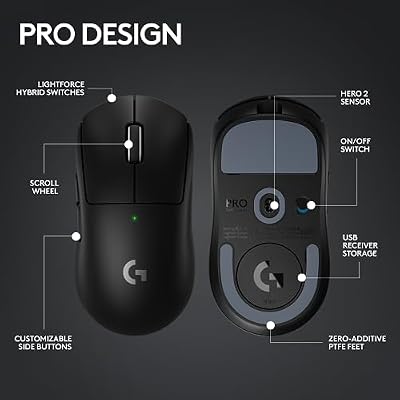


As an Amazon Associate we earn from qualifying purchases. Product prices and availability are accurate as of the date/time indicated.
Frequently Asked Questions
Should I copy TenZ’s crosshair?
Only if it is easy to see on your own monitor. Crosshairs that look good on a stream can be hard to see on a different screen. Test any crosshair in a practice range with your real brightness settings before you keep it.
What sensitivity should I use in Valorant?
Pick a comfortable eDPI and keep it steady. Many players find a number that lets them turn quickly without overshooting, then stick with it for several weeks. Matching a pro’s number is less useful than matching their eDPI on paper and then testing it yourself.
Is a 240Hz monitor worth it for Valorant?
It can be, if your PC reaches high frame rates in the game. If your frame rate sits well below 240, a 144Hz monitor may give you most of the benefit for less money.
Is a wireless mouse good for competitive Valorant?
Many players use wireless mice for competitive play. Check battery life, connection reviews and how the dongle sits on your desk. A wired mouse is a simpler choice if you want to remove one variable while you learn.


