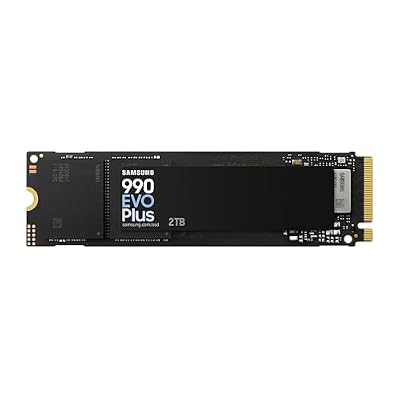
Xbox Series X SSD Gen4 2026: Storage Options, Expansion Cards and What Works
Xbox Series X storage works differently from a PC. The console uses a custom internal NVMe drive, and its expansion path runs through a proprietary card rather than a standard M.2 slot. That design surprises many buyers who expect to drop a generic Gen4 SSD into the console. This Xbox Series X SSD Gen4 guide explains the official expansion route, the unofficial workarounds, and how to choose storage that fits how you play.
This is a buying guide built around Microsoft’s storage design and the product class. We have not installed the listed drives in an Xbox Series X for this article. The hero listing was chosen for the query “Xbox Series X SSD Gen4”, and the alternatives came from the same search. Before buying anything, check the card’s exact product type and compare it with Microsoft’s current storage guidance, since compatibility is the main risk in this category.
The Official Expansion Route
Microsoft’s official option is the Storage Expansion Card, developed with Seagate. The card is a proprietary NVMe module that plugs into a dedicated port on the console, and it works on both Xbox Series X and Series S. It is sold in several capacities, and it is the simplest way to add fast storage that the console recognises. Games installed to the card can be played from it, which is the main reason most owners choose this route.
SanDisk has also sold a card described as officially licensed for Xbox, which offers another choice within the official ecosystem. Check the current capacity and licensing details on the seller’s page before buying, since product lines and availability change over time.
Standard M.2 Drives and Unofficial Adapters
Some owners look for a cheaper route using a standard M.2 NVMe drive and an adapter. Enthusiasts have demonstrated adapter setups that connect a regular NVMe drive to the console’s expansion port, but these are unofficial workarounds. Microsoft does not support them, and compatibility depends on the adapter, the drive and the console software at the time. A failed attempt can cost you more than the saving.
If you choose an unofficial route anyway, verify the adapter and drive combination with recent owner reports, confirm the console software version, and keep your game data backed up. For most buyers, the official card is the safer path, even though it costs more per terabyte.
External Drives and Game Storage Rules
Xbox Series X|S can use USB storage for some backward-compatible titles, which is useful for keeping older games on a cheaper drive. Current Series X|S games are generally played from internal storage or the expansion card rather than from a USB hard drive, so an external drive is not a universal solution for new releases. Check Microsoft’s current guidance for the games you own before buying.
This distinction is important for buyers who expect a USB drive to behave like a secondary library. It can hold files and some older titles, but it may not run newer games at full speed. Plan your storage with that limit in mind.
Comparison Table: Xbox Storage Routes
The table below compares the storage routes that Xbox owners usually consider. Ranges are broad and not tied to exact prices. Check the live listing and Microsoft’s current compatibility notes before buying.
| Route | Best for | Support status | Typical price range |
|---|---|---|---|
| Official Storage Expansion Card (Seagate) | Simplest way to add fast storage for current games | Official, console-recognised | Check current price |
| Officially licensed third-party card | Buyers who want an alternative within the official ecosystem | Official license, check model | Check current price |
| Standard M.2 NVMe with adapter | Cost-focused tinkerers willing to accept risk | Unofficial, unsupported | Check current price |
| USB external drive | Backups, files and some backward-compatible titles | Limited for current Series X|S games | Check current price |
If you are planning a fuller setup, our best gaming TV for Xbox Series X guide covers display choices that suit the console. For a broader look at Xbox accessories, see the best gaming controller for Xbox roundup.
Choosing Capacity for Your Xbox Library
Capacity planning matters more on consoles than on most PCs, because the internal drive fills quickly with large titles and updates. Decide which games you play most often and whether they need to run from fast storage. An expansion card gives you room for those titles while the internal drive holds the rest. If you rarely install new games, you may need less than you think.
Keep a note of which games support expansion storage and how they behave. Some titles have specific requirements or launch from internal storage, so the card is not the answer for every situation.
Where Xbox Owners Get the Most Value
For most Xbox Series X owners, the official expansion card gives the best balance of simplicity and reliability. It avoids the compatibility risk of unofficial adapters and fits the console’s design. The cost is higher per terabyte, so consider whether you need the full capacity from day one or can start smaller and add room later.
Owners who mostly play older or backward-compatible games may get value from a USB drive, which keeps those titles off the internal storage. Owners who want a single-drive solution for current releases should look at the official card.
Further reading on related storage decisions: best Xbox gaming headset, best gaming TVs for Xbox series x, best gaming earbuds for Xbox, Xbox controller vs DualSense on PC, best SSD for gaming PC.
More options for this setup include best gaming ssds, best gaming pc ssd.
Frequently Asked Questions
Can I put a normal M.2 SSD in my Xbox Series X?
Not directly. The console uses a proprietary expansion port. Adapter-based workarounds exist, but they are unofficial and unsupported by Microsoft, so they carry compatibility and warranty risk.
Do the Seagate expansion cards work on Series S too?
Microsoft’s expansion cards are designed to work across the Series X and Series S consoles. Check the product listing and console requirements to confirm compatibility for your model.
Can I play new Xbox games from a USB drive?
Current Series X|S games are generally not played from USB drives. USB storage can hold files and some backward-compatible titles, so check Microsoft’s guidance for the specific games you own.
Is an expansion card worth the price?
For owners who install many large games and want fast, supported storage, yes. For owners with a small library, starting with less capacity and adding later can make more sense.
Final Verdict
The safest route to more Xbox Series X storage is the official Storage Expansion Card or an officially licensed equivalent. Unofficial M.2 adapters are possible but unsupported, and USB drives suit files and older games rather than current releases. Check the hero listing and the alternatives on the card, confirm the exact product type and the current Microsoft compatibility guidance, and choose the capacity that matches your library. That keeps your console supported and your games running the way you expect.