PS5 Gaming SSD Gen4 2026: How to Choose an M.2 Drive for PlayStation 5 Storage
The PS5 has an internal M.2 expansion slot that accepts a PCIe Gen4 NVMe drive, which makes storage upgrades straightforward for owners who run out of room. Choosing a drive is not as simple as picking the fastest model on the shelf. Sony publishes specific size, interface and speed requirements, and a drive that works on a PC may not qualify for the console. This PS5 gaming SSD Gen4 guide explains what the console needs, how to avoid common compatibility mistakes and how to pick a drive that fits your library.
This is a buying guide built around the console’s requirements. We have not installed the drives in the listing below on a PS5 for this article. The hero listing was chosen for the query “PS5 gaming SSD Gen4”, and the alternatives came from the same search. Check the card for the exact model, capacity and heatsink dimensions, then compare them against Sony’s current requirements before purchase.


What Sony Requires for the PS5 M.2 Slot
Sony’s official PS5 guidance lists a PCIe Gen4 x4 M.2 NVMe interface using the Key M connector. Supported lengths run across the common M.2 sizes, from 2230 through 22110. Sony lists storage capacities from 250GB up to 8TB on its current page, although older guides still quote a 4TB maximum, so check the official source when you buy. Sony also recommends a sequential read speed of 5,500 MB/s or faster for the drive.
Size matters as much as interface. Sony lists a maximum thickness of 11.25mm for the drive, measured with any heatsink included. Many heatsinked drives are close to that limit, so a drive that fits on a desktop may still be too thick for the PS5 slot. Measure the listing’s total height carefully before ordering, and read any compatibility note that the seller provides.
Why Gen4 Is the Right Target
The PS5’s slot runs at PCIe Gen4, so a Gen5 drive will physically fit and work in backward-compatible mode but will not run faster than Gen4 in that console. Paying extra for Gen5 on a PS5 usually does not change load times in games. A well-chosen Gen4 drive that meets Sony’s 5,500 MB/s recommendation gives you the same practical benefit at a lower cost.
Pay attention to sustained performance as well as peak speed. Consoles run long sessions, and a drive that throttles under heat can slow down during large installs. A heatsink that fits within the 11.25mm limit helps keep the drive steady, and it is worth paying a little more for a model that performs consistently.
Game Storage Rules That Affect Your Purchase
A faster drive does not automatically make every game load faster. Some PS5 titles are designed to run from internal storage and gain little from an expansion drive. Others benefit from it, especially those with large open worlds or frequent asset streaming. Sony’s guidance on which games can be stored on expansion storage and how they behave should be your reference, since rules can change through system updates.
Also note that the console needs to format the new drive before use. Plan for that step, and make sure your saves and game data are backed up or stored in the cloud before you swap drives. Format and setup take time, and installed games may need to be redownloaded or moved depending on your settings.
Comparison Table: PS5 Expansion Drive Options
The table below lists the broad categories of drive that suit the PS5 slot. Ranges are general and not tied to exact retail prices. Check the live listing for current models and pricing.
| Drive type | Best for | Key check | Typical price range |
|---|---|---|---|
| Gen4 2TB with heatsink within 11.25mm | Most PS5 owners who want room for a large library | Total height and sustained speed | Check current price |
| Gen4 1TB without heatsink | Budget expansion with a separate heatsink option | Meets 5,500 MB/s recommendation | Check current price |
| Gen4 4TB or larger | Large libraries and long-term storage | Official capacity support | Check current price |
| Gen5 drive in Gen4 slot | Future flexibility, though speed matches Gen4 on PS5 | Fit and cost versus benefit | Check current price |
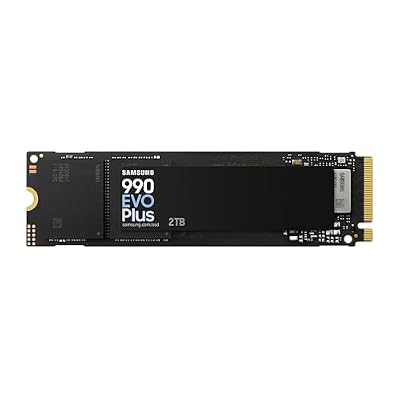
Samsung 990 PRO w/Heatsink SSD 2TB, PCIe Gen4 M.2 2280, up to 7,450MB/s | NVMe Internal Solid State Hard Drive Best for PlayStation 5 (PS5 SSD) Console Expansion (MZ-V9P2T0CW)


As an Amazon Associate we earn from qualifying purchases. Product prices and availability are accurate as of the date/time indicated.
For broader choices across the PS5 field, see our best PS5 compatible SSDs 2026 roundup. If you want to understand why speed differences between generations matter less on this console, the PCIe Gen5 vs Gen4 SSD comparison explains the trade-offs.
Installing the Drive Safely
Follow Sony’s official instructions for opening the console and installing the drive, and power the PS5 fully off before starting. Use a proper screwdriver and do not force the drive into the slot. Secure the drive with the correct screw, and fit the cover back correctly before powering on. If the console does not detect the drive, check that the cover and connector are seated properly and that the drive meets the size and speed requirements.
Once the console recognises the drive, format it when prompted and set it up as expansion storage. Keep the PS5 software up to date, since storage support can change with system updates. Moving games between internal and expansion storage is possible in the settings menu, which helps when you want to free up space without deleting titles.
Further reading on related storage decisions: best gaming M.2 SSDs, Samsung 980 Pro 1TB review, best NVMe SSD for gaming 2026, best gaming monitors for PS5, best TV for gaming PS5.
More options for this setup include best ps5 gaming headset, best gaming earbuds for ps5, best gaming ssds.
Frequently Asked Questions
Does the PS5 need a Gen4 SSD?
The PS5’s M.2 slot is PCIe Gen4, and Sony recommends a drive that meets its speed requirement. A Gen4 drive is the logical target. A Gen5 drive will fit and work, but it will not run faster in the console.
What size should my heatsink be?
Sony lists a maximum total thickness of 11.25mm for the drive, including any heatsink. Measure the total height of the listing before you buy, since many heatsinked drives are close to that limit.
Can I use an SSD I already have in my PC?
Possibly, if it meets Sony’s size, interface and speed requirements. Check the thickness, the PCIe generation and the sustained speed before moving it. Keep in mind that the console will format the drive.
Will a faster SSD make every game load faster?
No. Some games gain little from an expansion drive, while others with heavy streaming benefit more. Sony’s guidance on storage and game behaviour is the best reference.
Final Verdict
For the PS5, a Gen4 M.2 drive that meets Sony’s size and speed requirements is the right choice for most owners. Check the hero listing and the alternatives on the card, confirm capacity and total height, and verify the drive against Sony’s current official specification. Skip paying extra for Gen5 speed the console cannot use, and invest in capacity and heat management instead. That approach gives you a reliable expansion drive that fits the console and your library.