Crucial T705 Gen5 SSD Review 2026: Is a PCIe 5.0 Drive Worth It for Gaming?
The Crucial T705 is one of the most talked-about PCIe 5.0 NVMe drives aimed at gamers and creators. Its headline sequential read rating sits in the 13 to 14.5 GB/s range depending on capacity, which puts it in the top tier of consumer storage. That number grabs attention, but a gaming buyer needs more than a spec sheet. This Crucial T705 Gen5 SSD review 2026 explains what the T705 class delivers, where the extra speed actually matters for games, and when a cheaper drive makes more sense.
This is a buying guide built around the product class, not a lab report. We have not benchmarked the drive for this article. The hero listing below was selected for the query “Crucial T705 Gen5 NVMe SSD”, and the alternatives came from the same search. The listing may be a close match rather than the exact model you have in mind, so check the card for the exact capacity, model and current price before you order.
What the Crucial T705 Is Built to Do
The T705 is a PCIe 5.0 x4 M.2 2280 drive that uses the NVMe 2.0 protocol. Crucial’s published figures put sequential reads at roughly 13,600 MB/s on the 1TB model, about 14,500 MB/s on the 2TB model, and about 14,100 MB/s on the 4TB model. Those are manufacturer ratings, and independent reviewers have generally reported real-world results close to them in sequential tests. The drive pairs a Phison-class controller with Micron 3D TLC NAND, which is a common and well-understood combination in the Gen5 segment.
Sequential speed is only one part of the picture. A gaming drive also has to handle small random reads, sustained writes when a large patch lands, and heat over long sessions. Gen5 drives run hotter than Gen4 drives under load, so the cooling plan matters as much as the model. If you plan to run a Gen5 drive near the top of its speed range for long periods, read the heatsink section below before buying.
Where Gen5 Speed Helps Gaming
Most current games load assets from storage as you move through a level, and the bottleneck is often random read latency and decompression rather than raw sequential throughput. That means a Gen5 drive is not an automatic upgrade for every title. The benefit shows up most in three places. The first is large open-world games that stream assets continuously. The second is game installs that sit on a drive with little free space, where a faster controller keeps stutter down. The third is bulk operations such as copying large game folders or creating shader caches.
For a PC gamer who already owns a fast Gen4 drive, the gain in day-to-day play is usually modest. For a player building a new system or replacing an older SATA drive, the jump is much more noticeable. Our best PCIe 5 NVMe SSD guide places Gen5 drives alongside the best Gen4 choices so you can weigh the price difference against the speed you will actually use.
Capacity Choices for Gen5
Gen5 drives are most sensible at 2TB or larger for gaming. A single modern AAA title can take over 150GB, and a few large games quickly fill a 1TB drive. The 2TB class is the sweet spot for most builders because it leaves room for several large installs without forcing constant uninstalls. The 4TB class suits players with large libraries or those who want to keep a full game collection installed at all times.
Heat, Heatsinks and Sustained Performance
Gen5 NVMe drives can throttle when temperatures climb. Throttling is a protective step that lowers speed to keep the controller safe, and it usually appears during long copy jobs or sustained writes rather than during typical game loading. A heatsink or a motherboard M.2 shield with good thermal contact helps keep the drive in its full-speed range. Many Gen5 drives ship with a heatsink, but some listings do not include one, so confirm what is in the box and whether the heatsink height fits your case and motherboard.
Check your motherboard manual for which M.2 slot is connected to the CPU’s PCIe 5.0 lanes. Putting a Gen5 drive in a slot wired to the chipset will limit its speed. This is a common setup mistake, and it is more important than any small difference between two Gen5 models.
Comparing the T705 Class to Other Options
The table below compares the broad categories you are likely to consider. Prices change often and vary by retailer, so the ranges are intentionally general and you should check the live listing before buying.
| Drive class | Best for | Interface | Typical price range |
|---|---|---|---|
| Gen5 1TB class | Smaller libraries and a Gen5 platform on a budget | PCIe 5.0 x4 NVMe | Check current price |
| Gen5 2TB class (T705 class) | Most gamers who want top speed and room for games | PCIe 5.0 x4 NVMe | Check current price |
| Gen5 4TB class | Large game libraries and creators with big project files | PCIe 5.0 x4 NVMe | Check current price |
| Gen4 2TB class | Value buyers where Gen5 gains are small | PCIe 4.0 x4 NVMe | Check current price |
If you want to see how the Gen5 and Gen4 classes compare on power draw, heat and real game loads, our PCIe Gen5 vs Gen4 SSD comparison covers the trade-offs in more depth. For larger capacities, the best 2TB gaming SSDs and best 4TB NVMe SSDs guides compare price per terabyte across brands.

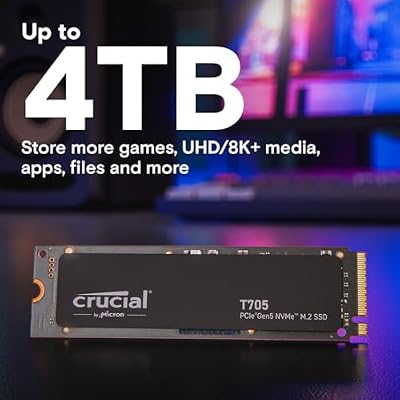
Crucial T705 PCIe Gen5 NVMe 2TB SSD, Up to 14,500MB/s, TLC NAND, Intel & Ryzen Compatible, for Hardcore Gaming & High-Speed Storage, Solid State Drive, Includes 1Mo Adobe CC – CT2000T705SSD3




As an Amazon Associate we earn from qualifying purchases. Product prices and availability are accurate as of the date/time indicated.
Who Should Buy a Gen5 Drive Like This
A Gen5 drive makes the most sense when three things are true. Your motherboard has a Gen5 M.2 slot connected to the CPU. Your games or work benefit from fast storage, such as large open worlds or heavy content creation. And you are willing to manage heat with a proper heatsink. If one of these is missing, a high-quality Gen4 drive usually gives better value for the money.
Buyers who play mostly esports titles or older games should be cautious. Those titles load quickly on almost any NVMe drive, and the extra Gen5 cost may not show up in frame times. Spend that budget on a larger capacity or a better CPU and GPU instead. Our best SSD for gaming PC guide explains which capacity and speed tiers suit different player types.
Installation and Setup Tips
Before installing, update your motherboard BIOS to the latest version, since early Gen5 support on some boards improved through firmware updates. Install the drive in the CPU-connected M.2 slot, secure it with the included screw or the motherboard retention clip, and apply the heatsink or shield. After Windows is installed, update the drive firmware using the manufacturer’s tool and confirm that the link is running at PCIe 5.0 x4 in your system information utility.
If you plan to clone an existing system drive, verify the clone and keep the old drive intact until the new one has booted several times. For a fresh game library, consider moving only your largest and most-played titles to the Gen5 drive and keeping older titles on a secondary drive to keep the fast tier available.
Further reading on related storage decisions: best NVMe SSD for gaming 2026, best gaming PC SSD, Crucial T705 2TB review, best gaming M.2 SSDs, best gaming SSDs.
Frequently Asked Questions
Is a Crucial T705 class drive worth it for gaming?
It can be, especially for a new build with a Gen5 motherboard and a large game library. For many players, a strong Gen4 drive delivers nearly the same day-to-day experience at a lower cost. Gen5 is the better pick when you want maximum headroom and you already plan to build around current platforms.
Does a Gen5 SSD need a heatsink?
Most Gen5 drives run warm under sustained load. A heatsink or a motherboard shield helps keep the drive out of thermal throttling during long copy jobs and large installs. Confirm that the heatsink fits your board and case clearance before buying.
Will a Gen5 drive work in a Gen4 motherboard slot?
Yes. Gen5 drives are backward compatible and will run on Gen4 slots, but they will operate at Gen4 speeds. The drive still works well, so the main issue is that you will not see the Gen5 speed ceiling.
Which capacity should I choose?
Choose 2TB as the default for most gaming builds. Pick 4TB if you keep a large library installed at all times or work with big creative files. A 1TB drive is best reserved for secondary storage or a tight budget.
Final Verdict
A Gen5 drive in the Crucial T705 class is a strong choice for a gamer building a new system on current hardware, provided the motherboard slot and cooling are right. The extra speed helps most in large games and heavy file work, and less in esports titles. Check the hero listing and the alternatives on the card, confirm the exact capacity and current price, and make sure your board and case can handle the drive. That approach gives you the performance you need without paying for speed your games will not use.