Best Gen4 NVMe SSD Budget 2026: Fast Storage Without Paying for Gen5
For most gamers, a budget Gen4 NVMe SSD is the smartest storage upgrade. A good Gen4 drive loads games far faster than SATA, and it costs much less than a PCIe 5.0 model with a heatsink. The challenge is choosing among many similar-looking drives where the cheapest option may use weaker NAND or a slower controller. This guide explains how to find the best budget Gen4 NVMe SSD for 2026, which specs deserve attention and where you can safely save.
This is a buying guide built around the product class. We have not benchmarked the drives in the listing below for this article. The hero listing was chosen for the query “best Gen4 NVMe SSD budget”, and the alternatives came from the same search. Check the card for the exact model, capacity and current price, since listings can change.
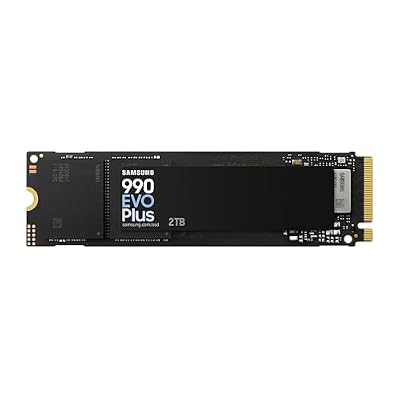
What Budget Gen4 Actually Gives You
A Gen4 NVMe drive uses PCIe 4.0 x4 and typically delivers sequential reads in the range of about 5,000 to 7,500 MB/s for mainstream models. That is far beyond SATA, which tops out around 550 MB/s, and it is enough to make game loading, system boot and large file transfers feel quick. For the majority of gaming setups, the difference between a good budget Gen4 drive and a premium Gen4 drive is smaller than the price gap.
Budget does not have to mean compromise, but it does mean you should check a few things. Look at the NAND type, the controller, the endurance rating and whether the drive uses a DRAM cache. Drives without DRAM can still perform well for gaming, though they may slow down more under heavy sustained writes. The right balance depends on how you use the drive.
Specs That Matter on a Budget
Controller and NAND Quality
The controller and NAND together determine most of a drive’s behaviour under load. Mainstream Gen4 controllers from established vendors are generally reliable, while unknown brands can cut corners on error handling and sustained performance. When two drives have similar prices, choose the one from the brand with the longer track record and better warranty support.
Endurance and Warranty
Gaming drives see moderate writes, since most installs are one-time events. Still, check the terabytes-written rating and warranty length. A longer warranty signals the maker’s confidence in the product, and it protects you if the drive fails early.
Capacity Sweet Spot
For budget builds, 1TB is the minimum you should consider for a primary game drive, and 2TB is the better value for most people. Price per terabyte often falls as capacity rises, so a 2TB drive can cost noticeably less per gigabyte than a 1TB drive. Choose the capacity that fits your library, then compare brands within that tier.
Comparison Table: Budget Gen4 Options
The table below sorts budget Gen4 choices by the role they usually fill. Ranges are broad and not tied to exact retail prices. Check the live listing before you buy.
| Option | Best for | Interface | Typical price range |
|---|---|---|---|
| Budget 1TB Gen4 | Secondary storage or a tight-budget first drive | PCIe 4.0 x4 NVMe | Check current price |
| Budget 2TB Gen4 | Best value for a primary game drive | PCIe 4.0 x4 NVMe | Check current price |
| Mainstream Gen4 with DRAM | Consistent performance under sustained writes | PCIe 4.0 x4 NVMe | Check current price |
| Gen4 with heatsink included | Buyers who want no-fuss thermal control | PCIe 4.0 x4 NVMe | Check current price |
If you have a little more to spend, our best NVMe SSD for gaming 2026 guide covers higher-end Gen4 models. For a quick look at capacity tiers, the best gaming SSDs roundup groups drives by price and speed.
When Budget Gen4 Is Enough, and When It Is Not
A budget Gen4 drive is enough for most gamers. It handles game loading, OS drives and general storage well, and it stays fast enough for mainstream creative work. Players with a large modern library and a Gen5 platform may want more headroom, but for a Gen4 build or a mixed-use PC, budget Gen4 is the sensible default.
Budget Gen4 falls short in two situations. The first is when you move very large files at high sustained speed for long periods, such as large video edits, where thermal behaviour and DRAM matter more. The second is when you fill the drive close to capacity, since performance usually drops as free space shrinks. In both cases, a higher-capacity or better-cooled drive solves the issue more effectively than paying for Gen5.
Installation and Value Tips
Install the drive in a slot wired to the CPU if your board has one, since that avoids sharing lanes with chipset devices. Update the BIOS if the board supports the drive model, and update the drive firmware after installation. If the board has a heatsink or M.2 shield, use it, since even Gen4 drives can throttle under long writes.
For value, compare price per terabyte within the same brand tier, and watch for bundles that include a heatsink. Our best SSD for gaming PC guide explains how to match capacity to the games you play, and the PCIe Gen5 vs Gen4 SSD comparison shows where the premium for Gen5 stops making sense.
Further reading on related storage decisions: best gaming M.2 SSDs, Samsung 980 Pro 1TB review, best gaming PC SSD, WD Black SN850X 2TB review.
Frequently Asked Questions
Is a budget Gen4 SSD fast enough for gaming?
Yes. It loads games far faster than SATA and performs very close to premium Gen4 drives in most gaming tasks. The biggest differences appear in sustained heavy workloads, not in everyday play.
Should I choose 1TB or 2TB for a budget build?
For a primary game drive, 2TB is the better value and leaves room for several large titles. A 1TB drive works well as a secondary drive or for a tight budget with a small library.
Does a budget Gen4 drive need a heatsink?
It is not strictly required for light gaming, but a heatsink or board shield helps during long writes and large installs. If your board includes a shield, use it.
Is DRAM cache necessary in a gaming SSD?
DRAM helps with consistent performance under sustained writes and random access. Drives without DRAM can still work well for gaming, but they may slow more under heavy load, so check reviews for the specific model.
Final Recommendation
The best budget Gen4 NVMe SSD for most gamers in 2026 is a 2TB drive from an established brand, with a reasonable warranty and a heatsink or board shield in use. Compare the hero listing and the alternatives on the card, confirm the capacity and price, and check that the drive sits in a CPU-connected slot. That combination gives you fast game loading and plenty of room without paying for Gen5 headroom you may never use.