WD Black SN8100 Gen5 SSD Review: What the 14,900 MB/s Rating Means for Gamers
The WD_BLACK SN8100 is a PCIe 5.0 NVMe drive that its maker rates at up to 14,900 MB/s sequential read, with the same read rating across its 1TB, 2TB and 4TB models. It is positioned as a gaming-focused Gen5 drive, and it competes directly with the other top Gen5 options on the market. This WD Black SN8100 Gen5 SSD review explains what that headline figure means in a game, where the drive fits in a build, and how to choose between it and cheaper alternatives.
This is a buying guide built around the product class. We have not tested the SN8100 ourselves for this article. The hero listing below was selected for the query “WD Black SN8100 Gen5 SSD”, and the alternatives came from the same search. The listing may be a close match or a different capacity, so verify the exact model, capacity and price on the card before buying.
Reading the Rated Numbers Honestly
The published specifications for the SN8100 list PCIe 5.0 x4 with NVMe 2.0, sequential reads up to 14,900 MB/s and sequential writes up to 14,000 MB/s on the higher-capacity models. Independent reviewers have reported measured sequential reads very close to that rating in their own tests. That is a strong result, and it places the drive among the fastest consumer SSDs currently on sale.
Still, a rating is a peak figure under ideal conditions. Gaming performance depends on random reads, the drive’s behaviour when it fills up, and temperatures over long sessions. A drive with excellent sequential numbers does not automatically load every game faster than a good Gen4 drive. Use the rating as a sign of headroom, and weigh it against the things your games actually do.
Gaming Use Cases Where the SN8100 Helps
The clearest benefit appears in large games that stream data constantly. Open-world titles, games with very large texture packs and titles that rebuild shader caches on new drivers all put steady demand on storage. A Gen5 drive with a strong controller keeps that demand from becoming a bottleneck, especially in areas where the game is pulling in new assets as you travel.
The benefit is smaller in older or esports-focused titles, which load quickly on almost any modern NVMe drive. If most of your playtime is in those games, a less expensive drive will likely feel identical. The SN8100 makes the most sense when your library is large and modern, and when you want your storage to stay fast for several years of new releases.
Capacity Planning for a Gen5 Build
Most gamers should consider 2TB as the baseline for a Gen5 drive. One AAA title can take up a large share of a 1TB drive, and multiple big installs fill it quickly. A 4TB model suits players who keep a large library installed or who also handle video and project files. Keep some free space on any drive, since a nearly full SSD can show slower write speeds and less consistent performance.
Heat and Cooling
Gen5 drives run hot under sustained load, and the SN8100 is no exception. Sustained writes, such as large game installs or big file copies, are where thermal throttling is most likely. A heatsink or a motherboard M.2 shield with good contact helps keep speed steady in those moments. If the listing includes a heatsink, check its height against your case and cooler clearance. If it does not, plan for a third-party heatsink before you buy.
Also confirm which M.2 slot on your board connects to the CPU’s PCIe 5.0 lanes. A Gen5 drive in a chipset-connected slot will run slower than its rating, and that is one of the most common reasons buyers feel disappointed with a fast drive.
How the SN8100 Compares to Other Gen5 and Gen4 Choices
The table below groups the choices a gamer usually compares. Ranges are general and not tied to exact retail prices. Always confirm the live price and the specific model before you buy.
| Option | Best for | Interface | Typical price range |
|---|---|---|---|
| Gen5 gaming flagship (SN8100 type) | Maximum Gen5 headroom for a large, modern library | PCIe 5.0 x4 NVMe | Check current price |
| Gen5 mainstream alternatives | Gen5 platform on a moderate budget | PCIe 5.0 x4 NVMe | Check current price |
| High-end Gen4 gaming drive | Most players, with lower heat and cost | PCIe 4.0 x4 NVMe | Check current price |
| Budget Gen4 drive | Secondary storage and value builds | PCIe 4.0 x4 NVMe | Check current price |
For a wider view of the Gen5 market, see our best PCIe 5 NVMe SSDs 2026 roundup. Readers weighing generations should also check the PCIe Gen5 vs Gen4 SSD comparison, which explains where the difference matters and where it does not.

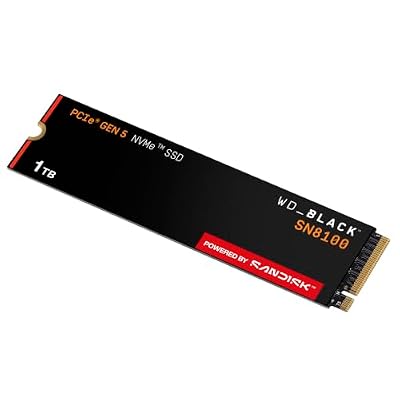
WD_Black SN8100 1TB NVMe SSD - PCIe 5.0x4, M.2 2280, Up to 14,900MB/s Read Speed, up to 11,000MB/s Write Speed, Best for AI Applications, Gaming, and Video Editing - WDS100T1X0M






As an Amazon Associate we earn from qualifying purchases. Product prices and availability are accurate as of the date/time indicated.
Who Should Choose the SN8100
Choose a drive in this class if you are building or upgrading a Gen5 system, you keep a big modern library, and you want storage that stays fast for years. It is also a good match for creators who move large files and want a fast scratch or project drive. Buyers on Gen4 platforms, or those mostly playing older games, will get better value from a strong Gen4 drive.
If you want a Gen5 drive but are unsure about the budget, our best NVMe SSD for gaming 2026 guide covers options across price tiers. For a deeper look at larger capacities, the best 4TB NVMe SSDs roundup compares the value of big drives.
Setup and Maintenance Checklist
Update the motherboard BIOS to a version that supports your CPU’s Gen5 lanes. Install the drive in the CPU-connected slot, add the heatsink or shield, and update the drive firmware using the manufacturer’s tool. After Windows is installed, verify the link speed in a system information utility. Keep your drivers current, and check the drive’s health periodically with the manufacturer’s software or a trusted monitoring tool.
When migrating from an older system drive, clone carefully, boot from the new drive, and keep the old drive offline until you are sure everything works. Back up your save files and game account data before any storage change. These steps take a little time, but they prevent the most frustrating problems.
Further reading on related storage decisions: WD Black SN850X 2TB review, best gaming M.2 SSDs, best gaming PC SSD, best gaming SSDs, best 2tb gaming SSDs 2026.
Frequently Asked Questions
Is the WD Black SN8100 faster than a Gen4 drive in games?
In sequential tests, yes by a wide margin. In games, the gap is smaller and depends on the title. Large open-world games and heavy streaming benefit most, while esports titles load quickly on almost any modern NVMe drive.
Does it work in a Gen4 motherboard?
It is backward compatible with Gen4 slots, so it will work. It will run at Gen4 speeds in that case, which still delivers strong performance.
Which capacity should I buy?
Two terabytes suits most gaming builds. Choose 4TB if you keep a large library installed or handle big creative files. The 1TB model is best reserved for secondary storage or a tight budget.
Final Verdict
The WD Black SN8100 class offers top-tier Gen5 sequential speed and strong independent results, which makes it a serious option for a gaming build on current hardware. Its best use case is a large, modern game library on a Gen5 platform with good cooling. Check the hero listing and the alternatives on the card, confirm the exact model, capacity and price, and verify your board’s slot and heatsink clearance. For Gen4 builds or light gaming, a well-reviewed Gen4 drive is the better value.