

Affiliate disclosure: As an Amazon Associate we earn from qualifying purchases. This post contains affiliate links — if you buy through them we may earn a small commission at no extra cost to you. This never affects our recommendations.
- Why CRTs Still Matter for Retro Gaming in 2026
- Specs & Provenance: The Professional Upscaler
- Why It Matters: Adaptive Scaling + Advanced Filtering
- Where to Buy in 2026: Good Availability
- Modern Accessories You’ll Need: Comprehensive Cable Kit
- Vs. CRTs & OSSC Pro: Feature Comparison
- Pros & Cons: The Comprehensive Upscaler
- FAQ: Questions from Serious Retro Gamers
- Final Verdict
- Related Articles
- Frequently Asked Questions
- Related Articles
In a hurry? See the top-rated RetroTink 4K deals available right now:
As an Amazon Associate we earn from qualifying purchases.

🛒 Best Price Today on Amazon
Prime members get fast, free shipping on everything above, plus member-only deals. New members get a 30-day free trial — cancel anytime.
Start 30-Day Prime Free Trial →See Today’s Amazon DealsWhy CRTs Still Matter for Retro Gaming in 2026
The RetroTink 4K is the most advanced consumer-grade retro video upscaler in existence. Unlike the OSSC Pro, which specializes in integer scaling and scan-line emulation, the RetroTink 4K is a Swiss Army knife: it accepts virtually any analog video source (composite, S-Video, component, RGB, SCART), scales to 1080p or 4K, and includes features like adaptive aspect ratio correction and bob deinterlacing. For retro gamers without access to quality CRT hardware, the RetroTink 4K is the most flexible solution available in 2026.
While the RetroTink 4K cannot replicate the authentic phosphor behavior of a real CRT, it comes remarkably close through advanced processing algorithms. For gamers who prioritize compatibility and flexibility over pixel-perfect puritanism, it’s the superior choice to the OSSC Pro.
Specs & Provenance: The Professional Upscaler
The RetroTink 4K is manufactured by RetroTink, a specialist company dedicated to retro gaming hardware. Unlike the OSSC Pro (open-source), RetroTink 4K is a commercial product with professional-grade engineering. The “4K” indicates native 4K output capability (3840×2160), though the device also supports 1080p output to accommodate older displays.
Key specs: Composite/S-Video/component/RGB/SCART inputs, HDMI output up to 4K @ 60Hz, advanced line doubling and filtering algorithms, bob deinterlacing for interlaced sources (480i, 576i), aspect ratio correction, and customizable scaling modes. The device includes a user-friendly menu system for on-the-fly adjustments.
| Specification | Value |
|---|---|
| Video Inputs | Composite RCA, S-Video, Component (YPbPr), RGB, SCART |
| Video Output | HDMI (up to 4K @ 60Hz, 1080p @ 120Hz) |
| Scaling Algorithms | Advanced line doubling, bob deinterlacing, aspect ratio correction |
| Scan-Line Options | Scan-line overlay (adjustable strength and opacity) |
| Console Support | NES, SNES, Genesis, N64, Dreamcast, arcade boards, others |
| Latency | ~1–2 frames (minimal; superior to OSSC Pro) |
| Price | $300–$400 USD (2026 pricing) |
| Availability | Generally available; less scarcity than OSSC Pro |
Why It Matters: Adaptive Scaling + Advanced Filtering
The RetroTink 4K’s core advantage is its adaptive scaling algorithms. Instead of rigid integer-multiple scaling like the OSSC Pro, the RetroTink 4K uses intelligent line-doubling that adapts to the source resolution and refresh rate. A 320×224 source might be scaled to 1920×1344 (not a perfect integer multiple) with intelligent filtering that minimizes artifacts.
The bob deinterlacing feature is genuinely useful for systems that output interlaced video (Dreamcast at 480i, many arcade boards). The OSSC Pro struggles with interlaced sources; the RetroTink 4K handles them gracefully by intelligently separating fields and doubling lines.
Scan-line rendering is available but optional, with adjustable opacity. You can dial in exactly the level of scan-line visibility you prefer—not possible on the OSSC Pro.
Where to Buy in 2026: Good Availability
RetroTink products are commercially manufactured and distributed more broadly than open-source alternatives. Availability in 2026 is reasonable, though the 4K model is more expensive than the OSSC Pro.
Where to source:
- RetroTink official website (usually in stock)
- Amazon and major retailers (consistent availability)
- Specialty retro gaming retailers
- eBay (occasionally available; check pricing)
Pricing reality: MSRP is $300–$350 USD. Secondary market pricing is close to MSRP, reflecting better availability than the OSSC Pro. Budget $300–$400 total.
Modern Accessories You’ll Need: Comprehensive Cable Kit
The RetroTink 4K’s strength is input flexibility, but you’ll still need quality cables and a 4K-capable display to take full advantage.


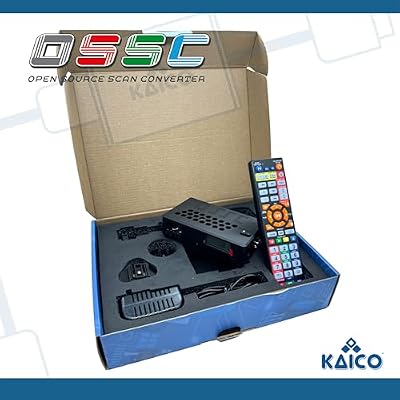
As an Amazon Associate we earn from qualifying purchases. Product prices and availability are accurate as of the date/time indicated.

PhotoFast 4K Gamer Pro Video Game Console HDMI 4K upscaler 1080p to 4k @60fps without lag upscale for Nintendo Switch/Nintendo Switch OLED/Wii U/PlayStation 4 / PS3 / Xbox & more
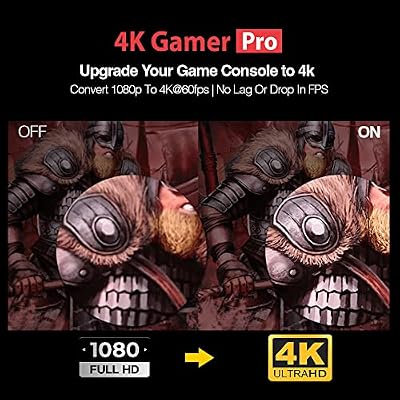


As an Amazon Associate we earn from qualifying purchases. Product prices and availability are accurate as of the date/time indicated.
Component video cables are critical—the RetroTink 4K will faithfully reproduce whatever signal quality you feed it. Premium cables from reputable makers cost $40–$100 but are essential. For RGB sources (SNES, Genesis with RGB mod), RGB-to-component converters or SCART adapters are required.
A 4K display is not mandatory—1080p displays work fine and are cheaper—but if you’re investing in the RetroTink 4K’s capabilities, a 4K display lets you see the full output quality. Budget $300–$1,000 for a 4K gaming monitor or TV.
Vs. CRTs & OSSC Pro: Feature Comparison
RetroTink 4K vs OSSC Pro: RetroTink has more input flexibility, better deinterlacing, 4K capability, and 1–2 frame latency vs OSSC’s 2–3 frames. OSSC Pro excels at pixel-perfect integer scaling for progressive (non-interlaced) sources. For most users, RetroTink is more versatile; for purists, OSSC Pro is more “authentic.”
RetroTink 4K vs Original CRT: RetroTink is 1/10th the cost and requires no maintenance. A real CRT wins on phosphor authenticity and zero input lag. For pragmatists, RetroTink 4K is the logical choice in 2026’s scarce CRT market.
Comparison: OSSC Pro Review: Scan-Line Magic for Modern Displays, Dell P1130 Buying Guide: Affordable 21-Inch Trinitron Monitor
Pros & Cons: The Comprehensive Upscaler
Pros:
- Comprehensive input support (composite, S-Video, component, RGB, SCART)
- Advanced deinterlacing for interlaced sources (480i, 576i)
- 4K output capability; future-proofs your setup
- Intelligent scaling adapts to source; minimal artifacts
- Adjustable scan-line overlay with opacity control
- Low latency (~1–2 frames); excellent for timing-sensitive games
- Better availability than OSSC Pro; less scarcity premium
- Commercial product with professional support
- Compatible with any modern 4K-capable display
Cons:
- More expensive than OSSC Pro ($300–$400 vs $140–$200)
- Advanced scaling algorithms are not “pixel-perfect” like integer scaling
- Scan lines are software-rendered, not authentic CRT phosphor
- Requires quality cables and display for best results
- Learning curve for menu navigation and optimization
- Overkill for simple integer-scaling use cases (OSSC Pro is simpler)
- 4K displays are expensive; 1080p negates much of the advantage
FAQ: Questions from Serious Retro Gamers
Should I buy the RetroTink 4K or OSSC Pro?
OSSC Pro if: You want pixel-perfect integer scaling and simplicity. Budget is tight ($140–$160 MSRP). You only use progressive-scan sources (NES, SNES, Genesis, etc.).
RetroTink 4K if: You use interlaced sources (Dreamcast at 480i, arcade boards). You want maximum input flexibility. You own a 4K display. Budget allows $300–$400.
Is 4K output necessary?
No. A 1080p display works fine and is significantly cheaper. The RetroTink 4K can output to 1080p without issue. 4K is a luxury, not a requirement. Only buy a 4K display if you have other uses for it (modern gaming, movies, etc.).
How much latency does it add?
Approximately 1–2 frames (16–33ms at 60Hz). This is lower than the OSSC Pro and imperceptible for most games. Competitive fighting game players might notice vs CRT zero lag, but casual gaming is unaffected.
Can I use it with every retro console?
Effectively yes. NES, SNES, Genesis, N64, Dreamcast, arcade boards, computer systems—all output analog video that the RetroTink 4K can process. You may need adapters for some systems (N64 video quality is notoriously bad, but the RetroTink 4K upscales it as well as possible).
How does interlaced video look on the RetroTink 4K?
Excellent. The bob deinterlacing intelligently separates fields and doubles lines, producing smooth output from interlaced sources. Dreamcast games look great—far superior to OSSC Pro’s interlaced handling.
Final Verdict
The RetroTink 4K is the most versatile retro upscaler in 2026. It trades pixel-perfect integer scaling for comprehensive input flexibility, advanced deinterlacing, and 4K capability. For gamers who use multiple console types and value simplicity over puritanism, it’s the superior choice to the OSSC Pro.
Buy one if: You want the most flexible retro upscaler. You use interlaced sources. You own a 4K display. Budget is $300–$400+.
Skip it if: You want pixel-perfect integer scaling (use OSSC Pro). You only use progressive-scan consoles. Budget is under $200.
In 2026, as CRT availability declines, professional upscalers like the RetroTink 4K represent the future. It’s a worthwhile investment for serious retro gamers who don’t have access to quality CRT hardware.
Related: OSSC Pro Review: Scan-Line Magic for Modern Displays, CRT vs OLED for Retro Gaming: Which Display Wins in 2026?
Related Articles
Looking for more on this topic? Browse the hand-picked guides below — each one applies the same scoring rubric used in this review.
Related reading: retro gaming console reviews.
Frequently Asked Questions
What does the RetroTink 4K actually do?
It takes analogue or low-resolution digital output from retro consoles and converts it to a modern HDMI signal at up to 4K, with line-accurate scaling, CRT emulation shaders, and very low processing delay. The goal is to make original hardware look correct on a modern display rather than blurry and stretched.
Is it worth the price over cheaper upscalers?
It is worth it if you own many consoles with different output types and care about image accuracy, since it consolidates several devices and offers far better scaling and shader options. For a single console over a single cable type, a much cheaper dedicated adapter delivers most of the benefit.
How does it compare with the OSSC Pro?
The RetroTink emphasises frame-buffered processing with sophisticated shaders and broad format support, while the OSSC line historically prioritised pure line-doubling with essentially zero buffering. In practice both are excellent; the RetroTink is generally the easier device to live with, and the OSSC appeals to latency purists.
Does it add input lag?
It adds a small, consistent delay measured in a fraction of a frame in its lower-latency modes, which is imperceptible for nearly all play. Some of the heavier processing and shader options increase that slightly. Your television processing usually contributes more delay than the upscaler does.
What cables do I need for my consoles?
It accepts component, S-Video, composite, SCART RGB, and digital input depending on the model configuration. Getting the best result means using the highest-quality output each console supports, which often requires a specific RGB or component cable rather than the composite lead that shipped in the box.













