

Affiliate disclosure: As an Amazon Associate we earn from qualifying purchases. This post contains affiliate links — if you buy through them we may earn a small commission at no extra cost to you. This never affects our recommendations.
- Why CRTs Still Matter for Retro Gaming in 2026
- Specs & Provenance: The Open-Source Standard
- Why It Matters: Scan Lines Without a CRT
- Where to Buy in 2026: Limited Availability, High Demand
- Modern Accessories You’ll Need: Console Cables & HDMI
- Vs. Original CRTs: The Compromise
- Pros & Cons: The Practical Upscaler
- FAQ: Questions from Budget-Conscious Gamers
- Final Verdict
- Related Articles
- Frequently Asked Questions
- Related Articles
In a hurry? See the top-rated OSSC Pro deals available right now:
As an Amazon Associate we earn from qualifying purchases.

🛒 Best Price Today on Amazon
Prime members get fast, free shipping on everything above, plus member-only deals. New members get a 30-day free trial — cancel anytime.
Start 30-Day Prime Free Trial →See Today’s Amazon DealsWhy CRTs Still Matter for Retro Gaming in 2026
The OSSC Pro is not a CRT itself, but a critical tool for retro gamers unable or unwilling to source original CRT hardware. OSSC (Open Source Scan Converter) Pro is an HDMI upscaler that takes low-resolution 240p/480p signals from retro consoles and cleanly scales them with scan-line emulation to modern displays. In 2026, when quality CRTs are becoming rare and expensive, the OSSC Pro offers an alternative path to authentic-looking retro gaming on modern hardware.
The fundamental advantage of a CRT—perfect scan lines without interpolation—is impossible on LCD/OLED displays. But the OSSC Pro comes remarkably close by applying integer-multiple scaling and software-based scan-line overlay. For gamers unable to afford a PVM-20M4U or Dell P1130, the OSSC Pro + modern display combo provides 85% of the retro CRT experience at a fraction of the cost.
Specs & Provenance: The Open-Source Standard
The OSSC Pro is a specialized video processor designed specifically for retro gaming. It accepts composite, S-Video, and component video inputs from classic consoles (NES, SNES, Genesis, Dreamcast, Arcade boards) and outputs HDMI at various resolutions and refresh rates. The “Pro” variant (released 2024–2025) adds features like SCART input, expanded scaling options, and improved timing accuracy compared to the original OSSC.
Key specs: Composite/S-Video/Component input, SCART input (Pro variant), HDMI output, integer-multiple scaling (2x, 3x, 4x, 5x), scan-line generation, customizable sync timing, and firmware updates via USB. The OSSC Pro is designed and maintained by retro gaming enthusiasts—true open-source hardware, not a commercial product.
| Specification | Value |
|---|---|
| Video Inputs | Composite RCA, S-Video, Component (YPbPr), SCART (Pro) |
| Video Output | HDMI (up to 1080p @ 60Hz) |
| Scaling Modes | Integer multiples (2x–5x), aspect ratio correction |
| Scan-Line Options | Hardware scan-line emulation (adjustable strength) |
| Console Support | NES, SNES, Genesis, N64, Dreamcast, arcade boards, others |
| Latency | ~2–3 frames (minimal input lag) |
| Cost | $140–$200 (varies by region/seller) |
| Availability | Special order; limited production runs |
Why It Matters: Scan Lines Without a CRT
The OSSC Pro’s core trick is integer-multiple scaling with hardware scan-line injection. A 256×240 NES signal can be upscaled to 1024×960 (4x integer scaling), then scan lines are drawn in the gaps to simulate CRT behavior. The result looks remarkably close to an actual CRT display—not identical, but far superior to bilinear filtering or no scaling at all.
The key advantage: no input lag or frame interpolation. The OSSC Pro processes the signal in real-time with minimal latency (~2–3 frames), making it suitable for timing-sensitive games like shmups and fighting games. Modern LCDs with image processing can add 50–200ms of latency; the OSSC Pro avoids this entirely.
Where to Buy in 2026: Limited Availability, High Demand
The OSSC Pro is not mass-produced. Manufacturing is limited, and demand consistently exceeds supply. Availability is unpredictable.
Where to source:
- Official OSSC website and forums (pre-order/waitlist when available)
- Retro gaming specialty retailers (check regularly; stock depletes within hours)
- eBay (available but often at 2–3x markup due to scarcity)
- International retro gaming communities and forums
Pricing reality: MSRP is $140–$160 USD, but availability is so limited that secondary market prices reach $250–$400. Budget accordingly and be patient—production runs happen sporadically.
Modern Accessories You’ll Need: Console Cables & HDMI
The OSSC Pro handles scaling and scan lines, but you need proper source cables and a compatible display to complete the setup.


Mcbazel OSSC SCART Component VGA to HDMI Open Source Scan Converter v1.6 for Retro Gaming Saturn SNES PS1 Console US Plug

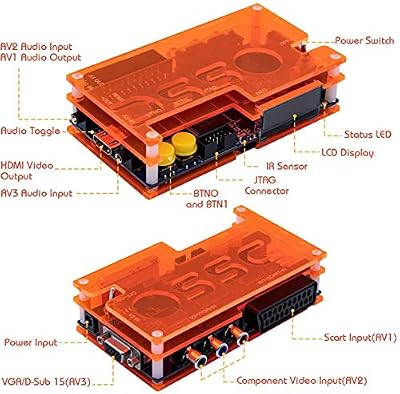

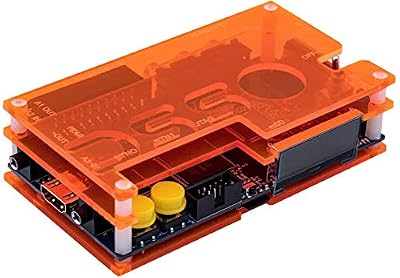


As an Amazon Associate we earn from qualifying purchases. Product prices and availability are accurate as of the date/time indicated.
Quality component video cables (YPbPr) from console to OSSC Pro are critical—cheap cables introduce noise that degrades the upscaled image. Premium cables from companies like Beharbros or Insurrection Industries cost $40–$80 but are worth the investment. HDMI cables from OSSC Pro to display should be decent quality; even budget HDMI cables work fine for short runs.
Display selection matters: Any modern TV or monitor with HDMI works, but low-latency displays (gaming monitors, high-end TVs) perform best. Avoid TVs with image processing enabled (use “Game Mode” if available).
Vs. Original CRTs: The Compromise
The OSSC Pro is not a CRT replacement—it’s a practical alternative when CRTs are unavailable or unaffordable. Key differences:
OSSC Pro + Modern Display: Perfect scan lines (drawn by software), instant pixel response, no phosphor glow, 2–3 frame latency, ~$200 total investment (upscaler + budget display).
Original CRT (e.g., Dell P1130): Authentic scan lines and phosphor, zero input lag, natural motion blur, natural geometry, 5–10 year lifespan, $300–$500 upfront + recap service later.
The OSSC Pro wins on: affordability, space efficiency, modern connectivity, no maintenance. CRTs win on: authenticity, zero lag, natural optics, longevity if maintained.
Compare: RetroTink 4K Review: The Ultimate Retro Upscaler, CRT vs OLED for Retro Gaming
Pros & Cons: The Practical Upscaler
Pros:
- Affordable ($140–$200 MSRP; secondary market pricing is high but still cheaper than CRT + recap)
- Integer scaling and scan-line emulation produce authentic-looking retro image
- Minimal latency (~2–3 frames) for timing-sensitive games
- Works with any modern display (TV, monitor, projector)
- Compact form factor; no desk space burden
- Supports multiple console types; highly versatile
- Open-source; community-driven development and support
- No maintenance required; lasts indefinitely
Cons:
- Limited production; often hard to acquire at MSRP
- Secondary market markups ($250–$400) due to scarcity
- Scan lines are software-rendered, not authentic phosphor behavior
- No phosphor glow or natural motion blur of real CRTs
- Slight display lag (2–3 frames) vs zero lag of CRTs
- Requires quality cables and display for best results
- Limited to composite/S-Video/component input (no RGB without adapter)
FAQ: Questions from Budget-Conscious Gamers
Is OSSC Pro worth the high secondary market price?
At MSRP ($140–$160), absolutely. At secondary market prices ($250–$400), it depends. If you can wait, monitor official channels and grab one at MSRP. If you can’t wait, the cost is still 1/10th of a quality CRT + recap service.
How does it compare to the RetroTink 4K?
OSSC Pro is better for retro-accurate gaming (pixel-perfect scaling, minimal latency). RetroTink 4K is more flexible (accepts more input types, supports scaling to 4K). OSSC Pro is the retro purist choice; RetroTink is the Swiss Army knife. Choose based on your needs.
Do I need a special display for the OSSC Pro?
No, any modern HDMI display works. A gaming monitor with low latency is ideal, but even budget TVs are fine. Enable “Game Mode” if your TV has it to minimize latency.
How much latency does the OSSC Pro add?
Approximately 2–3 frames (33–50ms at 60Hz). This is minimal for most games. Competitive fighting game players might notice the difference vs CRT zero lag, but casual gaming is unaffected.
Can I use it with original consoles?
Yes. Connect your NES, SNES, Genesis, Dreamcast, or arcade cabinet directly to the OSSC Pro. The device accepts composite/S-Video/component output from any classic system.
Final Verdict
The OSSC Pro is the practical retro gamer’s choice in 2026. When quality CRTs are rare and expensive, the OSSC Pro + modern display delivers 80–85% of the CRT experience at 1/5 the cost. The scan-line rendering is convincing, latency is minimal, and the image quality is outstanding.
Buy one if: You want authentic-looking retro gaming without hunting for rare CRT hardware. This is the pragmatic path forward as CRTs become increasingly scarce.
Skip it if: You have access to quality CRT hardware. A real Dell P1130 or Eizo T968 is superior in every way except convenience and cost.
In 2026, as CRT scarcity accelerates, the OSSC Pro represents the future of retro gaming for most enthusiasts. If you can acquire one at MSRP, do it. The alternative is increasingly expensive and difficult.
Related: RetroTink 4K Review: The Ultimate Retro Upscaler in 2026, CRT vs OLED for Retro Gaming: Which Display Wins in 2026?
Related Articles
Looking for more on this topic? Browse the hand-picked guides below — each one applies the same scoring rubric used in this review.
Frequently Asked Questions
What is the difference between the OSSC Pro and the original OSSC?
The original was a pure line multiplier with no frame buffer, which gave essentially zero added lag but could not handle format conversion or variable timings. The Pro adds an optional frame buffer, broader input support, and more processing modes while keeping a low-latency path for purists.
Is line doubling better than frame buffering?
Line doubling adds almost no delay because it never stores a full frame, but the output timing must be something your display accepts, and some televisions refuse the unusual modes it produces. Frame buffering guarantees compatibility and enables better scaling at the cost of roughly one frame of delay.
Does it work with my television?
Most modern displays accept its output, but compatibility with the pure line-doubled modes varies by set, and some televisions apply heavy processing that undoes the benefit. Enable game mode on the display first. If a mode produces no picture, switching to a buffered output usually resolves it.
Which consoles benefit most?
Systems with RGB or component output see the largest improvement, since the device is preserving an already good analogue signal rather than rescuing a poor one. Composite-only consoles benefit far less, and are usually better served by a device with dedicated comb filtering.
Is it hard to configure?
There is a learning curve, since sampling phase, line multiplication, and mask settings all interact and the ideal values differ per console. The community publishes tested profiles for common systems, and loading one of those is far quicker than tuning from scratch.
















