Retroid Pocket Handheld Gaming Review
The Retroid Pocket line is one of the better-known families of Android-based handhelds aimed at retro gaming. The pitch is straightforward: a compact, controller-focused device that runs emulators for many classic systems, with a screen and battery designed for long sessions on the go. Retroid devices are often praised for their build and their polished front-end, and they tend to appeal to players who want a consistent experience rather than a tinkering project. Buyers should still understand what the category does and does not deliver before they spend money.
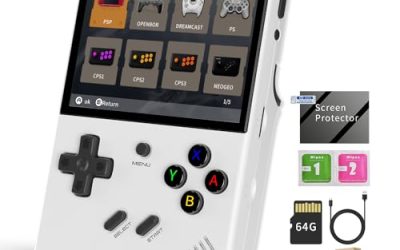
This article is a buying guide. We did not run our own tests on a Retroid unit, so we do not claim specific frame rates, battery figures, or emulation results. The listing above may be a close match to the Retroid Pocket model you are considering rather than an exact variant, so verify the processor, RAM, storage, screen, and price on the card. The checklist below is useful regardless of which model you pick.


What Retroid Handhelds Are Designed to Do
Retroid devices are built around emulation of classic consoles and handheld systems. An Android base gives access to a wide set of emulator apps and a familiar interface for file management and streaming apps. The controls and screen are the main selling points. For many players, the experience is about comfort and reliability rather than peak graphics. Newer, heavier games are not the focus, and many of them will not run well on a device built for retro libraries.
Android Base and Software Setup
Because the device runs Android, setup involves installing emulators, organizing game folders, and configuring controllers. Check whether the device ships with a front-end that simplifies this. A clean software setup saves time. Also check how often the manufacturer provides updates, since software support affects long-term value.
Controls and Ergonomics
Controls matter most for retro play. Check the d-pad, face buttons, shoulder buttons, and analog sticks. Look for reviews that comment on hand comfort during long sessions. A device that feels good in the hands for an hour is more useful than one with a longer spec list. If you play for hours at a time, pay attention to the weight and grip shape.
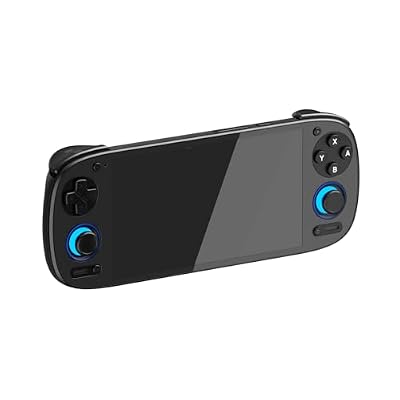
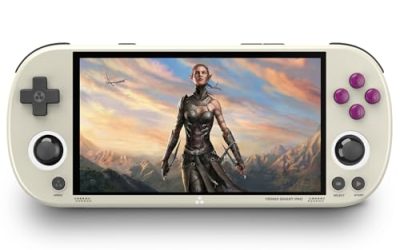
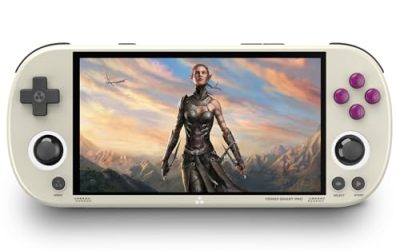
Retroid Pocket 5 Retro Handheld Game Console, 8+128G, 5.5-inch touchscreen 1080p Portable Android Gaming Handheld with Adreno 650 GPU & WiFi 6/BT5.1, Snapdragon 865 Processor, Android 13 (Black)


As an Amazon Associate we earn from qualifying purchases. Product prices and availability are accurate as of the date/time indicated.
How Retroid Models Compare With Other Retro Handhelds
The table below compares the classes of retro handhelds that buyers typically weigh. It is a checklist for your comparison rather than a ranking of specific devices. Price ranges are approximate, and the live price is what matters.
| Class | Best for | Typical price range | Main trade-off |
|---|---|---|---|
| Android retro handheld, compact | Pocketable play of classic systems | Check current price | Smaller screen and limited power |
| Android retro handheld, larger screen | Longer sessions and better visibility | Check current price | Heavier body |
| Windows-based handheld PC | PC game libraries and broader software | Check current price | Shorter battery life and more setup |
| Budget retro handheld | Entry-level classic play | Check current price | Basic build and fewer software features |
Buying Checklist for an Android Retro Handheld
Start with the screen. Check the resolution, panel size, and brightness, and look for reviews that comment on visibility outdoors. Next, check the battery. Retro emulation is light, so battery life is often better than on a gaming PC handheld, but the actual runtime depends on the screen brightness and the emulator used. Then check the storage and whether a microSD card can be added. Finally, confirm the warranty and the return policy, since quality control varies across budget and mid-range devices.
Storage and Library Management
A retro library can grow large, especially with high-quality art and save files. Plan for expandable storage, and check whether the device supports the card size you intend to use. Organizing your games in clear folders from the start saves frustration later.
Connectivity and TV Output
If you want to play on a television, check for video output and the resolution it supports. Bluetooth controller support is useful for couch play. Check whether the device supports the controllers you already own.


As an Amazon Associate we earn from qualifying purchases. Product prices and availability are accurate as of the date/time indicated.
Who Should Consider a Retroid Pocket Handheld
This category suits people who want a compact retro handheld with a polished software experience and who do not need to run newer demanding PC games. It is less suitable for players who want a full Windows environment or the latest AAA titles. If you want a broader list of options, our retro gaming handhelds guide covers the market. If you are considering a Windows device instead, our handheld gaming PC guide compares the alternatives. For a lower-cost retro option, our Anbernic RG556 guide covers a different price tier.
Retro Enthusiasts
Enthusiasts who want accurate emulation of older systems benefit from a device with a strong software base and clear controls. Check which systems the device supports at full speed, since some demanding systems need more power than others.
Gift Buyers
Gift buyers should check the return policy and the warranty, and confirm that the device is shipped with the accessories they expect. A simple setup guide helps the recipient get started quickly.
Related Guides on GamingPCGuru
Use these guides alongside this article when you compare budgets, displays, cooling, and the wider market before you buy.
- Retroid Pocket 5 guide, for another Android retro handheld.
- retro gaming handheld guide, for devices built for classic systems.
- Android gaming handheld guide, for Android-based handheld options.
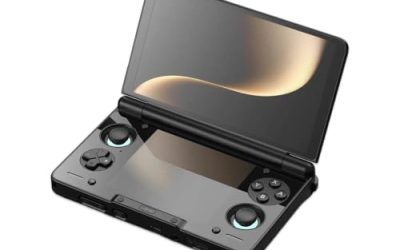
- AYANEO Pocket DMG guide, for a compact handheld alternative.
- best gaming handhelds guide, for handhelds across Windows and Android.
Frequently Asked Questions
Is a Retroid handheld good for modern games?
Lighter modern games may run at reduced settings, but demanding titles will struggle. The device is designed primarily for retro libraries. Check reviews of the specific model for the games you care about.
How does battery life compare with a Windows handheld?
Retro emulation generally uses less power than modern PC games, so an Android retro handheld often lasts longer. Actual runtime depends on screen brightness, the emulator, and the games you play.
Do I need to add a microSD card?
For a large retro library, yes. Internal storage can fill quickly, and a microSD card is an inexpensive way to add capacity. Check the maximum supported card size before buying.
Final Verdict
A Retroid Pocket handheld is a sensible choice for players who want a polished, controller-focused device for classic systems. Focus on the screen, controls, battery, and storage. Use the featured listing and the alternatives as a shortlist, then verify the exact model, processor, and live price before you buy.