Here is the honest starting point: no current retro handheld lets you click a battery out with a thumbnail and snap a fresh one in. That design is gone. What actually exists is a spectrum. At the good end, a battery door hides a plug-in pack you can swap with no tools or one small screwdriver. In the middle, a screwed back shell covers a plug-connected cell that lifts out cleanly. At the bad end, the cell is glued down and replacement means heat, prying and a real risk of bending the pack.
This roundup only includes machines on the right side of that spectrum, and each pick is labelled with the swap it actually asks of you. Powerful Android flagships are deliberately absent: their batteries are sealed in with adhesive, and pretending otherwise would make this list useless.
As an Amazon Associate, we earn from qualifying purchases.
Quick Answer
The Miyoo Mini Plus is the easiest battery swap in retro handhelds: a rear battery cover hides a 3000 mAh plug-in pack with no glue and no soldering. The TrimUI Smart Pro, Anbernic RG35XX Plus and Powkiddy RGB30 need one screwdriver but still use plug-in packs, while the Data Frog SF2000 uses a simple rear battery compartment.
What Replaceable Honestly Means in 2026
Three levels cover every machine worth discussing. Level one is a battery door or compartment: open the back, lift the pack out, drop the new one in. Level two is a screwed shell: remove four to six small screws, unplug a two-pin connector, lift the pack out. No soldering at either level, and a careful owner finishes in minutes. Level three is where most of the market sits: the pack is taped or glued down, sometimes under other components, and removal is a repair job rather than a swap.
That third level is why several famous names are missing here. The AYN Thor line, the Retroid Pocket 5, the Retroid Pocket Flip 2 and the Anbernic RG556 and RG406H all use adhesive-fixed cells inside sealed shells. A repair shop can change them with heat and patience, but that is not what replaceable should mean to a buyer. The five picks below stay at level one or level two.
One more honesty note: replacement packs come from the maker or third-party sellers, and the cell format printed on the pack matters more than the brand on the box. Every pick below lists what to match when a battery wears out.
Level One: A Battery Door Does the Work
Miyoo Mini Plus: The Easiest Swap on This List
The Mini Plus is the closest any retro handheld gets to the old way. A battery cover on the back opens to reveal a 3000 mAh pack wired through a small two-pin plug. There is a full repair-guide trail for this exact job because it is genuinely simple: open the cover, unplug the connector, lift the pack out, plug the new one in. No adhesive, no soldering, no shell disassembly. The stock cell is a standard flat pack format, so replacements are easy to source years later.
The trade-offs live elsewhere. The dual-core processor and 3.5-inch screen cap the library at PlayStation 1 and below, and the small shell suits short sessions. As a long-term ownership pick, though, nothing else here is this painless to keep alive.
Specs
- Screen: 3.5-inch IPS, 640 x 480
- Processor: dual-core Cortex-A7, 1.2 GHz
- Memory: 128 MB RAM, microSD storage
- Battery: 3000 mAh plug-in pack, standard 103665 flat cell format
- Swap method: rear battery cover, two-pin plug, no glue, no tools needed for the pack itself
- Extras: Wi-Fi, Linux with mature community firmware
Data Frog SF2000: A Plain Battery Compartment
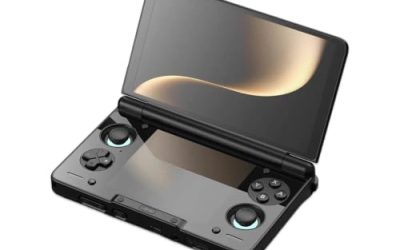
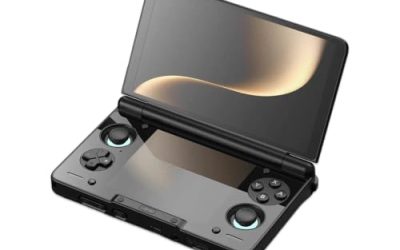
The SF2000 is the budget outlier, and its one old-fashioned virtue is a proper battery compartment on the back of the shell, exactly where handhelds used to put them. The maker documentation shows the compartment plainly, and the 1500 mAh pack inside is a removable unit rather than a glued-in cell. When the pack fades, you open the compartment and change it, the way owners did for decades.
Everything else about the SF2000 demands low expectations. The chip struggles with parts of the Super Nintendo and Game Boy Advance libraries, and fit and finish are firmly budget tier. Buy it as a beater, and the swappable pack means it can sit in a drawer for years and still be revived in a minute.
Specs
- Screen: 3.0-inch IPS, 640 x 480
- Processor: dual-core, 1.0 GHz
- Memory: microSD storage
- Battery: 1500 mAh removable pack in a rear compartment
- Swap method: open the rear battery compartment, lift the pack out, no soldering
- Extras: AV television output, claimed five to six hours of play per charge
Level Two: One Screwdriver, One Plug, No Glue Fights
TrimUI Smart Pro: The Big Screen With a Plug-In Pack
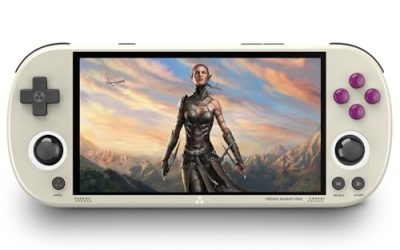
The Smart Pro hides the largest battery on this list, a 5000 mAh pack, behind a screwed back panel. Inside, the cell connects with a plug rather than solder joints, so the swap is a screwdriver job: back off, connector out, pack lifted free, new pack in. It asks more of you than the Miyoo door, but it never asks for heat guns or prying against adhesive, which is the line that matters.
In exchange you get the most capable level-two machine here for widescreen play: a 4.96-inch 720p screen, a quad-core chip that handles PlayStation 1 easily and some PSP, and dual sticks with ambient lighting. If you want a handheld that feels modern but can still be revived with a fresh pack in five years, this is the balanced pick.
Specs
- Screen: 4.96-inch IPS, 1280 x 720
- Processor: Allwinner A133 Plus quad-core
- Memory: 1 GB RAM, microSD storage
- Battery: 5000 mAh plug-in pack
- Swap method: screwed back panel, two-pin plug, no soldering, no glued cell
- Extras: Wi-Fi, Bluetooth, dual USB-C ports, Linux firmware
Anbernic RG35XX Plus: Screws, a Plug and Light Adhesive

The RG35XX Plus needs six small screws removed before its 3300 mAh pack can be unplugged, and the pack sits against light adhesive, so it needs a gentle lift rather than sliding out freely. That still places it firmly in swap territory: the connector means no soldering, and the adhesive is the mild kind that releases with slow pressure, not the structural glue used in sealed flagships. Repair guides for this shell family rate the battery job as easy and quick.
As a gaming machine it is the refined vertical option: an H700 quad-core chip, a sharp 3.5-inch screen, Wi-Fi and Bluetooth, and a huge firmware scene. Buyers who want Game Boy-era ergonomics with a battery they can change at home, slowly and carefully, are well served here.
Specs
- Screen: 3.5-inch IPS, 640 x 480
- Processor: Allwinner H700 quad-core Cortex-A53
- Memory: 1 GB RAM, dual microSD slots
- Battery: 3300 mAh plug-in pack
- Swap method: six screws, two-pin plug, light adhesive under the pack
- Extras: Wi-Fi, Bluetooth, mini HDMI output
Powkiddy RGB30: The Square-Screen Screwdriver Swap
The RGB30 follows the same honest pattern: four screws hold the back shell, and inside, the 4100 mAh pack connects by a wired plug that owners routinely disconnect and reconnect during repairs and mods. There is no soldered battery lead and no glued cell to fight. The swap is not tool-free, but it is documented, repeatable and safe for a careful owner.
The reason to pick it is the screen: a 4-inch 720 x 720 square panel that suits Game Boy, vertical arcade and Pico-8 libraries beautifully, backed by an RK3566 chip that covers PlayStation 1 and a slice of Nintendo 64 and Dreamcast. Powkiddy build quality is the known compromise, which makes the easy battery access even more valuable over a long ownership run.
Specs
- Screen: 4.0-inch IPS, 720 x 720, 1:1 aspect ratio
- Processor: Rockchip RK3566 quad-core, 1.8 GHz
- Memory: 1 GB RAM, dual microSD slots
- Battery: 4100 mAh plug-in pack
- Swap method: four screws, wired plug connector, no soldering
- Extras: Wi-Fi, Bluetooth, mini HDMI output, Linux firmware
How to Choose
Start with the swap you are actually willing to do. If opening a shell sounds like a chore you will never perform, the Miyoo Mini Plus and its battery cover are the only honest recommendation, with the SF2000 compartment as the budget route. If a small screwdriver does not scare you, the other three picks open up, and the choice becomes about the games.
Match the machine to your library next. The Mini Plus and RG35XX Plus are vertical handhelds built for Game Boy, Game Boy Advance and PlayStation 1. The TrimUI Smart Pro is the widescreen pick for PSP-leaning libraries. The RGB30 is the specialist for square-format and vertical arcade play. The SF2000 should only be bought for 8-bit and light 16-bit play.
Finally, check the pack before you need it. Note the cell format in each pick, and confirm a matching replacement exists from the maker or a reputable parts seller. A replaceable battery only extends a handheld life if the replacement can be bought later.
Who Should Skip This List
Skip this list if you want PlayStation 2 or GameCube power. Every Android flagship with that performance seals its battery in with adhesive, so power and easy swaps do not currently coexist. Skip it if you plan to use fast charging daily and replace the whole device every couple of years anyway; battery longevity is a long-term ownership concern. And skip the SF2000 in particular if Super Nintendo and Game Boy Advance are your main libraries, because its chip is not up to them regardless of how charming its battery compartment is.
Frequently Asked Questions
Does any retro handheld have a truly tool-free battery swap?
Almost none. The Miyoo Mini Plus comes closest, with a battery cover and a plug-in pack that needs no tools for the pack itself. Everything else on this list needs at least a small screwdriver, and most handhelds outside it need heat and prying because their cells are glued in.
Will swapping the battery erase my games or saves?
No. Games, saves and firmware live on the microSD card or internal storage, not in the battery. A swap only cuts power. It is still sensible to shut the handheld down fully before unplugging any pack, and to let a new pack charge fully before a long session.
How long do these batteries last before they need replacing?
A lithium pack typically holds up well for a few years of regular play before run time drops noticeably. Storage habits matter: a handheld kept fully charged in a hot drawer ages faster than one stored half charged somewhere cool. Every pick here makes that eventual replacement a home job instead of a repair bill.
What should I check when buying a replacement pack?
Match three things: the voltage, the connector type and the physical cell size, all printed on the original pack. Capacity can vary slightly between replacements, but a pack that is thicker than the original can strain the shell or the battery cover, so size is the measurement that cannot be guessed.
Final Verdict
Replaceable batteries in retro handhelds are a modest feature: real, but only in the budget Linux corner of the market. The Miyoo Mini Plus is the standout, with a battery cover and a plug-in pack that anyone can change. The TrimUI Smart Pro is the best all-round level-two pick, the RG35XX Plus the best vertical one, the RGB30 the square-screen specialist, and the SF2000 the cheap compartment throwback. If keeping a handheld alive for a decade matters to you, these five respect that goal; the sealed flagships, for all their power, do not.
Product and ASIN Reference
| Product | ASIN |
|---|---|
| Miyoo Mini Plus | B0CGV6CQPL |
| TrimUI Smart Pro (White, 128GB) | B0FMJWW5MG |
| Anbernic RG35XX Plus | B0CN3CJFZH |
| Powkiddy RGB30 | B0CNWWXFPV |
| Data Frog SF2000 | B0CRR7ZQYS |