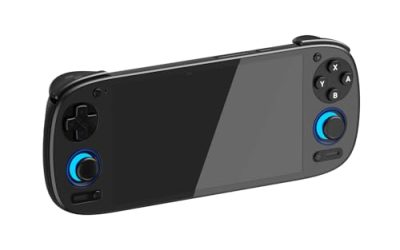
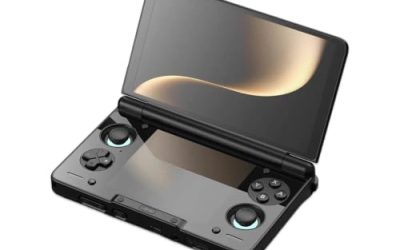
Student gaming runs on stolen minutes and a thin wallet. Ten minutes between lectures, twenty on a bus, half an hour in the dorm. A retro handheld fits that life better than almost any other device: it plays games you already own, asks for no subscription, wakes instantly, and survives a backpack. The five picks below are ranked the way a student budget actually works, by how much play each one returns across a whole degree, not by raw power.


As an Amazon Associate, we earn from qualifying purchases.
Quick Answer
The Miyoo Mini Plus is the student default: tiny, cheap to replace, and perfect for ten-minute sessions. The TrimUI Smart Pro adds a widescreen and the biggest battery of the budget pair, the RG35XX Plus adds speed and TV output, the RG406H is the comfortable dorm pick, and the RG556 is the one stretch purchase that covers everything.
A Student Budget Is a Four-Year Budget
Judge these machines by cost per semester, not cost on the day. A handheld bought in the first term has to survive three more years of backpacks, bus rides, spilled coffee nearby, and being lent to a roommate. That reframes the spec sheet. A replaceable battery matters less than a shell that shrugs off drops. A big internal library matters less than a microSD slot, because a card is cheap to replace and easy to back up before exams eat your saves.
It also reframes performance. Student sessions are short and interruptible, so the features that earn their keep are instant sleep, reliable save states, and a battery that treats a day of classes as a warm-up. Raw chip power decides which systems you can play, but the boring logistics decide whether the device is still in your bag in year three.
One more student-specific point: none of these machines needs an ongoing spend to stay useful. No store account, no online service to keep paying for, and community firmware is free. The games come from your own collection, dumped from cartridges and discs you own, so the running cost of the hobby stays at zero after the hardware itself.
1. Miyoo Mini Plus: The Ten-Minute Machine
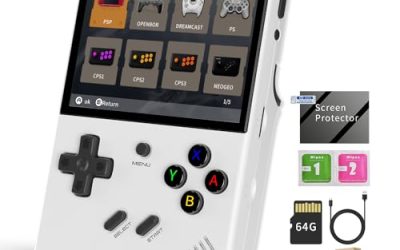
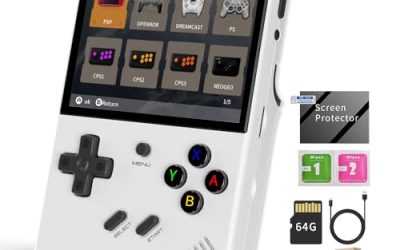
The Mini Plus is the pick that matches student time. The vertical shell is smaller than a phone, disappears into a jacket pocket, and under Onion OS a single press of the power button suspends your game and the next press returns you to the exact frame. A session can be as short as one bus stop and still feel complete, which is more than most gaming hardware can say.
The 3.5-inch screen and the widely praised d-pad suit the Game Boy, GBA, SNES and PS1 libraries, and the 3,000 mAh battery sips power at the modest brightness a lecture hall corridor needs. Wi-Fi is built in, which covers retro achievements and easy file transfers from a laptop without cables. The limits are honest ones: the dual-core chip stops at the PS1 era, and there is no touchscreen, so stylus-driven DS games are off the list. For the cartridge-era catalogue played in bursts, it is the easiest recommendation on this page.
Specs
- Chip: Dual-core ARM processor
- Display: 3.5-inch IPS, 640 by 480, no touchscreen
- Battery: 3,000 mAh
- Operating system: Linux with Onion OS support
- Storage: microSD expansion
- Tier: Budget
2. TrimUI Smart Pro: The Library-Break Widescreen
The Smart Pro is the budget pick for students who read their games as much as play them. The 4.96-inch 1280 by 720 screen gives RPG text, menu-heavy strategy games and PSP titles room to breathe, and the slim horizontal shell slides into the same backpack pocket as a paperback. At 128GB, the configuration listed here swallows a large library without card juggling in week one.
Its 5,000 mAh battery is the largest of the Linux picks and suits the student pattern perfectly: charge it over the weekend and it covers a week of breaks. The Allwinner A133P chip handles the 16-bit era and PS1 comfortably and reaches the friendlier end of the PSP catalogue. Like the Miyoo it has no touchscreen, and it runs Linux rather than Android, so it does not run PortMaster ports. Buy it for the screen and the stamina, not for headroom.
Specs
- Chip: Allwinner A133P
- Display: 4.96-inch IPS, 1280 by 720, no touchscreen
- Battery: 5,000 mAh
- Operating system: Linux
- Storage: 128GB microSD card included, expandable
- Tier: Budget
3. Anbernic RG35XX Plus: The Mini Plus With Headroom
The RG35XX Plus takes the same pocketable vertical formula and removes its main weakness. The Allwinner H700 is meaningfully faster than the Miyoo chip, which shows up as quicker loading and fast-forward that makes grinding through an RPG between classes genuinely practical. Dual microSD slots let you keep a second card of long games separate from the everyday library, a small feature that suits a student who plays in two modes: short bursts and Sunday marathons.
It also adds a mini HDMI output, so the same machine that lives in your pocket can drive a dorm television for multiplayer on the controllers you already have. The compromises are familiar: the firmware options are capable but suspend-and-resume polish sits a notch behind Onion OS, the shoulder buttons are small, and there is still no touchscreen. It is the budget pick for students who found the Mini Plus ceiling and want the same shape without it.
Specs
- Chip: Allwinner H700, quad-core Cortex-A53, Mali-G31 MP2 GPU
- Display: 3.5-inch IPS, 640 by 480, no touchscreen
- Memory and storage: 1 GB RAM, dual microSD slots
- Battery: 3,300 mAh
- Connectivity: Wi-Fi 5, Bluetooth 4.2, mini HDMI output
- Operating system: Linux
- Tier: Mid-range
4. Anbernic RG406H: The Dorm-Room Comfort Pick

Some student gaming is not stolen minutes at all, and the RG406H is built for the evening session in a dorm chair. The 4-inch 960 by 720 screen is the largest true 4:3 panel here, so SNES, PS1 and GBA games fill it edge to edge with no wasted space, and the Unisoc T820 with Android 13 runs those systems plus PSP and most of the DS catalogue. The touchscreen the smaller picks lack is present, which unlocks the stylus half of the DS library.
Android suits shared-living life in quiet ways: standby drain is low enough that the 5,000 mAh battery survives a bag from Friday to Monday, and the interface is the one every student already knows from their phone. The cost is size and shape. This is a bag device rather than a pocket device, and one-handed standing play never feels natural. Choose it when your gaming happens in one place and comfort over two hours matters more than disappearing into a pocket.
Specs
- Chip: Unisoc Tiger T820
- Display: 4-inch IPS, 960 by 720, touchscreen
- Memory and storage: 8 GB RAM, 128 GB internal storage, microSD expansion
- Battery: 5,000 mAh
- Operating system: Android 13
- Tier: Mid-range
5. Anbernic RG556: The One Stretch Purchase

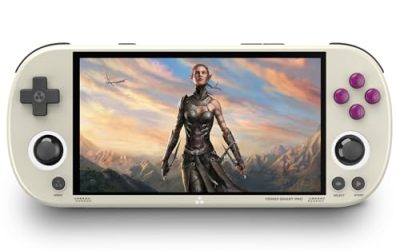
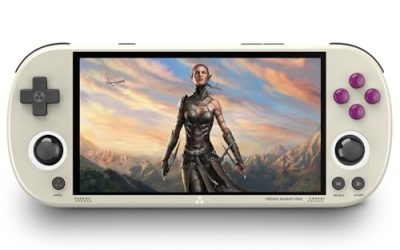
Every student roundup needs one pick that breaks the budget on purpose, and the RG556 is the honest version of it. The argument is replacement math: one machine that covers the classic library and a solid slice of the PS2 and GameCube generation can retire the urge to upgrade for the rest of a degree. The 5.48-inch AMOLED screen at 1920 by 1080 is the best display here by a distance, and text-heavy games stay readable at arm’s length.
The Unisoc T820 pairs with 8 GB of RAM and 128 GB of internal storage, and the 5,500 mAh battery is the largest in this roundup. It runs Android 13 with a touchscreen, so menus behave like a phone’s. It does not run PortMaster, since that library targets Linux handhelds, and it is the device here you would least want to lose. If the budget stretches once, this is where it pays back longest.
Specs
- Chip: Unisoc Tiger T820
- Display: 5.48-inch AMOLED, 1920 by 1080, touchscreen
- Memory and storage: 8 GB RAM, 128 GB internal storage, microSD expansion
- Battery: 5,500 mAh
- Operating system: Android 13
- Tier: Premium
How to Choose
Start with your sessions, not the spec sheet. If your play happens in gaps of fifteen minutes or less, instant sleep and pocket size outrank everything, which points at the Mini Plus or the RG35XX Plus. If your gaps are longer but still mobile, library breaks and bus rides, the Smart Pro’s screen and battery take over. If most of your gaming happens in one chair in the evening, comfort wins and the RG406H or RG556 is the right shape of purchase.
Then check the library you actually own. A shelf of Game Boy and SNES cartridges needs none of the Android power on this page. A PS2-heavy collection is the one case where the stretch pick stops being a luxury. Finally, apply the semester test: can you back up the card, and replace the device without real pain if it vanishes from a library table? The pick that survives those questions survives the degree.
Who Should Skip
Skip this category if your gaming is mostly modern: none of these machines plays current releases, and a student whose library lives on a gaming laptop gains nothing here. Skip the budget Linux picks if you need a touchscreen for DS games, since three of the five have none. Skip the RG556 if losing a device would genuinely hurt, because a cheaper handheld you can afford to lose is the better student purchase. And skip handhelds if your breaks are better spent off a screen; the library will still be there at graduation.
Frequently Asked Questions
Can a student handheld replace a gaming laptop?
No, and it is not trying to. These machines cover the cartridge and early disc eras, roughly everything up to the PS1 comfortably and parts of the two generations after that on the stronger picks. Modern PC and console releases still need modern hardware. What the handheld replaces is phone gaming in short breaks, with proper controls and no battery anxiety for the device you need for class.
How long will one of these last across a degree?
The hardware is simple and the failure points are few: a battery that slowly loses capacity and a microSD card that can be replaced in seconds. Community firmware keeps the software side improving for years, and because the games are files you own rather than a service, nothing can be shut down on you mid-degree. Treated normally, any pick here should outlast the course that prompted the purchase.
Do these handhelds need Wi-Fi or an account to work?
No. Every pick here plays fully offline, which suits library basements and trains alike. Wi-Fi, where fitted, is for optional extras such as retro achievements, firmware updates and moving files without a cable. There is no account to create and nothing to subscribe to.
Which pick is best for playing in a shared dorm room?
The RG406H. Its screen fills properly for the classic systems, the touchscreen opens the DS library, and Android standby means it is always ready on a desk. Pair any of these with wired earbuds and the fan-free, speaker-optional design keeps a roommate out of your session entirely.
Final Verdict
Buy the Miyoo Mini Plus if your gaming life is measured in minutes. Step up to the TrimUI Smart Pro for the widescreen and week-long battery, or the RG35XX Plus for the same pocket shape with real headroom and TV output. The RG406H is the dorm-evening answer, and the RG556 is the single stretch purchase that can carry a whole degree. All five ask for one payment and no loyalty after it, which is exactly the deal a student budget needs.
Product and ASIN Reference
| Product | ASIN |
|---|---|
| Miyoo Mini Plus (Black, 64GB) | B0DC6QHQ3Y |
| TrimUI Smart Pro (128GB) | B0CSK9B4G4 |
| Anbernic RG35XX Plus | B0CN3CJFZH |
| Anbernic RG406H (White) | B0DNF3LD4C |
| Anbernic RG556 (Blue) | B0FKHBVGLQ |