- Top Pick: ChillCore Laptop Cooling Pad, RGB Lights Laptop Cooler 9 Fans for 15.6-19.3 Inch Laptops, Gaming Laptop Fan Cooling Pad with 8 Height Stands, 2 USB Ports – A21 Blue
- Best Value: havit HV-F2056 Laptop Cooling Pad for 15.6-17 Inch Laptops, Black
- Premium Choice: Thermalright Peerless Assassin 120 SE CPU Cooler, 6 Heat Pipes AGHP Technology, Dual 120mm PWM Fans, 1550RPM Speed, for AMD:AM4 AM5/Intel LGA 1700/1150/1151/1200/1851,PC Cooler
Affiliate disclosure: As an Amazon Associate we earn from qualifying purchases. This post contains affiliate links — if you buy through them we may earn a small commission at no extra cost to you. This never affects our recommendations.
- Quick Picks
- Air Cooler vs AIO: When Air Wins
- Single Tower vs Dual Tower: Performance and Clearance Tradeoffs
- RAM Clearance Guide: Which Coolers Work with Tall RAM
- Top 5 Best Air Coolers for Gaming in 2026
- Comparison Table
- What to Look For When Buying an Air Cooler
- Verdict
- Related Articles
- Frequently Asked Questions
- Related Articles
As an Amazon Associate we earn from qualifying purchases at no extra cost to you.








In a hurry? See the top-rated Air Cooler for Gaming deals available right now:
🛒 Check Air Cooler For Gaming Prices on Amazon →🛒 Best Price Today on Amazon
Prime members get fast, free shipping on everything above, plus member-only deals. New members get a 30-day free trial — cancel anytime.
Start 30-Day Prime Free Trial →See Today’s Amazon DealsQuick Picks
| Cooler | Best For | Price Range |
|---|---|---|
| Noctua NH-D15 G2 | Best overall — maximum thermal headroom | ~$110 |
| be quiet! Dark Rock Pro 5 | Premium silent build, black aesthetic | ~$90 |
| Thermalright Peerless Assassin 120 SE | Budget dual-tower, outstanding value | ~$35 |
| Noctua NH-U12A | Tight builds, RAM clearance priority | ~$80 |
| DeepCool AK620 | Balanced performance at accessible price | ~$45 |
If you just want the short answer: the Noctua NH-D15 G2 is the best air cooler for gaming you can buy right now. If budget is the constraint, the Thermalright Peerless Assassin 120 SE punches so far above its price it embarrasses coolers twice as expensive.
Everything below explains the tradeoffs so you can choose the right fit for your case, budget, and CPU.
Air Cooler vs AIO: When Air Wins
Liquid cooling (AIO) is heavily marketed, but for most gaming builds — especially those not running extreme overclocks — a quality air cooler is the smarter choice. Here is why.
Reliability. Air coolers have no pump, no liquid, no tubing, and no radiator fittings. There is nothing to fail except a fan bearing, which you can replace for a few dollars. AIOs have a finite lifespan typically measured in 3–6 years before pump degradation becomes a performance issue. A quality air cooler can outlast two or three AIO generations.
Noise. The “air coolers are loud” perception is outdated. Modern flagship air coolers — particularly Noctua and be quiet! — operate at noise levels that compete with or beat the pump-and-fan combination of most 240mm AIOs. A dual-tower air cooler with low-speed fans at idle is functionally inaudible.
No leak risk. Pump failures and fitting failures happen. Running liquid cooling directly above thousands of dollars of motherboard, GPU, and RAM is a risk that air cooling eliminates entirely.
Cost. A top-tier air cooler costs $40–$110. A quality 360mm AIO costs $100–$200. The performance difference on air-cooled gaming workloads (where sustained all-core load is limited to game scenarios, not extended content creation) is marginal enough that it rarely justifies the premium.
When AIOs make sense: extremely compact ITX cases where a 165mm tower simply won’t fit, aesthetics-first builds centered on RGB, or users running sustained all-core workloads (video encoding, 3D rendering) where the extra radiator surface area provides meaningful sustained temperature reduction.
For the majority of gaming builds: buy the air cooler, invest the difference in a better GPU or faster storage.
Single Tower vs Dual Tower: Performance and Clearance Tradeoffs
The most important structural decision when choosing an air cooler is tower count.
Dual Tower
Dual-tower coolers use two heatsink stacks with a fan sandwiched between them (and often a second fan on the outside). This configuration significantly increases surface area and airflow paths, resulting in 5–15°C lower peak temperatures compared to equivalent single-tower designs on high-TDP CPUs like the Intel Core i9-14900K or AMD Ryzen 9 9950X.
Tradeoffs: Dual towers are tall (155–170mm), wide, and heavy. They can conflict with tall RAM kits installed in slots adjacent to the CPU socket. They require a case with adequate CPU cooler clearance — verify your case spec before buying.
Single Tower
Single-tower coolers stack one heatsink with fans on one or both sides. They are narrower, lighter, and leave considerably more RAM clearance. The Noctua NH-U12A is the standout example: a single-tower design that performs closer to entry dual-tower coolers than you would expect, in a form factor that works in tighter cases and mid-height RAM.
Tradeoffs: Single towers hit their thermal ceiling sooner on high-TDP processors. For a Core i5 or Ryzen 5 gaming build, the difference is irrelevant. For a Core i9 or Ryzen 9 pushing 200W+, the dual tower is the correct choice.
RAM Clearance Guide: Which Coolers Work with Tall RAM
Tall RAM kits (DDR5 with heatspreaders, RGB modules) commonly measure 42–50mm in height. This conflicts with the overhang of many dual-tower coolers on DIMM slot 1 (the slot closest to the CPU socket).

| Cooler | RAM Clearance (approx.) | Notes |
|---|---|---|
| Noctua NH-D15 G2 | ~32mm slot 1, ~45mm slot 2 | Fan offset helps; check your specific board layout |
| be quiet! Dark Rock Pro 5 | ~40mm | Improved over predecessor |
| Thermalright Peerless Assassin 120 SE | ~45mm | Generous clearance for dual tower |
| Noctua NH-U12A | ~67mm | Single-tower advantage; fits virtually any RAM |
| DeepCool AK620 | ~30mm slot 1 | May require repositioning front fan |
Practical recommendation: If you run 44mm+ RGB DDR5 and want a dual-tower, the Thermalright Peerless Assassin 120 SE offers the most generous RAM clearance in the category. If RAM clearance is the primary constraint, the Noctua NH-U12A is the solution.
Top 5 Best Air Coolers for Gaming in 2026
1. Noctua NH-D15 G2 — Best Overall
The NH-D15 G2 is the definitive air cooler benchmark. Noctua redesigned the original NH-D15’s heatsink geometry from the ground up — new fin spacing, revised heatpipe routing, and a refined version of the NF-A15 PWM chromax fan. The result is measurably better thermal performance than its already-excellent predecessor.
On a Core i9-14900K at stock settings, the NH-D15 G2 keeps peak all-core temperatures in the 85–90°C range — territory where most 360mm AIOs barely edge it out. On gaming workloads where power draw is more modest, it is effectively unlimited in headroom.
The G2 comes in three variants optimized for different socket heights: the standard, LBC (Low Base Contact, optimized for AMD AM5 IHS geometry), and HBC (High Base Contact, optimized for Intel LGA1700). Choosing the right variant for your platform matters — select accordingly.
Height: 165mm | Fans: 2x NF-A15 PWM | TDP Rating: 300W+ | Weight: 1,320g
Who it’s for: Anyone building a high-end gaming PC who wants the best air cooling available and won’t need to upgrade the cooler for the next decade.
2. be quiet! Dark Rock Pro 5 — Best Premium Silent Cooler
be quiet! built its reputation on inaudible operation, and the Dark Rock Pro 5 delivers. The cooler uses a dual-tower design with ceramic-coated heatpipes, a 135mm Silent Wings 4 PWM front fan, and a 120mm Silent Wings 4 PWM middle fan. The all-black finish — matte aluminum top cap, black coated fins and heatpipes — is the cleanest aesthetic in the category.
Thermal performance sits just below the NH-D15 G2, typically within 3–5°C on sustained workloads. On gaming scenarios this gap is irrelevant. Where the Dark Rock Pro 5 stands apart is the noise floor — at mid-speed fan settings it is among the quietest coolers ever measured.
Installation requires a bit more patience than Noctua’s tool-free bracket system, but the included mounting hardware is solid and the manual is clear.
Height: 162.8mm | Fans: 135mm + 120mm Silent Wings 4 PWM | TDP Rating: 250W | Weight: 1,200g
Who it’s for: Silent build enthusiasts who want near-NH-D15 G2 performance with premium aesthetics and the quietest possible operation.
3. Thermalright Peerless Assassin 120 SE — Best Budget Pick
Thermalright Peerless Assassin 120 SE
At roughly $35, the Peerless Assassin 120 SE is the most disruptive product in air cooling. Two 120mm TL-C12 PWM fans, six heatpipes, and a dual-tower heatsink that performs within striking distance of coolers costing three times as much. Independent reviews consistently show it trading blows with the Noctua NH-D15 (original) on mid-range CPUs — an extraordinary result at this price point.

RAM clearance is notably good for a dual-tower: approximately 45mm, which accommodates most standard DDR5 kits. The TL-C12 fans are not class-leading for acoustics at maximum speed but are entirely acceptable at normal gaming fan curves.
Build quality uses more plastic in the fan housing than the premium options, and the silver/black color scheme is neutral rather than refined. At this price, those are not complaints — they are expected tradeoffs for a product that embarrasses the competition on price-to-performance.
Height: 155mm | Fans: 2x TL-C12 120mm PWM | TDP Rating: 220W | Weight: 855g
Who it’s for: Any budget-to-mid-range build from a Core i5 to Ryzen 7. The default recommendation when someone asks “what cooler should I buy without spending too much.”
4. Noctua NH-U12A — Best Single Tower for Tight Builds
The NH-U12A defies the expectation that single-tower coolers are compromise options. Using seven heatpipes, Noctua’s proprietary Sterrox fin lancing technology, and dual NF-A12x25 PWM fans in push-pull, it performs within 5–8°C of dual-tower flagships on mid-to-high-range CPUs — while fitting in cases and configurations where a dual tower physically cannot go.
The NF-A12x25 is widely regarded as the finest 120mm fan ever manufactured for static pressure. In push-pull configuration on the NH-U12A, airflow through the dense heatsink is exceptional for the form factor.
At 158mm tall and standard 120mm width, the NH-U12A fits cases that have tight CPU cooler height limits and leaves ~67mm of RAM clearance — enough for every DDR5 kit available including tall RGB heatspreaders.
Height: 158mm | Fans: 2x NF-A12x25 PWM (push-pull) | TDP Rating: 250W | Weight: 1,045g
Who it’s for: Builds with tall RAM, cases with moderate clearance limits, or users who prioritize case airflow compatibility over maximum thermal performance.
5. DeepCool AK620 — Best Accessible Value
DeepCool AK620
The DeepCool AK620 occupies the middle ground between the Thermalright Peerless Assassin 120 SE’s budget dominance and the premium tier. Six heatpipes, a dual-tower configuration, and two 120mm FK120 PWM fans in push-pull deliver thermal performance that comfortably handles Ryzen 7 and Core i7 class processors in all gaming scenarios.
The AK620 is slightly louder than the Noctua and be quiet! options at equivalent fan speeds, but the FK120 fans are well-controlled on a good PWM curve. Build quality is solid, installation is straightforward with a tool-free mounting mechanism, and the neutral gray/black aesthetic pairs well with most builds.
Where the AK620 earns its place over the Peerless Assassin is slightly better acoustic refinement and the DeepCool brand’s wider retail availability — it’s easy to find in most regions and commonly on sale.
Height: 160mm | Fans: 2x FK120 120mm PWM | TDP Rating: 260W | Weight: 1,090g
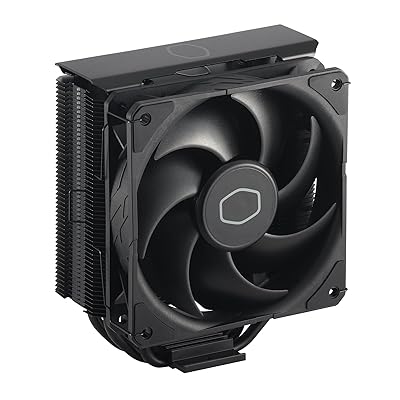
Who it’s for: Mid-range to high-end gaming builds where the Thermalright feels too budget and the Noctua feels unnecessary. A reliable, no-fuss dual-tower.
Comparison Table
| Cooler | Height | Fan Config | TDP Rating | RAM Clearance | Peak Noise |
|---|---|---|---|---|---|
| Noctua NH-D15 G2 | 165mm | 2x 140mm | 300W+ | ~32–45mm | 24.6 dB(A) |
| be quiet! Dark Rock Pro 5 | 162.8mm | 135mm + 120mm | 250W | ~40mm | 24.3 dB(A) |
| Thermalright Peerless Assassin 120 SE | 155mm | 2x 120mm | 220W | ~45mm | 33 dB(A) |
| Noctua NH-U12A | 158mm | 2x 120mm (P-P) | 250W | ~67mm | 22.6 dB(A) |
| DeepCool AK620 | 160mm | 2x 120mm | 260W | ~30mm | 29 dB(A) |
What to Look For When Buying an Air Cooler
TDP Rating vs Your CPU’s Actual Power Draw. Manufacturer TDP ratings are marketing figures, not hard limits. Cross-reference with independent reviews testing your specific CPU. A Ryzen 5 7600X gaming build runs far cooler than a Core i9-14900K at all-core load.
Case CPU Cooler Height Clearance. Measure or check your case spec sheet before buying a 165mm tower. Most mid-tower ATX cases support 160mm+, but budget cases and smaller form factors vary. This is the most common compatibility mistake.
Socket Compatibility. All five coolers listed here support Intel LGA1700/1851 and AMD AM4/AM5. Verify the package contents include your socket’s mounting hardware — most ship with everything, but it is worth confirming.
Fan Connector Availability. Dual-fan coolers need two PWM headers or a splitter. Check your motherboard’s available CPU_FAN and CPU_OPT headers.
Thermal Paste. All five coolers include thermal paste in the box. Noctua’s NT-H1 (included) is excellent. You don’t need to buy separate paste unless you have a specific preference.
Weight and Motherboard Stress. Coolers above 1,000g should ideally be used with a backplate mounting system (all five here use backplates) and the PC should be transported horizontally when moving to reduce stress on the CPU socket area.
Verdict
For maximum performance: The Noctua NH-D15 G2 is the benchmark. It is the best air cooler for gaming available in 2026, full stop. If you are building around a high-TDP processor or simply want to buy once and never think about cooling again, this is the pick.
For silent premium builds: The be quiet! Dark Rock Pro 5 is the alternative for users who prioritize acoustics and aesthetics alongside top-tier performance.
For budget builds: The Thermalright Peerless Assassin 120 SE is the default recommendation at $35. Nothing at this price performs like this. Buy it without hesitation for any mid-range gaming build.
For tight cases or tall RAM: The Noctua NH-U12A solves the clearance problem without meaningfully compromising cooling performance.
For balanced mid-range: The DeepCool AK620 hits the sweet spot between budget and premium, and is widely available at reliable prices.
The air cooler market in 2026 has never offered better value at every price tier. Any of these five picks will keep your CPU running cool, your system quiet, and your build reliable for years.
Related Articles
Looking for more on this topic? Browse the hand-picked guides below — each one applies the same scoring rubric used in this review.
Frequently Asked Questions
What is the best gaming cooling air cooler in 2026?
The best gaming cooling air cooler depends on your budget and how you plan to use it. The options compared above are our top-rated picks based on real customer ratings, build quality, and overall value — start with the highest-rated model that fits your budget.
How much should I expect to spend on a gaming cooling air cooler?
Prices vary by brand and features. Budget options cover the essentials, while mid-range and premium models add durability, performance, and extra features. Compare the prices in the list above to find the best value for your needs.
What should I look for when buying a gaming cooling air cooler?
Focus on what matters most for your use case — build quality, compatibility, performance, warranty, and verified customer reviews. Every pick above is selected to balance these factors.
Are budget gaming cooling air cooler options worth it?
Yes. For most people a well-reviewed budget or mid-range gaming cooling air cooler delivers excellent value. You only need to spend more if you specifically require premium materials or top-tier performance.
How did we choose these gaming cooling air cooler picks?
We compare current Amazon ratings, review counts, key features, and price to surface the options with the best real-world value. The list is refreshed as ratings and availability change.