- Top Pick: Thermalright Assassin X120 Refined SE CPU Air Cooler, 4 Heat Pipes, TL-C12C PWM Fan, Aluminium Heatsink Cover, AGHP Technology, for AMD AM4/AM5/Intel LGA 1150/1151/1155/1200/1700/1851(AX120 R SE)
- Best Value: Thermalright Peerless Assassin 120 Vision MAX ARGB White CPU Air Cooler, Twin Tower Radiator 2150RPM,480×854 Resolving Power IPS Screen with 5’’,Computer Cooler for Intel lga1851/1700/115x,AM4/AM5
- Premium Choice: ID-COOLING FROZN A620 PRO SE Dual-Tower CPU Cooler, Low Noise, 157mm, 260W
Affiliate disclosure: As an Amazon Associate we earn from qualifying purchases. This post contains affiliate links — if you buy through them we may earn a small commission at no extra cost to you. This never affects our recommendations.
As an Amazon Associate we earn from qualifying purchases at no extra cost to you.



In a hurry? See the top-rated Budget Air CPU Cooler for Gaming deals available right now:
🛒 Check Budget Air Cpu Cooler For Gaming Prices on Amazon →🛒 Best Price Today on Amazon
Prime members get fast, free shipping on everything above, plus member-only deals. New members get a 30-day free trial — cancel anytime.
Start 30-Day Prime Free Trial →See Today’s Amazon DealsIntroduction: Why Air Coolers Still Win Below $80 in 2026
The all-in-one liquid cooler had its moment. Sleek RGB rings, 360mm radiators, the Instagram-worthy look of “liquid cooling” — the marketing machine worked. But in 2026, if you are building or upgrading a gaming PC on a real budget, air cooling is not a compromise. It is the smarter choice.
Here is why. Below the $80 price point, AIO coolers suffer from two fundamental problems that air coolers simply do not have. First, pump failure. A closed-loop liquid cooler introduces a pump, tubing, a radiator, and a cold plate — every extra component is a failure point. Air coolers have no moving parts beyond the fan, which you can replace for under $20. Second, value. The thermal performance of a $35 dual-tower air cooler regularly matches or exceeds a $60 240mm AIO in independent benchmarks. You are not paying for performance with an AIO at that price — you are paying for aesthetics.
Air coolers in 2026 have also solved their biggest historical weaknesses. Modern asymmetric designs clear tall RAM modules. Revised mounting hardware ships with LGA1851 and AM5 support out of the box. And top-tier fans have pushed noise floors so low that “silent” is no longer an exaggeration.
This guide covers the five best budget air CPU coolers for gaming right now — all under $60, all capable of handling mainstream and enthusiast CPUs, and all better value than the AIOs competing in the same price bracket.
Comparison Table
| Cooler | TDP Support | Heat Pipes | Height | Fan Size |
|---|---|---|---|---|
| DeepCool AK620 | 260W | 6 | 160mm | 2x 120mm |
| Thermalright Peerless Assassin 120 SE | 250W+ | 6 | 155mm | 2x 120mm |
| be quiet! Pure Rock 2 | 150W | 4 | 155mm | 1x 120mm |
| Noctua NH-U12S redux | 180W | 5 | 158mm | 1x 120mm |
| Scythe Fuma 3 | 260W | 6 | 154mm | 2x 120mm |
Top 5 Budget Air CPU Coolers for Gaming in 2026
1. DeepCool AK620 — Best Overall Budget Dual-Tower
Price: ~$45 | Form Factor: Dual-tower | Socket Support: LGA1700, LGA1851, AM4, AM5
The DeepCool AK620 is the cooler that genuinely embarrassed AIOs costing twice as much when it launched, and it has only gotten better with updated mounting hardware. Six nickel-plated copper heat pipes run through two dense aluminum fin stacks, flanked by a pair of 120mm fans that push air in a classic push-pull configuration.
Specs at a Glance:
- TDP Rating: 260W
- Heat Pipes: 6 (nickel-plated copper)
- Height: 160mm
- Fan Speed: 500–1,850 RPM
- Noise Level: up to 28 dB(A)
- RAM Clearance: 68mm (without offset; rear fan can be raised)
Pros:
- Exceptional thermal performance for the price — competes with 240mm AIOs
- Dual fans included; no need to buy extras
- Quiet at idle and light gaming loads
- Solid build quality with no flex in fin stack
Cons:
- 160mm height is taller than many budget cases allow — measure before buying
- 68mm RAM clearance is tight; low-profile RAM may be needed depending on build
- Mounting hardware setup takes patience on first install
Who It Is For: Builders pairing mid-to-high-end CPUs (Intel Core Ultra 200, AMD Ryzen 7/9) with a mid-tower or full-tower case. If you want maximum thermal headroom without spending AIO money, this is the pick.
Buy the DeepCool AK620 on Amazon
2. Thermalright Peerless Assassin 120 SE — Best Value Under $40
Price: ~$35 | Form Factor: Dual-tower | Socket Support: LGA1700, LGA1851, AM4, AM5
The Peerless Assassin 120 SE is the cooler that made the PC building community question whether premium pricing ever made sense. At $35, it delivers dual-tower performance that competes directly with the AK620 — and at certain noise-normalized benchmarks, it comes out slightly ahead. Thermalright’s manufacturing efficiency is legendary at this price, and the PA120 SE is the best proof of that.
Specs at a Glance:
- TDP Rating: 250W+
- Heat Pipes: 6 (copper)
- Height: 155mm
- Fan Speed: 300–1,550 RPM (TL-C12 fans)
- Noise Level: up to 25.6 dB(A)
- RAM Clearance: 45mm (front fan); rear unrestricted
Pros:

- Best price-to-performance ratio in this entire category
- Remarkably quiet — one of the lowest noise floors at load in its class
- 155mm height fits more cases than the AK620
- LGA1851 bracket included in the box
Cons:
- Thermal paste not included in some regional variants — verify at checkout
- Fan controller clips feel cheap compared to premium coolers
- Fin stack edges are sharp during installation
Who It Is For: Budget builders who refuse to sacrifice performance. The PA120 SE is the first recommendation for anyone building a gaming PC under $800 who still wants real thermal performance. If you are cooling a Ryzen 5 7600X or Core i5-13600K equivalent, this cooler will never be the bottleneck.
Buy the Thermalright Peerless Assassin 120 SE on Amazon
3. be quiet! Pure Rock 2 — Best Single-Tower for Compact Builds
Price: ~$35 | Form Factor: Single-tower | Socket Support: LGA1700, AM4, AM5
Not every gaming build needs — or has room for — a dual-tower cooler. The be quiet! Pure Rock 2 is built for compact mid-towers and smaller cases where a 160mm dual-tower simply will not fit or would block side panel clearance. It punches well above its single-tower weight class with a well-optimized fin density and be quiet!’s signature Silent Wings-derived fan.
Specs at a Glance:
- TDP Rating: 150W
- Heat Pipes: 4 (copper)
- Height: 155mm
- Fan Size: 1x 120mm
- Fan Speed: 600–1,500 RPM
- Noise Level: up to 25.1 dB(A)
Pros:
- Exceptionally quiet — be quiet! fan quality is genuinely class-leading
- Compact footprint does not overhang RAM slots
- Good build quality with a premium feel despite the price
- No RAM clearance issues
Cons:
- 150W TDP rating means it is not suitable for high-end CPUs under sustained all-core load
- Single fan limits thermal ceiling versus dual-tower options
- LGA1851 support requires a separate mounting kit on some units — check product page
Who It Is For: Compact build enthusiasts, small form factor gaming rigs, or anyone cooling a mid-range CPU (Core i5, Ryzen 5) in a tighter case. Also an excellent choice for home theater PCs where silence is the primary requirement.
Buy the be quiet! Pure Rock 2 on Amazon
4. Noctua NH-U12S redux — Best Single-Tower for Reliability
Price: ~$50 | Form Factor: Single-tower | Socket Support: LGA1700, LGA1851, AM4, AM5
Noctua’s redux line delivers the Austrian brand’s engineering and manufacturing standards at a price that removes the premium tax on the colorway. The NH-U12S redux uses the same SecuFirm2 mounting system as Noctua’s flagship products, comes with the brand’s legendary NF-P12 fan, and ships with NT-H1 thermal paste — arguably the best value-per-tube paste in the market.
What you sacrifice in the redux line is the color scheme. The fans are gray. The heatsink is gray. If you are building a windowed showcase system, the redux is not for you. If you are building something that needs to work flawlessly for five years, it absolutely is.
Specs at a Glance:
- TDP Rating: 180W
- Heat Pipes: 5 (copper)
- Height: 158mm
- Fan Size: 1x 120mm NF-P12 redux
- Fan Speed: 450–1,700 RPM
- Noise Level: up to 22.4 dB(A)
- Includes: NT-H1 thermal paste, SecuFirm2+ mounting
Pros:

- Best-in-class fan and mounting quality at this price
- NT-H1 thermal paste included — genuinely excellent compound
- Six-year warranty — longest in this roundup
- SecuFirm2+ mounting is the easiest and most secure in the category
Cons:
- $50 for a single-tower when dual-towers exist for $35 — the premium is purely for Noctua brand trust and build quality
- No RAM clearance issues, but single fan limits peak thermal performance
- Gray colorway is polarizing
Who It Is For: Builders who prioritize long-term reliability and brand confidence over raw price-to-performance ratios. Also ideal for workstation-adjacent gaming builds where five-year uptime matters more than saving $15.
Buy the Noctua NH-U12S redux on Amazon
5. Scythe Fuma 3 — Best for RAM Clearance and Tight Dual-Tower Builds
Price: ~$55 | Form Factor: Dual-tower (asymmetric) | Socket Support: LGA1700, LGA1851, AM4, AM5
The Scythe Fuma 3 solves the problem that prevents many builders from using dual-tower coolers in the first place: tall RAM. Its asymmetric design offsets the front tower to provide genuine RAM slot clearance while maintaining the thermal mass of a full dual-tower configuration. The result is a cooler that delivers AK620-class performance in builds where the AK620 physically cannot fit due to RAM height or fan placement constraints.
Six heat pipes, two of Scythe’s Kaze Flex 120 fans, and a 154mm height profile round out a package that feels intentional rather than compromised.
Specs at a Glance:
- TDP Rating: 260W
- Heat Pipes: 6 (copper, asymmetric layout)
- Height: 154mm
- Fan Size: 2x 120mm Kaze Flex 120
- Fan Speed: 300–1,200 RPM (PWM)
- Noise Level: up to 24.9 dB(A)
- RAM Clearance: Significantly improved over symmetric designs
Pros:
- Asymmetric design solves RAM clearance for tall DDR5 kits
- 154mm height — lowest profile dual-tower in this roundup
- Kaze Flex fans are genuinely excellent: high airflow at low noise
- Competitive thermal performance matching the AK620
Cons:
- $55 puts it at the top of this price bracket — dual-towers at $35 offer strong competition
- Asymmetric layout means installation takes more attention to orientation
- Scythe is a smaller brand; less community troubleshooting content than DeepCool or Noctua
Who It Is For: Builders running tall DDR5 RAM (especially high-profile heat spreaders on 6000+ MHz kits) who still want full dual-tower performance. Also ideal for anyone in a case with a strict 155mm height limit who wants maximum cooling.
Buy the Scythe Fuma 3 on Amazon
How to Choose a Budget Air CPU Cooler
TDP Rating vs. Your Actual CPU
TDP ratings on coolers are marketing numbers — they reflect maximum tested capacity, not sustained real-world performance. A 260W TDP rating means the cooler can handle a worst-case scenario thermal load, not that your CPU will constantly pull 260W.
For practical guidance: pair a single-tower cooler with CPUs rated at 65W–125W TDP. Pair a dual-tower with CPUs rated 125W–253W. If you are running a CPU with a high base TDP and plan to push all-core workloads (rendering, video encoding alongside gaming), choose a dual-tower regardless of CPU TDP — the thermal headroom matters under mixed loads.
Single-Tower vs. Dual-Tower
Single-tower coolers (Pure Rock 2, NH-U12S redux) have one fin stack and one fan. They are smaller, lighter, and cause zero RAM clearance issues. Their thermal ceiling is lower.
Dual-tower coolers (AK620, Peerless Assassin, Fuma 3) sandwich two fin stacks around a pair of fans in push-pull. The thermal mass is significantly higher, making them appropriate for power-hungry CPUs. The trade-off is physical size and potential RAM clearance conflicts.
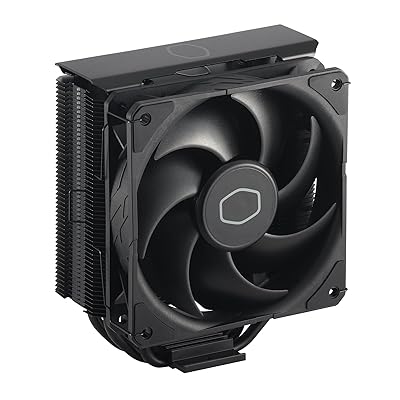
Rule of thumb: if you are cooling a 65W–105W CPU in a compact build, a single-tower is sufficient. For anything above that, a dual-tower is worth the extra space.
RAM Clearance
Standard dual-tower coolers leave 45–68mm of clearance above the RAM slots on the side nearest the first DIMM slot. Most modern DDR5 kits with aggressive heat spreaders (Corsair Dominator, G.Skill Trident Z5) can exceed 45mm in height.
Check your RAM height before purchasing. The Scythe Fuma 3 is the explicit solution if clearance is a concern. Alternatively, the DeepCool AK620 allows raising the rear fan to improve clearance.
Case Height Clearance
Every case lists a maximum CPU cooler height in its specifications. Measure or look it up before buying. A 160mm cooler in a case rated for 155mm will either not fit at all or require forcing a side panel against the fan — which kills airflow and can damage the fan.
The coolers in this guide range from 154mm (Fuma 3) to 160mm (AK620). Mid-towers from established brands typically support 155–165mm. Verify against your specific case.
LGA1851 and AM5 Bracket Support
Intel’s LGA1851 (Arrow Lake) and AMD’s AM5 are the two dominant current platforms. All five coolers in this guide ship with or offer bracket support for both sockets — but verify at the time of purchase, as some units in distribution still ship with LGA1700-only mounting hardware in regions where LGA1851 stock is newer.
Thermalright and Noctua have historically been the most proactive about including updated mounting in box. When in doubt, check the manufacturer’s website for a free mounting kit before assuming the cooler is incompatible.
Final Verdict
If you want the best thermal performance per dollar without any caveats, buy the Thermalright Peerless Assassin 120 SE. At $35, it is one of the most competitive products ever released in PC cooling — dual-tower, six heat pipes, quiet fans, and modern socket support. It is the default recommendation for most gaming builds.
If your case or RAM demands a more thoughtful approach:
- RAM clearance issue → Scythe Fuma 3
- Compact case, smaller CPU → be quiet! Pure Rock 2
- Long-term reliability priority → Noctua NH-U12S redux
- Maximum thermal headroom at the budget → DeepCool AK620
What none of these coolers will do is fail silently three years into a build because a pump seized. They will not leak. They will not require an extra USB header. And every one of them — even the cheapest — will keep a mainstream gaming CPU cool, quiet, and stable through years of gaming sessions.
At this price tier, air cooling is not the budget option. It is the right option.
Last updated: May 2026. Prices are approximate and subject to change. Always verify socket compatibility with your specific CPU before purchasing.
Related Articles
Looking for more on this topic? Browse the hand-picked guides below — each one applies the same scoring rubric used in this review.
Frequently Asked Questions
What is the best gaming cpu cooler air budget in 2026?
The best gaming cpu cooler air budget depends on your budget and how you plan to use it. The options compared above are our top-rated picks based on real customer ratings, build quality, and overall value — start with the highest-rated model that fits your budget.
How much should I expect to spend on a gaming cpu cooler air budget?
Prices vary by brand and features. Budget options cover the essentials, while mid-range and premium models add durability, performance, and extra features. Compare the prices in the list above to find the best value for your needs.
What should I look for when buying a gaming cpu cooler air budget?
Focus on what matters most for your use case — build quality, compatibility, performance, warranty, and verified customer reviews. Every pick above is selected to balance these factors.
Are budget gaming cpu cooler air budget options worth it?
Yes. For most people a well-reviewed budget or mid-range gaming cpu cooler air budget delivers excellent value. You only need to spend more if you specifically require premium materials or top-tier performance.
How did we choose these gaming cpu cooler air budget picks?
We compare current Amazon ratings, review counts, key features, and price to surface the options with the best real-world value. The list is refreshed as ratings and availability change.
Ready to decide? Our #1 pick for 2026 is the Cooler.
Live price & availability on Amazon.