- Top Pick: DARKROCK 3-Pack 120mm Black Computer Case Fans
- Best Value: Thermalright 5 Pack TL-C12C-S CPU Fan 120mm ARGB Case Cooler Fan, 4pin PWM Silent Computer Fan with S-FDB Bearing Included, up to 1550RPM Cooling Fan(5 Quantities)
- Premium Choice: Thermaltake 200mm Pure 20 Series Black 200x30mm Thick Quiet High Airflow Case Fan with Anti-Vibration Mounting System Cooling CL-F015-PL20BL-A
Affiliate disclosure: As an Amazon Associate we earn from qualifying purchases. This post contains affiliate links — if you buy through them we may earn a small commission at no extra cost to you. This never affects our recommendations.
- Best Overall: Arctic P12 PWM PST — Unbeatable Value Airflow
- Best Premium: Noctua NF-A14 PWM — The Quietest High-Performance 140mm
- Best ARGB: Lian Li UNI FAN SL120 — Daisy-Chain RGB System
- Best High-Static Pressure: Corsair LL120 — RGB and Performance
- Case Fan Airflow Guide
- Frequently Asked Questions
- Related Articles
- Related Articles
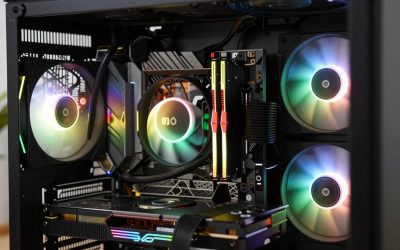
Proper case fan selection and configuration is one of the most overlooked aspects of gaming PC building. The best case fans for airflow keep your GPU, CPU, VRMs, and storage drives running at optimal temperatures by establishing a steady flow of cool air through the case. In 2025, premium case fans offer remarkable efficiency — moving more air at lower noise levels than ever before, with optional ARGB lighting for aesthetic builds.
As an Amazon Associate we earn from qualifying purchases at no extra cost to you.







In a hurry? See the top-rated Case Fans for Airflow deals available right now:
🛒 Check Case Fans For Airflow Prices on Amazon →🛒 Best Price Today on Amazon
Prime members get fast, free shipping on everything above, plus member-only deals. New members get a 30-day free trial — cancel anytime.
Start 30-Day Prime Free Trial →See Today’s Amazon DealsBest Overall: Arctic P12 PWM PST — Unbeatable Value Airflow
The Arctic P12 PWM PST is the best-value case fan available, delivering exceptional static pressure and airflow performance at a price that makes buying 5–6 of them for a full case build affordable. The PST (PWM Sharing Technology) daisy-chaining feature allows multiple fans to share a single PWM header — reducing motherboard header usage. Available in both standard (black) and ARGB versions. Maximum airflow of 56.3 CFM at 29 dBa puts it among the quietest high-performance 120mm fans. Buy a 5-pack for a complete case fan solution.

Best Premium: Noctua NF-A14 PWM — The Quietest High-Performance 140mm
Noctua’s NF-A14 is the gold standard for quiet, high-performance 140mm case fans. Its 82.52 CFM at 24.6 dBa delivers more airflow than most 120mm fans at lower noise levels. The A-series aerodynamic design optimizes airflow while minimizing turbulence noise. If you’re building a silent or near-silent gaming PC and want the best 140mm fans money can buy, the NF-A14 is the answer. Available in brown-beige or black (chromax) colorways.
Best ARGB: Lian Li UNI FAN SL120 — Daisy-Chain RGB System
Lian Li’s UNI FAN SL120 revolutionized case fan aesthetics with its seamless blade-to-blade installation system — multiple fans connect together and install as a unit, eliminating the gap between individual fans and creating a continuous LED wall effect. The included controller manages up to 16 fans from a single hub. Airflow performance is solid for an RGB-focused design, and the L-Connect 3 software provides detailed control. Best ARGB case fans for builders prioritizing aesthetics.

Best High-Static Pressure: Corsair LL120 — RGB and Performance
Corsair’s LL120 fans feature dual light loops with 16 individually controlled LEDs — one of the most visually impressive RGB fan implementations available. Static pressure performance makes them excellent for radiator mounting where fin density requires pressure over flow volume. iCUE software integration synchronizes LL120 lighting with all Corsair ecosystem components. Best case fans for AIO radiator mounting with RGB requirements.
Case Fan Airflow Guide
Optimal Fan Configuration
The most effective airflow configuration: intake fans at the front and bottom (positive pressure prevents dust ingestion), exhaust fans at the rear and top. A 3-front-intake / 1-rear-exhaust / 1-top-exhaust configuration provides excellent CPU, GPU, and VRM cooling in most mid-tower cases. Avoid equal intake/exhaust counts — slight positive pressure (more intake than exhaust) reduces dust buildup.

120mm vs 140mm: Which Size Is Better?
140mm fans move more air at lower RPM (and therefore lower noise) than 120mm fans at equivalent performance. If your case supports both 120mm and 140mm mounting positions, use 140mm where possible. Most modern mid-towers support 140mm front fans and 120mm rear exhaust.
Frequently Asked Questions
How many case fans do I need for gaming?
Minimum: 2 intake + 1 exhaust for adequate airflow in most builds. Ideal: 3 intake + 2 exhaust for high-TDP CPU/GPU combinations. Adding fans beyond 5 provides diminishing thermal returns — focus on fan quality and positioning over fan quantity.
Does fan direction matter?
Critical. Fans draw air through the label side and push through the frame/blade side. Front/bottom fans should push air INTO the case (intake). Rear/top fans should push air OUT of the case (exhaust). Installing a fan backward negates its intended airflow contribution.
Should I use PWM or DC fans?
PWM (4-pin) fans allow precise RPM control from near-zero to maximum — enabling silent operation at low loads and maximum cooling under gaming loads. DC (3-pin) fans vary speed via voltage but can’t operate at as low RPM as PWM fans. Always choose PWM fans for a gaming build with a quality motherboard.
Related Articles
Looking for more on this topic? Browse the hand-picked guides below — each one applies the same scoring rubric used in this review.