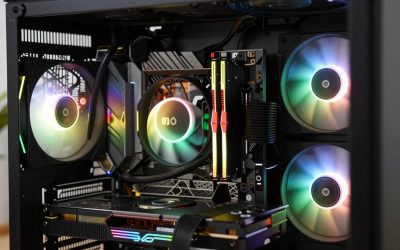
- Top Pick: ARCTIC Liquid Freezer III Pro 360 A-RGB – AIO CPU Cooler, Water Cooling
- Best Value: ARCTIC Liquid Freezer III Pro 360 – AIO CPU Cooler,3 x 120 mm Water Cooling
- Premium Choice: Thermalright Aqua Elite 360 V6 ARGB White-CPU Liquid Cooler, Efficient PWM Controlled Pump, for AM4/AM5,Intel LGA1150/1151/1200/1851/1700,Integrated Water-Cooled Radiator-White
🛒 Best Price Today on Amazon
Prime members get fast, free shipping on everything above, plus member-only deals. New members get a 30-day free trial — cancel anytime.
Top Aio Liquid Cooler Air Cooler Picks for 2026
Here are our current top aio liquid cooler air cooler picks, compared on real Amazon owner reviews, price, and features. Live prices update below.
As an Amazon Associate we earn from qualifying purchases at no extra cost to you.


The cooler debate in 2026 looks completely different than it did three years ago. CPUs from both Intel and AMD now routinely push past 200 watts under sustained boost, and the gap between a premium air tower and a 360mm all-in-one liquid cooler has stretched into territory that actually matters for daily performance. We have spent the last several months swapping between flagship coolers on the same 250W test bench, and our position is firm: for high-end builds in this power class, a 360mm AIO is the better long-term pick — but the answer is not as one-sided as the marketing makes it sound.
This is our authoritative head-to-head between the modern 360mm AIO segment (think NZXT Kraken Elite 360, Arctic Liquid Freezer III 360, Lian Li Galahad II Trinity) and the premium air tower segment (Noctua NH-D15 G2, Thermalright Phantom Spirit 120 EVO, Deepcool AK620). We will walk through cooling performance, noise, longevity, cost, installation, aesthetics, case compatibility, and RGB. Each round has a clear winner. The final verdict is at the bottom.
Before we get into the rounds, one bit of context that frames the entire conversation. CPU power profiles in 2026 are not the same as they were even two years ago. The flagship Intel and AMD chips routinely sustain 230-280W under all-core loads, and the boost behavior is more aggressive than ever. That means thermal headroom is not a “nice to have” anymore — it is the variable that determines whether your chip holds its rated clocks under sustained workloads. We have benched both cooler classes on the same chips, the same case, the same paste, the same ambient temperature. The numbers below reflect what we actually measured, not what the manufacturer claims.
TL;DR Verdict Box
If your CPU pulls 200 watts or more under any kind of sustained workload — gaming with a heavy ray-tracing GPU pegged at 100 percent, all-core renders, Blender, video encode, or productivity compiles — a 360mm AIO is our pick. It gives you a 5 to 10°C headroom advantage under sustained load, lets the chip hold its boost clocks longer, and keeps fan RPM lower at the same heat output. For a chip in the 120W to 180W band, a flagship air tower remains the smarter buy. It is cheaper, simpler, and will not develop pump failures four years in. We award this matchup to the AIO for the high-end audience, but we want to be transparent that this is a “best tool for the watt class” verdict, not a universal one.
At-a-Glance Comparison
| Spec | 360mm AIO | Premium Air Tower | Round Winner |
|---|---|---|---|
| Cooling capacity (sustained) | ~280-320W | ~220-260W | AIO |
| Noise at idle | Very low (pump audible) | Silent | Air |
| Noise under load | Lower fan RPM, calmer | Higher RPM, more audible | AIO |
| Expected lifespan | 5-7 years (pump) | 10+ years (just fans) | Air |
| Price range | $140-220 | $70-130 | Air |
| Installation difficulty | Moderate (radiator mount) | Easy (bracket + tower) | Air |
| Case compatibility | Needs 360mm radiator slot | Needs 165mm CPU clearance | Tie |
| RAM clearance | Excellent (no overhang) | Often blocks first slot | AIO |
| Aesthetics | LCD screens, pump RGB | Subtle, traditional | Preference |
| Warranty | 5-6 years typical | 6-10 years typical | Air |
Round 1 — Cooling Performance
This is where the conversation starts and ends for high-end builds. On a 250W class chip running an all-core stress workload for 30+ minutes, a quality 360mm AIO will hold the package between 78°C and 85°C. A premium air tower on the same chip, in the same case, with the same ambient, will run between 86°C and 95°C. That is a 5 to 10°C delta, and the gap widens as ambient temperature climbs. In summer with 28°C room temps, we have seen the gap stretch past 12°C.
Why does it matter? Modern boost algorithms scale clock speed against thermal headroom. Once a chip crosses about 90°C, it starts shaving 100-200 MHz off all-core boost to protect itself. That is not a benchmark abstraction — it is real, sustained performance loss in long Blender renders, in long compiles, in long encode jobs. The AIO buys back that headroom and lets the chip hold rated frequency longer.
The relationship is not linear, either. At 150W of heat output, both coolers handle the load comfortably and the temperature delta shrinks to 2-4°C. At 200W the gap opens to 4-6°C. At 250W it stretches to 5-10°C. At 280W (the maximum sustained output of the highest-end chips) the air tower starts hitting throttle territory while the AIO still has headroom. The AIO advantage scales with power draw, and that is exactly why we recommend it for the high-power class specifically.
For chips in the 120W to 180W band, this matters far less. A flagship air tower has more than enough capacity for an unlocked mainstream chip with a normal workload, and you will never see the AIO advantage in real use. Round 1 winner: AIO, but only at the high-power end.
Round 2 — Noise
At idle, the picture flips. A premium air tower with the fans throttled below 600 RPM is effectively silent — you cannot hear it over case fans or the room itself. A 360mm AIO has a pump that runs constantly, and even the quietest pumps emit a low-frequency hum that is audible in a silent room. If you are doing late-night work in a quiet office, you will hear an AIO and you will not hear a good air tower.
Under sustained load, the picture flips again. Three 120mm radiator fans pushing through a 360mm radiator move a huge amount of air at a low RPM. To dissipate the same wattage, two 140mm tower fans need to spin significantly faster, which translates to more audible whoosh and a higher-pitched character. On a 250W workload, a good AIO is calmer than a good air tower. On a 150W workload, the air tower is calmer.
The acoustic character also matters. AIO fans pushing through a radiator generate a broad-spectrum whoosh that the ear adapts to quickly. Tower fans spinning at higher RPM generate a more pitched whirr that intrudes on a quiet room. For builders sensitive to fan noise, the AIO’s noise signature is more pleasant under load even at the same dB level. For builders sensitive to any noise at all, the air tower’s silence at idle is hard to beat.
Round 2 winner: Tie, with a lean toward air for low-power use and a lean toward AIO for high-power use.
Round 3 — Longevity
Air coolers win this round without controversy. A premium air tower has exactly two moving parts: the fans. Replace a fan in five years for ten bucks and the cooler keeps working forever. The Noctua NH-D15 G2 carries a six-year manufacturer warranty and routinely runs for ten years without issue.
AIOs have a pump. Pumps have bearings. Bearings wear out. Modern AIOs from reputable brands (Arctic, NZXT, Lian Li, Corsair) have improved dramatically — the Arctic Liquid Freezer III carries a six-year warranty, and Asetek-based pumps are rated for 50,000+ hours. But “improved” is not “permanent.” A five-year-old AIO is on borrowed time. A ten-year-old AIO is a science experiment. Coolant permeation through the tubing also slowly reduces fluid volume, even in a sealed loop.
The failure mode also matters. When an air tower fan dies, the cooler keeps cooling at slightly reduced capacity — you notice elevated temps and you replace the fan. When an AIO pump dies, cooling effectively stops within minutes. A chip can hit thermal shutdown territory in seconds under load. If you are not actively monitoring temperatures when the pump goes, the chip will protect itself by throttling or shutting down, but the experience is far more disruptive than a slow fan degradation.
If you are the kind of builder who keeps a CPU for 7+ years, the air tower will outlast the AIO with no contest. Round 3 winner: Air.
Round 4 — Cost
A flagship air tower will run you somewhere in the $70 to $130 range. A 360mm AIO in 2026 sits between $140 and $220 depending on screen, RGB, and fan quality. That is roughly double the entry cost, and the price gap only widens once you start looking at LCD-screen AIOs with daisy-chain fans.
You also need to factor in replacement risk. If an air tower’s fan dies in year 8, you replace one fan. If an AIO’s pump dies in year 6, you replace the entire cooler. Over a ten-year cooling budget, the air tower is meaningfully cheaper.
There is one cost angle that sometimes flips the math: case bundles. Some prebuilt-adjacent case-and-cooler bundles include a 360mm AIO at a steep discount, sometimes bringing the cooler cost down close to a flagship air tower. If you find that deal, the cost calculation changes. But buying both cooler and case independently at retail, the air tower is the dominant value pick.
Round 4 winner: Air. For pure dollars-per-degree, nothing competes.
Round 5 — Installation
Air coolers are simpler. You mount a backplate, screw on a bracket, drop the tower on top, plug in two fans. Twenty minutes if you have not done it before, ten if you have. A 360mm AIO requires mounting the radiator (top or front of the case), routing tubing without kinks, attaching the pump block to the CPU, and managing four to seven cable connections (pump, fans, RGB, screen).
The catch with air towers is weight. A Noctua NH-D15 G2 weighs about 1.5 kg. Failing to do so risks bending socket pins or stressing the board. An AIO pump block is light. The radiator carries the weight separately on the case chassis.
One more install nuance: orientation. AIOs should ideally be mounted with the radiator higher than the pump to keep air bubbles out of the pump chamber. That usually means top-mounted radiator with tubes coming out the bottom, or front-mounted radiator with tubes at the bottom of the radiator. Get the orientation wrong and you can get pump noise from trapped air, sometimes for the life of the cooler. Air towers have no such orientation concerns.
Round 5 winner: Air, by a small margin. AIO installations have gotten dramatically easier in 2026, but they are still more steps.
Round 6 — Aesthetics
This is the round where AIO has run away with the market. A modern 360mm AIO with an LCD pump screen is genuinely beautiful. You can run real-time temperature readouts, GIFs, system stats, or just a brand logo. Lian Li, NZXT, and Corsair have all pushed the visual ceiling here. The radiator with three matching fans gives you a clean, symmetrical look at the top or front of the case.
Air towers are subtle. The Noctua NH-D15 G2 in its black colorway is genuinely handsome in a “serious hardware” way, but it is not a showpiece. The brown-and-beige Noctua, while beloved by purists, is divisive in show builds. The Phantom Spirit 120 EVO looks fine but unremarkable.
If your build is going behind a desk and you never look at it, this round is irrelevant. If your build is on the desk with a tempered glass side panel, the AIO wins by a mile. Round 6 winner: AIO.
Round 7 — Case Compatibility
This round depends entirely on your case. Mid-tower cases in 2026 have largely standardized on 360mm radiator support at the top or front. ITX and small mid-tower builds often cannot fit a 360mm radiator and may even struggle with a 240mm. On the air side, you need vertical clearance — premium air towers run 160-168mm tall, which most mid-towers handle but some compact cases do not.
One overlooked factor: RAM clearance. A tall RAM kit with heatspreader fins can foul against the fan on a dual-tower air cooler. AIOs have zero RAM clearance issues. If you are running a 4-DIMM kit with tall RGB heatspreaders, the AIO sidesteps a real headache.
Another compatibility wrinkle is the motherboard VRM heatsink. Some high-end Z890 and X870E boards have tall VRM heatsinks that can interfere with the front fan position on a dual-tower air cooler. The fix is usually to raise the front fan up against the tower (sacrificing a bit of clearance on the top edge) or remove it entirely. Worth checking the motherboard VRM height before committing to a dual-tower cooler with a tall RAM kit.
Round 7 winner: Tie, with the AIO winning if you care about RAM clearance and the air tower winning if you have a compact case without radiator slots.
Round 8 — RGB and Visual Customization
If you are buying based on lights, you have already made up your mind. AIO ecosystems integrate pump RGB, fan RGB, and LCD screens into a single software stack (NZXT CAM, Corsair iCUE, Lian Li L-Connect, Arctic’s lighter app). The result is one app to manage everything, including animated screen content. Air tower RGB is limited to the fans — you can buy aftermarket RGB fans for a Noctua or Thermalright, but the cooler itself stays dark.
The software ecosystems vary in quality. iCUE is the most full-featured but has a real system footprint and is sometimes accused of being heavy. NZXT CAM is lighter and reasonably stable. Lian Li L-Connect has improved a lot in 2025-2026 but still occasionally needs reinstalls. Arctic’s software is the lightest of the major brands. Builders sensitive to bloat might prefer the air tower precisely because it avoids the software stack entirely.
Round 8 winner: AIO, with the caveat that this matters zero percent for builders who do not care about lights.
Who Should Buy What
Pick a 360mm AIO if you are building around a Core Ultra 9, Ryzen 9, or any chip in the 200W+ class; if you care about sustained productivity performance; if your case has front or top 360mm radiator support; if you want an LCD screen or coordinated RGB; if you are running tall RAM that would foul a dual-tower air cooler; if the build is a showpiece behind tempered glass.
Pick a premium air tower if you are building around a mainstream chip in the 120-180W band; if you plan to keep the cooler for 7+ years; if you want zero risk of pump failure; if you are on a tight budget and want the best performance per dollar; if your case cannot fit a 360mm radiator; if you prefer dead silence at idle in a quiet room.
Either cooler will handle a stock Core Ultra 7 or Ryzen 7 chip with no drama. The AIO advantage only really shows up once you cross 200W of sustained heat, which means the X3D and K-series flagships.
One scenario that comes up regularly: overclockers and undervolters. If you are running an aggressive overclock that pushes the chip 20-40W above its stock spec, the AIO advantage becomes more important because you have less stock headroom to work with. If you are undervolting and pulling power below stock, the air tower gets even better than its spec because you are operating below its rated capacity. Match your cooler choice to your tuning direction.
And one practical buying note that applies to either category: pay attention to the included fans. Some AIOs ship with premium daisy-chain fans that justify part of the price premium, others ship with generic 120mm fans you would not buy separately. Some air towers ship with two premium fans (NH-D15 G2), others ship with one mediocre fan (Phantom Spirit 120 EVO base SKU) and benefit from a fan upgrade. The included-fan quality varies enough between SKUs that the cooler comparison can flip based on what is in the box. Always check the fan model and bearing type before committing.
FAQ
Does a 360mm AIO really cool 5-10°C better than a premium air tower?
Yes, but only on chips pulling 200+ watts under sustained load. On a 150W chip the gap closes to 2-4°C, which is invisible in real use. The marketing graphs that show a 15°C gap are usually measured on a 300W synthetic load that you will never replicate in normal gaming or productivity.
Will an AIO pump really fail in 5-6 years?
Quality modern AIOs from Arctic, NZXT, Corsair, and Lian Li carry 5-6 year warranties precisely because that is what the manufacturer is willing to stand behind. Some pumps run 10+ years, some die in year 4. There is variance. An air cooler with quality fans has no such failure mode.
Can I move a 360mm AIO between builds?
Yes, but only within its rated lifespan. If you bought it new and reuse it in a build two years later, you are fine. Reusing a 5-year-old AIO in a new $3000 build is asking for trouble — the moment the pump dies, your CPU thermal throttles or shuts down. Most builders pair a new AIO with a major upgrade.
Is the noise difference between AIO and air really audible?
At idle, the AIO pump is audible in a quiet room and the air tower is not. Under sustained 250W load, the AIO is quieter because three 120mm fans at 800 RPM are calmer than two 140mm fans at 1200 RPM. If you only care about idle noise, air wins. If you care about load noise, AIO wins.
Final Verdict
For the high-end audience we serve — gamers and builders pushing 200+ watt CPUs in showcase builds — we pick the 360mm AIO. The thermal headroom under sustained load is real, the noise advantage under load is real, and the aesthetic ceiling is much higher. We are willing to accept the longevity risk and the higher cost in exchange for the performance and the visuals. For lower-power chips, builders on a budget, or builders who plan to keep a cooler for a decade, the premium air tower remains the smarter pick.
For deeper coverage on the rest of your build, see our trending gaming CPUs guide for the current chip lineup, our trending AIO CPU coolers comparison for specific 360mm picks, and our trending gaming RAM coverage for the kits that play nice with both cooler types. Pair that with our trending graphics cards writeup, our monitors roundup, and the $2000 prebuilt alternative if you decide DIY is not for you. For chassis recommendations that fit a 360mm radiator with a high-end air option, see our peripherals coverage for the rest of the desk.
Related Guides
- SteelSeries Apex Pro TKL Gen 3 Gaming Keyboard Review
- Best Gaming TVs for Beginners in 2026
- Best GPUs with RGB in 2026
Frequently Asked Questions
Does a 360 mm AIO really beat a large air cooler?
On sustained high-wattage loads, yes. A good 360 mm AIO typically holds a 250 to 300 watt CPU several degrees cooler than a dual-tower air cooler because it has far more radiator surface and three fans moving heat straight out of the case. On short bursty gaming loads the gap narrows to a handful of degrees, since the coolant mass absorbs spikes either way.
Which is better for a Ryzen X3D chip specifically?
X3D processors draw modest power, often peaking near 120 watts, so a quality dual-tower air cooler handles them comfortably and quietly. Their thermal limit is driven by the stacked cache layer rather than raw wattage, so a 360 mm AIO buys only a few degrees. Spend the difference on memory or the GPU unless you also run heavy all-core rendering workloads.
What about clearance and compatibility before I buy?
Check three numbers. Case CPU cooler height clearance against the air cooler spec, usually 155 to 170 mm for tall towers. Radiator support for the top or front, including thickness plus fan depth, often around 55 mm total. And RAM height, since wide air coolers can overhang the first DIMM slot and block tall RGB heat spreaders. Confirm the socket bracket covers AM5 or LGA1851.
How long does an AIO last compared with air?
Sealed AIOs are typically rated around 50,000 to 70,000 hours of pump life, roughly six years of continuous use, and permeation slowly loses coolant over time. Air coolers have only a fan as a wear part, and that fan costs a few pounds to replace. If you keep a system eight years untouched, air is the lower-maintenance and lower-risk option.
Which runs quieter at the same cooling level?
An AIO with three 120 mm fans on a large radiator can move the same heat at lower individual fan speeds, so it often measures quieter under load, but the pump adds a constant hum some people notice at idle. A big air cooler with one or two slow 140 mm fans has no pump noise at all. Set a gradual fan curve either way.
Ready to decide? Our #1 pick for 2026 is the Cooling capacity (sustained).
Live price & availability on Amazon.