

- Top Pick: Zalman T6 ATX Mid Tower Computer PC Case, Pre-Installed 120mm Fan, 5.25 ODD, USB 3.0, Patterned Mesh Design, mATX ITX for Gaming Workstation, Black
- Best Value: Silverstone Technology FLP02 Retro-Inspired Tower Chassis with high-Performance Cooling and Expansion Support, SST-FLP02W
- Premium Choice: DARKROCK EC2 ATX Mid Tower Gaming Computer PC Case, Type-C Ready
🛒 Best Price Today on Amazon
Prime members get fast, free shipping on everything above, plus member-only deals. New members get a 30-day free trial — cancel anytime.
- Top Workstation Cases Picks for 2026
- Best Workstation Cases at a Glance
- 1. CORSAIR 7000D Airflow Full-Tower ATX PC Case, High-Airflow Front Panel
- 2. Corsair Crystal Series 680X RGB High Airflow Tempered Glass ATX Smart Case
- 3. NZXT H6 Flow Compact Dual-Chamber Mid-Tower Airflow Case, Panoramic
- 4. Cooler Master MasterBox Q300L Micro-ATX PC Case, Compact mATX
- 5. Corsair iCUE 220T RGB Airflow Tempered Glass Mid-Tower Smart ATX Case
- 6. HYTE Y70 Touch Infinite Modern Aesthetic Gaming PC Case, 2.5K LCD Touchscreen
- How to Choose a Workstation PC Case
- Frequently Asked Questions
- Related Guides
- Related Articles
Top Workstation Cases Picks for 2026
Here are our current top workstation cases picks, compared on real Amazon owner reviews, price, and features. Live prices update below.
As an Amazon Associate we earn from qualifying purchases at no extra cost to you.


A workstation case has a different job from a flashy gaming chassis: it has to keep powerful, hard-working components cool, hold the storage a professional workload demands, and stay quiet enough to sit beside you all day. When a machine is rendering, compiling, editing video or crunching data for hours, airflow and drive capacity matter far more than RGB. This guide rounds up the best workstation PC cases in 2026, chosen for the things that count in a professional build — strong cooling, room for drives, and low-noise operation — across compact, mid-tower and full-tower sizes.
Our picks were chosen on what genuinely serves a workstation: airflow and cooling potential, drive-bay and storage support, build quality, quiet operation, and value. We describe each case by its real strengths rather than quoting invented numbers, and we are honest where a chassis leans more toward gaming aesthetics than pure professional use. Prices run from around $40 up to around $350, spanning a compact micro-ATX case, airflow-focused mid-towers, and spacious full-towers built for heavy storage and large cooling. Below is an at-a-glance comparison of all six, then a closer look at each and a buyer’s guide built around airflow, drive support and noise — the criteria that actually decide which case suits a workstation.
Best Workstation Cases at a Glance
| Case | Best For | Standout Spec | Approx Price |
|---|---|---|---|
| Corsair 7000D Airflow Full-Tower | Maximum drives and cooling | Full-tower, high airflow, huge | around $269 |
| Corsair Crystal 680X RGB | Dual-chamber airflow build | Dual-chamber, high airflow ATX | around $275 |
| NZXT H6 Flow Dual-Chamber | Clean airflow mid-tower | Dual-chamber, panoramic airflow | around $90 |
| Cooler Master MasterBox Q300L | Compact budget workstation | Micro-ATX, ventilated, tiny | around $40 |
| Corsair iCUE 220T RGB Airflow | Airflow on a budget (gaming look) | High-airflow front, tempered glass | around $180 |
| HYTE Y70 Touch Infinite | Showcase build (gaming-first) | Integrated 2.5K LCD touchscreen | around $350 |
1. CORSAIR 7000D Airflow Full-Tower ATX PC Case, High-Airflow Front Panel

CORSAIR 7000D Airflow Full-Tower ATX PC Case – High-Airflow Front Panel – Spacious Interior – Easy Cable Management – 3X 140mm AirGuide Fans with PWM Repeater Included – Black


As an Amazon Associate we earn from qualifying purchases. Product prices and availability are accurate as of the date/time indicated.
The Corsair 7000D Airflow is the standout workstation pick of this list, and for a professional build it is the one to beat. It is a spacious full-tower case with a high-airflow front panel, room for a large number of storage drives, and support for extensive radiators and fans. At around $269 it is built precisely for the demands a workstation places on a chassis: heat, storage and expansion.
This is the case to choose when your build does serious work and needs to run cool, quiet and capacious. The high-airflow design pulls plenty of fresh air across hot components during long renders or compiles, the full-tower interior swallows multiple hard drives and SSDs for big project libraries, and the generous space makes cable management and large cooling easy. The abundant airflow also lets fans spin slower and quieter for the heat removed. For a no-compromise workstation chassis with maximum cooling and drive capacity, the 7000D Airflow is the clear standout.
Pros: Massive drive capacity, excellent high-airflow cooling, huge interior, ideal serious workstation.
Cons: Large footprint needs desk or floor space; premium price.
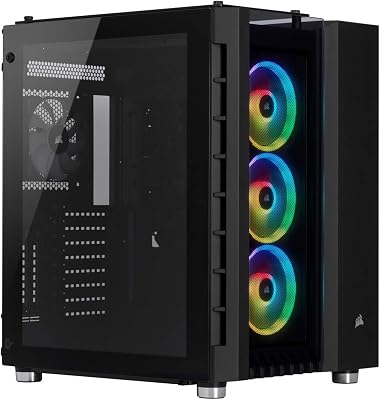
2. Corsair Crystal Series 680X RGB High Airflow Tempered Glass ATX Smart Case

CORSAIR iCUE Link 3500X RGB Mid-Tower ATX PC Case – Panoramic Tempered Glass – Reverse Connection Motherboard Compatible – 3X CORSAIR iCUE Link RX120 RGB Fans Included – Black


As an Amazon Associate we earn from qualifying purchases. Product prices and availability are accurate as of the date/time indicated.
The Corsair Crystal 680X RGB is the dual-chamber airflow pick. It uses a dual-chamber layout that separates the power supply and drives from the main components, paired with a high-airflow design and tempered-glass panels. At around $275 it pairs strong cooling with a premium look, making it a capable workstation case that does not hide its components.
This is the case for the professional who wants excellent airflow and tidy internal organisation, and does not mind — or actively likes — a more showcase-style build. The dual-chamber design isolates the PSU and drives for cleaner cable routing and unobstructed airflow over the CPU and GPU, which helps a hard-working machine stay cool, and there is solid room for storage. The RGB and glass lean toward aesthetics, so it is part workstation, part showpiece. For a high-airflow, well-organised chassis with room for drives and a premium finish, the 680X is a strong choice.

Pros: Dual-chamber layout for clean airflow and cabling, high-airflow design, good drive support.
Cons: RGB and glass add cost and lean showcase; large dual-chamber footprint.
3. NZXT H6 Flow Compact Dual-Chamber Mid-Tower Airflow Case, Panoramic

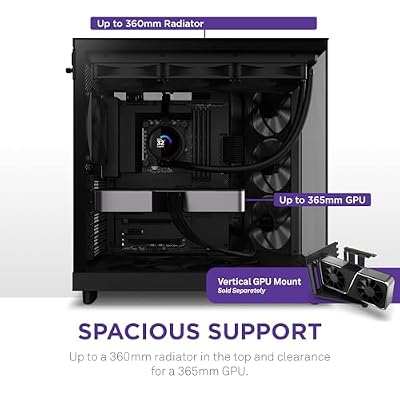
NZXT H6 Flow - Compact Dual-Chamber ATX PC Case - Black | Compact dual-chamber ATX case with panoramic glass and 3 included 120mm fans. Airflow-optimized for clean, cool builds.




As an Amazon Associate we earn from qualifying purchases. Product prices and availability are accurate as of the date/time indicated.
The NZXT H6 Flow is the clean airflow mid-tower pick. It is a compact dual-chamber mid-tower with a panoramic glass design and a strong focus on airflow, including angled front intake fans in many configurations. At around $90 it offers genuinely good cooling and a tidy interior at a far more accessible price than the full-towers here.
This is the case for a workstation builder who wants excellent airflow and a clean, organised build without a huge chassis or a huge price. The dual-chamber layout routes cables and the power supply out of sight for unobstructed airflow over the components that get hot, the compact mid-tower size fits most desks, and the airflow focus keeps a hard-working system cool and able to run quietly. Drive support is more modest than a full-tower, so very storage-heavy workstations may want more. For a tidy, well-cooled, fairly priced workstation mid-tower, the H6 Flow is an excellent value.
Pros: Strong airflow, clean dual-chamber cabling, compact mid-tower, very good value.
Cons: Fewer drive bays than full-towers; less room for the largest cooling setups.
4. Cooler Master MasterBox Q300L Micro-ATX PC Case, Compact mATX

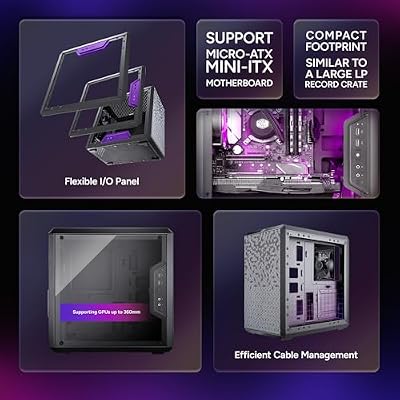
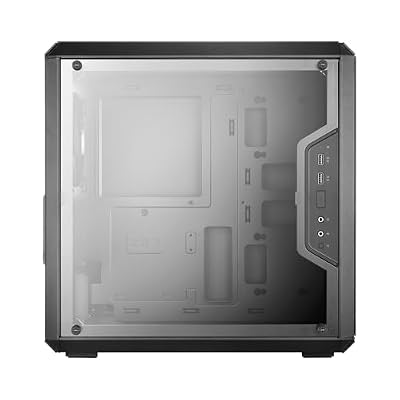
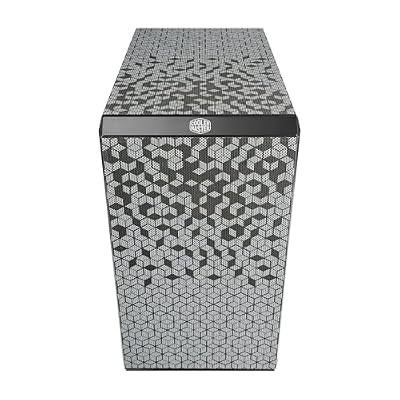
Cooler Master Q300L V1 Micro-ATX PC Case, High Airflow, Transparent Panel | 360mm Graphics Card Support, 240mm AIO Support, Micro-ATX Motherboard, Magnetic Dust Filters, Modular I/O Panel







As an Amazon Associate we earn from qualifying purchases. Product prices and availability are accurate as of the date/time indicated.
The Cooler Master MasterBox Q300L is the compact budget workstation pick. It is a small micro-ATX case with a heavily ventilated, perforated design and a tiny footprint, and at around $40 it is by far the most affordable chassis here. For a space-constrained or budget professional build, it packs useful cooling and flexibility into a small box.
This is the case to choose when desk space or budget is tight but you still want decent airflow. The ventilated panels let air move freely across components despite the small size, the micro-ATX format suits a compact workstation built around a smaller motherboard, and the modular I/O and mounting add flexibility. Being a small case, it holds fewer drives and less cooling than the towers here, so it suits lighter workstation duties rather than heavy multi-drive workloads. For an affordable, ventilated, space-saving chassis, the Q300L is a smart, practical choice.
Pros: Very affordable, well-ventilated for its size, tiny footprint, flexible micro-ATX layout.
Cons: Limited drive bays and cooling room; micro-ATX only, not for large builds.
5. Corsair iCUE 220T RGB Airflow Tempered Glass Mid-Tower Smart ATX Case
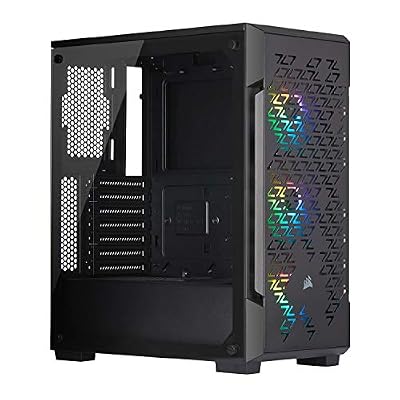
Corsair iCUE 220T RGB Airflow Tempered Glass Mid-Tower Smart ATX Case - High Airflow - Three Included SP120 RGB PRO Fans - Black


As an Amazon Associate we earn from qualifying purchases. Product prices and availability are accurate as of the date/time indicated.
The Corsair iCUE 220T RGB Airflow is the airflow-on-a-budget pick, though it is honestly a gaming-styled case at heart. It is a mid-tower ATX chassis with a high-airflow front panel, tempered-glass side, and bundled RGB fans, and at around $180 it brings good cooling to a build that also wants to look the part. For a workstation that doubles as a personal machine, it is a reasonable fit.
This is the case for someone who wants solid airflow and does not mind — or wants — a gaming aesthetic on a professional build. The high-airflow front feeds cool air to the components for a system that works hard, the mid-tower size suits most desks, and the included RGB fans add cooling and colour out of the box. Be clear-eyed that it prioritises looks alongside cooling and offers more modest drive support than a workstation-focused tower. For a good-looking, well-cooled mid-tower that crosses over between work and play, the 220T is a capable option.
Pros: Good high-airflow front, included RGB fans, tempered glass, attractive mid-tower.
Cons: Gaming-styled rather than pure workstation; modest drive support for heavy storage.
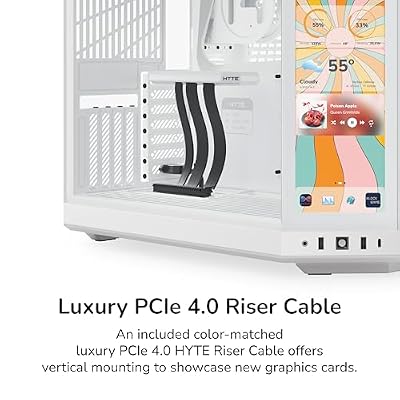
6. HYTE Y70 Touch Infinite Modern Aesthetic Gaming PC Case, 2.5K LCD Touchscreen

HYTE Y70 Touch Infinite Modern Aesthetic Gaming PC Case - Integrated 2.5K LCD Touchscreen Screen Display - Dual Chamber ATX Desktop Chassis - 10 Fan Capacity - Luxury PCIe 4.0 Riser Cable - Snow White




As an Amazon Associate we earn from qualifying purchases. Product prices and availability are accurate as of the date/time indicated.
Rounding out the list is the HYTE Y70 Touch Infinite, and it is the honest outlier here: a premium, gaming-first showcase case rather than a purpose-built workstation chassis. Its headline feature is a large integrated 2.5K LCD touchscreen on the front, paired with a modern wrap-around glass aesthetic. At around $350 it is the most expensive case on the list and very much a statement piece.
We include it for the professional who also wants a striking, showcase build and is willing to pay for it — a creator’s machine that doubles as a desk centrepiece, for instance. The roomy interior accommodates capable hardware and cooling, and the integrated touchscreen can display system stats or media at a glance. But be clear about what it is: this is a design-led gaming case, not an airflow-and-storage-optimised workstation tower, and its premium goes largely toward the screen and looks. If aesthetics and that LCD matter to you as much as the work, it is a unique option; for pure workstation value, the Corsair towers or NZXT H6 Flow are more focused.

Pros: Striking integrated 2.5K LCD touchscreen, roomy modern design, premium showcase build.
Cons: Gaming-first design, not a workstation-optimised case; highest price by far.
How to Choose a Workstation PC Case
For a workstation, airflow is the single most important factor, because a professional machine spends long stretches under heavy load and that load generates heat. Look for a case with a genuine high-airflow design — mesh or ventilated front panels and clear paths for air to move across the CPU, GPU and drives — like the Corsair 7000D Airflow, Crystal 680X and NZXT H6 Flow. Good airflow not only keeps components cool and stable during renders and compiles, it also lets the fans spin slower and quieter for the same cooling, which matters for a machine on your desk.
Drive support comes next, because workstations often handle large project files, media libraries and data sets that need plenty of storage. A spacious full-tower like the 7000D Airflow holds many hard drives and SSDs, making it ideal for storage-heavy professional work, while the dual-chamber Crystal 680X also offers solid capacity. Compact cases like the NZXT H6 Flow and especially the micro-ATX MasterBox Q300L hold fewer drives, so if your workload depends on lots of local storage, favour a larger chassis with more bays.
Quiet operation is the third pillar of a good workstation case, and it follows naturally from airflow and build quality. A case that cools efficiently lets you run fans at lower, quieter speeds, and well-built chassis with sound-aware design keep noise down during long sessions — exactly what you want from a machine you sit beside all day. The dual-chamber layouts of the H6 Flow and Crystal 680X also tuck noisy elements and cabling away from the main airflow path, helping keep things calm as well as cool.
Finally, match the size and style to your needs and be honest about priorities. If you need maximum cooling and storage, go full-tower like the 7000D Airflow; if you want a tidy, well-cooled build at a sensible price, the NZXT H6 Flow is excellent value; if space or budget is tight, the MasterBox Q300L fits. The iCUE 220T and especially the HYTE Y70 Touch lean toward gaming looks, so choose them only if aesthetics matter alongside the work. Decide whether airflow, drives, quiet or looks lead your build, set your budget, and pick the case on this list that fits — the best workstation case is the one that keeps your hardware cool, holds your storage, and stays quiet while you work.
Frequently Asked Questions
What makes a PC case good for a workstation rather than gaming?
A workstation case prioritises airflow, drive capacity and quiet operation over aesthetics, because professional machines run under heavy load for long periods and often need lots of storage. Cases like the Corsair 7000D Airflow and NZXT H6 Flow focus on cooling and organisation, while design-led cases like the HYTE Y70 Touch are gaming-first. For pure workstation duty, favour high airflow and plenty of drive bays.
Which case here holds the most drives?
The Corsair 7000D Airflow full-tower has by far the most room for storage, supporting a large number of hard drives and SSDs — ideal for storage-intensive workstation workloads like video editing or data work. The dual-chamber Crystal 680X also offers solid drive support, while compact options like the NZXT H6 Flow and the micro-ATX MasterBox Q300L hold noticeably fewer drives.
How important is airflow for a workstation build?
Very important. A workstation runs under sustained heavy load, generating more heat over longer periods than typical use, so a high-airflow case like the 7000D Airflow, Crystal 680X or NZXT H6 Flow keeps components cool and stable. Good airflow also lets the fans run slower and quieter for the same cooling, which keeps a desk-side machine pleasant to work next to.
Is the HYTE Y70 Touch a good workstation case?
It is a premium, gaming-first showcase case with an integrated touchscreen rather than a purpose-built workstation chassis, and most of its $350 price goes toward the screen and design. It can house capable hardware, so it suits a creator who wants a striking centrepiece, but for pure workstation value — airflow, drives and quiet for the money — the Corsair towers or NZXT H6 Flow are more focused choices.
Related Guides
- Best PC Cases
- Best Power Supplies
- Best CPU Coolers
- Best Case Fans for Airflow
- Best NVMe SSDs for Storage
- Best Pre-Built Gaming PCs
Affiliate Disclosure: As an Amazon Associate, we earn from qualifying purchases. If you click a link and make a purchase, we may earn a small commission at no extra cost to you. Prices and availability are accurate as of publication and may change.










