- Top Pick: Thermalright Peerless Assassin 120 SE CPU Cooler, 6 Heat Pipes AGHP Technology, Dual 120mm PWM Fans, 1550RPM Speed, for AMD:AM4 AM5/Intel LGA 1700/1150/1151/1200/1851,PC Cooler
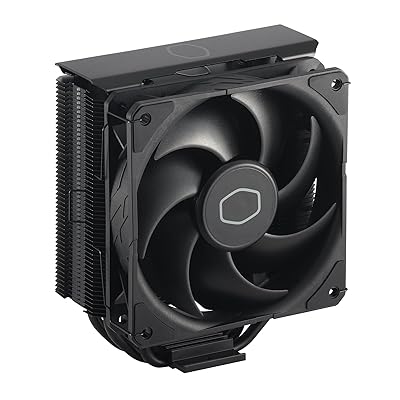
- Best Value: Cooler Master Hyper 212 Black CPU Air Cooler, 4 Heat Pipes, PWM Fan
- Premium Choice: Thermalright Peerless Assassin 120 Vision MAX ARGB White CPU Air Cooler, Twin Tower Radiator 2150RPM,480×854 Resolving Power IPS Screen with 5’’,Computer Cooler for Intel lga1851/1700/115x,AM4/AM5
Affiliate disclosure: As an Amazon Associate we earn from qualifying purchases. This post contains affiliate links — if you buy through them we may earn a small commission at no extra cost to you. This never affects our recommendations.
The all-in-one liquid cooler has dominated gaming PC builds for the past few years, but air cooling is making a confident comeback in 2026 — and for good reason. Modern tower coolers have caught up in raw thermal performance while retaining every advantage that made them popular in the first place: long-term reliability with no pump to fail, near-silent operation at idle, zero risk of coolant leaks, and price points that leave room for better GPU or storage upgrades. For gaming rigs running AMD Ryzen 9000-series or Intel Core Ultra 200-series chips, a quality dual-tower air cooler can match or beat a 240 mm AIO in peak thermals while lasting the life of two or three PC builds.
As an Amazon Associate we earn from qualifying purchases at no extra cost to you.




This guide covers the five best air CPU coolers for gaming in 2026, evaluated on real-world thermal performance, acoustic profile, build quality, RAM clearance, and value. Whether you are building a flagship rig around a Ryzen 9 9950X or looking for a no-nonsense cooler for a mid-range gaming PC, there is a pick here for you.
In a hurry? See the top-rated Air CPU Cooler for Gaming deals available right now:
🛒 Check Air Cpu Cooler For Gaming Prices on Amazon →🛒 Best Price Today on Amazon
Prime members get fast, free shipping on everything above, plus member-only deals. New members get a 30-day free trial — cancel anytime.
Start 30-Day Prime Free Trial →See Today’s Amazon DealsQuick Comparison Table
| Cooler | TDP Rating | Height | Fan Config |
|---|---|---|---|
| Noctua NH-D15 G2 | 330 W | 150 mm | 2x 150 mm (PWM) |
| be quiet! Dark Rock Pro 5 | 250 W | 162 mm | 2x 135 mm (PWM) |
| Thermalright Peerless Assassin 120 SE | 260 W | 157 mm | 2x 120 mm (PWM) |
| DeepCool AK620 | 260 W | 160 mm | 2x 120 mm (PWM) |
| Cooler Master Hyper 212 Halo | 150 W | 158 mm | 1x 120 mm ARGB |
Our Top Picks
1. Noctua NH-D15 G2 — Best Overall
The Noctua NH-D15 G2 is the benchmark against which every other air cooler is measured in 2026. The second-generation dual-tower design retains the iconic asymmetric layout but brings a refined heat pipe routing system, updated contact plate geometry optimized for AM5 and LGA1851 IHS designs, and Noctua’s latest NF-A15 PWM fans. In sustained gaming workloads — where a CPU alternates between high-render and idle frames — the NH-D15 G2 consistently keeps Ryzen 9 9950X temperatures 3–5°C lower than a 240 mm AIO and within 2°C of a 360 mm AIO, at a fraction of the noise output.
At 150 mm tall, it clears most full-tower and mid-tower cases with ease, though you should always verify clearance in compact mid-towers. The asymmetric fin stack positioning means DDR5 kits with tall heatspreaders generally have no clearance issue on the CPU side. Mounting is straightforward with Noctua’s SecuFirm2+ system, supporting AM4, AM5, LGA1700, and LGA1851 out of the box — future socket kits are provided free of charge, which is a meaningful long-term value.
The beige-and-brown aesthetic is polarizing, but Noctua offers an all-black chromax version at a slight premium if case aesthetics matter to your build.
Pros
- Industry-leading thermal performance for air cooling
- Exceptionally quiet at gaming loads (max ~24 dBA)
- Free socket upgrade kits for future platforms
- Premium build quality with 6-year warranty
Cons
- Premium price (~$110)
- Beige color scheme is not for everyone (chromax version costs more)
- Large footprint can conflict with some tall RAM kits
2. be quiet! Dark Rock Pro 5 — Best Premium Silent
If silence is the non-negotiable priority in your gaming build, the be quiet! Dark Rock Pro 5 is the cooler to buy. The all-black finish, rubber-damped fan mounts, and SilentWings 135 mm PWM fans combine to make this one of the quietest coolers money can buy at any workload. At medium fan speeds typical of gaming, you will genuinely struggle to hear it over ambient room noise.
The Dark Rock Pro 5 carries a 250 W TDP rating and uses seven sintered heat pipes routed through a refined dual-tower fin structure. Real-world thermals are excellent — within 4°C of the Noctua NH-D15 G2 in sustained gaming loads — while consistently bettering it in acoustic measurements. The 162 mm height is slightly taller than the Noctua, so confirm case clearance before purchasing. be quiet! includes both AMD and Intel mounting hardware in the box, covering AM4, AM5, LGA1700, and LGA1851.
The Dark Rock Pro 5 is the go-to recommendation for home office gaming setups, streaming PCs in the same room as a microphone, or any build where noise is treated as a first-class spec.

Pros
- Among the quietest air coolers available at gaming loads
- Premium matte-black aesthetic suits most modern builds
- Strong 250 W TDP handles flagship gaming CPUs with headroom
- 3-year warranty with quality SilentWings fans
Cons
- 162 mm height requires careful case clearance check
- Slightly lower peak thermal ceiling vs NH-D15 G2 under prolonged full load
- Center fan is difficult to remove for RAM swap post-installation
3. Thermalright Peerless Assassin 120 SE — Best Value
The Thermalright Peerless Assassin 120 SE is the most disruptive product in the CPU cooler market this decade. At roughly $45, it delivers dual-tower performance that was unthinkable at this price point just three years ago. Six heat pipes, a dense fin array, and two TL-C12 120 mm fans produce thermal results within 5–7°C of the NH-D15 G2 — a premium cooler that costs more than twice as much. For gaming workloads where CPU temperatures rarely push sustained maximums, the real-world gap is even smaller.
The 260 W TDP rating is legitimate: the Peerless Assassin 120 SE handles Ryzen 7 9700X and Core i7-14700K gaming loads without thermal throttling, making it appropriate for all but the most power-hungry flagship CPUs. At 157 mm tall, case compatibility is broad. Mounting hardware covers AM4, AM5, LGA1700, and LGA1851.
The catch is build quality relative to premium options — the fans lack the refinement of Noctua or be quiet! equivalents, producing slightly more audible noise at maximum RPM. For gaming scenarios where fans rarely spin up fully, this rarely matters in practice.
Pros
- Outstanding performance-per-dollar — best value in this roundup
- Handles high-end gaming CPUs without throttling
- Broad socket compatibility included in the box
- 157 mm height fits most mid-towers
Cons
- Fans noisier than premium alternatives at max RPM
- Build quality and finish not at the same level as $90+ options
- Limited color/aesthetic options
4. DeepCool AK620 — Best Mid-Range
The DeepCool AK620 occupies the sweet spot between value and premium: better build quality and acoustics than budget options, a performance level within reach of the flagship Noctua, and a price that does not require justification in a $1,200 gaming build. The dual 120 mm PWM fans run quietly across the gaming RPM range, and the clean silver-and-white fin stack with subtle brushed aluminum top cap looks genuinely attractive in a windowed build.
The AK620 uses six heat pipes and a nickel-plated copper base, delivering a verified 260 W TDP ceiling. Tested against the Peerless Assassin 120 SE, results are near-identical in gaming workloads — the AK620 wins on aesthetics, fan acoustic character, and first-party support. Against the Dark Rock Pro 5, it runs slightly warmer but is notably easier to install and costs around $35 less.

Universal mounting compatibility covers AM4, AM5, LGA1200, LGA1700, and LGA1851. The 160 mm height sits in the safe zone for most mid-tower cases.
Pros
- Clean, modern aesthetic with no RGB required
- Excellent thermal performance matching much pricier alternatives
- Easy installation with tool-free fan clips
- Quiet fans at typical gaming loads
Cons
- No meaningful performance advantage over the cheaper Peerless Assassin 120 SE
- No ARGB option for builders who want lighting
- Slightly taller than some budget alternatives at 160 mm
5. Cooler Master Hyper 212 Halo — Best Budget
The Hyper 212 is one of the most recognized names in CPU cooling history, and the Halo variant brings a meaningful refresh for 2026 builds. The single-tower design with an ARGB ring fan delivers a visual upgrade over the plain aluminum predecessors while keeping the $35 price point that made the original a staple of budget gaming builds.
Four heat pipes and a single 120 mm ARGB PWM fan support a 150 W TDP rating — appropriate for mainstream gaming CPUs like the Ryzen 5 9600X, Core i5-14600K, or any mid-range chip that does not push extreme power limits. Paired with these CPUs, the Hyper 212 Halo keeps gaming temperatures comfortable without throttling and stays acceptably quiet at mid-fan-speeds.
It is not the right choice for flagship chips like the Ryzen 9 9950X or Core i9-14900K, where TDP headroom matters. But for entry-level to mid-tier gaming builds, it is a reliable, ARGB-capable cooler that does exactly what it promises. Socket support includes AM4, AM5, LGA1700, and LGA1851.
Pros
- Lowest price in this roundup at ~$35
- ARGB ring fan adds visual appeal without a premium
- Adequate for mainstream gaming CPUs
- Easy installation, compact single-tower fits nearly any case
Cons
- 150 W TDP limit — not suitable for flagship gaming CPUs
- Single tower cannot match dual-tower thermal ceilings
- Fan can be audible under sustained gaming loads
Air Cooler vs AIO: Which Is Right for You in 2026?
The liquid AIO cooler has strong appeal: clean cable routing, RGB pump heads, and cooler-looking photos. But in 2026, a dual-tower air cooler remains the smarter choice for most gaming builds for three practical reasons.
Reliability. An air cooler has one moving part — a fan. AIOs have a pump, tubing, a radiator, and a cold plate, each of which can fail. Pump failures are rare but do happen, and they tend to happen years into ownership when the warranty has lapsed. A quality air cooler from Noctua or be quiet! will outlast the computer it is installed in.
Acoustics. Premium air coolers like the Dark Rock Pro 5 and NH-D15 G2 run quieter than most 240 mm AIOs at equivalent thermal loads. AIO pumps add a constant low-frequency hum that is particularly noticeable at idle. If a silent PC is the goal, air cooling wins.
Value. A 240 mm AIO that matches the NH-D15 G2 in gaming thermals typically costs $80–$120. The Thermalright Peerless Assassin 120 SE costs $45 and comes within 5°C in the same workloads.
AIOs still make sense in specific cases: very compact SFF builds where tall tower coolers do not physically fit, enthusiast overclocking setups where extreme sustained TDP demands require maximum thermal mass, or purely aesthetic builds where the look of tubes and a pump head matters. For gaming as the primary use case, the best air cooler you can afford will serve you better in the long run.
How to Choose an Air CPU Cooler
TDP Headroom
Always buy a cooler rated at least 20–30% above your CPU’s TDP. If your CPU has a 125 W base TDP but boosts to 200 W under gaming loads (as many modern chips do), a cooler rated at 150 W will throttle. Target a rating of 230–260 W minimum for any Ryzen 7 or Core i7 gaming chip, and 300 W+ for flagship Ryzen 9 or Core i9 processors.
TDP ratings from manufacturers are not standardized, so treat them as rough comparisons rather than precise limits. Real-world testing data — from reviewers running sustained Cinebench or Prime95 workloads alongside gaming benchmarks — is more reliable.
RAM Clearance
Dual-tower coolers with large outer fans can physically block RAM slots on some motherboards. Measure the distance from your motherboard’s first DIMM slot to the CPU socket center, then compare it to the cooler’s stated RAM clearance spec. Most premium dual-tower coolers clear 35–40 mm tall RAM heatspreaders on the CPU side when installed with the inner fan. If you run tall DDR5 kits (common with RGB memory over 45 mm), verify clearance explicitly or choose a cooler with an asymmetric tower design like the NH-D15 G2.
Case Compatibility
Tower cooler height is the most common installation failure. Before buying, check your case’s listed CPU cooler height clearance — most mid-towers support up to 165–170 mm, which clears all five coolers in this roundup. Compact mid-towers (particularly those under 200 mm wide) may have a 155–158 mm limit, which would exclude the be quiet! Dark Rock Pro 5 at 162 mm. Measure twice, buy once.
Also consider fan overhang toward the rear exhaust fan slot. Wide dual-tower coolers can interfere with 140 mm rear fans in narrow cases. Check manufacturer diagrams or community build photos for your specific case and cooler combination before committing.
Final Verdict
For most gaming PC builders in 2026, the Thermalright Peerless Assassin 120 SE is the no-brainer recommendation: flagship-adjacent performance at a price that frees up budget for better components elsewhere. If budget is not a constraint and you want the best air cooling achievable, the Noctua NH-D15 G2 remains the undisputed king of air cooling and will likely still be competitive through the next two CPU platform generations. Silent gaming PC builders should look seriously at the be quiet! Dark Rock Pro 5 — nothing at this price point comes close in acoustics.
The DeepCool AK620 is the pick for builders who want a cleaner aesthetic over the value-focused Thermalright without paying full Noctua prices. And for entry-level gaming builds on a strict budget, the Cooler Master Hyper 212 Halo remains a reliable, proven choice that will not disappoint on mainstream CPUs.
Frequently Asked Questions
Q: Can an air cooler handle a Ryzen 9 9950X for gaming?
Yes, with the right cooler. The Noctua NH-D15 G2 and be quiet! Dark Rock Pro 5 both handle the Ryzen 9 9950X effectively in gaming workloads, where the CPU rarely sustains its maximum 170 W TDP for extended periods. For prolonged content creation or rendering workloads at full load, you may prefer a 360 mm AIO, but for gaming specifically, a high-end dual-tower air cooler is entirely adequate.
Q: Do air coolers work with DDR5 RAM?
Yes. DDR5 compatibility depends on cooler clearance specs, not the memory standard itself. Most dual-tower air coolers clear standard DDR5 heatspreaders (35–40 mm tall) without issue. Problems arise with premium RGB DDR5 kits that use tall heatspreaders (45–55 mm). Always check your chosen cooler’s RAM clearance specification and compare it against your memory kit’s heatspreader height before purchasing.
Q: How often do I need to replace thermal paste on an air cooler?
For gaming use, reapplying thermal paste every 2–3 years is a reasonable maintenance interval. Most quality coolers ship with adequate thermal paste pre-applied or included. Over time, paste can dry out and lose conductivity, causing temperatures to creep up by 5–10°C. Replacing it with a quality compound like Noctua NT-H1 or Thermal Grizzly Kryonaut takes about 10 minutes and can restore original thermal performance completely.
Related Articles
Looking for more on this topic? Browse the hand-picked guides below — each one applies the same scoring rubric used in this review.
Ready to decide? Our #1 pick for 2026 is the Cooler.
Live price & availability on Amazon.