- Top Pick: Thermalright Aqua Elite 240 V3 Water Cooling CPU Cooler, Double PWM ARGB Fans with S-FDB Bearings,Efficient PWM Controlled Pump,for AMD/AM4/AM5, Intel LGA1150/1151/1200/1700/1851, (AE240 V3)
- Best Value: NZXT Kraken Core 240 RGB – 240mm AIO CPU Cooler – Black
- Premium Choice: CoolerMaster MasterLiquid ML240L RGB V2, Close-Loop AIO CPU Liquid Cooler, Gen3 Dual Chamber Pump, 240mm Radiator, SickleFlow 120 PWM ARGB, AMD Ryzen AM5/AM4, Intel LGA1700/1200 (MLW-D24M-A18PC-R2)
Affiliate disclosure: As an Amazon Associate we earn from qualifying purchases. This post contains affiliate links — if you buy through them we may earn a small commission at no extra cost to you. This never affects our recommendations.
As an Amazon Associate we earn from qualifying purchases at no extra cost to you.





A 240mm all-in-one liquid cooler hits a sweet spot that a lot of builders overlook. It fits in cases that cannot accommodate a 360mm radiator, costs significantly less than the flagship tier, and delivers more than enough thermal headroom for mainstream CPUs. If you are running an Intel Core i5-13600K, a Ryzen 5 7600X, or anything in the mid-range segment, a 240mm AIO is not a compromise — it is the correct choice. Reserve the 360mm units for 253W monsters like the i9-14900K or Ryzen 9 7950X.
We evaluated five of the most recommended 240mm AIOs for 2026 gaming builds, scoring each on cold plate quality, pump noise and longevity (MTBF ratings), fan curve flexibility via software, socket compatibility (LGA 1700, AM5, AM4), tube length and routing, and overall value. Here is everything you need to know before buying.
In a hurry? See the top-rated 240mm AIO Cooler for Gaming deals available right now:
🛒 Check 240Mm Aio Cooler For Gaming Prices on Amazon →🛒 Best Price Today on Amazon
Prime members get fast, free shipping on everything above, plus member-only deals. New members get a 30-day free trial — cancel anytime.
Start 30-Day Prime Free Trial →See Today’s Amazon DealsQuick Comparison: Top 5 240mm AIO Coolers at a Glance
| Cooler | Best For | Noise (Idle / Load) | TDP Rating | Socket Support |
|---|---|---|---|---|
| Corsair iCUE H100i Elite LCD | Overall performance + features | 22 / 36 dBA | 250W+ | LGA1700, AM5, AM4 |
| NZXT Kraken 240 | Clean aesthetics, minimal setup | 21 / 34 dBA | 200W | LGA1700, AM5, AM4 |
| Arctic Liquid Freezer II 240 | Performance per dollar | 23 / 37 dBA | 200W | LGA1700, AM5, AM4 |
| Lian Li Galahad II 240 LCD | Integrated display customization | 22 / 35 dBA | 220W | LGA1700, AM5, AM4 |
| be quiet! Silent Loop 2 240mm | Near-silent operation | 18 / 30 dBA | 200W | LGA1700, AM5, AM4 |
Why 240mm and Not 360mm?
Before getting into the individual picks, it is worth addressing the size question directly. A 360mm AIO uses three 120mm fans across a larger radiator surface, which improves heat dissipation — but only if your CPU actually pushes that much thermal load.
For CPUs with a TDP under 150W (Core i5, Ryzen 5, even most Ryzen 7 chips running stock settings), a quality 240mm AIO keeps temperatures well within safe operating range — typically 60–75°C under sustained gaming load. Pushing to 360mm in this scenario buys you maybe 5–8°C less, at a cost of $40–$80 more, and requires a larger case.
The real argument for 360mm kicks in when you are running an unlocked 200W+ CPU with aggressive PBO or manual overclocking. For 95% of gaming builds in 2026, 240mm is the right call.
AIO vs Air Cooler at This Price
A quality tower air cooler like the Noctua NH-D15 or DeepCool AK620 trades blows with 240mm AIOs in raw thermal performance — and often wins on reliability since there is no pump to fail. So why choose an AIO?
- Cleaner RAM clearance (no heatsink fin stack overhanging the DIMM slots)
- Lower CPU socket mechanical stress
- Better aesthetics for windowed cases
- Easier cable management in small-to-mid ATX cases
If silence and longevity over a decade are the priorities and you do not care about looks, a good air cooler at $60–$80 is a legitimate alternative. For gaming rigs where the build matters visually, AIOs win.
The Top 5 Best 240mm AIO Coolers for Gaming in 2026
1. Corsair iCUE H100i Elite LCD — Best Overall
Price: ~$179 | Check on Amazon
The H100i Elite LCD sits at the top because it combines flagship-tier performance with one of the most mature software ecosystems in the AIO space. The 2.1-inch IPS LCD on the pump head displays real-time CPU temperature, usage graphs, system info, or custom animations — and it actually works reliably, unlike cheaper implementations that flicker or lose connection after driver updates.
Corsair’s dual 120mm LL120 RGB fans deliver strong static pressure at moderate noise levels. The copper cold plate is precision machined, and Corsair quotes an MTBF of 70,000+ hours for the pump — roughly eight years of continuous operation. Fan curve customization via iCUE is granular: you can set curves against CPU temp, coolant temp, or GPU load simultaneously.

Specifications
| Feature | Detail |
|---|---|
| Radiator Size | 240mm (277 x 120 x 27mm) |
| Fans | 2x 120mm LL120 RGB |
| Pump Speed | 800–2,700 RPM |
| Cold Plate | Copper |
| Tube Length | 400mm |
| MTBF | 70,000 hours |
| Socket Support | LGA1700, LGA1200, AM5, AM4 |
Pros
- Mature iCUE software with deep fan curve customization
- Vivid, stable 2.1″ LCD pump head display
- Copper cold plate with excellent contact surface
- 70,000+ hour MTBF pump rating
- Solid RGB integration across fans and head
Cons
- iCUE software is resource-heavy (~300MB RAM)
- Premium price — pay roughly $50 more than the Arctic for marginal thermal gains
- USB header required for display functionality
The H100i Elite LCD is the cooler to buy if you want it all: best display, best software control, strong thermals, and a warranty you can trust. It is overkill if you are on a tight budget, but it justifies the price for mid-to-high-end builds.
2. NZXT Kraken 240 — Best Aesthetics
Price: ~$129 | Check on Amazon
NZXT has refined the Kraken formula into one of the most visually clean AIOs available. The 240 model features an infinity mirror LED ring on the pump head that creates a deep, layered glow without being garish. If the interior of your build is visible through a tempered glass panel and you want something that looks premium without shouting, the Kraken 240 is the answer.
Setup through NZXT CAM is significantly simpler than Corsair iCUE — a genuine advantage for builders who do not want to spend an evening tuning RGB zones. Thermal performance is competitive in the 200W TDP range. The included F120 RGB fans provide decent static pressure and are notably quiet at mid-speed settings.
Specifications
| Feature | Detail |
|---|---|
| Radiator Size | 240mm (275 x 121 x 30mm) |
| Fans | 2x 120mm F120 RGB |
| Pump Speed | 800–2,800 RPM |
| Cold Plate | Copper |
| Tube Length | 400mm |
| MTBF | 70,000 hours |
| Socket Support | LGA1700, LGA1200, AM5, AM4 |
Pros
- Infinity mirror pump head is genuinely stunning
- NZXT CAM is lightweight and easy to configure
- Quiet fans at 50–75% duty cycle
- Sturdy build quality with braided tubing
- 70,000-hour MTBF pump
Cons
- No LCD display — only LED ring
- CAM software has had historical stability issues on some Windows builds
- Slightly thicker radiator limits case compatibility in tight builds
- Not ideal above 200W sustained TDP without aggressive fan curves
The Kraken 240 is the cooler for builders who want a showcase interior without complexity. It is not the absolute thermal champion in this bracket, but it is close enough for any mid-range CPU, and nothing looks better doing it.
3. Arctic Liquid Freezer II 240 — Best Performance Per Dollar
Price: ~$79 | Check on Amazon
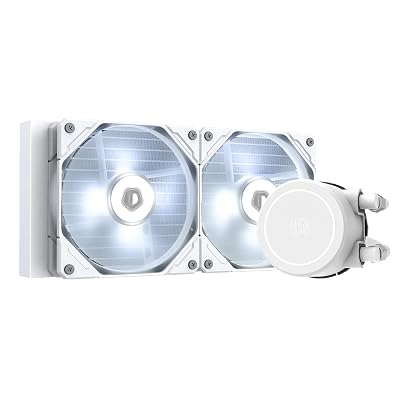
The Arctic Liquid Freezer II 240 is the benchmark that every other AIO in this price tier is measured against. At roughly $79, it consistently outperforms coolers that cost $40–$60 more — the result of a thick 38mm radiator (versus the typical 27mm), an integrated VRM fan on the pump head that actively cools socket-area components, and Arctic’s P-series fans with exceptional static pressure.
There is no RGB. There is no software. There is no app. You plug it in, connect fans to the included fan hub, and it works. Fan speed is controlled automatically via PWM, or you can tune headers in your motherboard’s BIOS. The cold plate is copper, the tubes are reinforced, and Arctic rates the pump at 70,000+ hours MTBF.
Specifications
| Feature | Detail |
|---|---|
| Radiator Size | 240mm (282 x 124 x 38mm) |
| Fans | 2x 120mm P12 PWM PST |
| Pump Speed | 800–2,000 RPM |
| Cold Plate | Copper |
| Tube Length | 450mm (longest in this roundup) |
| MTBF | 70,000 hours |
| Socket Support | LGA1700, LGA1200, AM5, AM4 |
Pros
- Best thermal performance per dollar in the 240mm segment
- Thick 38mm radiator — noticeably better than thin-rad competitors
- VRM/socket area fan on pump head is genuinely useful
- Longest tube length (450mm) for flexible routing
- No proprietary software — fully BIOS/UEFI controlled
Cons
- No RGB whatsoever
- Integrated pump fan hub means you manage headers differently
- Thicker rad requires checking case clearance before buying
- Minimalist aesthetic — pump head is plain black
If thermals-per-dollar is the only metric that matters, buy the Arctic Liquid Freezer II 240 and spend the savings on RAM or storage. It is the logical, unsentimental pick for performance-focused builders.
4. Lian Li Galahad II 240 LCD — Best Display
Price: ~$139 | Check on Amazon
The Galahad II Trinity LCD takes the integrated display concept and executes it with the most visual real estate in this roundup. The large circular LCD on the pump head supports full custom image and GIF display, real-time system metrics, and animations managed through Lian Li’s L-Connect 3 software. If the Corsair H100i’s 2.1″ display feels small in a large windowed case, the Galahad II’s wider format head makes a stronger visual statement.
Thermals are solid — not Arctic-level, but comfortably within range for CPUs up to ~220W TDP. The included 120mm fans use ARGB addressing compatible with major motherboard headers (ASUS AURA, Gigabyte RGB Fusion, MSI Mystic Light), which simplifies setup if you are already in one ecosystem.
Specifications

| Feature | Detail |
|---|---|
| Radiator Size | 240mm (274 x 120 x 27mm) |
| Fans | 2x 120mm ARGB PWM |
| Pump Speed | 800–2,600 RPM |
| Cold Plate | Copper |
| Tube Length | 380mm |
| MTBF | 70,000 hours |
| Socket Support | LGA1700, LGA1200, AM5, AM4 |
Pros
- Large, vivid LCD display with full custom image/GIF support
- ARGB fans compatible with all major motherboard ecosystems
- L-Connect 3 software is stable and well-maintained
- Strong visual presence for showcase builds
Cons
- Shorter tube length (380mm) — routing can be tight in larger cases
- Not the strongest performer in heavy sustained workloads
- L-Connect 3 requires installation for display control (no standalone BIOS control)
- Slightly overkill for builds where the LCD is rarely visible
The Galahad II 240 LCD is the right pick if the display experience is the priority and you want broad ARGB motherboard compatibility. It splits the difference between the Corsair’s premium software and the NZXT’s aesthetics, with more screen to show for it.
5. be quiet! Silent Loop 2 240mm — Best Noise Level
Price: ~$109 | Check on Amazon
be quiet! built the Silent Loop 2 for exactly one purpose: to be inaudible. At idle, the system registers at approximately 18 dBA — near the threshold of human hearing in a quiet room. Under sustained gaming load, it climbs to around 30 dBA, which is quieter than most competing AIOs sitting at idle. This is achieved through specially dampened pump internals, be quiet!’s high-quality Silent Wings-derived fans, and a conservative default fan curve that only ramps aggressively when temperatures demand it.
Performance is competent — adequate for mainstream gaming CPUs — but the design clearly prioritizes acoustic results over maximum thermal extraction. There is no RGB, and there is no companion software beyond basic motherboard fan control. The copper cold plate is well finished, and the pump carries the same 70,000+ hour MTBF as competitors in this list.
Specifications
| Feature | Detail |
|---|---|
| Radiator Size | 240mm (275 x 120 x 27mm) |
| Fans | 2x 120mm Silent Wings PWM |
| Pump Speed | 800–2,400 RPM |
| Cold Plate | Copper |
| Tube Length | 400mm |
| MTBF | 70,000 hours |
| Socket Support | LGA1700, LGA1200, AM5, AM4 |
Pros
- Lowest noise floor of any AIO in this roundup (18 dBA idle)
- Acoustically dampened pump — virtually silent under moderate load
- Premium Silent Wings fan quality
- Clean, understated aesthetic
- 3-year warranty
Cons
- No RGB — not the pick for lit builds
- No companion software for fan curve customization beyond BIOS
- Thermal performance lags slightly behind Arctic and Corsair at max load
- Not recommended for CPUs exceeding 200W TDP with aggressive overclocking
For home office setups, bedroom builds, or anyone for whom fan noise is a genuine nuisance, the be quiet! Silent Loop 2 240mm is in a class of its own. It is the only AIO where “I cannot hear it” is a genuine, repeatable claim at gaming loads.
Final Comparison: All Five Side by Side
| ~$179 | ~$129 | ~$79 | ~$139 | ~$109 |
|---|---|---|---|---|
| Copper | Copper | Copper | Copper | Copper |
| 27mm | 30mm | 38mm | 27mm | 27mm |
| 400mm | 400mm | 450mm | 380mm | 400mm |
| 2.1″ LCD | LED ring | None | Large LCD | None |
| Yes | Yes | No | Yes (ARGB) | No |
| iCUE | CAM | None needed | L-Connect 3 | None needed |
| 22 dBA | 21 dBA | 23 dBA | 22 dBA | 18 dBA |
| 36 dBA | 34 dBA | 37 dBA | 35 dBA | 30 dBA |
| 70,000 hrs | 70,000 hrs | 70,000 hrs | 70,000 hrs | 70,000 hrs |
| All-around | Aesthetics | Value/Perf | Display | Silence |
Frequently Asked Questions
Is a 240mm AIO enough for a gaming CPU in 2026?
Yes, for the majority of gaming CPUs. A 240mm AIO handles sustained loads from Intel Core i5/i7 and AMD Ryzen 5/7 chips comfortably, keeping temperatures in the 65–75°C range under gaming load. You only need a 360mm unit if you are running a 200W+ flagship CPU (i9-14900K, Ryzen 9 7950X/7900X) with aggressive overclocking. For stock-clocked mid-range gaming CPUs, 240mm is correct.
How long does an AIO cooler pump actually last?
All five coolers in this guide carry a 70,000-hour MTBF (Mean Time Between Failures) rating. At 8 hours of use per day, that works out to approximately 24 years — though real-world failure distribution is not that tidy. Most pump failures happen either in the first 6 months (early defects caught under warranty) or after 7–10 years of continuous use. Buy from a brand with a solid 3–5 year warranty and you are covered for the relevant hardware lifecycle.
Should I run push, pull, or push-pull fan configuration?
For a standard 240mm AIO mounted to pull cool air out of the case (exhaust), the default single-fan-per-rad configuration (push) is sufficient for most gaming workloads. Push-pull — adding a second set of fans to push air through the other side of the radiator — reduces temperatures by approximately 3–5°C at the cost of additional fan noise and two extra fan headers. It is most beneficial when the radiator is mounted as an intake (pulling cool ambient air through the rad into the case). For typical exhaust mounting, stick with the included fans in standard push configuration.
Does cold plate material matter — copper vs aluminum?
Yes. Copper has roughly twice the thermal conductivity of aluminum (385 W/m·K vs 205 W/m·K), meaning it transfers heat from the CPU IHS to the coolant faster. All five coolers in this guide use copper cold plates, which is the standard for any AIO above $60. Avoid budget AIOs that use aluminum cold plates — they are a meaningful performance downgrade, especially for higher-TDP chips.
Verdict
Best overall: Corsair iCUE H100i Elite LCD — best software, best display, strong thermals, long warranty. Worth the premium for mid-to-high builds.
Best value: Arctic Liquid Freezer II 240 — the thermal leader at this size for $79. No RGB, no drama, just excellent cooling.
Best aesthetics: NZXT Kraken 240 — cleanest look in a windowed case, simple setup, competitive performance.
Best display: Lian Li Galahad II 240 LCD — the largest, most customizable LCD and broad ARGB compatibility.
Best for silence: be quiet! Silent Loop 2 240mm — the quietest AIO in the 240mm segment, period.
For most gaming builds, start with the Arctic if budget is the priority, or step up to the Corsair if you want premium software control and a standout pump head display. Either way, a quality 240mm AIO is all the liquid cooling a gaming rig needs.
Related Articles
Looking for more on this topic? Browse the hand-picked guides below — each one applies the same scoring rubric used in this review.
Ready to decide? Our #1 pick for 2026 is the Cooler.
Live price & availability on Amazon.