A student monitor has to hold two lives in one frame. By day it is coursework: lecture slides beside notes, a paper beside its sources, code beside its output. By night the same screen becomes films, streams, and games with friends down the hall. The real decision at 27 inches is balance, because 1080p looks grainy for close reading at this size, QHD serves both study and play, and refresh rate only matters once the coursework is genuinely covered.
This guide is for undergraduates furnishing a dorm desk, students in shared apartments whose laptop is their only computer, and gamers who need their entertainment screen to survive essay season. Every model below was selected from the name and specifications on its Amazon product page, and the list deliberately includes one fast gaming panel, one USB-C all-rounder, and calmer QHD screens for reading-heavy degrees.
Quick Picks
As an Amazon Associate we earn from qualifying purchases
| Product | Best for | Key spec from title |
|---|---|---|
| ASUS TUF Gaming VG27AQ3A | Study by day, fast games by night | 27-inch QHD, 180Hz, Fast IPS, speakers, FreeSync Premium |
| BenQ GW2790TC | A laptop-first dorm desk on one cable | 27-inch IPS, 1080p, 144Hz, USB-C, height and tilt adjustable |
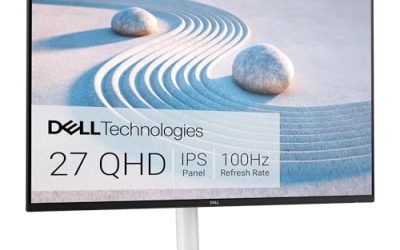
| Dell 27 Plus QHD (S2725DS) | Shared rooms and lecture playback | 27-inch QHD, 100Hz, integrated 2x5W speakers, height adjustable |
| BenQ GW2790Q | Reading-heavy degrees and late library hours at home | 27-inch QHD 100Hz IPS, HDMI, DisplayPort, eye-care modes |
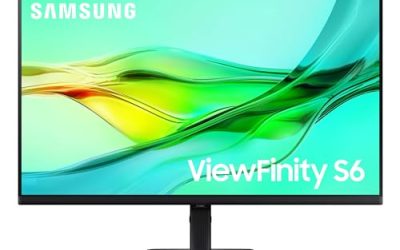
| Samsung ViewFinity S6 (S60UD) | A final-year desk that doubles as a work setup | 27-inch QHD, 100Hz, HDR10, USB-C, built-in LAN, daisy chain |
How to Choose
Put coursework resolution ahead of gaming numbers
At dorm distance you sit close, and close up, a 27-inch 1080p panel shows its pixels in every paragraph. QHD at 2560 x 1440 is the student sweet spot: two windows for an essay and its sources, sharp text for long readings, and enough detail for games to look their best. The one 1080p model in this list earns its place through a high refresh rate and USB-C convenience, not through sharpness. If your degree is reading and writing, let resolution win every argument with refresh rate.
Spend refresh rate only if games are a real hobby
A 180Hz panel transforms fast games, and the ASUS below pairs that speed with QHD, so nothing about study suffers. But refresh rate is invisible in a word processor, and many student laptops cannot push high frame rates at QHD anyway. Be honest about the split of your week. Gamers who play competitive titles most evenings should absolutely take the fast panel. Everyone else gets more daily value from speakers, eye comfort, and a stand that fits a small desk properly.
Think about the laptop you actually carry to lectures
Most students run everything from one laptop, so the connection matters. A USB-C monitor like the BenQ GW2790TC or the Samsung can carry the picture over the same style of port your laptop charges through, and the Samsung adds laptop charging at 90W on its product page plus a built-in LAN port for wired internet in halls. Check what your laptop outputs before ordering, because an HDMI-only machine and a USB-C-only machine lead to different best buys in this very list.
Fit the monitor to a dorm desk, not a showroom
Dorm desks are shallow and shared with textbooks, lamps, and everything else. A 27-inch screen fits, but the stand footprint and height decide whether it fits comfortably. Height adjustable models help when the desk chair is whatever the building issued. Built-in speakers save the space and money a separate set would take, which is why the Dell and ASUS picks list them proudly. Where student-budget models cut back is stand adjustment and ports, so know which loss your room can absorb.
The 5 Best Options
ASUS TUF Gaming VG27AQ3A

This is the two-lives monitor done properly. The TUF VG27AQ3A runs a QHD Fast IPS panel at 180Hz with a 1ms response time, 130 percent sRGB coverage, speakers, FreeSync Premium, G-SYNC compatibility, and Extreme Low Motion Blur Sync, so competitive games stay fluid and coursework stays sharp on the same screen. HDR support covers film nights. For a student whose social life happens partly in game lobbies, it is the pick that never asks them to choose between the degree and the hobby.
Specs
- Screen size: 27 inches
- Resolution: QHD 2560 x 1440
- Refresh rate: 180Hz
- Panel: Fast IPS
- Response time: 1ms
- Colour: 130 percent sRGB
- Audio: speakers
- Sync: FreeSync Premium, G-SYNC compatible, Extreme Low Motion Blur Sync
- Ports: HDMI, DisplayPort
- HDR: HDR support
Best for: Student gamers who need one screen to ace seminars and keep up in fast multiplayer titles.
Watch out for: The title lists no USB-C and no height adjustment, so connect a laptop by HDMI and check the stand height against a typical dorm desk and chair pairing.
BenQ GW2790TC
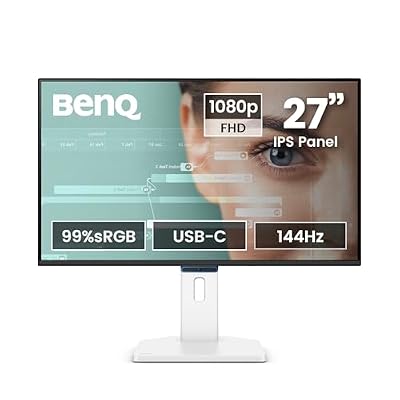
BenQ built this model around the student laptop. The GW2790TC offers a 27-inch IPS panel with USB-C connection, a height and tilt adjustable stand that is rare at the practical end of the market, and a 144Hz refresh rate that keeps games and scrolling lively. Its 1080p resolution is the honest compromise: at 27 inches text will not match the QHD picks for sharpness, yet the one-cable convenience, Eye-CareU tools, flicker-free design, and slim bezel make everyday dorm life unusually easy.
Specs
- Screen size: 27 inches
- Resolution: 1080p FHD
- Refresh rate: 144Hz
- Panel: IPS
- Connection: USB-C
- Stand: height and tilt adjustable
- Eye comfort: Visual Optimizer, flicker-free, low blue light, Eye-CareU
- Design: ultra slim bezel
Best for: Laptop-only students who value one-cable simplicity and an adjustable stand over maximum text sharpness.
Watch out for: The 1080p panel is visibly less sharp than the QHD models here for close reading, so try to see a 27-inch 1080p screen in person before committing a reading-heavy degree to it.
Dell 27 Plus QHD (S2725DS)

In a shared flat, the Dell is the good citizen. Its QHD panel gives coursework proper room, the 100Hz refresh rate keeps video and casual games smooth, and the integrated dual 5W speakers are strong enough for lecture playback and film nights without a separate purchase crowding the desk. The stand adjusts for height, tilt, swivel, and pivot, which helps when the screen rotates between a desk chair and a bed for a group watch. Eye Comfort certification suits long revision sessions.
Specs
- Screen size: 27 inches
- Resolution: QHD 2560 x 1440
- Refresh rate: 100Hz
- Panel: IPS
- Contrast ratio: 1500:1
- Colour: 99 percent sRGB listed on the product page
- Speakers: integrated 2x5W
- Eye comfort: TÜV Rheinland eye comfort certification, ComfortView Plus
- Stand: height, tilt, swivel, pivot
- Colour: Ash White
Best for: Students in shared housing who need one likeable screen for study, calls home, and communal streaming.
Watch out for: There is no USB-C input in the title, so your laptop will use HDMI plus its own charger; tidy the two cables once or they will migrate across the desk.
BenQ GW2790Q

For degrees measured in pages, the GW2790Q is the calm choice. Its QHD IPS panel at 100Hz keeps dense text crisp, while the title’s eye-care stack, Eyesafe certification, Brightness Intelligence Gen2, Low Blue Light Plus, and Eye-CareU, is joined on the product page by Coding Mode and ePaper Mode for readers and programmers. It connects by HDMI and DisplayPort, mounts on VESA hardware, and its ultra slim bezel leaves a small desk feeling less crowded than the screen size suggests.
Specs
- Screen size: 27 inches
- Resolution: 2K QHD 2560 x 1440
- Refresh rate: 100Hz
- Panel: IPS
- Ports: HDMI, DisplayPort
- Eye comfort: Eyesafe, Brightness Intelligence Gen2, Low Blue Light Plus, Eye-CareU
- Design: ultra slim bezel
- Mounting: VESA MediaSync
Best for: Humanities, law, and coding students whose screen time is overwhelmingly text, day and night.
Watch out for: The title lists no height adjustment, speakers, or USB-C, so position it carefully on arrival and expect sound to come from your laptop or headphones.
Samsung ViewFinity S6 (S60UD)

Final-year students and those starting placements should look at the Samsung as a bridge into working life. The QHD panel lists 100Hz and HDR10, the USB-C connection charges a laptop at 90W according to the product page, and a built-in LAN port delivers wired internet that crowded student Wi-Fi cannot promise during an online exam or interview. Daisy chain support and a height adjustable Easy Setup stand mean the same monitor can anchor a first job’s home desk without being replaced.
Specs
- Screen size: 27 inches
- Resolution: QHD 2560 x 1440
- Refresh rate: 100Hz
- HDR: HDR10
- Connection: USB-C with 90W charging listed on the product page
- Networking: built-in LAN port
- Extra display support: daisy chain
- Stand: height adjustable, Easy Setup design
- Model: LS27D606UANXGO
Best for: Final-year students and interns who want one purchase to cover study now and a first work-from-home setup next.
Watch out for: It is the most desk-infrastructure-heavy pick here, so its docking value is wasted if your laptop lacks USB-C video output or your room has no network socket nearby.
Which One Fits Your Situation
Your evenings are ranked matches and group games
Take the ASUS TUF VG27AQ3A without overthinking it. The 180Hz QHD Fast IPS panel is the only one here built for competitive play, and its speakers and resolution keep it fully useful for coursework. Just confirm your laptop or PC can feed high frame rates at QHD, because the panel can only show what the machine produces.
Your dorm desk holds a laptop and little else
The BenQ GW2790TC fits that footprint best. One USB-C cable, an adjustable stand, and a slim bezel keep the small surface workable, and 144Hz keeps casual gaming lively. Accept the 1080p compromise knowingly: if your course is mostly slides, video, and browsing rather than dense documents, the convenience genuinely outweighs the softer text.
You share a room or a flat with other students
Choose the Dell S2725DS. Decent built-in speakers avoid headphone-only living, the swivel stand turns the screen toward a bed or a second chair for shared viewing, and QHD keeps your own work sharp when the room is yours again. It is the most socially flexible screen in this roundup by a clear margin.
Your degree is essays, readings, and revision
The BenQ GW2790Q protects the only eyes you get. Its reading modes, adaptive brightness, and QHD clarity serve long documents better than any gaming specification would, and VESA mounting lets you add an arm when the library-at-home setup becomes permanent. Pair it with the headphones you already own for audio.
Common Mistakes
- Buying a 27-inch 1080p screen for a reading-heavy degree without realising how coarse text looks up close.
- Paying for a very fast panel while your laptop can only output modest frame rates at QHD.
- Forgetting to measure dorm desk depth, then perching a large stand where your books needed to live.
- Assuming a monitor includes speakers, and budgeting nothing for sound in a shared room.
- Choosing a screen with no height adjustment for a fixed dorm chair, and studying at a slouch all year.
Frequently Asked Questions
Is 27 inches too large for a dorm desk?
For most dorm desks, no. The panel is about two feet wide, and students sit close enough that QHD resolution stays sharp and useful. The stand footprint is the real constraint, so favour models with compact bases or VESA mounting. If your desk is unusually shallow, a height adjustable model like the BenQ GW2790TC or the Dell keeps posture sensible in the tight space.
Should a student choose QHD or a faster 1080p monitor?
Choose QHD unless competitive gaming is a central hobby. QHD makes essays, readings, and research visibly sharper at 27 inches, and it still plays games well at 100Hz. A fast 1080p panel like the BenQ GW2790TC suits laptop users who prize one-cable ease and high frame rates over text density. Your degree’s reading load should cast the deciding vote.
Can a student monitor double as a TV for a dorm room?
It can for streaming through a laptop, console, or streaming stick connected by HDMI, and built-in speakers make the arrangement feel complete. The Dell S2725DS, with its dual 5W speakers and swivel stand, handles this double duty best here. Remember that a monitor has no TV tuner, so broadcast television would need an external source of some kind.
What should a student check before ordering a 27-inch monitor?
Check three things. First, which video output your laptop has, HDMI or USB-C, so the cable plan works on day one. Second, the desk depth and where the stand will sit among your books and lamp. Third, whether the title lists the features you are counting on, such as speakers or height adjustment, instead of assuming they are standard at this size.