- Top Pick: 15.6" Laptop Screen Extender, 1080P FHD Triple Portable Monitor for Laptops, Ultra-Slim Travel Dual Monitor Fit for 12"-17.3" Laptops, USB-C Plug&Play Extended Screen Compatible with Win/Mac/Android
- Best Value: VueForge Laptop Screen Extender, 15.6” Ultra-Slim Triple Portable Monitor for Laptop, Two Cable USB-C/HDMI Plug-Play, Travel Dual Monitor for 13–17.3" Laptops, MacOS/Windows/Android
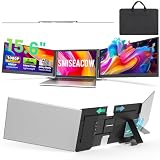
- Premium Choice: SMISEACOW Laptop Screen Extender Triple 15.6", 1080P FHD IPS 0.18" Ultra-Slim & 3.9 lbs, Plug-Play Portable Monitor for Laptops Fits 12-17.3" Laptops, Compatible with Win/Mac/Android
A triple screen laptop extender is one of the most impactful productivity upgrades a mobile worker can buy. By clamping two extra FHD panels onto your laptop lid, it turns a single cramped display into a three-screen workstation that folds flat and travels as one piece, ideal for spreadsheets, coding, trading, or editing anywhere you set up.
This review examines what actually separates a great triple extender from a mediocre one, then walks through several of the most popular models so you can match weight, brightness, and connectivity to your laptop and how you work.
As an Amazon Associate we earn from qualifying purchases at no extra cost to you.




🎮 Get More From Your Setup — Free
Prime Gaming gives you free PC games every month, in-game loot, and a free Twitch channel sub — plus fast free shipping on all the gear above. New members get a 30-day free trial.
Watch: Triple Screen Laptop Extender — Video Review
Design & Build
These extenders mount via adhesive brackets on the back of your laptop lid and fold into a slim slab you carry as a single unit. Ultra-slim models like the 15.6″ USB-C triple and the VueForge ultra-slim keep thickness minimal, while the SMISEACOW 15.6″ adds heft at around 3.9 lbs, and the Vixtan 14″ stays lighter near 3 lbs. Detachable designs like the 235°-rotation model and the Venraty upgraded extender add flexibility for presentations and awkward angles. Hinge durability is the key build concern, since these panels fold and unfold constantly, so reinforced pivots earn their keep.
Performance
The FHD IPS panels here deliver crisp 1080p with wide viewing angles, exactly what side screens need. Connectivity is the deciding factor: single-cable USB-C plug-and-play (as on the 15.6″ USB-C model) is effortless on modern laptops, while the VueForge uses a two-cable USB-C/HDMI approach that helps machines with limited video-capable ports. The 235° detachable and Venraty models let you reposition panels freely. On a compatible laptop the whole rig deploys in seconds, and the productivity jump from one screen to three is immediate and hard to give up once you’ve adjusted.
Pros & Cons
- Triple the workspace that folds and travels as one unit.
- USB-C plug-and-play setup on the driverless models.
- Sharp FHD IPS panels with strong off-angle clarity.
- Detachable options for flexible positioning.
- Added weight, from about 3 lbs up to nearly 4 lbs.
- Extra battery drain on the host laptop.
- Adhesive mounting is semi-permanent and fussy to move.
Alternatives to Consider
If a full triple rig feels heavy, a single or dual detachable extender adds space at less weight. Users on slim 13″ ultrabooks should favor the lighter Vixtan 14″ for better balance, while those wanting maximum panel size will prefer the ultra-slim 15.6″ models. And stationary users may get more from standalone portable monitors on small stands than a fixed lid attachment.
Related Guides
- Best Gaming Laptop with 144Hz Display in 2026: Top 5 Smooth-Screen Picks for Fluid Gameplay
- Best Black Friday Gaming Laptop Deals: Expert-Tested 2026 Picks From Major Retailers
- Laptop With 5090 (2026)
- Expandable Laptop Monitor (2026)
Frequently Asked Questions
Will it fit my laptop?
Most fit 12″ to 17.3″ laptops via USB-C. Confirm your USB-C port supports DisplayPort Alt Mode for driverless plug-and-play models.
How much does it weigh?
Expect roughly 3 to 4 lbs depending on the model; the Vixtan 14″ is among the lightest at around 3 lbs.
Do these need drivers?
USB-C Alt Mode units are typically driverless. HDMI-hybrid or DisplayLink-based models may need a quick driver install, so check the listing.
Can I detach a panel?
Detachable models like the 235°-rotation and Venraty extenders let you remove or reposition a screen for flexible layouts.
Verdict
A triple screen laptop extender pays off the first week you use one. Frequent travelers should choose the lightweight Vixtan 14″, while those wanting the biggest panels will like the ultra-slim 15.6″ USB-C model or the flexible Venraty detachable. Verify your laptop’s port compatibility first and weight second, and you’ll never want to go back to a single screen.