- Top Pick: Vixtan 14" Triple Laptop Screen Extender, 3.0 lbs Lightweight FHD IPS Portable Monitor for Laptop, USB-C Plug & Play Multi Screen Attachment for 13-17.3" laptops with Windows/Mac/Chrome
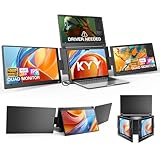
- Best Value: KYY Triple Screen Laptop Monitor Extender 15.6" Quad Laptop Screen Extender
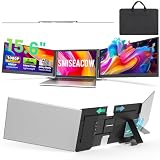
- Premium Choice: 15.6" Laptop Screen Extender, 1080P FHD Triple Portable Monitor for Laptops, Ultra-Slim Travel Dual Monitor Fit for 12"-17.3" Laptops, USB-C Plug&Play Extended Screen Compatible with Win/Mac/Android
A triple-screen laptop setup used to mean a desk full of monitors. Now a folding screen extender clips onto your laptop lid and unfolds two extra FHD panels, giving you a portable three-display cockpit you can pack into a bag. For anyone who multitasks heavily, day-traders, developers, spreadsheet warriors, it’s a genuine productivity multiplier on the move.
This review evaluates the best laptop triple-screen extenders, from the lightweight Vixtan to the SMISEACOW and KYY models, to help you choose the right one for your machine and workflow. If you’re tired of alt-tabbing on a single screen, these are worth serious consideration.
As an Amazon Associate we earn from qualifying purchases at no extra cost to you.




🎮 Get More From Your Setup — Free
Prime Gaming gives you free PC games every month, in-game loot, and a free Twitch channel sub — plus fast free shipping on all the gear above. New members get a 30-day free trial.
Watch: Laptop Triple Screen — Video Review
Design & Build
Triple-screen extenders mount to the back of your laptop lid and swing two panels out to flank the main display. The Vixtan 14-inch keeps weight down to around three pounds with an FHD IPS panel, while the SMISEACOW 15.6-inch emphasizes an ultra-slim 0.18-inch profile at 3.9 pounds. The KYY model even offers a quad configuration for those wanting a fourth screen, and the 235-degree rotation detachable design adds flexibility.
All rely on IPS panels for wide viewing angles and connect via USB-C, with some using HDMI as well. Fit matters: match the panel size to your laptop, since these attach directly to the lid and balance depends on your machine’s weight.
Performance
The productivity gain is immediate and real. Spreading work across three 1080P screens means keeping your main task, reference material, and communication all visible at once, no more constant window-switching. The IPS panels deliver crisp text and good color for documents, coding, trading dashboards, and media.
Plug-and-play setup works smoothly on Windows and Mac, with Mac occasionally needing display-arrangement tweaks. These are productivity tools, not gaming or color-grading displays, so 1080P resolution is the expected trade-off. The main consideration is the added lid weight, which is noticeable on thin-and-light laptops but tolerable on standard 15-inch machines.
Pros & Cons
- Instant triple-screen multitasking in a portable form.
- Sharp IPS panels with wide viewing angles.
- Plug-and-play over USB-C on Windows and Mac.
- Slim, foldable designs that pack away with the laptop.
- Adds lid weight, most noticeable on ultralight laptops.
- 1080P resolution limits fine detail work.
- Size-specific fit means matching the model to your laptop.
Alternatives to Consider
If minimizing weight is your top priority, the Vixtan 14-inch at around three pounds is the lightest of the bunch. Buyers wanting the slimmest profile should look at the SMISEACOW 15.6-inch, while those needing a fourth panel can consider the KYY quad extender. For single-cable simplicity, a USB-C-only model reduces desk clutter.
Frequently Asked Questions
Does a triple-screen extender work with MacBooks?
Yes, the IPS models list Mac compatibility, though you may need to adjust display arrangement in System Settings and confirm your USB-C port supports video output.
How much weight does it add to my laptop?
Expect roughly three to four pounds depending on the model, which is significant on thin laptops but manageable on standard 15-inch machines.
Will it fit my laptop size?
Match the panel size to your screen. Most models fit 12-to-17.3-inch laptops, but check the specific compatibility range before buying.
Do I need to install software?
No drivers are required for basic use, it’s plug-and-play. Some units include optional software for rotation and brightness adjustment.
Verdict
A laptop triple-screen extender is a powerful portable productivity upgrade for heavy multitaskers who can accept the added lid weight. The Vixtan 14-inch leads for lightness, the SMISEACOW for slimness, and the KYY for those wanting a fourth panel, so match the model to your laptop and workflow.