Noctua Case Fan RGB Review 2026: A Buyer’s Guide to Noctua Fans and RGB Lighting
Noctua is known for quiet, well-engineered fans, and many builders want that performance in a case that also shows off RGB lighting. The two goals do not always sit together. Noctua’s core reputation rests on low noise, strong airflow and durable bearings, and its design choices have often favoured a restrained look over flashy lighting. This guide explains how to judge a Noctua case fan with RGB, what to weigh against non-RGB models and how to avoid paying for lighting you will not use. It is a buying guide, not a detailed research, and we have not run our own noise or airflow tests for it.
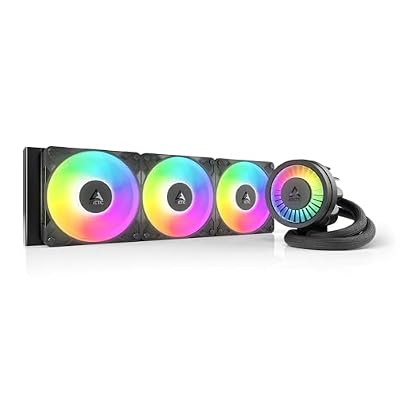
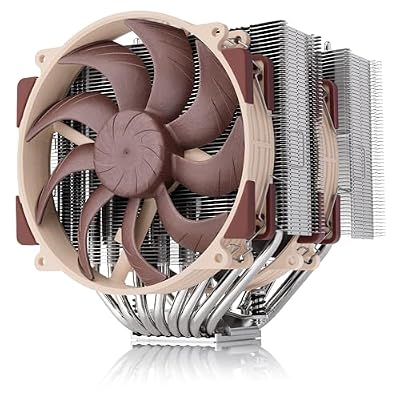
The hero listing was selected for the query “Noctua case fan” and may be a close match rather than the exact model you want. Check the card for the precise model, lighting type, size and current price before ordering. The alternatives are included so you can compare options on the same criteria. The advice here is built around the product class, so it stays useful even if specific listings change.

What Noctua Fans Are Designed to Do
A case fan has two jobs: move air and do it quietly. Noctua’s fans are typically optimised for a low noise level at a given airflow, using bearing designs and blade shapes that aim to reduce vibration and turbulence. That focus makes them popular for radiators, CPU coolers and quiet builds. The fan’s job is to push or pull air through the case, so static pressure and airflow matter as much as how the fan looks.
RGB lighting is a separate feature. Some fans include addressable LEDs that can be controlled by a motherboard or a hub, while others have fixed lighting or no lighting at all. Lighting adds cost and a small amount of complexity, and it does not change how the fan moves air. Decide whether lighting matters to you before you compare models.
Lighting Type and Control
Check how the lighting is powered and controlled. Addressable RGB usually needs a compatible controller or a motherboard header, and some fans need a separate hub. Fixed lighting is simpler but offers fewer colour options. Confirm the connector type and whether your board supports the lighting standard before buying.
Size, Speed and Mounting
Fan size determines how the fan fits your case. Common sizes include 120mm and 140mm, and the mounting holes must match the case. Speed range matters too, because a fan that runs slower at the same airflow is often quieter. Check the rated speed and the mounting pattern on the card.
Comparison Table: Fan Choices for an RGB Build
The table compares the main fan types you will see when shopping for a quiet RGB build. Price ranges are broad, and the exact figure should be checked on the listing.
| Fan type | Key strength | Best for | Main trade-off | Typical price range |
|---|---|---|---|---|
| Non-RGB quiet fan | Low noise, simple setup | Quiet builds that prioritise sound | No lighting | Check current price |
| Addressable RGB fan | Customisable lighting effects | Showcase builds with a controller | Needs compatible control and wiring | Check current price |
| Fixed-colour RGB fan | Simple lighting without software | Builders who want a single colour | Limited effects | Check current price |
| Fan with lighting hub | Clean multi-fan lighting chain | Builds with several matching fans | Adds cost and cabling | Check current price |
If you are still deciding between air and liquid cooling, our air vs AIO cooling comparison covers noise and case fit in more detail. For a broader air cooler view, the best air CPU coolers for gaming guide is a useful next step.
Noise, Airflow and Real-World Use
Balancing Noise and Airflow
Quiet fans are most useful when the case has enough intake and exhaust to keep components cool. A fan that is quiet at low speed may not move enough air through a restrictive front panel, so the case design matters. Look for a case with good mesh coverage and a clear airflow path, and our best tempered glass gaming cases guide shows which chassis suit high airflow.
Radiators and Case Fans
Fans used on a radiator follow the same principles, but they often face higher static pressure. Choose a fan rated for pressure if it will pull air through dense fins. The fan’s speed range and rated pressure on the card help you judge whether it suits a radiator or an open intake.
RGB Without Compromise
If you want lighting, it is worth checking whether the lighting affects speed control or noise. Some fans with RGB use the same motor and blade design as their non-RGB counterparts, so the lighting adds only cost. Confirm that the fan’s PWM control and speed range remain the same on the model you choose.
Installation and Cable Management
Plan the cable route before mounting the fans. Addressable RGB fans often chain together, so the order and direction matter. Keep the fan cables away from moving parts, and route them along the case’s cable channels to keep the interior tidy. Our best mid-tower gaming cases guide shows which chassis leave enough room for tidy fan routing.
For a complete build sequence, our how to build a gaming PC step by step guide explains the order of installation, and the best gaming cooler article gives an overview of cooling options for the whole system.
For cooler pairing, the best CPU cooler for gaming guide covers the processor side of the airflow plan, and the best budget AIO liquid coolers 2026 list shows radiator-based options. Small-form-factor builders should also read the best ITX mini gaming cases guide, since fan placement is tighter in those chassis.
Frequently Asked Questions
Does Noctua make RGB case fans?
Noctua’s lineup has historically focused on quiet, non-addressable designs, so RGB options are limited compared with some rivals. Check the specific model on the card to confirm whether it includes lighting and how it is controlled.
Are Noctua fans worth the price for a quiet build?
Many builders value their low noise and durable bearings, especially in quiet systems. Compare the noise and airflow claims with independent reviews before deciding whether the premium suits your build.
Can I mix Noctua and RGB fans in one case?
Yes, but match the fan size and mounting pattern. Lighting on mixed fans may not sync unless they share a controller, so confirm compatibility before buying.
Do RGB fans run louder than non-RGB fans?
Not necessarily. Lighting usually adds little noise, but the fan’s motor and blade design matter more. Check the rated speed range and reviews for the exact model.
Final Recommendation
For a quiet build, a Noctua fan is a strong choice if you value low noise and steady airflow above lighting. If you want RGB, confirm the lighting type, control method and size on the card, and make sure the fan’s speed range stays the same as the non-RGB version. Start with the listing above, measure your case, and match the fan to the role it will play in the airflow plan. A well-chosen fan delivers quiet, reliable performance for years, whether or not it glows.