🛒 Best Price Today on Amazon
Prime members get fast, free shipping on everything above, plus member-only deals. New members get a 30-day free trial — cancel anytime.
Top Choose Gaming Gpu Definitive Buyer Picks for 2026
Here are our current top choose gaming gpu definitive buyer picks, compared on real Amazon owner reviews, price, and features. Live prices update below.


Affiliate disclosure: GamingPCGuru is reader-supported. When you buy through links on our site, we may earn an affiliate commission at no extra cost to you. This does not influence our independent reviews.
How to Choose a Gaming GPU in 2026: Stop Overpaying for Halo Cards
Quick Answer (TLDR)
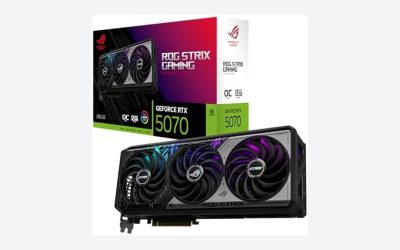
For 95% of gamers in 2026, the right GPU is in the $500–$900 range — RTX 5070, RTX 5070 Ti, RX 9070, or RX 9070 XT. These cards deliver excellent 1440p performance, capable 4K with DLSS/FSR, and have enough VRAM (12–16GB) to handle ray tracing without immediate obsolescence. The RTX 5080 is the sweet spot for serious 4K gamers, and the RTX 5090 should only be considered if you do professional content creation or have effectively unlimited budget. Below the $500 tier, the RTX 5060 and RX 9060 XT cover entry 1440p adequately. Avoid the 8GB VRAM trap — any new GPU purchase in 2026 should have 12GB minimum, ideally 16GB, to remain viable through 2028.
The Five Criteria That Matter
1. Resolution and refresh rate of your monitor. This is the single most important variable, and the one most buyers ignore. If you game at 1080p 144Hz, the RTX 5060 is genuinely all you need — buying an RTX 5080 to drive that monitor is wasting 60% of your card’s capability. For 1440p 144Hz, target the RTX 5070 or RX 9070. For 4K 144Hz, you need RTX 5080 minimum, or RTX 5090 with DLSS 4 for path tracing. For 4K 240Hz OLED with no compromises, only the RTX 5090 fully delivers.
2. VRAM capacity — the silent killer of GPU longevity. An 8GB GPU buying decision in 2026 is a decision to upgrade again in 2027. Modern game texture budgets, ray tracing data structures, and frame generation buffers eat VRAM aggressively. The RTX 5060 8GB will struggle with maxed-out 1440p texture settings within 18 months. Target 12GB minimum for 1440p gaming; 16GB if you can stretch the budget. The 16GB RTX 5070 Ti is meaningfully better future-proofing than the 12GB RTX 5070.
3. Power supply compatibility. The RTX 5090’s 575W board power and 690W transient spikes demand a 1200W+ ATX 3.1 PSU with native 12V-2×6 cabling. RTX 5080’s 360W needs 850W. RTX 5070 Ti’s 320W needs 750W. If your current PSU is a quality 750W ATX 3.0 unit, the practical maximum GPU you can install is the RTX 5070 Ti — adding a 5080 means a PSU upgrade. Budget for this when planning.
4. Driver and feature ecosystem. NVIDIA’s DLSS 4 with Multi-Frame Generation (4x) is genuinely transformative for marginal cards — a 5070 with DLSS 4 frame gen at 4K Quality mode delivers playable framerates in path-traced Cyberpunk. AMD’s FSR 4 has closed the gap significantly in 2026 but still trails DLSS in image quality at lower internal resolutions. Intel’s XeSS 2 is competitive but supported in fewer games. If you play ray-traced and path-traced titles heavily, NVIDIA’s ecosystem advantage is real and worth the price premium.
5. Case clearance. The RTX 5090 AIB cards are 4-slot, 360–380mm beasts that block bottom intake fans in most mid-towers. Even the RTX 5080 partner cards run 320–340mm. Measure your case before buying — I’ve watched too many builders return $1,500 GPUs because they couldn’t close the side panel. Use the manufacturer’s published dimensions, then add 5mm of safety margin for cable bends.
Buying Checklist
- Identify your target resolution and refresh rate based on your monitor (or the monitor you’ll buy)
- Determine VRAM requirements: 12GB minimum, 16GB preferred for 1440p; 16GB minimum for 4K
- Verify your PSU is ATX 3.1 (or quality ATX 3.0 with native cabling) and has wattage headroom
- Measure case clearance: card length, slot count, and bottom-fan clearance
- Confirm motherboard PCIe lane configuration supports your card’s bandwidth
- Check CPU pairing — pairing a 5090 with a Ryzen 5 7600 creates a massive bottleneck
- Compare DLSS 4 / FSR 4 game support for your actual library
- Check retailer return policy for compatibility issues before purchasing
- Verify warranty coverage — NVIDIA cards through partners typically have 3-year warranties
Spec Primer: Decoding the Headline Numbers
CUDA cores / Stream processors. The raw count of parallel compute units. More is better, but cross-generation comparisons are meaningless because architectural efficiency differs. An RTX 5070 with 6,144 CUDA cores meaningfully outperforms an RTX 3070 with 5,888 CUDA cores due to Blackwell architecture improvements.
Boost clock. The marketing number for peak frequency under ideal thermal conditions. Real-world sustained clocks are usually 100–200 MHz below boost. Less important than CUDA core count and memory bandwidth.
VRAM type and bandwidth. GDDR7 (current Blackwell flagship) delivers roughly 50% more bandwidth than GDDR6X at equivalent bus widths. The RTX 5080’s 16GB GDDR7 on a 256-bit bus delivers 960 GB/s. The bus width matters as much as the chip generation — a 192-bit bus on the RTX 5070 limits bandwidth to 672 GB/s regardless of GDDR7’s per-pin speed.
TDP / Total Board Power (TBP). The sustained power draw under maximum gaming load. Transient spikes can exceed this by 20–30% for microseconds. Plan your PSU around TBP + 200W headroom for the CPU and rest of system.
Ray tracing cores and tensor cores. Generation matters here. NVIDIA’s fourth-gen RT cores in Blackwell are roughly 2x faster per core than Ada Lovelace’s third-gen, which is why an RTX 5070 can match an RTX 4080 in path-traced workloads despite lower CUDA core count.
Common Buyer Mistakes
Buying the most expensive card “just in case.” The RTX 5090 is genuinely overkill for anything below 4K 240Hz OLED. If you play at 1440p, you’ll see less than 15% improvement over an RTX 5070 Ti for triple the price. Right-size to your monitor.
Ignoring CPU bottlenecks. Pairing an RTX 5090 with a Ryzen 5 7600 will deliver RTX 5070 performance in most CPU-bound titles. The GPU sits idle waiting for CPU draw calls. Budget for at least a Ryzen 7 9800X3D or Core Ultra 7 265K with any 5080+ purchase.
Trusting only synthetic benchmarks. 3DMark Speed Way and Time Spy are useful baselines but don’t reflect actual game performance. Check real-game benchmarks at your target resolution from Hardware Unboxed, Gamers Nexus, or Tom’s Hardware reviews.
Overlooking the used market. A used RTX 4090 in good condition with verified warranty time sells for $1,400–$1,600 in 2026. That’s competitive with a new RTX 5080 and delivers similar raster performance with more VRAM (24GB vs 16GB). For non-DLSS-4-dependent games, used 4090s are a brilliant value play.
Forgetting about driver overhead. NVIDIA’s drivers historically scale better with weaker CPUs than AMD’s. If your CPU is on the lower end, NVIDIA cards will deliver a higher percentage of their theoretical performance versus AMD competitors.
FAQ
Should I wait for the RTX 5070 Super or 5080 Super refresh? Rumors point to a Q4 2026 refresh adding more VRAM (potentially 24GB on a 5080 Super). If you can wait six months and don’t need a GPU now, the wait is justified. If you need a card today, the current 5080 is excellent.
Is AMD still worth considering for high-end gaming? Yes, for pure raster. The RX 9070 XT is roughly RTX 5070 Ti performance in non-ray-traced workloads at $100–$150 less. For ray-traced and path-traced titles, NVIDIA’s lead is significant and FSR 4 still trails DLSS 4 in image quality.
What about Intel Arc Battlemage cards? The Arc B580 is genuinely competitive in the $250 entry tier and the Arc B770 challenges RTX 5060 in the $400 tier. Driver maturity has improved dramatically through 2025–2026 but still has occasional edge-case issues in older or indie titles. For budget mainstream builds, Intel is a viable third option.
How important is DLSS 4 versus DLSS 3? Multi-Frame Generation (4x) on RTX 50 series is a meaningful step up from DLSS 3’s 2x frame gen, especially at lower native framerates. It transforms 45 fps into 180 fps with imperceptible artifacts in well-optimized games. For path-traced titles, DLSS 4 is the difference between playable and unplayable on mid-range cards.
Used Market Considerations
The 2026 used GPU market is unusually attractive thanks to the influx of RTX 4080/4090 cards being traded in for RTX 50 series. A used RTX 4090 in good condition with verified warranty time sells for $1,400–$1,600 — competitive with new RTX 5080 and offering 24GB VRAM versus the 5080’s 16GB. A used RTX 4080 Super at $700–$850 outperforms a new RTX 5070 Ti at the same price in raster workloads. Just verify warranty transferability and run thorough furmark/3DMark stability tests before completing the purchase. Used GPUs from crypto mining operations should be heavily discounted or avoided due to thermal stress cycling history.
Final Take
The honest truth about GPU buying in 2026: most enthusiast gamers should buy the RTX 5070 Ti or RX 9070 XT in the $700–$900 range and stop. These cards handle 1440p ultra at 144Hz comfortably, do 4K with DLSS/FSR upscaling, and have enough VRAM to last 4+ years. The RTX 5080 makes sense for dedicated 4K gamers, the RTX 5090 only for content creators with paid workloads to justify it. Below $500, prioritize VRAM (12GB minimum) over raw FPS — the RTX 5060 Ti 12GB is a better long-term buy than the 8GB version even at slightly lower frame rates today. Match your GPU to your monitor and CPU, not to your ego.
Frequently Asked Questions
How much should I spend relative to the rest of the build?
The graphics card should typically take 40 to 50 percent of a gaming budget, since it determines frame rate more than any other part. Pairing a flagship GPU with a weak CPU wastes money at 1080p, and pairing a flagship CPU with a weak GPU wastes money at every resolution.
How much VRAM do I need for my resolution?
Use 8GB as the absolute floor for 1080p, 12GB as the sensible target for 1440p, and 16GB for comfortable 4K with high textures and ray tracing. Running out of video memory causes hard stutter and texture pop-in rather than a graceful frame rate decline, so err upward.
Do upscaling and frame generation change what I should buy?
Yes. DLSS, FSR and XeSS all effectively lower the hardware needed for a given resolution, and frame generation can multiply output frame rates in supported single-player titles. Check which technologies a card supports, because feature availability is often generation-locked even within the same brand.
How do I check the card will physically fit?
Compare three numbers against your case: card length in millimetres, slot thickness, and required power connectors. High-end cards routinely exceed 320mm and three slots. Also confirm your power supply wattage and whether it provides native 12V-2×6 cabling rather than a multi-headed adapter.
Is buying used a good idea?
It can save a lot, especially one generation back, but you lose warranty coverage and miss newer features like frame generation and AV1 encoding. Inspect for physical damage, test under sustained load immediately, and factor higher power consumption of older cards into the total cost of ownership.