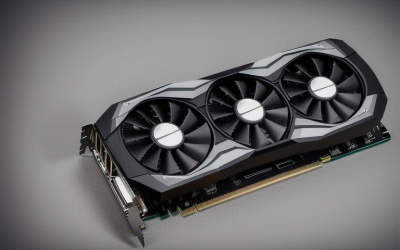
Updated November 2026 – Short answer: yes, the Radeon RX 6600 is still a good 1080p graphics card, especially on the used market, but its 8 GB of memory and weak ray tracing mean the Intel Arc B580 or Radeon RX 7600 suit buyers who want newer features or more headroom.
Is the Radeon RX 6600 good for gaming? At 1080p it handles esports, most current games at medium to high settings, and older titles at the top settings. It is not a 1440p ray-tracing card, and it is not in the same class as an RTX 5080, which is a different tier entirely.
Is the Radeon RX 6600 Good for Gaming? Key Specs
AMD launched the RX 6600 in late 2021 on the RDNA 2 architecture. The maker lists these headline specs:
- 1,792 stream processors
- 8 GB of GDDR6 memory on a 128-bit bus
- 32 MB of Infinity Cache
- 28 ray accelerators
- A PCIe 4.0 x8 connection
- A total board power rating of around 132 W, with a recommended power supply of 450 W
That low power draw is part of the appeal. Many partner cards use a single 8-pin connector and fit small cases, which makes the card a common pick for compact and budget builds.
1080p Performance: What to Expect
Reviewers consistently describe the RX 6600 as a 1080p card. Outlets that cover budget GPUs report that it holds comfortable frame rates in esports titles and many recent games at 1080p, with demanding releases needing medium settings or upscaling. Exact figures depend on the game, the processor and the settings, so use a reviewer’s chart for your specific title rather than a single number.
| Use case | Verdict | What to pair it with |
|---|---|---|
| 1080p esports | Very good, high refresh rates in most titles | A 6-core processor such as a Ryzen 5 5600 class or newer, a 144 Hz monitor |
| 1080p AAA at medium to high settings | Good, with some titles needing tweaks | 16 GB of RAM, FSR upscaling when needed |
| 1440p | Possible in lighter games, limited in new ones | Upscaling, lower textures |
| Ray tracing | Limited, expect big frame rate drops | Use it sparingly or skip it |
| 4K | Not suitable for new games | A higher-tier card |
| Compact or low-power builds | Excellent fit | Small power supply of 450 W or higher |
Memory: Is 8 GB Enough?
For 1080p, 8 GB is workable but increasingly tight. Reviewers have shown that a growing number of new games can use more than 8 GB at high texture settings, which causes stutter or forces lower textures. If you play mostly esports and older games, it is fine. If you want new releases at high settings for years to come, the 12 GB of an Arc B580 offers more room.
PCIe 4.0 x8: Does It Matter on an Older Board?
The RX 6600 uses only eight PCIe lanes. On a PCIe 4.0 board this is no problem. On an older PCIe 3.0 board, the card runs at the lower link speed, and reviewers report that the loss is small in many games but can grow when memory runs out and data moves across the bus. If you are pairing the card with an older system, check your motherboard manual for the PCIe version of the graphics slot.
Ray Tracing on the RX 6600
The card has hardware ray accelerators, so it can run ray tracing, which the older RX 580 cannot do. In practice, the performance cost is high and the card has limited memory for ray-traced effects. Most buyers are better off leaving ray tracing off or using light settings. If ray tracing matters to you, look at a newer RDNA 4 or Nvidia RTX 50-series card.
AMD RX 6600 vs NVIDIA RTX 5080: Not a Fair Fight
People searching for AMD RX 6600 vs NVIDIA RTX 5080 are comparing a budget card from 2021 with a current high-end card. They sit in different tiers, so the question is less about which is faster and more about what you need. The RTX 5080 targets high-refresh 1440p and 4K play and uses a much larger power budget. The RX 6600 targets 1080p on a small budget.
Choose based on your monitor and budget rather than the brand: if you play at 1080p and want a modest build, the RX 6600 is enough. If you want 4K or heavy ray tracing, a card in the RTX 5080 class is the type of hardware that job calls for, and it needs a bigger power supply and case. Follow the graphics card maker’s guidance on power connectors for any high-end card.
RX 6600 vs RX 7600 vs Arc B580
| Card | Best for | Key stated specs | Limits |
|---|---|---|---|
| Radeon RX 6600 | Used or budget 1080p builds | 8 GB GDDR6 · 128-bit · PCIe 4.0 x8 · RDNA 2 | Older architecture, limited ray tracing |
| Radeon RX 7600 | New 1080p with RDNA 3 features | 8 GB GDDR6 · PCIe 4.0 x8 · RDNA 3 | Same 8 GB of memory |
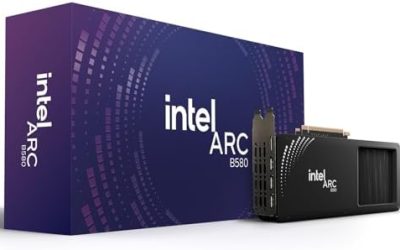
| Intel Arc B580 | 1080p and light 1440p with more memory | 12 GB GDDR6 · 192-bit · PCIe 4.0 x8 | Needs Resizable BAR, higher processor demand on older CPUs |
| GeForce RTX 5060 | New 1080p with Nvidia features | 8 GB GDDR7 | 8 GB of memory |
Radeon RX 6600 – Best for Used 1080p Value
The RX 6600 is the card to look at if you find a clean used one at a good price. It is efficient, quiet in good partner designs, and fits most cases.
Radeon RX 7600 – Best for Newer Features
The RX 7600 is the newer design with RDNA 3 and a modest performance lift according to reviewers. It suits buyers who want a new card with a warranty.
Intel Arc B580 – Best for More Memory
The B580 gives 12 GB of memory and reviewers report strong 1080p results, with the caveat of processor overhead on older chips. It suits recent platforms.
Budget Build Pairings
The RX 6600 pairs well with mid-range processors in the 6-core class. A Ryzen 5 5600 or 7500F style chip, or an Intel Core i5 from the 12th generation onward, will keep up. Add 16 GB of RAM and a 450 W or larger power supply from a known brand, which follows the maker’s own recommendation. Since the card is efficient, you can build a small, quiet system around it without a large cooler.
Used market checklist
- Ask for proof the card runs a game or benchmark without artifacts.
- Check that all fans spin and the shroud is intact.
- Confirm the seller allows returns.
- Look for the exact model so you can check its length against your case.
- Update to the latest AMD driver after installing.
Upscaling and Settings That Stretch the RX 6600
AMD’s FidelityFX Super Resolution is the main tool for keeping the RX 6600 relevant. In supported games it renders at a lower resolution and scales the image up, trading a little sharpness for smoother play. AMD’s newer frame generation technology also exists, though it works best when the base frame rate is already reasonable, and it adds input latency. For competitive games, skip frame generation and use native rendering at lower settings instead.
- Lower texture quality one notch if a game reports memory warnings on the 8 GB card.
- Reduce shadow and volumetric settings before touching resolution.
- Cap the frame rate slightly below your monitor’s refresh rate for steadier pacing.
- Keep the AMD driver current for game fixes and new upscaling support.
Monitor and Resolution Fit
A 1080p monitor at 144 Hz is the natural partner. The card can push many esports games near that refresh rate, and demanding games benefit from adaptive sync, which AMD supports through FreeSync. A 1440p monitor is workable if you accept upscaling and lower settings in new games, but it removes the headroom the card has at 1080p. Anyone planning to move to 1440p within a year should consider a faster card now instead of buying twice.
Cooling, Noise and Case Fit
Because the board power is low, most partner cards use one or two fans and run quietly. Cards are short enough for compact cases, but sizes differ by model, so check the maker’s listed length and your case’s clearance. In a small case, make sure there is at least one intake and one exhaust fan. If a used card is loud, a failing fan is a common cause, and the fan can usually be replaced by following the card maker’s guidance or by a technician.
Is It Worth Upgrading From an RX 6600?
If your games run well at 1080p, there is no urgent reason to upgrade. Consider a change when 8 GB of memory starts limiting new releases, when you move to a 1440p monitor, or when you want better ray tracing. At that point the upgrade candidates are the Arc B580 for more memory on a budget, or an RDNA 4 or RTX 50-series card for a larger jump, each with its own power and platform needs.
Frequently Asked Questions
Is the RX 6600 good for 1440p gaming?
Only in lighter games or with upscaling. Reviewers describe it as a 1080p card, and 1440p in new titles needs low settings. A faster card is a better 1440p choice.
Is the RX 6600 still worth buying in 2026?
Yes, if the price is right and you play at 1080p. It is efficient and capable, and used examples can be good value. If you want more memory or newer features, look at the Arc B580.
What power supply does the RX 6600 need?
AMD lists a recommended supply of 450 W for the card. Check your model’s manual for connector needs, as many partner cards use one 8-pin connector.
Can the RX 6600 run ray tracing?
It can, using its hardware ray accelerators, but performance drops sharply. For most games, leave ray tracing off or use low settings.
Does PCIe 3.0 hurt the RX 6600?
The card uses eight lanes, so on PCIe 3.0 it runs at a lower link speed. Reviewers report small losses in many games and larger ones when video memory runs out.
Is the RX 6600 better than the RX 580?
Yes, by a wide margin. It is faster, more efficient, supports ray tracing in hardware and is on a newer architecture with better driver support.