Caesar IV is Tilted Mill Entertainment’s Roman city builder, published by Activision: you govern a province of the empire, lay out housing, aqueducts, markets and defences, and climb the political ladder toward the imperial title itself. The game first appeared in September 2006, and the copy Steam sells today is a 2016 reissue of that release, so every layer of its record still belongs to the earlier era.
Players looking for a Linux version will find one encouraging signal in the usual places, so this article goes to the record itself: the platform flags, the purchase package, the requirements fields, the depot list, the community file and Valve’s Deck sheet. The answer those layers give is unanimous, and the one dissenting label turns out to be a template artefact rather than a build.
As an Amazon Associate, we earn from qualifying purchases.
Quick answer
No. Caesar IV has no native Linux build on any storefront: Steam’s flags, its only purchase package and its single content depot are all Windows-only, and GOG sells the same Windows build. On a Linux desktop it runs through Proton, where its community file sits at Silver across 19 reports, but only after documented tinkering with legacy components.
What the Steam record actually says
Start with the flags, because everything else agrees with them. The app record reads Windows true, Mac false, Linux false. The decisive layer is the purchase package, and there is exactly one: package 121232, which grants the base app alone and repeats the same mask on its own record. Every buyer gets the same Windows build.
The requirements fields tell the same story more quietly. The Windows field is genuinely populated with period hardware: a 1.8 GHz processor, 512 MB of memory, a DirectX 9.0c card with 256 MB of video memory and 2 GB of storage. The Mac and Linux fields are not shells with headings over empty lists; they are empty lists outright. The Windows field also carries the game’s multiplayer epitaph in its notes: the official servers are inactive and the game is single-player only, matching the store categories, Single-player and Family Sharing.
SteamDB completes the picture. The depot list holds a single content depot, 517811, at 1.23 GiB, with no operating-system split: no Linux depot exists, emptied, stranded or otherwise. The registered icon set runs to the standard client icon, icon and logo files, with no Linux client icon among them. The public branch stands on build 1321375, built in September 2016 ahead of the reissue, and has not moved since.
Two absences round out the record. There is no third-party DRM notice and no external account notice, so nothing stands between a buyer and the build beyond Steam itself. And no controller support is declared, which shapes the gear section below: this is a mouse-and-keyboard game, and any pad in a setup serves the rest of the library, through Steam Input where it works at all.
A family of one
Some older games hide their platform answer in an expansion or soundtrack app, so the family deserves a direct check. Caesar IV’s record exposes no downloadable-content array at all, and SteamDB associates no add-on apps with it: no expansion, no demo, no soundtrack, no artbook. The family is empty. That also removes the usual trap in which a music app flags every platform true and makes a game look Linux-friendly in a store scan; here there is nothing else to misread.
Proton: a Silver file that asks for work
ProtonDB is where this game gets interesting, and where its one misleading label lives. The game’s page heads its requirements block with the words “Natively Supports:”, a claim Steam’s record contradicts at the flag, package, field and depot layers. The heading is a template artefact on the community page, not evidence of a port, and it is the only place anywhere that suggests a native build exists.
The community file itself is real but thin, with an evidence caveat worth stating plainly. ProtonDB’s summary feed returns no record for this app, so the figures here are the ones displayed on the game’s page rather than a full summary read: a Silver rating drawn from 19 reports, with no headline breakdown or confidence grade to quote. Silver means a game that runs after tweaks, and the reports make the tweaks unusually specific.
The recurring recipe across the filings has three steps. First, an older Proton branch does the heavy lifting: many successful reports settle on Proton 4.11-13, because the legacy components install cleanly there, while newer branches appear in both the successes and the failures. Second, protontricks installs two period components into the prefix, the .NET Framework 2.0 package (dotnet20) and a DirectX 9 library (d3dx9_29). Third, the game’s own RegisterDLL.bat file, shipped inside its install folder, must be run once through the prefix before the launcher will start the game. Filings that skip a step describe a launcher that opens and a game that errors out; filings that complete all three describe a builder that then plays well, with occasional complaints about camera speed.
This is not a broken game on Linux, but not an install-and-play one either: the Silver tier is earned by a documented procedure.
Steam Deck: Unsupported, on paperwork that cannot age
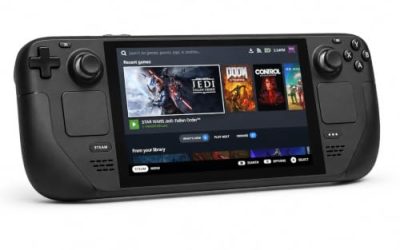
Valve has reviewed this game, and the verdict is Unsupported for both the Deck and SteamOS. The reading here came through SteamDB’s republication of Valve’s compatibility sheet, because Valve’s own endpoint returned garbled data on repeated attempts. The single test, dated October 2022, ran the stable Proton runtime, recorded the input method as “other” rather than any controller scheme, and returned the token that SteamOS does not support the game.
Ordinarily a 2022 test on a living game would raise a staleness question. This is the opposite shape. The tested build, 1321375, is exactly the build standing on the public branch today, because the branch has not moved since September 2016. The paperwork grades the build on sale, so the Unsupported badge is current by construction: it cannot go stale until the game changes, and the game has not changed in years. The practical reading is simple: Caesar IV is a desktop game, and the recommendations below are framed for a desk.
The GOG route leads to the same build
Because GOG’s search tools have a known blind spot for games the store does sell, this ruling rests on the product record itself. GOG’s live catalogue holds Caesar IV as product 1460037487, under the slug caesar_iv, and its product record reads Windows true, Mac false, Linux false. A DRM-free edition exists, genuinely useful for archival-minded buyers, but it is the same Windows build Steam sells. No storefront sells a native Linux copy, and no edition changes the Proton picture.
How to choose
Decide first whether the tinkering procedure is acceptable. If running protontricks once, installing two legacy components and executing a shipped batch file sounds like a fair price for a well-regarded Roman city builder, the Steam copy under an older Proton branch is a workable route, and the GOG copy offers the same build without DRM for the same procedure. If you want a city builder that installs and launches cleanly on Linux today, look at natively supported builders instead. Buy on whichever storefront you already use, because the build, and the work it needs, are identical on both.
Who should skip
Skip this one if you play mainly on a Steam Deck, where Valve’s verdict is Unsupported on current paperwork. Skip it if you dislike prefix tinkering on principle, because the Silver file is built on exactly that. Skip it if you were hoping for the multiplayer the 2006 box promised; the game’s own notes declare the servers inactive and the release single-player only. And skip it if a native build is a hard requirement: none exists, on any store, in any edition.
Gear for a desktop city builder
Caesar IV is played with a mouse, a keyboard and long sessions in menus and map views, so the desk gear leads. Both pads are included for the wider library, with the honest caveat that this game’s record declares no controller support at all.
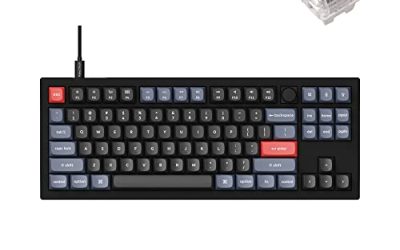
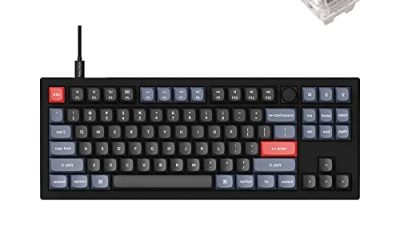
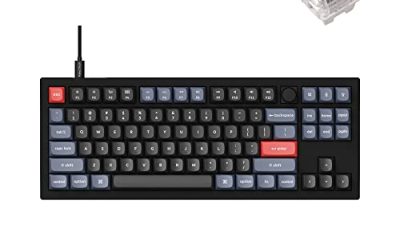
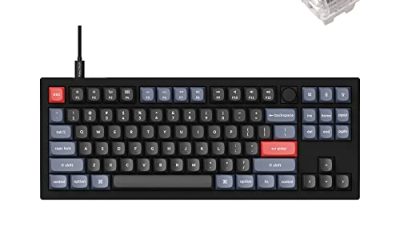
Keychron V3
A tenkeyless board with keyboard-level remapping suits a game built on hotkeys and camera controls: remaps made in the keyboard itself keep working on every Linux install, with no driver layer.
Specs
- Tenkeyless layout with rotary knob
- QMK and VIA remapping support
- Hot-swappable K Pro Brown switches
- Wired USB-C connection
- Maker-rated 1,000 Hz polling
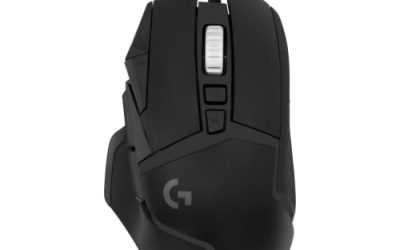
Logitech G502 HERO
City builders live by pointer precision, and a wired mouse with a high-resolution sensor and programmable buttons turns repeated confirm, cancel and camera inputs into single clicks.
Specs
- HERO optical sensor, up to 25,600 DPI
- 11 programmable buttons
- Adjustable weight system
- Wired USB connection
- On-board memory profiles
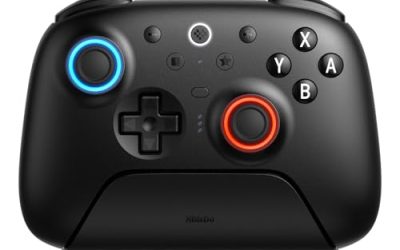
8BitDo Ultimate 2 Bluetooth Controller

The premium-tier pad for the rest of a strategy library: anti-drift sticks and a charging dock make it the desk controller, and Steam Input gives it its best chance in games that never declared pad support.
Specs
- Connectivity: Bluetooth wireless and USB-C wired
- Joysticks: TMR electromagnetic, anti-drift design
- Triggers: Hall effect, with mode switching
- Extras: two remappable back buttons, motion control
- In the box: charging dock included
Xbox Wireless Controller, Carbon Black
The mid-range reference pad: Steam Input support is universal, the glyphs match what most games display, and it pairs over Bluetooth or wireless for the parts of a library that speak controller.
- Connectivity: Xbox Wireless and Bluetooth
- Port: USB-C for wired play
- Controls: hybrid D-pad, dedicated Share button
- Power: AA batteries or optional rechargeable pack
Samsung T9 Portable SSD 2TB
The budget-friendly way to keep a library of period games and their prefixes on fast external storage: a 2 TB drive over USB-C moves whole installs between machines without a fresh download, which pairs well with games whose prefixes sometimes need rebuilding.
Specs
- Capacity: 2 TB portable SSD
- Interface: USB 3.2 Gen 2×2, USB-C connector
- Maker-rated speeds: up to 2,000 MB per second read, 1,950 MB per second write
- Features: Dynamic Thermal Guard, maker-rated drop resistance
FAQ
Is Caesar IV native on Linux?
No. Steam’s flags, its single purchase package and its only content depot are all Windows-only, the Mac and Linux requirements fields are empty lists, and GOG’s product record reads Windows-only as well. No native build exists anywhere.
Why does ProtonDB say “Natively Supports” on the game’s page?
That heading is a template artefact on the community page. It is contradicted by every layer of Steam’s own record, and the reports underneath it are all Proton reports about the Windows build, several describing the tinkering it needs before it will run.
What does it take to run Caesar IV under Proton?
The documented recipe is an older Proton branch, commonly 4.11-13, plus two protontricks installs, the .NET 2.0 package and the d3dx9_29 library, plus one run of the RegisterDLL.bat file shipped in the game’s folder. Reports that complete all three steps describe a game that then plays well.
Can I play Caesar IV on a Steam Deck?
Valve’s own testing says no: the Deck verdict is Unsupported, and SteamOS carries the same rating. The test ran in October 2022 against build 1321375, still the current public build, so the verdict describes the copy on sale today rather than an outdated version.
Final verdict
Caesar IV on Linux is a clear record with a fiddly middle. The record could not be plainer: one Windows build, sold by both Steam and GOG, with no native port, no DLC family to hide one in, no Deck support and no multiplayer servers left. The middle is the Proton file, Silver across a thin set of reports, where a three-step procedure separates a working province from a launcher error. Buy it as a desktop tinkering project if the Roman city building appeals; pass it by if you want Deck play, pad play or a clean install, because the record offers none of the three.
Product and ASIN Reference
| Product | ASIN |
|---|---|
| Keychron V3 | B0B2DMMMG2 |
| Logitech G502 HERO | B07GBZ4Q68 |
| 8BitDo Ultimate 2 Bluetooth Controller | B0F194QFT2 |
| Xbox Wireless Controller, Carbon Black | B08DF248LD |
| Samsung T9 Portable SSD 2TB | B0CHFS9K14 |