The Operational Art of War IV is the deep end of the wargaming pool: a hex-and-counter operational simulator from TrickeySoft LLC, published on Steam by Matrix Games, covering conflicts from the First World War to hypothetical modern campaigns. It first released in November 2017, reached Steam in October 2018, and its mouse-driven, menu-dense design looks like exactly the kind of strategy game that should travel well to Linux.


The record answers that hope plainly. Every layer Steam publishes for app 792660 — the platform flags, the requirements fields, the single purchase package and the depot table — reads Windows only. What Linux players get instead is a Proton route with a thin community file and a Steam Deck badge that says Unsupported. This article reads each layer in turn, so the verdict rests on the record rather than on the store page’s silence.
As an Amazon Associate, we earn from qualifying purchases.
Quick answer
The Operational Art of War IV is not native on Linux. Steam’s flags, its only purchase package and its depot table all read Windows only, and the Mac and Linux requirements fields are empty lists. The route is Proton: ProtonDB’s file is Silver on the headline tier from a small set of reports, and Valve rates the game Unsupported on Steam Deck.
The status at a glance
| Question | Answer from the record |
|---|---|
| Native Linux build | No — flags, package and depots all read Windows only |
| Linux requirements tab | Absent — the field is an empty list |
| Add-on apps | None — no DLC array, and SteamDB names no DLC apps |
| Anti-cheat | None named; the PBEM++ notice is an account layer |
| ProtonDB record | Silver headline, Platinum best, 8 reports, low confidence |
| Steam Deck verdict | Unsupported, tested March 2022 on an older build |
| GOG edition | None — ruled from the catalogue API and product address |
A record with nothing hiding in it
Start with the flags. Steam’s appdetails record lists platforms as Windows true, Mac false, Linux false. The requirements fields match the plainest pattern this series tracks: the Windows field is genuinely populated, while the Mac and Linux fields are empty lists outright — not the empty shell, where headings sit over blank lists, but no tab in any form. Nothing on the store page could be mistaken for a Linux specification.
The published Windows minimum is a period piece: Windows 7, 8 or 10, a Pentium 4 or better, 512 MB of RAM, a DirectX 9.0c class graphics card and 650 MB of storage, with Microsoft .Net 4.0 noted as a requirement — a Windows framework dependency a compatibility layer must supply before the first scenario loads.
The package layer, the decisive one, agrees. The game sells through a single purchase package, and that package reads Windows true, Mac false, Linux false while granting the base app alone. No second edition or bundle exists to carry a different flag set: the thing Steam sells is a Windows build, full stop.
The depot table closes the question. SteamDB lists exactly one content depot, holding the whole install at about 1.60 GiB, with no operating system split and no Linux-labelled depot beside it. The only redistributable attached is the DirectX June 2010 package, a Windows component, and the asset list registers no Linux client icon. No DRM notice appears on the record.
No family to sweep
Most games in this series need a family sweep, because a soundtrack or expansion app can carry flags the base game lacks. This record offers nothing to sweep. The base app’s record exposes no DLC field at all, and SteamDB’s DLC listing names no associated apps: the family size is zero. Content growth runs through the Steam Workshop and scenario packs outside the store’s app system, neither of which publishes platform flags. The verdict rests on the base record alone, and it is unanimous.
The account layer is not anti-cheat
One line on the record deserves precise reading: the external account notice names the Slitherine PBEM++ service for multiplayer. PBEM++ is the publisher’s play-by-email server system — an asynchronous turn-exchange account layer for that multiplayer mode. It is an account requirement, not an anti-cheat system, and this article does not present it as one.
The anti-cheat question itself gets silence from all three sources, reported here as silence, not as a ruling. Steam names no anti-cheat in the game’s categories and carries no DRM notice. SteamDB’s technology detection finds only the Lua SDK. The AreWeAntiCheatYet catalogue carries no entry for this app. Nothing blocks Proton at the anti-cheat layer; the obstacles ProtonDB’s file describes are of a different kind.
Eight reports and a Silver headline
ProtonDB’s summary record for app 792660, read in full this session, is one of the thinnest files in this cluster: a Silver headline tier, a Platinum best-reported tier and a Silver trending tier, across just 8 reports with low confidence. The split says the game can run well on the right setup, while the headline says the average attempt meets friction. With a file this small, treat every tier as provisional.
The report text, which is all the game page rendered this session, describes where the friction lives: graphical glitches that worsen sharply if the window is resized, minimised or alt-tabbed, occasional crashes that become rarer with in-game audio turned off, a launcher that misbehaves if anything other than its buttons is pressed, and slow turn processing in multiplayer. None of that is anti-cheat or engine failure; it reads as an older Windows interface application objecting to a different windowing system. One check could not be completed: because the page rendered report text only, whether its requirements block carries the stray native-support heading seen on other games in this cluster could not be verified.
The Deck sheet says Unsupported, on old paperwork
Valve rates The Operational Art of War IV Unsupported on Steam Deck, and SteamOS separately Unsupported. One evidence note: Valve’s own compatibility endpoint returned a garbled response this session, so the verdict and its paperwork were read through SteamDB’s republication of Valve’s sheet for this app. The sheet’s single test result is the SteamOS support failure token, with proton-stable named as the recommended runtime — a finding that the Windows build under Proton does not work on the handheld, not an absence of testing.
The paperwork is stale in the specific way this series flags. The test is dated 26 March 2022 and was run on build 4412385, while the current public branch stands at build 14979410, built in July 2024. The badge therefore grades a superseded build: the standing official verdict, but one a fresh test could in principle revise. The store record lists no controller support at all, which fits: this is a mouse-and-menus interface.
One storefront only
There is no second copy to weigh. GOG’s natural product address for the title redirects to the general catalogue; its catalogue API returns only other wargames from the same publisher’s shelf, and the products API returns nothing. No GOG edition exists. The Steam copy is the only PC edition on sale.
Gear for a desktop wargame
The record’s shape decides the gear: an Unsupported Deck badge and a mouse-driven interface push this game to the desk, so the picks below are desktop hardware — a remappable keyboard, a precise mouse, two pads for the rest of a Linux library, and fast portable storage.
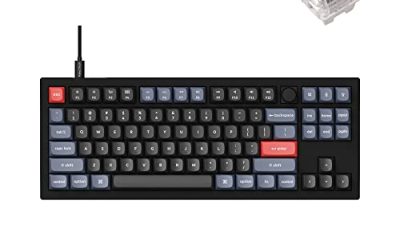
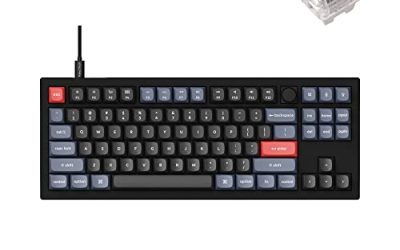
Keychron V3
The keyboard pick for desktop sessions: a tenkeyless board with QMK and VIA support lets you remap keys at the keyboard level, across every Linux install you plug it into.
Specs
- Tenkeyless layout with rotary knob
- QMK and VIA remapping support
- Hot-swappable K Pro Brown switches
- Wired USB-C connection
- Maker-rated 1,000 Hz polling
Logitech G502 HERO
A wargame of this density is played with a pointer: hundreds of unit selections, map drags and menu dives per turn. Eleven programmable buttons carry the inputs a long scenario repeats.
Specs
- HERO optical sensor, up to 25,600 DPI
- 11 programmable buttons
- Adjustable weight system
- Wired USB connection
- On-board memory profiles
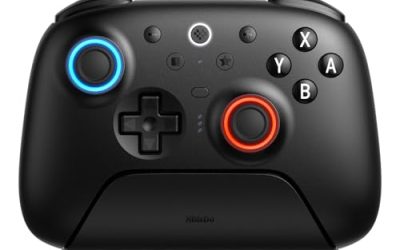
8BitDo Ultimate 2 Bluetooth Controller

The pad pick for the wider Linux library rather than for this title, whose record lists no controller support. For games that do take a pad, it covers docked and desktop play with modern sticks, triggers and back buttons.
Specs
- Connectivity: Bluetooth wireless and USB-C wired
- Joysticks: TMR electromagnetic, anti-drift design
- Triggers: Hall effect, with mode switching
- Extras: two remappable back buttons, motion control
- In the box: charging dock included
Xbox Wireless Controller, Carbon Black

The safest guest pad in PC gaming: Steam Input support is universal, the glyphs match what most games display, and it pairs over Bluetooth or its own wireless standard.
- Connectivity: Xbox Wireless and Bluetooth
- Controls: hybrid D-pad, dedicated Share button
- Power: AA batteries or optional rechargeable pack
Samsung T9 Portable SSD 2TB

For moving a Linux game library between machines, or keeping an offline backup of installers, a fast USB-C drive is the simple answer. The headline figure needs a Gen 2×2 host port; on a lesser port the drive runs at that ceiling.
Specs
- Capacity: 2 TB portable SSD
- Interface: USB 3.2 Gen 2×2, USB-C connector
- Maker-rated speeds: up to 2,000 MB per second read, 1,950 MB per second write
- Features: Dynamic Thermal Guard, maker-rated drop resistance
How to choose
Choose the Steam copy, because it is the only PC edition sold. On a Linux desktop, set expectations by the ProtonDB file rather than by the game’s age: the hardware demands are trivial, but the Silver headline on low confidence says the Windows interface layer, not performance, is where trouble appears, so keep the game on a fixed window, keep its audio setting in mind as a stability lever, and do not plan around the Deck. For multiplayer, the PBEM++ account is part of the deal on any platform.
Who should skip
Skip this one if you are shopping for a native Linux wargame: no build exists, and no layer of the record hints one is coming. Skip it if the Steam Deck is your only machine, because Valve’s verdict is Unsupported rather than merely untested. Skip it if a Silver headline drawn from eight reports is not evidence enough — the file is genuinely thin. And skip it if you want a DRM-free offline installer, since no GOG edition exists.
FAQ
Is The Operational Art of War IV native on Linux?
No. Steam’s record for app 792660 flags Windows only, the sole purchase package repeats that split, the only content depot carries no operating system division, and the Linux requirements field is an empty list.
How well does it run under Proton?
ProtonDB’s summary record reads Silver on the headline and trending tiers and Platinum on the best-reported tier, across 8 reports with low confidence. Filers describe window-handling glitches and crashes that ease with audio off. Read the tiers as provisional.
Is it playable on Steam Deck?
Valve’s verdict is Unsupported, for Steam Deck and SteamOS alike, read through SteamDB’s republication after Valve’s endpoint returned garbled data. The test dates from March 2022 on an older build than the one now shipping, so the paperwork is stale, but the verdict stands.
Does the game use anti-cheat?
No source names any. Steam carries no anti-cheat category or DRM notice, SteamDB detects only the Lua SDK, and the AreWeAntiCheatYet catalogue has no entry for the game. The PBEM++ notice is the publisher’s play-by-email account system, not anti-cheat.
Final verdict
The Operational Art of War IV is a Windows-only release whose record is unusually clean to read: one package, one depot, no DLC family, no icon artwork pretending at a port, and no anti-cheat layer in the way. What it offers Linux players is narrower than its Windows reputation suggests — a Proton route graded Silver by a small, divided community file, an Unsupported Deck badge earned on an older build, and a single storefront. Buy the Steam copy for a Linux desktop if operational-level wargaming is the goal; leave it alone if the handheld or a native build is the requirement.
Product and ASIN Reference
| Product | ASIN |
|---|---|
| Keychron V3 | B0B2DMMMG2 |
| Logitech G502 HERO | B07GBZ4Q68 |
| 8BitDo Ultimate 2 Bluetooth Controller | B0F194QFT2 |
| Xbox Wireless Controller, Carbon Black | B08DF248LD |
| Samsung T9 Portable SSD 2TB | B0CHFS9K14 |