Combat Mission: Red Thunder is Battlefront’s Eastern Front wargame, covering Operation Bagration and the fighting in Poland in the summer of 1944 at battalion scale and below. It reached Steam on 15 June 2023 with two expansions alongside it, and it is the kind of deep, mouse-driven simulation Linux strategy players routinely check for a port before buying.
There is no port to find. Every layer of the game’s Steam record — the platform flags, the single purchase package, the depot table, the requirements fields and both expansion records — reads Windows only, with no Linux build hiding behind any of them. What Linux players get instead is a Proton route on the desktop, a thin community file behind it, and an Unsupported verdict on Steam Deck.
As an Amazon Associate, we earn from qualifying purchases.
Quick answer
Combat Mission: Red Thunder is not native on Linux. Steam’s record and its single purchase package flag Windows alone, the depot table holds no Linux build, and both expansions repeat the same mask. The desktop route is Proton, where ProtonDB reads Gold on just four reports, and Valve rates the game Unsupported on Steam Deck.
The record, layer by layer
Start with the layer that decides what a purchase actually delivers. The game’s appdetails record flags the platforms as Windows true, Mac false, Linux false, and its one purchase package, package 870240, repeats exactly that mask: Windows true, Mac false, Linux false. A Steam purchase of this game grants a Windows build and nothing else.
The requirements fields are as plain as the flags. The Windows field is genuinely populated — a minimum of Windows 7, a Pentium IV class processor at 1.8 GHz, 4 GB of RAM, OpenGL graphics and 13 GB of storage, with a note that the game does not work in a virtualized environment. The Mac and Linux fields, by contrast, are empty lists outright. There is no Linux tab on the store page in any form, not even the empty shell of headings over blank lists that some records carry, so there is nothing a reader could mistake for a published Linux specification.
SteamDB’s depot table closes the remaining gap. The game ships two content depots, a main depot of 17.22 GiB and a small companion depot of 3.65 MiB, with no operating-system configuration split between them and no Linux-labelled depot of any size. The only redistributable attached is a Windows one, the .NET 4.7 redistributable from the shared Windows install depot. The registered icon set is the plain client icon set; no Linux client icon exists on the record, so the leftover-icon shape — artwork registered for a build that was never delivered — cannot form here either.
The notices are equally quiet. The record carries no third-party DRM notice and no external account notice. That second absence is worth naming precisely, because the publisher’s catalogue often attaches a play-by-email account notice to its Steam records; this record does not. The game’s own feature list advertises play by email as a mode, but Steam’s record names no account requirement, no launcher and no anti-cheat. SteamDB’s technology detection finds only the SteamworksNET SDK, and the AreWeAntiCheatYet catalogue carries no entry for this app at all. Three sources checked, three silences — reported here as silence, not as a ruling.
Two expansions, same answer
The base record’s add-on array holds exactly two apps, and both were read individually. Combat Mission: Red Thunder – Battle Pack 1 and Combat Mission: Red Thunder – Fire and Rubble each flag Windows true, Mac false, Linux false, matching the base game without deviation. The family sweep is two for two in agreement, and there is no soundtrack or art-book app in the family, so the familiar trap — an audio product carrying all-true flags that a careless scan then credits to the game — has nothing to attach to.
A four-report Proton file
ProtonDB’s summary record for this app, read directly this session, gives a split that needs its size stated before its tiers. The headline tier is Gold, the best-reported tier is Platinum and the trending tier is Gold — but the whole file rests on four reports, and ProtonDB itself rates the confidence as low. Four reports is a very thin file: it says the players who filed found a game that runs well under Proton, and it cannot say much more. Treat the Gold as a promising signal from a small sample, not a settled grade.
One check could not be completed. The game’s ProtonDB page rendered as a script shell to every fetch route this session, so whether its requirements block carries the stray native-support heading seen on so many other titles could not be verified, and this article makes no claim about it. The summary numbers above are unaffected; they come from the data record, not the rendered page.
The Deck sheet says Unsupported, on the current build
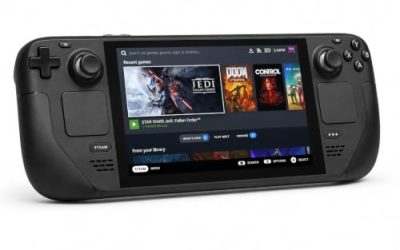
Valve rates Combat Mission: Red Thunder Unsupported on Steam Deck, and SteamOS separately Unsupported. One evidence note: Valve’s own compatibility endpoint returned garbled bytes on repeated reads this session, so the verdict and its paperwork were read through SteamDB’s republication of Valve’s record for this app, the fallback route this project has used before.
The paperwork has one unusual virtue. The test is dated 27 January 2026 and was run on build 11458900, which is still the current public branch build — the branch has not moved since it was built in June 2023 — so the Unsupported badge grades exactly the build on sale today, not a superseded one. The sheet’s recommended runtime is a Proton 10.0 beta, and its deductions are the interface kind: the game requires manually invoking the on-screen keyboard for text entry, and it can show non-Deck display glyphs. Combined with a record that lists no controller support at all, they describe a game built for a mouse, a keyboard and a desk — which is where the gear below is aimed.
The other storefront
A second edition does exist. GOG sells Combat Mission Red Thunder as a DRM-free release, verified on its live product page this session: the page names Battlefront as the developer, carries the same 15 June 2023 release date as the Steam record, and lists both expansions, Fire and Rubble and Battle Pack 1, beside the base game. Its compatibility line reads Windows only. So the GOG copy is a genuine alternative for players who want an offline installer, but it changes nothing about platforms: it is the same Windows build through a different shop, and no storefront sells a Linux edition of this game.
Gear for a desktop campaign
The record’s shape — no native build, no controller support, an Unsupported handheld verdict — points at a desk. The picks below are a keyboard and mouse first, storage second, and two pads included honestly for the rest of a library rather than for this game.
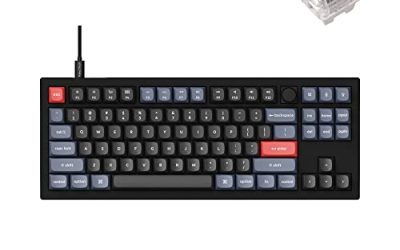
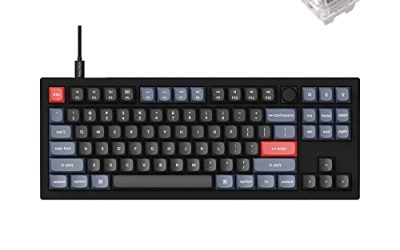
Keychron V3
The keyboard pick for long order-giving sessions: a tenkeyless board with QMK and VIA support lets you remap keys at the keyboard level, which keeps working across every Linux install you plug it into.
Specs
- Tenkeyless layout with rotary knob
- QMK and VIA remapping support
- Hot-swappable K Pro Brown switches
- Wired USB-C connection
- Maker-rated 1,000 Hz polling
Logitech G502 HERO
This is a mouse game above all: unit selection, waypoints and camera work all run through the pointer. Eleven programmable buttons cover the orders and camera inputs a long WeGo turn repeats.
Specs
- HERO optical sensor, up to 25,600 DPI
- 11 programmable buttons
- Adjustable weight system
- Wired USB connection
- On-board memory profiles
Samsung T9 Portable SSD 2TB
For moving a Linux game library between a desktop and a laptop, or keeping an offline backup of installers, a fast USB-C drive is the simple answer. The headline figure needs a Gen 2×2 host port; on a lesser port the drive runs at that ceiling instead.
Specs
- Capacity: 2 TB portable SSD
- Interface: USB 3.2 Gen 2×2, USB-C connector
- Maker-rated speeds: up to 2,000 MB per second read, 1,950 MB per second write
- Features: Dynamic Thermal Guard, maker-rated drop resistance
8BitDo Ultimate 2 Bluetooth Controller

Not for this title — the record lists no controller support — but a strong desk-side pad for the controller-friendly half of a strategy library, with modern sticks, triggers and back buttons.
Specs
- Connectivity: Bluetooth wireless and USB-C wired
- Joysticks: TMR electromagnetic, anti-drift design
- Triggers: Hall effect, with mode switching
- Extras: two remappable back buttons, motion control
- In the box: charging dock included
Xbox Wireless Controller, Carbon Black
The safest guest pad in PC gaming: Steam Input support is universal and the glyphs match what most games display. Like the pad above, it earns its place in a wider library, not in a Red Thunder session.
- Connectivity: Xbox Wireless and Bluetooth
- Port: USB-C for wired play
- Controls: hybrid D-pad, dedicated Share button
- Power: AA batteries or optional rechargeable pack
How to choose
Choose the Steam copy if you want the build both compatibility records describe and the expansions one purchase away; choose the GOG copy if a DRM-free offline installer matters more, accepting the same Windows build and the same Proton route. On a Linux desktop, install under Proton and start from the default compatibility tool: the community file is small, but its best reports reach Platinum and nothing in it reports a blocker. Set expectations around the input, not the performance: the game expects a mouse and a physical keyboard, and its own notes exclude virtualized environments. On Steam Deck, the honest advice is not to plan around it: Valve’s Unsupported verdict was earned on the build sold today.
Who should skip
Skip this one if you are shopping for a native Linux wargame: no layer of the record offers one, and neither expansion changes that. Skip it if your only machine is a Steam Deck, because Valve rates the game Unsupported and its interface deductions are structural, not settings-deep. Skip it if a four-report community file is not evidence enough for you — the ProtonDB sample here is genuinely thin, and waiting for a larger file is a defensible choice. And skip it if you need a controller-first experience; the record lists no controller support at all.
FAQ
Is Combat Mission: Red Thunder native on Linux?
No. Steam’s record flags Windows only, its single purchase package repeats that mask, the depot table holds no Linux build, and the Mac and Linux requirements fields are empty lists outright. No Linux edition exists on any storefront.
How well does it run under Proton?
ProtonDB’s summary reads Gold on the headline and trending tiers and Platinum on the best-reported tier, but the file holds only four reports and ProtonDB rates its own confidence as low. Read it as an encouraging small sample, not a settled grade.
Can I play it on Steam Deck?
Valve rates the game Unsupported on Steam Deck and on SteamOS, tested in January 2026 on the same build the store sells today. The sheet flags manual keyboard invocation and non-Deck glyphs, and the game lists no controller support, so it is best treated as a desktop title.
Is there a GOG version, and does it help Linux players?
Yes, GOG sells the game and both expansions as a DRM-free edition, verified on its live product page. It is Windows only there too, so it offers an offline installer, not a Linux build.
Final verdict
Combat Mission: Red Thunder is a Windows-only release with a clean, unambiguous record: one package, two depots, empty non-Windows fields, two expansions in full agreement, and no stray flags or leftover artwork anywhere to misread. Linux players are offered a workable desktop route instead — a Gold community file whose thinness is stated on its face, a DRM-free GOG alternative for the installer-minded, and a Steam Deck verdict that is honestly negative and honestly current. Buy it for a Linux desktop under Proton if the Eastern Front at battalion scale is what you are after, and leave the handheld out of the plan.
Product and ASIN Reference
| Product | ASIN |
|---|---|
| Keychron V3 | B0B2DMMMG2 |
| Logitech G502 HERO | B07GBZ4Q68 |
| Samsung T9 Portable SSD 2TB | B0CHFS9K14 |
| 8BitDo Ultimate 2 Bluetooth Controller | B0F194QFT2 |
| Xbox Wireless Controller, Carbon Black | B08DF248LD |