Stronghold Crusader HD is Firefly Studios’ high-resolution re-release of the 2002 desert-castle RTS, bundling the original Crusader campaigns and trails with Crusader Extreme, its raised unit cap and tactical powers. Its Steam record is one of the plainest in the Stronghold catalogue: every layer describes a Windows game, and nothing else. There is no Linux build hiding in a bundle, a depot or a second storefront.
That makes the Linux question a Proton question, and on that side the record is unusually deep. The community file is the largest of any Stronghold title, Valve has tested the game on Steam Deck and published a badge, and a second storefront sells the same Windows build. This piece reads each layer on its own terms: flags and packages, depots, the Proton file, the Deck sheet and the GOG record.
As an Amazon Associate, we earn from qualifying purchases.
Quick answer
Stronghold Crusader HD is not native on Linux: Steam’s record is Windows-only at the flag, package and depot layers, with empty Mac and Linux requirement fields. The route is Proton: ProtonDB rates the Windows build Gold across 95 reports, and Valve rates it Playable on Steam Deck. GOG sells the same Windows build.
What the Steam record actually sells
Start with the decisive layer, the purchase package. Steam sells Stronghold Crusader HD in its own package, and that package reads windows true, mac false, linux false, granting the base app alone. The game’s two bundle appearances repeat the mask: the Stronghold Collection package and the Stronghold Crusader 2 Ultimate Edition package both read Windows-only as well. No route into this game on Steam delivers anything but the Windows build.
The app-level record agrees. The platform flags read Windows alone. The Windows requirements field is genuinely populated with a period specification — a 1.6 GHz Pentium 4 class processor, 512 MB of RAM, a 64 MB graphics card — while the Mac and Linux requirements fields are empty lists outright: not shells, not copied Windows text, just absent. The icon set carries the standard client icon and logo art, and no Linux client icon.
The depot list closes the question. SteamDB lists a main content depot of about 726 MB plus one language depot per supported language, for roughly 1.7 GB in total. Every depot is Windows content; there is no Linux depot, no macOS depot, and nothing emptied or stranded. The record also exposes no DLC array, and SteamDB associates no add-on apps with this game, so no expansion, soundtrack or demo app exists whose flags could disagree with the base game. The family is size zero.
Two absences are worth naming exactly. The record carries no third-party DRM notice and no external account notice: nothing asks for a second launcher or a publisher account. And it lists no controller support at all — no controller-support field is present — which matters for how the Deck badge below should be read.
The Proton file: Gold, deep, and with a stray heading
ProtonDB’s summary for this app is the strongest in the series. The headline tier is Gold, the best-reported tier is Platinum, the trending tier is Gold, and the file holds 95 reports with strong confidence — a deep sample that makes the Gold headline a settled community verdict rather than a handful of lucky installs.
One part of the ProtonDB page should not be followed. The page heads its requirements block with a “Natively Supports:” label, which a reader could take as a claim that a native build exists. It does not: Steam’s flags, package, fields and depots all say Windows-only, and this article follows Steam. The reports beneath the heading are all grading the Windows build through Proton.
The report texture fits a Gold file on an old DirectX-era engine. Single-player filings on current Proton versions describe the campaigns and skirmish trails running well. The recurring frictions are window-shaped: alt-tabbing can leave a black screen, fixed in several filings by running a virtual desktop through winecfg or by wrapping the game in gamescope. Audio can go missing on some Proton branches, with the Hotfix branch named as the cure. Multiplayer is the one real project: the official servers are long gone — SteamDB flags the record NoServers — and filings that play online or over LAN do it by installing DirectPlay through protontricks. None of that is a compatibility block; it is the normal archaeology of a 2002 multiplayer stack.
Steam Deck: Playable, on paperwork from an older build
Valve’s own endpoint returned garbled data on repeated reads in this session, so the verdict here is read through SteamDB’s republication of Valve’s test sheet. The sheet rates the game Playable on Steam Deck, with SteamOS separately marked Compatible, and recommends the stable Proton runtime.
The deductions are the familiar ones for a mouse-and-keyboard RTS of this age. The game sometimes shows mouse, keyboard or non-Deck controller icons instead of Deck glyphs; entering some text requires manually invoking the on-screen keyboard; and some in-game text is small and may be difficult to read. Against those, Valve records that all functionality is accessible with the default controller configuration and that the default graphics configuration performs well. Because the record lists no controller support, that default configuration is Steam Input translating the Deck’s controls into mouse and keyboard input — and the ProtonDB Deck filings recommend choosing a community layout.
The paperwork needs one honest caveat. Valve’s test was run in November 2022 against the build current then; the public branch has since moved to a newer build, updated in June 2026, so the sheet grades an older build than the one on sale today. The badge stands — Valve has not withdrawn it — but the test does not cover the current build.
The GOG copy
GOG sells this game, and finding that out takes more care than a search box. GOG’s own search endpoints return nothing for the title — the products API search and the embed storefront search both come back empty — and the obvious product address redirects to the general catalogue. Neither result was relied on. The live product page sits under the shorter slug “stronghold_crusader”, its page title reads Stronghold Crusader HD, and the GOG product API record behind it reads windows true, osx false, linux false.
So the GOG edition exists and is Windows-only: the same build, sold DRM-free, with no Linux or Mac copy behind it. It changes nothing about the platform answer, but it is a genuine second buying route.
Gear that fits the record
The picks below follow the record’s shape: the handheld Valve tested, two pads that work through Steam Input for docked play, a mouse for the desktop sessions this RTS was designed for, and library storage.
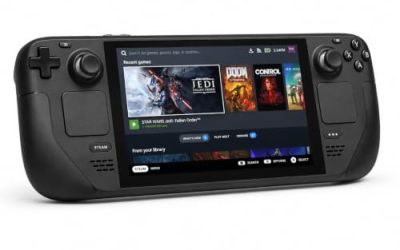
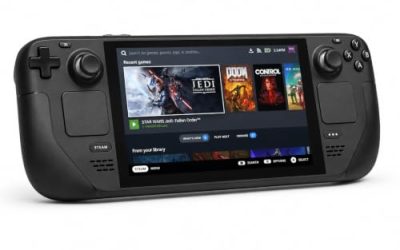
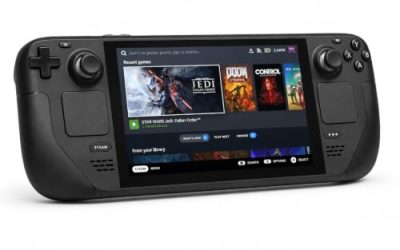
Valve Steam Deck OLED 512GB

The device the Playable badge was written for. Crusader HD’s published minimums are trivial next to the Deck’s hardware, and Valve’s sheet confirms the default graphics perform well; the work is in the controls, where a community layout earns its keep.
Specs
- Display: 7.4-inch HDR OLED, 1280 by 800, up to 90 Hz
- Processor: AMD Zen 2 and RDNA 2 custom APU
- Memory: 16 GB LPDDR5
- Storage: 512 GB NVMe, plus a microSD slot
- Wireless: Wi-Fi 6E and Bluetooth
- Channel note: Valve sells the Deck mainly through its own store, so Amazon listings are third-party sellers
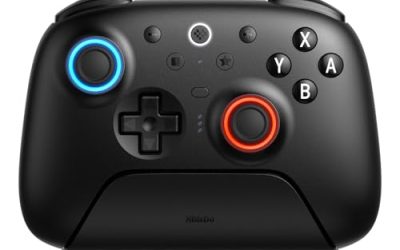
8BitDo Ultimate 2 Bluetooth Controller
A docked-play pad for a game whose record claims no controller support: everything it does here runs through Steam Input, so the value is the hardware itself — anti-drift sticks, Hall effect triggers and two back buttons for camera and grouping shortcuts.
Specs
- Connectivity: Bluetooth wireless and USB-C wired
- Joysticks: TMR electromagnetic, anti-drift design
- Triggers: Hall effect, with mode switching
- Extras: two remappable back buttons, motion control
- In the box: charging dock included
Xbox Wireless Controller, Carbon Black
The second pad is the safe default: Steam Input handles it everywhere, it pairs over Bluetooth or its own wireless standard, and it is the controller most guests already know how to hold.
- Connectivity: Xbox Wireless and Bluetooth
- Port: USB-C for wired play
- Controls: hybrid D-pad, dedicated Share button
- Power: AA batteries or optional rechargeable pack
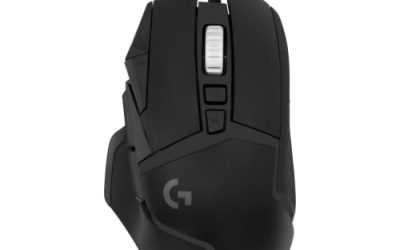
Logitech G502 HERO
Crusader HD was designed around a mouse: walls are drawn, troops are boxed and siege lines are placed by cursor. A precise wired mouse with eleven programmable buttons is the input this game asks for at a desk.
Specs
- HERO optical sensor, up to 25,600 DPI
- 11 programmable buttons
- Adjustable weight system
- Wired USB connection
- On-board memory profiles
Samsung T9 Portable SSD 2TB
The whole game is under two gigabytes, so this drive is about the library around it: moving a Steam collection between a desktop and a Deck dock, or keeping offline backups. The headline speed needs a Gen 2×2 host port; lesser ports cap it at their own ceiling.
Specs
- Capacity: 2 TB portable SSD
- Interface: USB 3.2 Gen 2×2, USB-C connector
- Maker-rated speeds: up to 2,000 MB per second read, 1,950 MB per second write
- Features: Dynamic Thermal Guard, maker-rated drop resistance
How to choose
Choose the Steam copy if you want the route both records describe: it is the build ProtonDB’s 95 reports grade and the build Valve tested, and Steam Cloud saves are on its record. Choose the GOG copy if you prefer a DRM-free installer and accept running the identical Windows build through the same Proton layer. Either way, budget a few minutes of setup: pick a community controller layout on Deck, expect the on-screen keyboard for text entry, and if multiplayer matters, plan the DirectPlay step through protontricks before the session, not during it. On a desktop, a mouse is not optional; it is the intended controller.
Who should skip
Skip this re-release if you are holding out for a native Linux port: the record gives no sign one exists or is coming, at any layer, on either storefront. Skip it if your only machine is a Deck and small text plus a manually invoked keyboard will wear on you across hundred-mission trails. Skip it if your interest is online play as it shipped in 2002 — the official servers are gone, and what remains is community plumbing. And if you already own the Definitive Edition covered elsewhere in this catalogue, read that record before buying a second Crusader: they are different apps.
FAQ
Is Stronghold Crusader HD native on Linux?
No. Steam’s flags, purchase package, requirements fields and depot list all describe a Windows-only game, and the Mac and Linux fields are empty lists. The Linux route is Proton, where the Windows build holds a Gold headline on ProtonDB.
How well does it run under Proton?
Well, by the deepest sample in the series: Gold headline, Platinum best-reported, 95 reports, strong confidence. The recurring fixes are a virtual desktop for alt-tab behaviour, the Hotfix branch if audio goes missing, and a DirectPlay install through protontricks for multiplayer.
Is it good on Steam Deck?
Valve rates it Playable, with all functionality accessible under the default configuration and default graphics performing well. The caveats are non-Deck glyphs, small text and manual keyboard invocation — and the sheet dates from November 2022, before the current public build.
Does GOG sell a Linux version?
No. GOG sells Stronghold Crusader HD — its product record reads Windows-only, with no Mac or Linux copy. GOG’s search returns nothing for the title, which is a search blind spot, not an absence; the edition exists and is the same Windows build Steam sells.
Final verdict
Stronghold Crusader HD on Linux is a closed question at the record level and an easy one in practice. There is no native build on Steam or GOG, no DLC app, and no account or DRM layer in the way. What exists is a Windows build with a Gold Proton file across 95 reports and a Playable Deck badge — paperwork from an older build, but a badge that still stands. Buy either copy, run it through Proton, and bring a mouse.
Product and ASIN Reference
| Product | ASIN |
|---|---|
| Valve Steam Deck OLED 512GB | B0CQ3RWQQZ |
| 8BitDo Ultimate 2 Bluetooth Controller | B0F194QFT2 |
| Xbox Wireless Controller, Carbon Black | B08DF248LD |
| Logitech G502 HERO | B07GBZ4Q68 |
| Samsung T9 Portable SSD 2TB | B0CHFS9K14 |