Combat Mission Shock Force 2 is Battlefront’s modern-warfare entry in the Combat Mission series, a battalion-level simulation of a hypothetical NATO campaign in Syria built around the WeGo system, where both sides plot a minute of orders and then watch them resolve together. It reached Steam on 31 August 2020 under publisher Matrix Games, the Slitherine group label, and has kept growing since, most recently with a Battle Pack expansion in February 2026.


For a Linux player the question is narrow: does any part of that record amount to a Linux version? This article reads the record layer by layer — package, flags, requirements fields, depot table, expansion family, anti-cheat sources, ProtonDB file and Steam Deck sheet — and reports what each layer says.
As an Amazon Associate, we earn from qualifying purchases.
Quick answer
No. Combat Mission Shock Force 2 sells on Steam as a Windows-only game: its purchase package, platform flags and all four expansions read Windows-only, and no Linux depot exists. On a Linux desktop the route is Proton, where 13 reports give a Gold headline and a Platinum best-reported tier. Valve rates the game Unsupported on Steam Deck.
The record, layer by layer
The decisive layer is the purchase package, because that is what a buyer receives. Shock Force 2 has exactly one, package 480294, and it reads windows true, mac false, linux false. The app-level platform flags repeat the same three values, so the two layers that govern a sale agree without qualification: a purchase today delivers the Windows build and nothing else.
The requirements fields tell the same story by omission. The Windows field is genuinely populated — Windows 11 as the stated operating system, a Pentium IV 1.8 GHz processor, 4 GB of RAM, a 256 MB graphics card with OpenGL support, 10 GB of storage — while the macOS and Linux fields are empty lists outright. There is no Linux tab in any form, and no leftover paperwork suggesting a port was ever specced. One Windows-field line deserves quoting for this audience: the publisher’s own notes state the game does not work in a virtualized environment, closing the virtual-machine detour on the record itself.
The depot table is just as plain. SteamDB lists two depots: a content depot of 4.57 GiB and a production depot of 89.58 MiB, 4.66 GiB on disk in total, neither carrying a Linux configuration. There is no Linux depot of any size, emptied or stranded, and the only redistributable is the Windows .NET 4.7 package. The icon set registers no LinuxClientIcon either. This is the plainest not-native shape: no ghost build, no populated field, no stranded depot — absence at every layer.
Four expansions, one answer
The expansion family holds four apps, each read individually. Marines, British Forces and NATO Forces arrived on launch day; the Battle Pack followed in February 2026. All four flag windows true, mac false, linux false — 4/4 agreement, zero dissent. SteamDB’s downloadable-content listing names the same four apps and nothing outside the array, so no soundtrack or artbook app hides at the family’s edge. A buyer weighing the complete edition is weighing five Windows-only records, not four exceptions and a port.
The account layer is not anti-cheat
Three anti-cheat sources were checked, and the honest summary is silence. Steam’s record names no anti-cheat: no anti-cheat category, no DRM notice. SteamDB’s technology detection finds only the SteamworksNET SDK. The AreWeAntiCheatYet dataset, all 1,167 games of it, carries no entry for this app. None of that is a ruling that the game is unprotected; it is the absence of any named system in the places such systems are named.
What the record does name is an account layer: the external account notice reads “Slitherine PBEM++ for Multiplayer”, with Steam account linking supported. PBEM++ is Slitherine’s play-by-email service, the series’ asynchronous multiplayer backbone — an account system, not anti-cheat. It matters practically: the multiplayer route on Linux runs through it, and the ProtonDB file below shows it working.
ProtonDB: a Gold file with a Platinum ceiling — and one wrong heading
ProtonDB’s summary for this app was read in full. The headline tier is Gold, the best-reported tier is Platinum, the trending tier is Platinum, across 13 reports with moderate confidence. The texture underneath splits by era. The newest filings, on current Proton builds, report the game installing and working fine out of the box. Older filings document the failure mode that held the headline at Gold: OpenGL initialization errors on some NVIDIA setups, worked around in one report by forcing the Mesa software path through a launch option, and an OpenGL driver error on an earlier Proton that a community build resolved. One Steam Deck filing reports the game playing well with a custom control layout and rates PBEM++ multiplayer Excellent, while noting Steam Cloud saves failing to sync.
One page element must be named as wrong. ProtonDB’s game page heads its requirements block “Natively Supports:”, a claim Steam’s record contradicts at every layer above — package, flags, fields and depots all read Windows-only. The heading check was completed and the heading is a labelling artefact; the article follows Steam, as it always does when the two disagree.
Steam Deck: an Unsupported badge from another era
Valve’s own compatibility endpoint returned garbled bytes on repeated reads this session, so the Deck sheet was read through SteamDB’s republication of Valve’s data, the fallback route disclosed here. The verdict is Unsupported for the Deck and Unsupported for SteamOS separately, with the result token stating that SteamOS does not support the game, and proton-stable as the recommended runtime.
The paperwork, though, is old. The test is dated 10 February 2022 and ran on build 5437466. The current public branch build is 21967996, built in February 2026 — the game has been patched for four more years, and a whole expansion has shipped, since Valve last looked. That makes the badge a supplement candidate in this project’s terms: a real verdict grading a build nobody can buy anymore. The tension deserves its proper weight — the official sheet says Unsupported, while the one Deck filing in the ProtonDB file, on a newer Proton, reports the game playing great once a custom control scheme is set up. The badge governs what a buyer should expect; the filing is texture, not a verdict.
The second storefront
GOG sells this game. The natural product address resolves to a live product page carrying the Battlefront copyright line and the Syria campaign description, and GOG’s product record — identity-checked by title and slug — lists system compatibility as Windows only, macOS and Linux both false. So the DRM-free route exists, and it is the same Windows build: useful for a buyer who wants an offline installer to run under Proton, useless for anyone hunting a native copy. No such copy exists on either storefront.
Desktop gear for a Windows build
The record lists no controller support at all, and this is a mouse-driven wargame, so the picks below are framed for a desk: keyboard and mouse first, pads only for the wider library, fast storage for a growing install.
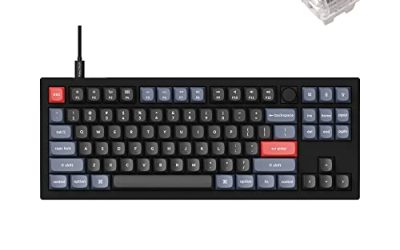
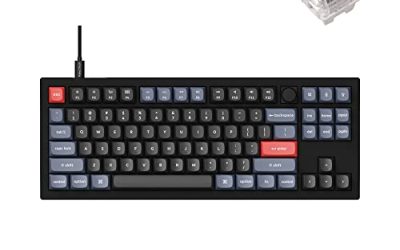
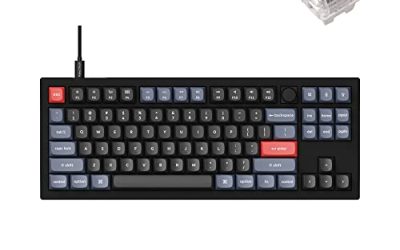
Keychron V3
The keyboard pick for desktop sessions: a tenkeyless board with QMK and VIA support lets you remap keys at the keyboard level, which keeps working across every Linux install.
Specs
- Tenkeyless layout with rotary knob
- QMK and VIA remapping support
- Hot-swappable K Pro Brown switches
- Wired USB-C connection
- Maker-rated 1,000 Hz polling
Logitech G502 HERO
The primary input pick. WeGo planning is a mouse discipline — plotting waypoints, checking lines of sight, scrubbing the replay — and eleven programmable buttons cover the camera and orders inputs.
Specs
- HERO optical sensor, up to 25,600 DPI
- 11 programmable buttons
- Adjustable weight system
- Wired USB connection
- On-board memory profiles
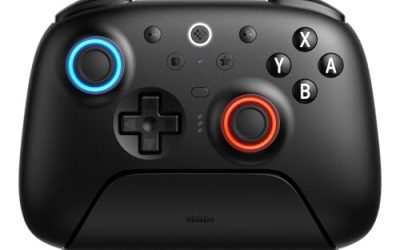
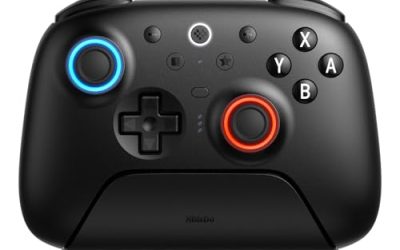
8BitDo Ultimate 2 Bluetooth Controller

A wider-library pick rather than a Shock Force 2 input: the game wants a mouse, but a modern pad covers the rest of a Linux library, with up-to-date sticks, triggers and back buttons.
Specs
- Connectivity: Bluetooth wireless and USB-C wired
- Joysticks: TMR electromagnetic, anti-drift design
- Triggers: Hall effect, with mode switching
- Extras: two remappable back buttons, motion control
- In the box: charging dock included
Xbox Wireless Controller, Carbon Black

The safest guest pad in PC gaming: Steam Input support is universal, glyphs match what most games display, and it pairs over Bluetooth or its own wireless standard.
- Connectivity: Xbox Wireless and Bluetooth
- Port: USB-C for wired play
- Controls: hybrid D-pad, dedicated Share button
- Power: AA batteries or optional rechargeable pack
Samsung T9 Portable SSD 2TB

For moving a Linux game library between machines, or keeping an offline backup of installers, a fast USB-C drive is the simple answer. The headline figure needs a Gen 2×2 host port; on a lesser port it runs at that ceiling.
Specs
- Capacity: 2 TB portable SSD
- Interface: USB 3.2 Gen 2×2, USB-C connector
- Maker-rated speeds: up to 2,000 MB per second read, 1,950 MB per second write
- Features: Dynamic Thermal Guard, maker-rated drop resistance
How to choose
Choose the Steam copy if you want the PBEM++ account wired to your Steam identity and the expansion family in one library; choose the GOG copy if an offline installer matters more, knowing the build inside is the same Windows one. Either way, plan on Proton: current builds carry the Gold headline, and recent filings run out of the box. Budget a few minutes for the known wrinkle — if an NVIDIA system throws an OpenGL initialization error, the ProtonDB file documents the launch-option workaround. Buy the base game first and add expansions as the theatres you want expand; every one is the same Windows-only proposition.
Who should skip
Skip this one if you are shopping for a native Linux wargame: the record is unanimous and there is no port to wait for. Skip it if Steam Deck is your only machine — Valve’s badge says Unsupported, and one encouraging filing does not overturn a verdict. Skip it if you intended to run it inside a virtual machine, because the publisher’s requirements rule that out. And skip it if you need a controller-first experience: the record lists no controller support, and the game is built around mouse plotting.
FAQ
Is Combat Mission Shock Force 2 native on Linux?
No. The purchase package, platform flags, requirements fields and depot table all read Windows-only, and all four expansions agree. There is no Linux build on Steam or GOG.
How well does Shock Force 2 run under Proton?
ProtonDB’s full summary gives a Gold headline with Platinum as both the best-reported and trending tier, from 13 reports at moderate confidence. Recent filings on current Proton builds report out-of-the-box play; the documented wrinkle is an OpenGL initialization error on some NVIDIA setups, with a launch-option workaround on file in the same reports.
Why is the Steam Deck badge Unsupported if a Deck report says it plays well?
Valve’s test dates to February 2022 and graded a build from that era; the game has since been patched for years and gained an expansion. The badge is the official expectation to buy against; the newer filing is community texture.
Does Shock Force 2 use anti-cheat?
No anti-cheat is named anywhere in the record: Steam lists none, SteamDB detects only the SteamworksNET SDK, and the AreWeAntiCheatYet dataset has no entry for the game. The named layer is the Slitherine PBEM++ account, which handles play-by-email multiplayer — an account system, not anti-cheat.
Final verdict
Combat Mission Shock Force 2 is a Windows game with a healthy Proton afterlife, and the record leaves no room for a more generous reading. Every delivery layer — package, flags, fields, depots, all four expansions — reads Windows-only, and GOG’s edition repeats the verdict. What a Linux desktop buyer gets instead is a Gold-rated Proton file whose newest reports run clean, a working PBEM++ multiplayer route, and a publisher still shipping expansions in 2026. Buy it as a Proton title on a desktop, mouse in hand, and it is a sound purchase. Buy it expecting a port, or a Deck game, and you will be disappointed.
Product and ASIN Reference
| Product | ASIN |
|---|---|
| Keychron V3 | B0B2DMMMG2 |
| Logitech G502 HERO | B07GBZ4Q68 |
| 8BitDo Ultimate 2 Bluetooth Controller | B0F194QFT2 |
| Xbox Wireless Controller, Carbon Black | B08DF248LD |
| Samsung T9 Portable SSD 2TB | B0CHFS9K14 |