

The best RX 9060 XT gaming PC for most buyers is one that names the 16GB version of the card, pairs it with at least 16GB of RAM and a 1TB SSD, and shows a recognizable power supply. Several listings in this group fit that description, but they differ a lot in platform age, cooling and price tier. Others use the 8GB version of the same card name, and two listings are separate graphics cards rather than computers. Below, each title is read for what it states, with plain notes on what is missing and what to confirm before you order.
Top picks at a glance

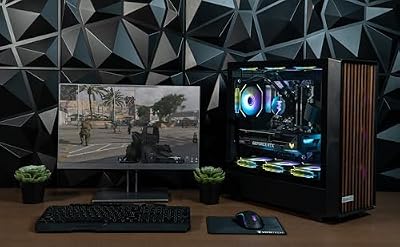
VIPRTECH Overlord 2.0 Gaming PC, Ryzen 9 3900X, 9060xt16GB Onyx Black | Liquid Cooled, 32GB DDR4, 1TB SSD


As an Amazon Associate we earn from qualifying purchases. Product prices and availability are accurate as of the date/time indicated.

MINISFORUM G1 Pro-89A6 Gaming Mini PC 32GB DDR5 1TB SSD,Ryzen 9 8945HX | 16C/32T,up to 5.4GHz,Radeon RX 9060 XT 16GB GDDR6,2xHDMI +DP2.1+DP1.4 Output,5GbE,Wi-Fi 7,Quad 4K,240W Performance Gaming PC


As an Amazon Associate we earn from qualifying purchases. Product prices and availability are accurate as of the date/time indicated.
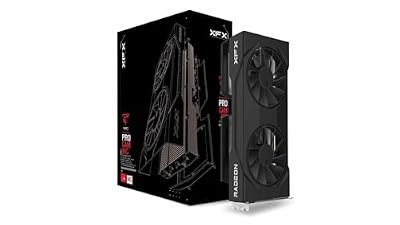
XFX Swift AMD Radeon RX 9060 XT OC Gaming Edition with 16GB GDDR6 HDMI 2xDP, RDNA 4 RX-96TSW16BQ, Graphics Card, Compatible with Desktop PCs



As an Amazon Associate we earn from qualifying purchases. Product prices and availability are accurate as of the date/time indicated.
| Model | Key point from the title | Price tier | Best for |
|---|---|---|---|
| HOENGAGER AI, Ryzen 7 7800X3D | RX 9060 XT 16GB, 32GB DDR5, 850W PSU | Premium | Buyers who want a stronger platform |
| KOTIN, Ryzen 5 9600X | 16GB card, DDR5, 650W 80+ Gold PSU | Mid-range | Balanced 1080p and 1440p play |
| HOENGAGER Panorama, Ryzen 7 5700X | 16GB card, 240mm AIO, DDR4 | Mid-range | Liquid cooling on an older platform |
| VIPRTECH Overlord 2.0, Ryzen 9 3900X | Liquid cooled, 32GB DDR4, card name typo’d | Not stated | Shoppers who verify the listing first |
| MINISFORUM G1 Pro-89A6 | Mini PC, Ryzen 9 8945HX, 32GB DDR5 | Not stated | Small-space setups |
| Skytech Gaming Storm | 8GB card, 650W Gold, ambiguous CPU wording | Mid-range | Brand-name prebuilt on 8GB |
| Skytech Gaming Edge, Ryzen 5 5500 | 8GB card, 650W Gold, 1TB NVMe | Budget | Entry price for the card name |
| Qehi, Ryzen 7 | 8GB card, 512GB SSD, CPU model unnamed | Budget | Light gaming and home office |
| XFX Swift OC Triple Fan 16GB | Graphics card only (off-type) | Component | Upgrading a compatible PC |
| XFX Swift OC Gaming Edition 16GB | Graphics card only (off-type) | Component | Upgrading a compatible PC |
What is changing in this category
Midrange graphics cards are increasingly sold in two memory sizes under one name, and prebuilt sellers use that to build cheaper and dearer versions of the same tower. The practical effect is that “RX 9060 XT” in a title tells you less than it used to. The memory figure matters: a 16GB card gives more room for high texture settings and 1440p, while an 8GB card is more likely to hit a ceiling in newer, memory-hungry games. Recent cards in this tier also support newer upscaling and frame generation techniques, though how well they work varies by game, so check what your favorite titles support.
The second change is a split in platforms. Some sellers pair the newest card with a current processor generation and DDR5 memory, while others reuse older Ryzen chips and DDR4 to hit a lower price. An older platform can still play games well, especially at higher resolutions where the graphics card does most of the work, but it limits upgrade paths and can hold back frame rates in processor-heavy titles. Liquid cooling and mini PC designs are also more common, which adds quiet or compact appeal and new questions about maintenance and noise. Rivals from other makers compete in the same tier, so comparing with an RTX 5060 class card is worthwhile; our comparison that includes Intel Arc Battlemage, the RTX 5060 and the RX 9060 XT is a good place to start.
How we picked these
We read each listing title for the card name and memory size, processor, RAM type, storage, power supply, cooling and any marketing label. Our basis is published specifications, manufacturer documentation and buyer reviews, plus general knowledge of how these parts behave. Nobody on the team used or measured these units. All specs below are seller claims taken from titles, and anything not in a title is marked “check the listing”.
HOENGAGER AI Gaming PC, Ryzen 7 7800X3D, RX 9060 XT 16GB, 32GB DDR5
This is the strongest platform on paper: a 7800X3D processor, 32GB of DDR5, a 1TB PCIe SSD and an 850W power supply, with software-controlled ARGB fans. The “AI” in the name is a marketing label, and the title does not explain it. It suits buyers who play processor-heavy games and want room to upgrade the graphics card later.
One thing to weigh is balance. A very strong processor next to a midrange graphics card means many games will be limited by the card, not the chip, so the extra platform spend pays off mostly in processor-heavy genres, in streaming while playing, and in the years ahead when a stronger card could be dropped in.
Use scenario: a 1440p gamer who also streams and wants a platform that will outlast the first graphics card.
Pros
- Current-style platform with DDR5.
- 850W PSU gives upgrade headroom.
- 16GB card and 32GB RAM.
Cons
- Highest price tier of the priced complete PCs.
- The PSU brand and cooler type are not stated.
Check the listing: cooler type, PSU brand and the warranty length. Ask before buying: what does “AI” actually include, if anything?
KOTIN Gaming PC Desktop, Ryzen 5 9600X, RX 9060 XT 16GB, 16GB DDR5
KOTIN pairs a Ryzen 5 9600X with the 16GB card, 16GB of DDR5 and a 1TB SSD, and it states a 650W 80+ Gold PSU. The title targets 1080p and 1440p gaming and streaming. That focus is realistic for this card class. The 16GB of RAM is workable, though people who multitask may want more.
The title is also candid about intent: 1080p and 1440p, with streaming as a secondary use. That is a fair description of what a card in this class is built for, and it avoids the 4K claims that some sellers attach to similar machines.
Use scenario: a first serious gaming PC where the buyer wants a stated PSU rating and a newer processor without paying for extras.
Pros
- Stated 80+ Gold PSU.
- Newer processor and DDR5.
- Clear resolution target in the title.
Cons
- 16GB RAM is modest for multitasking.
- Cooler type is not named.
Check the listing: case airflow, cooler and the RAM configuration. Ask before buying: is a RAM upgrade covered by the warranty?
HOENGAGER Panorama Prebuilt Gaming PC, Ryzen 7 5700X, RX 9060 XT 16GB, 240mm AIO
The Panorama pairs the 16GB card with a Ryzen 7 5700X, 32GB DDR4, a 1TB NVMe SSD and a 240mm AIO liquid cooler with software-controlled ARGB fans. The processor and DDR4 point to an older platform than the premium listing, so the card will be paired with a slower foundation. It suits buyers who want liquid cooling and generous memory in the middle of the price range.
Because the same seller offers a newer-platform tower in this set, the Panorama is best read as the cooler-and-memory-focused alternative rather than the performance-first one. If liquid cooling is not important to you, the platform difference may be the deciding factor.
Use scenario: a 1440p player who values a quiet case and plans to keep the system for a few years.
Pros
- 240mm AIO and 32GB RAM are both stated.
- 16GB card.
Cons
- Older platform and DDR4.
- PSU wattage is not given.
Check the listing: PSU brand and rating, and warranty terms on the cooler. Ask before buying: what is the upgrade path from this processor?
VIPRTECH Overlord 2.0 Gaming PC, Ryzen 9 3900X, “9060xt16GB”, Liquid Cooled
Here, “9060xt16GB” omits “RX” and runs the model and memory together, so the listing is typo-prone; ask the seller to confirm it is an RX 9060 XT 16GB. The title adds 32GB of DDR4 and a 1TB SSD, with liquid cooling stated but no radiator size. A Ryzen 9 3900X name suggests an older processor generation than those on newer listings.
The Overlord name and the “2.0” suggest a revised model, but the title gives no further explanation of what changed. Ask what the revision includes, and whether the stated 32GB of DDR4 runs as two matched modules.
Use scenario: a buyer who likes a high-core-count older chip for multitasking and will verify every detail first.
Pros
- 32GB RAM and liquid cooling are named.
- High-end processor tier within its generation.
Cons
- Typo-prone GPU wording.
- PSU and radiator size not stated.
Check the listing: the exact GPU, PSU, cooler size and platform age. Ask before buying: is a written parts list available?
MINISFORUM G1 Pro-89A6 Gaming Mini PC, Ryzen 9 8945HX, RX 9060 XT 16GB
The title lists 32GB DDR5, a 1TB SSD, a 16-core, 32-thread processor up to 5.4GHz, multiple display outputs, 5GbE, Wi-Fi 7 and a 240W figure. As a mini PC it saves desk space, but compact cases usually mean tighter cooling and limited upgrades. The title does not say how the graphics are implemented or whether memory and storage can be changed.
The multiple display outputs, including more than one DisplayPort and two HDMI ports, plus “Quad 4K” wording, make it attractive for multi-monitor desks. Whether the card can drive every output at once under gaming load is a question for the seller, not something the title answers.
Use scenario: a living-room or small-desk setup where size matters more than upgrading later.
Pros
- Compact footprint and strong connectivity.
- 32GB DDR5 and a 16GB card.
Cons
- Likely less upgradable and potentially louder under load.
- Cannot be treated as a normal desktop tower.
Check the listing: the cooling design, noise reports and what the 240W figure refers to. Ask before buying: can I swap the memory or SSD?
Skytech Gaming PC Storm, Ryzen 7, RX 9060 XT 8GB, 16GB RAM, 1TB SSD
The Storm has a 650W Gold PSU, DDR4 3200, Wi-Fi 5 and a 1TB NVMe SSD. The title repeats itself and mentions “AMD 5700” and “AMD 9060XT 8GB”, so treat the processor as unclear and confirm whether it is a Ryzen 7 5700-class chip. The card is the 8GB version, which matters at higher settings.
The listing stacks several descriptors in one long title, which makes it easy to misread. Pay special attention to the memory figure on the card and the processor line, then compare them with the Edge listing, which names its processor more cleanly.
Use scenario: a buyer who wants a known prebuilt brand and plans to play at 1080p with moderate textures.
Pros
- 650W Gold PSU stated.
- 1TB NVMe SSD.
Cons
- 8GB card and an older Wi-Fi standard.
- Unclear processor wording.
Check the listing: the exact processor and warranty. Ask before buying: is the 16GB card version available?
Skytech Gaming Edge Desktop PC, Ryzen 5 5500, RX 9060XT 8GB, 16GB DDR4
This one is very close to the Storm: same brand, 8GB card, DDR4 3200, 650W Gold PSU and 1TB NVMe SSD, but with a named Ryzen 5 5500 (4.2GHz boost). It sits in a lower price tier. The main difference between the two is a smaller, older processor, so compare them side by side.
The Edge is useful as a baseline. If its entry-level processor and 8GB card meet your needs, you avoid paying for upgrades you will not use; if not, the Storm and the 16GB listings show where the money goes.
Use scenario: an entry price for a current-generation card name, for 1080p play and lighter games.
Pros
- Named processor and PSU.
- Budget price tier with a 1TB NVMe drive.
Cons
- 8GB card and an entry processor.
- Near-duplicate of the Storm.
Check the listing: case airflow and RAM slots. Ask before buying: is it worth saving by accepting both an 8GB card and an older chip?
Qehi Gaming PC Desktop, Ryzen 7, RX 9060 XT 8GB, 16GB DDR4, 512GB SSD
The Qehi title names a Ryzen 7 without a model number, with the 8GB card, 16GB DDR4, a 512GB SSD and Wi-Fi 6, in white. It is marketed for gaming, live streaming, video editing and home office, which is broad for these specs. It suits cost-conscious buyers who accept entry-level memory and storage.
The title mixes gaming, streaming, video editing and home office, which suggests a general-purpose configuration. Video editing in particular benefits from more storage and RAM than 16GB and 512GB provide, so budget for expansion if that is a real use.
Use scenario: a small desk doing light editing and weekend gaming.
Pros
- Budget-tier position.
- White case with RGB for looks.
Cons
- CPU model, PSU and cooler are all unstated.
- 512GB fills quickly.
Check the listing: processor model, PSU wattage and warranty. Ask before buying: who is the actual seller and what support do they offer?
XFX Swift AMD Radeon RX 9060 XT OC Triple Fan Gaming Edition 16GB (graphics card only)
Off-type: this is a standalone graphics card, not a PC. It lists 16GB GDDR6, HDMI, two DisplayPort outputs and a triple-fan design on RDNA 4. It suits someone upgrading a compatible desktop. Confirm that your power supply, power connectors and case space can handle it, and have a qualified person help if unsure.
Because it is a component, the sensible comparison is against your current PC, not against the towers in this guide. Check the clearance in your case, read the card maker’s power connector requirements and switch the PC off and unplug it before installing, following the manufacturer’s instructions.
Pros
- Triple fan cooler and 16GB of memory.
- Useful for upgrades.
Cons
- Not a complete computer.
- Needs a compatible, sufficiently powerful PC.
Check the listing: card length and connectors. Ask before buying: is my power supply rated enough?
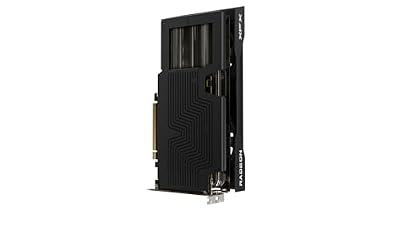
XFX Swift AMD Radeon RX 9060 XT OC Gaming Edition 16GB (graphics card only)
Also off-type, and a near-duplicate of the Triple Fan card above: the same series, memory and outputs, with a different model number and no triple-fan wording in the title. Treat the two as alternatives and compare the cooler design on the listing page.
If you are choosing between the two XFX cards, the title alone does not explain the difference beyond the model number and fan wording. Look at the listing page for card length, clock settings and warranty, and pick whichever fits your case and budget.
Pros
- 16GB card for upgrades.
- Priced in the same component tier as its sibling.
Cons
- Not a PC.
- Cooler configuration is unclear.
Check the listing: the number of fans and card dimensions. Ask before buying: which variant fits my case?
Buying guide: choosing an RX 9060 XT prebuilt
Memory size comes first
Because the same name covers 8GB and 16GB versions, read the number every time. At 1080p with moderate settings, 8GB can be adequate; at 1440p and high textures, 16GB gives more headroom. For a deeper look at how this card compares with a higher-tier alternative, see our RX 7900 GRE versus RX 9060 XT 16GB comparison, or RX 6600 XT versus RX 9060 XT if you are upgrading.
Platform age
Newer processors with DDR5 give more upgrade room, while older Ryzen chips with DDR4 are cheaper today but limit later changes. Older platforms can also run the card over an earlier slot generation; the effect is often small, but it is worth asking about. Quoted boost speeds are maximums, not constant clocks.
Cooling, including liquid
Liquid coolers add a pump and radiator that must be mounted properly. A 240mm AIO is common, but check the warranty, noise and clearance. Air-cooled towers are simpler. Do not open a PC while it is plugged in, and follow the manufacturer’s instructions for any maintenance.
Power supply
Look for brand, wattage and efficiency rating. A 650W Gold unit is a sensible stated baseline for this card class; 850W gives upgrade room. Unnamed power supplies deserve a question to the seller.
RTX 5060 class alternatives
If you are cross-shopping Nvidia systems, hold the rest of the specification constant: same memory size, similar processor tier, comparable PSU and warranty. The cards compete in a similar tier, but feature sets differ, including upscaling methods and ray tracing performance, and the right choice depends on the games you play. Use independent benchmark results for your titles, and do not treat a listing title as a performance comparison.
Near-duplicates and typos
The two Skytech towers are close cousins, the two XFX cards are close cousins, and the two HOENGAGER towers share a brand but differ in platform. The VIPRTECH title’s “9060xt16GB” and the Skytech Storm’s repeated wording both need confirmation. A Renewed label does not appear in these titles, but if any listing shows it, the condition and warranty must be checked on the listing page.
Worked example: power and storage
Assumptions (estimates): the card draws around 150 to 200 watts at peak, the processor 65 to 120 watts, and the rest 60 watts, giving 275 to 380 watts at peak. A 650W supply would run at roughly 42 to 58 percent of its rating, which leaves room. For storage, assume the operating system and drivers take 60GB and each large game 80 to 120GB: on 512GB you fit about four games, while on 1TB you fit about eight to ten. Confirm card power figures with the manufacturer.
| Spec concept | What to look for | Why |
|---|---|---|
| Card memory | 16GB for 1440p, 8GB only at 1080p | Texture headroom |
| Processor | Named model, recent generation if possible | Avoids bottlenecks |
| RAM | 16GB minimum, 32GB if multitasking | Smooth multitasking |
| Cooling | Type and radiator size stated | Noise and maintenance |
| PSU | Brand, wattage and rating | Stability and upgrades |
| Warranty | Length and who covers it | Protects against defects |
Mistakes buyers make
The biggest error is assuming every RX 9060 XT listing is the same card. Memory size changes the experience. Others pay for a premium label like “AI” without checking what it includes, overlook platform age because the graphics name is new, or buy a mini PC expecting desktop upgrade freedom. Some compare a graphics card listing to a full PC by price, forgetting that the card needs a compatible system. Many also skip the PSU line, trust a typo-prone title, or forget a warranty check for a liquid cooler.
Verdict by use case
For a future-proof platform, the HOENGAGER AI with its 7800X3D and 850W supply stands out. For balanced mid-range value with a stated Gold PSU, KOTIN is the clearest. For liquid cooling at mid-range, the Panorama fits. For compact setups, MINISFORUM suits, with caveats. For cheaper entry, the Skytech Edge and Qehi offer the 8GB card at lower tiers. Upgraders with a compatible PC should consider the XFX cards. Check VIPRTECH and the Storm listings for wording issues first.
Frequently asked questions
Is 16GB or 8GB better on an RX 9060 XT gaming PC?
For most buyers, 16GB is the safer choice. The larger memory pool gives more headroom for high texture settings and 1440p, where newer games can fill an 8GB card. An 8GB model can still work for esports titles and 1080p play at moderate settings. Since the same card name appears with both sizes, read the memory figure in each listing carefully.
Does an older Ryzen processor hold back an RX 9060 XT?
It can, depending on the game and resolution. Older processor families may limit frame rates in processor-heavy titles, and they often use older memory and slot generations. At higher resolutions the graphics card matters more, so the effect shrinks. If you plan to keep the PC for years, a newer platform leaves more room for upgrades, while an older one may be cheaper today.
Are liquid-cooled gaming PCs worth it?
They can run quieter and cooler under sustained load, but they add parts that can fail, such as a pump, and they need case space for the radiator. A 240mm radiator is a common size in prebuilts. Check how the seller handles warranty for the cooler, and follow the manufacturer’s instructions for any maintenance. Many air-cooled towers perform well enough for typical gaming sessions.
Is a mini PC a good way to get an RX 9060 XT?
It suits people with limited desk space who want a compact, ready-to-use system. The trade-offs are tighter cooling, fewer upgrade options and sometimes louder fans under load. Confirm in the listing how graphics are implemented, what the warranty covers and whether the memory and storage can be changed, because small cases make later changes harder.
Should I buy a standalone RX 9060 XT card instead of a prebuilt?
Only if your current PC has a compatible power supply, enough case space and a processor that will not bottleneck it. A standalone card costs less than a whole PC, but you must check connectors, wattage and clearance. If you are unsure, a qualified technician can help. The two XFX listings here are graphics cards, not complete computers.
How does the RX 9060 XT compare with an RTX 5060 class PC?
They compete in a similar tier, so the better choice depends on price, features and the games you play. Nvidia-based systems offer their own upscaling and ray tracing features, while AMD cards often stress memory size and value. Compare independent benchmark results for your games rather than relying on listing titles, and check the exact memory size of each model.
















