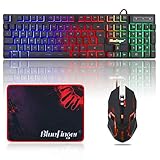
- Top Pick: BlueFinger RGB Gaming Keyboard and Backlit Mouse Combo, USB Wired, LED Gaming Set for Laptop PC Computer Game and Work
- Best Value: Wireless RGB Gaming Keyboard and Mouse – Rechargeable RGB Backlit,Long Battery Life,Mechanical Feel,7 Color Gaming Mouse for PC Game and Work
- Premium Choice: BlueFinger RGB Gaming Keyboard and Backlit Mouse and Headset Combo, USB Wired Backlit Keyboard, LED Gaming Mouse Set, Headset with Microphone for Laptop PC Computer Game and Work
For a quiet all-round desk, the Logitech MK955 Signature Slim suits multi-device users, the MK540 Advanced suits buyers who want a full-size set with long battery life, and the MK295 Silent or MK270 suit tight budgets; none of these is a serious esports setup, because combos pair a membrane or low-profile keyboard with an office-grade mouse. This guide sorts wireless combos by the use they fit, explains the 2.4 GHz versus Bluetooth question, and lists what to check before buying.
As an Amazon Associate we earn from qualifying purchases at no extra cost to you.


At a Glance: Wireless Keyboard and Mouse Combos
| Combo | Best for | Key stated specs | Limits |
|---|---|---|---|
| Logitech MK955 Signature Slim | Slim, quiet, multi-device work and light gaming | Low-profile full-size keyboard with number pad, quiet keys, pairs with several devices; works with Windows and Mac | Premium-leaning tier; reviewers raise long-term mouse durability as a point to watch |
| Logitech MK540 Advanced | Traditional full-size comfort and value | Padded palm rest, media hotkeys, 2.4 GHz receiver; rated by Logitech for up to 36 months keyboard battery and 18 months mouse battery | Some units are reported with intermittent dropouts or lag; single receiver connection |
| Logitech MK295 Silent | Budget quiet office and shared spaces | Full-size layout with number pad; SilentTouch keys the maker says cut keystroke noise by 90 percent | Single-device pairing, no backlight, light mouse |
| Logitech MK270 | Cheapest dependable full-size set | 2.4 GHz with a 10 m range; Logitech lists 36 months keyboard and 12 months mouse battery life; two AAA and one AA battery | Windows and Chrome OS focus; basic mouse; no Bluetooth |
| Logitech MX Keys S Combo | Premium typing and productivity | Backlit low-profile keys, multi-device pairing, higher-end mouse | Premium tier, rechargeable rather than replaceable batteries |
Specs are maker-stated or reported by review outlets, and figures like battery life depend on use and conditions. Other brands, including value names such as Seenda, sell combos with similar layouts, but their specifications vary by model, so compare each listing against the same checklist below.
2.4 GHz Receiver vs Bluetooth
This is the biggest practical difference between wireless sets. A 2.4 GHz receiver uses a USB dongle that talks directly to the keyboard and mouse. Bluetooth connects to the computer’s built-in radio, so no port is used, and many laptops, tablets and phones can pair at once.
| Feature | 2.4 GHz USB receiver | Bluetooth |
|---|---|---|
| Typical response | Generally the lower-latency option for fast play, since it uses a dedicated link | Fine for office work and casual games; can feel slightly less immediate |
| Setup | Plug in the dongle | Pair in system settings |
| Ports | Uses a USB port | None needed |
| Multiple devices | One receiver, one computer unless a unifying receiver is used | Many sets switch between two or three devices |
| Interference | Can be affected by crowded wireless areas or USB 3 hub noise | Can drop in the same crowded band |
Logitech describes the MK270 as having virtually no delays or dropouts, but no maker in this class publishes a millisecond figure for combos, so treat any latency number on a listing with caution. Reviewers generally place purpose-built gaming mice with 1 ms class wireless links in a different tier from office combos. If you play competitive shooters, a separate gaming keyboard and mouse are the more sensible purchase, and a combo remains useful for the second PC, the living-room setup or work.
Gaming vs Work vs Budget: How to Choose
For gaming
Combo mice normally use basic sensors and few buttons, and the keyboards use membrane or low-profile switches without full key rollover. They will cope with strategy, role-playing and casual titles, though they may miss key presses when you hold many keys together. Plan on a dedicated gaming mouse if you play fast games. Consider a combo mainly for a media PC or a couch setup, where the full-size keyboard and a stable 2.4 GHz connection are what matter.
For work
Typing comfort, quietness and multi-device pairing matter most. The MK955 and MX Keys S Combo lean this way, with low-profile keys and the ability to switch between a laptop and a desktop. A palm rest, as on the MK540, helps for long documents. A number pad is helpful for spreadsheet work.
For budget
The MK270 and MK295 cover the basics with replaceable batteries and a USB receiver. They suit a spare PC, a classroom, or an older machine. Budget sets from other brands often add Bluetooth and rechargeable cells, but quality control varies, so look at several independent reviews.
Full-Size vs Compact
- Full-size with number pad: Best for spreadsheets, data entry and people who use the numeric keys. The MK270, MK295 and MK540 are in this group.
- Slim full-size: The MK955 keeps the number pad but with low-profile keys, which many find comfortable and quieter.
- Compact or tenkeyless: Frees up mouse space, which helps low-sensitivity gaming. Few mainstream combos use this layout, so you may need a separate keyboard and mouse.
Measure the desk depth before buying a full-size set with a wrist rest, since it can push the keyboard too near the monitor stand.
Battery Life: What the Makers State
| Model | Keyboard | Mouse | Battery type |
|---|---|---|---|
| MK270 | 36 months (an older data sheet lists 24) | 12 months | 2 AAA and 1 AA |
| MK540 | Up to 36 months | Up to 18 months | Replaceable cells |
| MK295 | Long-life cells, per the maker | Long-life cells, per the maker | Replaceable cells |
| MK955 and MX Keys S Combo | Rechargeable, with use-dependent life | Rechargeable, with use-dependent life | Built-in rechargeable |
Logitech bases its keyboard figures on an assumed typing volume in an office, so heavy daily use shortens them. Backlighting cuts battery life on any rechargeable keyboard, and the on/off switch on the case is worth using when travelling. Replaceable batteries are simple to swap and never need a cable, while rechargeable models rely on a USB-C cable, which is easy to forget.
Compatibility and Setup Notes
- Operating system: Basic receiver sets like the MK270 list Windows and Chrome OS. The MK955 is described by reviewers as switching between Mac and Windows layouts.
- Receiver and ports: A single dongle uses one USB port. Plug it into a front or side port away from a congested USB 3 hub to reduce interference, and keep it within a few metres of the keyboard.
- Pairing several devices: Only the Bluetooth-capable sets support quick switching between computers.
- Software: Logitech sets may offer companion software for button remapping and battery status, though basic models work without it.
- Layout: Look for the correct regional layout, such as US ANSI or UK ISO, before buying.
Pick X If… Decision Table
| Pick this | If you… |
|---|---|
| Logitech MK955 Signature Slim | switch between a laptop and desktop, want a slim quiet set |
| Logitech MX Keys S Combo | type all day and want a premium productivity setup |
| Logitech MK540 Advanced | want full-size comfort, a palm rest and long battery life |
| Logitech MK295 Silent | share a space and want quieter keys on a budget |
| Logitech MK270 | need the simplest, lowest-cost full-size 2.4 GHz set |
| Separate gaming keyboard and mouse | play competitive games that need fast sensors and key rollover |
Care and Daily Use Tips
Wireless sets last longer with a few habits. Switch the mouse off in a bag so it does not drain cells, and keep the receiver plugged in or stored in the mouse compartment if the model has one. Wipe the keyboard with a slightly damp cloth, never spray liquid onto it, and remove batteries before a long storage period to avoid leakage. If the cursor stutters, move the receiver to a nearer port with a short extension cable, change the cells, and remove nearby wireless sources such as routers or phone chargers from the line between the keyboard and the receiver. For work laptops, ask IT before plugging in an unapproved receiver, since some managed systems restrict new USB devices.
Alternatives
- Separate keyboard and mouse: A mid-range mechanical keyboard and a wireless gaming mouse give better response than any combo and can be replaced one at a time.
- Wired set: Wired keyboards and mice avoid batteries and pairing, and remain the simplest route to the lowest latency.
- Compact keyboard and ergonomic mouse: Suits long work sessions and small desks, though you will not get a bundled price benefit.
- Keyboard-only upgrade: If your mouse is fine, replacing only the keyboard may be more worthwhile.
Frequently Asked Questions
Is 2.4 GHz better than Bluetooth for gaming?
Generally, yes. A dedicated receiver link is the lower-latency option and avoids pairing problems, which makes it the better choice for faster games. Bluetooth is convenient and fine for office use.
Can I use a wireless combo for competitive gaming?
You can, but combos are built for office comfort, not for the fastest sensors or full key rollover. Dedicated gaming gear is the better fit for shooters and fighting games.
How long do the batteries last?
Logitech lists up to 36 months for the MK270 and MK540 keyboards, and 12 to 18 months for their mice. Real life depends on typing volume, use of backlights and the batteries you fit.
Do I need a free USB port?
Receiver-based sets need one USB port. A Bluetooth set does not, though many combos include both options only on the higher-end models.
Are silent keyboards worth it?
For shared rooms or video calls they are useful, since the keys are designed to reduce click noise. Logitech states the MK295 cuts keystroke noise by 90 percent, which is a maker claim rather than an independent measurement.
Will a combo work on a Mac or a console?
Mac support depends on the model, and Logitech’s basic receiver sets list Windows and Chrome OS. Consoles vary by system and often accept only specific USB keyboards, so read the console’s accessory support page.