If your desk does double duty — spreadsheets and video calls by day, games by night — a dedicated “office” monitor with no gaming features and a dedicated “gaming” monitor with no USB-C or productivity extras are both the wrong buy. We pulled real monitors currently sold on Amazon across two searches that cover both jobs: fast enough for gaming, versatile enough for work, including a 4K/160Hz USB-C option and a genuine dual-monitor bundle.
Compare at a Glance
| Monitor | Price | Resolution/Refresh | Best For |
|---|---|---|---|
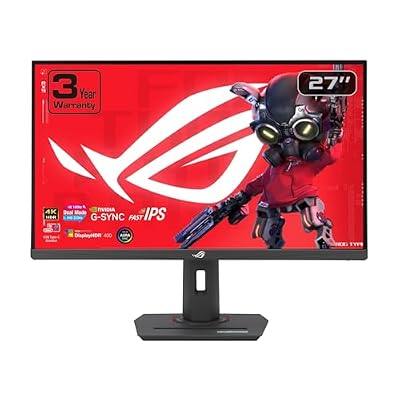
| ASUS ROG XG27UCG | $329.00 | 4K 160Hz / Dual-mode FHD | Best Overall |
| SANSUI 32″ Curved | $179.99 | 1080p 240Hz | Fastest refresh |
| Amzfast 27″ | $269.99 | 4K 160Hz / FHD 320Hz dual-mode | Dual-mode flexibility |
| Kado 2-Pack 27″ 165Hz | $199.89 | 1080p 165Hz (pair) | Instant dual-monitor setup |
| Sceptre Curved 24″ | $102.98 | 1080p, 98% sRGB | Color accuracy on a budget |
| Sceptre 22″ | $72.98 | 1080p up to 144Hz | Cheapest second monitor |
| KYY Portable 15.6″ | $69.99 | 1080p | Travel second screen |
| ARZOPA 16.1″ Portable | $96.98 | 1080p 144Hz | Portable + fast refresh |
Quick List
- ASUS ROG XG27UCG ($329.00) — Best Overall — 4K 160Hz with a USB-C G-Sync dual mode that also runs 1080p at much higher refresh.
- Kado 2-Pack 27″ 165Hz ($199.89) — Best for Instant Dual-Monitor — two matched monitors in one purchase.
- SANSUI 32″ Curved 240Hz ($179.99) — Best Refresh Rate — fastest panel on this list.
- Sceptre Curved 24″ ($102.98) — Best Color Accuracy Budget — 98% sRGB.
- KYY 15.6″ Portable ($69.99) — Best for Travel — doubles as a work or casual gaming second screen.
See All Picks



Being Honest About What These Monitors Are
Most picks here are gaming monitors with specs that happen to work well for office use too, not dedicated productivity monitors with a USB-C docking hub or factory color calibration certificate. The ASUS ROG XG27UCG is the exception — its USB-C input genuinely doubles as a single-cable laptop dock for power and video, which is a real productivity feature most gaming monitors skip. For everyday work — email, docs, video calls, spreadsheets — high refresh rate and decent sRGB coverage are more than enough, and you get a monitor that’s also properly fast for gaming instead of settling for 60Hz.
Should You Buy the Dual-Monitor 2-Pack?
The Kado 2-pack is a genuinely different buying decision from the rest of this list — instead of picking one monitor, you get two matched 27″ panels in a single purchase, which is the simplest way to set up a real dual-monitor work setup without hunting for a second matching panel separately. The tradeoff is a single 165Hz 1080p spec across both, rather than one higher-end display — reasonable for work and casual gaming, not the pick if you want 4K or the highest refresh rate available.
Do You Need the Portable Option?
The KYY and ARZOPA portable monitors only make sense if you genuinely move between locations. Both run off USB-C power from a laptop in many cases, so you don’t need a separate power brick. If your desk is fixed in one place, a standard monitor gives you more screen and better value per dollar than a portable panel.
Technical Comparison Table
| Monitor | Size | USB-C | Speakers |
|---|---|---|---|
| ASUS ROG XG27UCG | 27″ | Yes, with power delivery | — |
| SANSUI 32″ Curved | 32″ | No | — |
| Amzfast 27″ | 27″ | — | — |
| Kado 2-Pack 27″ | 27″ x2 | No | — |
| Sceptre Curved 24″ | 24″ | No | Built-in |
| Sceptre 22″ | 22″ | No | Built-in |
| KYY Portable | 15.6″ | Yes | Built-in |
| ARZOPA Portable | 16.1″ | Yes | — |
How We Chose These
We ran a second search specifically for dual-use gaming/work monitors to broaden past the original 5-monitor pass, which added a genuine 4K/160Hz USB-C option and a dual-monitor bundle pack — two product types the first search missed entirely. We excluded one LG ultrawide OLED listing with no stated price and several near-identical Kado curved 1080p variants, keeping only the highest-spec Kado pack (27″ at 165Hz) rather than listing four nearly identical bundles.
What to Look For
- USB-C with power delivery can replace a laptop dock entirely — a genuine productivity feature, not just a gaming spec.
- Curved vs. flat helps gaming immersion and doesn’t hurt document work; the main reason to pick flat is design/layout work where straight lines matter.
- A 2-pack bundle is the simplest route to a matched dual-monitor setup if you don’t already own a second display.
- Portable monitors only earn their price if you genuinely travel with your setup.
Why Trust GamingPCGuru
All eight monitors here are live Amazon listings pulled through our own product pipeline. We ran a second broader search specifically because our first pass missed both USB-C dock-capable monitors and dual-monitor bundle options, two genuinely useful product types for this dual-use case.
Questions
Is 1080p enough resolution for office work?
Yes for most office tasks at these screen sizes. If you regularly have many windows open side by side, a larger panel like the SANSUI 32″ gives you more usable space at the same resolution, or step up to the 4K ASUS for genuinely more pixel real estate.
Will these monitors work with a laptop for video calls?
Yes, any of these connect via HDMI (and the USB-C options directly) to a laptop. None include a built-in webcam, so you’d still use your laptop’s camera or a separate webcam.
Is a USB-C monitor better than HDMI for a laptop setup?
If the monitor supports USB-C power delivery like the ASUS here, yes — one cable handles video, power, and often data, replacing a separate charger and dock. HDMI-only monitors still need a separate charging cable for your laptop.
Update History
Published October 2026, expanded from an initial 5-monitor pass to 8 across two searches.
Sources and Verification
Product specifications, pricing and availability sourced directly from live Amazon product listings as of October 2026 via this site’s own product data pipeline.