
Best Graphics Card for Streaming Encoding: How to Choose a GPU for Hardware Encoding
If you stream while you game, the graphics card does more than render frames. Modern GPUs include dedicated video encoders that compress your gameplay and camera feed in real time, and that encoder often decides whether your stream looks sharp without costing you frame rate. Choosing the right card for streaming therefore means looking at the encoder, the codecs it supports, the memory you have left after the game runs, and the software you use to broadcast.
This guide explains how to choose a graphics card for streaming encoding in 2026. The hero listing below is a card that suits a streaming build, but read its specification table and confirm the exact model, memory and warranty before buying. We have not run our own encoding tests for this article, so the advice relies on published encoder specifications, typical software support and general buying logic.


GIGABYTE Radeon RX 9070 XT Gaming OC 16G Graphics Card, PCIe 5.0, 16GB GDDR6, GV-R9070XTGAMING OC-16GD Video Card
What the Hardware Encoder Actually Does
A hardware encoder is a fixed-function block on the GPU that compresses video. When you stream, your broadcasting software sends the captured frames to that block, which encodes them into a format the streaming platform accepts. Because the work runs on dedicated silicon, it takes less processing time than a software encoder running on the CPU. That leaves more CPU time for the game, which is the main reason streamers use GPU encoding.
Encoders differ in quality, codec support and feature set. The same bitrate can look better or worse depending on the encoder generation, so a newer encoder is usually worth the investment if you stream at a high quality setting.
Codec support
Look for support for H.264, HEVC and AV1. H.264 is universal and works with every platform. HEVC and AV1 can deliver better quality at a given bitrate, but platform support varies, so confirm that your destination accepts the codec before you change your settings.
Software support
Most streamers use OBS Studio, Streamlabs or a similar tool. Check that the encoder you want appears in the software’s output settings. Vendor encoders are widely supported, but the exact options and presets differ by software version.
Streaming GPU Comparison Table
The table below compares the classes of card you will see in streaming builds. Ranges are broad, and you should check the live listing for current pricing.
| Card class | Encoder focus | Best for | Typical price range |
|---|---|---|---|
| High-end NVIDIA RTX card | Latest NVENC generation, AV1 encode | Game plus 1080p or 1440p stream at high quality | Check current price |
| Mid-range NVIDIA RTX card | Current NVENC generation | 1080p streaming with a game at high settings | Check current price |
| High-end AMD RDNA card | AMD video encoder with AV1 support | Streaming with strong raster performance | Check current price |
| Intel Arc card | Intel media engine with AV1 encode | Budget streaming builds with AV1 output | Check current price |
For a streaming-focused PC overview, our best gaming PC for streaming guide covers the complete system. For the software side, our how to stream on Twitch from a PC walkthrough shows the settings to check.

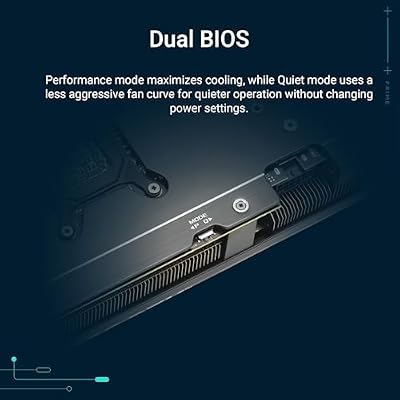
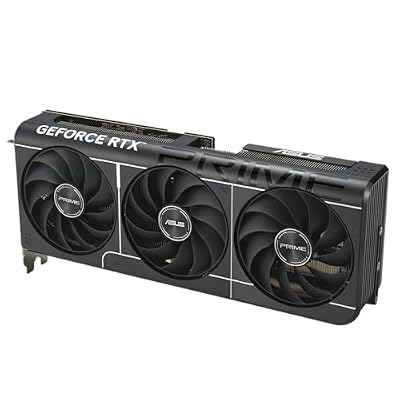
ASUS PRIME GeForce RTX 5070 12GB GDDR7 OC Edition Gaming Graphics Card | SFF-Ready, PCIe 5.0, HDMI/DP 2.1, 2.5-slot, Axial-tech Fans, Dual BIOS






As an Amazon Associate we earn from qualifying purchases. Product prices and availability are accurate as of the date/time indicated.
How to Weigh Encoder Quality Against Frame Rate
The central trade-off in streaming is between encoding quality and game performance. Higher quality settings usually use more of the encoder’s capacity, and a heavier game uses more of the GPU’s render power. If both compete for the same card, you may see dropped frames or a softer stream image. A good streaming setup keeps the encoder comfortably within its limits.
Start with the stream you want to send. A 1080p stream at a sensible bitrate is a common target for many platforms, and it is well within the range of current encoders. A 1440p stream or a higher bitrate needs more encoder headroom. Once you know the target, pick the card with a current encoder and enough memory to run your game alongside the encoder.
Preset and bitrate choices
Most encoders offer presets that trade speed for quality. Test two or three presets in a short recording, then review the footage for motion blur, compression artefacts and fine detail. Choose the preset that looks best while keeping your frame rate steady during play.
Memory and Power Considerations
A streaming build has to hold the game, the browser, the broadcasting software and any overlays in memory at the same time. A card with 8GB of video memory can run a stream at 1080p, but it has less room when the game uses large textures. If you stream a demanding title at high settings, 12GB or 16GB gives more breathing room. Our guide to the best GPU for a gaming budget explains how memory size affects the options in each price band.
Power and airflow matter because a card that runs hot can throttle, and throttling can reduce encoder performance as well as game performance. Choose a card with a cooler you trust, and make sure your case has airflow for the GPU and the CPU. Our piece on how to check GPU and CPU temperature shows the monitoring steps to take during a long stream.
GIGABYTE Radeon RX 9070 XT Gaming OC 16G Graphics Card, PCIe 5.0, 16GB GDDR6, GV-R9070XTGAMING OC-16GD Video Card


As an Amazon Associate we earn from qualifying purchases. Product prices and availability are accurate as of the date/time indicated.
Choosing Between Vendors for Streaming
1. NVIDIA for the broadest software support
NVIDIA’s encoder is supported in most streaming tools, and its generations have shipped with steady quality improvements. If you want the least friction when you set up a stream, an NVIDIA card is usually the simplest choice. Pick a card from the current generation if you plan to stream at high quality.
2. AMD for strong raster performance and modern codecs
AMD’s encoders support AV1 and perform well in current software. A high-end Radeon can be a strong choice if you want the most rendering power for the money and you have confirmed that your streaming software supports the AMD encoder option.
3. Intel Arc for budget AV1 output
Intel’s Arc cards include AV1 hardware encoding and can suit a budget streaming build, provided the games you play run well on Intel’s drivers. Check the encoder’s options in your software before committing.
Frequently Asked Questions
Do I need a high-end card to stream?
Not always. A current mid-range card can stream at 1080p well. A high-end card gives more room for demanding games and higher-quality streams at the same time.
Is AV1 better than H.264 for streaming?
AV1 can deliver better quality at the same bitrate, but only if the destination platform and your software support it. H.264 remains the most compatible choice.
Should I use the GPU encoder or the CPU encoder?
For most gamers, the GPU encoder is the better choice because it leaves more CPU time for the game. The CPU encoder can offer quality advantages at some presets, but it requires a strong processor.
Does streaming slow down my game?
It can, if the encoder or the GPU is overloaded. Choose a preset and bitrate your system can handle, and watch for dropped frames during a test session.
Final Recommendation
Our ranked advice for streaming encoding is as follows. First, pick a current-generation NVIDIA card if you want the simplest setup and the broadest software support, especially if you stream at 1440p or use AV1 output. Second, consider a high-end AMD card if you want strong game performance and your software supports its encoder. Third, choose an Intel Arc card for a budget build where AV1 output matters and your main games run well on Intel’s drivers. Compare the hero listing and the alternatives on encoder generation, memory and warranty, and confirm the exact model before you buy. For a complete streaming system around the card, our streamer setup guide shows how the rest of the hardware fits together. For router and network considerations during live streams, see our router guide for gaming and streaming, and for a broader look at the card market our best GPU for gaming guide. For the streaming software side, our streaming setups for gaming roundup shows how encoder choices fit into common broadcast layouts.





