
Best Graphics Card VRAM 8GB 12GB 16GB: How Much Video Memory Do You Really Need?
Video memory is one of the most searched and most misunderstood numbers on a graphics card. Many buyers assume more VRAM always means a faster card, but memory capacity only sets how much data the card can hold at once. It does not replace raw performance, and a card with a lot of memory but weak processing can still struggle. The useful question is whether a given card’s memory is enough for the resolution, the games and the time you plan to keep the card.
This guide compares the three most common memory tiers, 8GB, 12GB and 16GB, and explains how to match them to your build. The hero listing below is a graphics card from the mainstream market. Read its title and specification table to confirm the exact memory size, memory type and warranty before buying. We have not run our own memory-limit tests for this article. The advice relies on how memory is used in games and on the trade-offs that follow.

MSI Gaming GeForce RTX 3060 12GB 15 Gbps GDRR6 192-Bit HDMI/DP PCIe 4 Torx Twin Fan Ampere OC Graphics Card
What VRAM Does and Does Not Do
VRAM is the memory on the graphics card. Games store textures, geometry, frame buffers and some acceleration data in it. When a game needs more than the card holds, the driver has to move data across the system bus, which is much slower. The result is stutter, texture pop-in or, in extreme cases, a sharp frame rate drop. Capacity therefore decides whether a game can keep its assets close to the processor.
VRAM does not decide the rest of the performance. A card with 16GB but a small core count will still render slowly. Think of memory capacity as a ceiling. It is a necessary condition for smooth play in demanding games, not a sufficient one.
Why texture quality drives memory use
Textures are the largest single consumer of video memory in most modern games. Higher texture settings use more memory, and the jump between texture tiers can be large. That is why a game can run smoothly at one texture setting and stutter at the next, even when the frame rate is otherwise similar.
8GB, 12GB and 16GB: The Three Tiers Compared
The table below compares the three tiers, with notes on resolution and typical use. Ranges are broad, and prices move with stock and promotions.
| Memory tier | Typical resolution | Best for | Typical price range |
|---|---|---|---|
| 8GB GDDR6 or GDDR7 | 1080p | Esports, older titles, budget builds | Check current price |
| 12GB GDDR6 or GDDR7 | 1080p high, light 1440p | Modern single-player games with high textures | Check current price |
| 16GB GDDR6 or GDDR7 | 1440p high, entry 4K with upscaling | Demanding titles and longer ownership | Check current price |
| Higher-capacity variants of a model | Match the target resolution | Buyers who need headroom beyond 16GB | Check current price |
For the mainstream NVIDIA cards that span these tiers, read our RTX 5060 review and our RTX 5060 Ti review. The second one covers the step up to 16GB directly.
8GB: Still Workable, But Tight
An 8GB card can run a large number of games well at 1080p, especially esports titles and older single-player games. The limit shows up in newer games with high-resolution textures, ray tracing and heavy effects. In those titles, you may need to lower texture settings to keep the game smooth. If you buy an 8GB card, plan to play at 1080p and accept lower texture quality in demanding games.
Eight gigabytes also leaves less room for background tasks. Streaming software, browser tabs and overlays all draw on memory, so a tight budget can become a tight system. If you stream while you play, consider the memory headroom carefully.
12GB: The Practical Middle Ground
A 12GB card gives you enough headroom for most modern single-player games at 1080p with high textures. It also works at 1440p with moderate settings in many titles, provided you use upscaling where the game supports it. For many buyers, 12GB is the most practical tier for the money, because it avoids the tightest limits without the cost of a larger card.
The 12GB tier is not a permanent solution. Future games with larger texture budgets will push it, and it will age faster than 16GB. Plan for the card to be a mid-cycle purchase rather than one you keep unchanged for a long time.
Reading memory bandwidth alongside capacity
Memory bandwidth matters too. A card with more capacity but a narrow bus can be slower than a card with less memory and a wider bus in some games. Compare the bus width and memory type along with the capacity, rather than choosing on capacity alone.

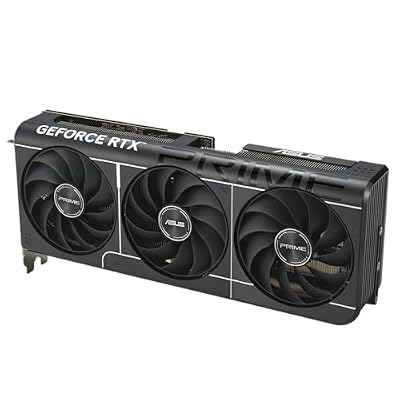
ASUS PRIME GeForce RTX 5070 12GB GDDR7 OC Edition Gaming Graphics Card | SFF-Ready, PCIe 5.0, HDMI/DP 2.1, 2.5-slot, Axial-tech Fans, Dual BIOS







As an Amazon Associate we earn from qualifying purchases. Product prices and availability are accurate as of the date/time indicated.
16GB: Headroom for 1440p and Longer Ownership
A 16GB card gives you the most comfortable headroom among the common tiers. It is the safer choice for 1440p high settings, for demanding titles with high-resolution textures and for buyers who want the card to last several years. It also gives a better experience with upscaling and ray tracing, because those features add memory cost.
For 4K, 16GB is the entry point rather than the top of the range. Many 4K players will also want strong core performance and good upscaling support. Our guide to the best GPU for 4K gaming explains how the high-end cards compare at that resolution.
Ray tracing and memory
Ray-traced games add memory cost through acceleration structures and extra buffers. A card that runs fine without ray tracing can reach its memory limit once the effect is on. If you plan to use ray tracing, the 16GB tier gives a safer margin. Our article on choosing a GPU for gaming shows how memory and features fit together.
Matching Memory to Your Monitor and Games
Start with the resolution and refresh rate you want. At 1080p, 8GB and 12GB cover most games with reasonable settings. At 1440p, 12GB is workable but 16GB is safer. At 4K, you will need more card overall, and memory is only one part of the decision. Our guide to the best 1080p gaming monitor and the best 1440p monitor for gaming help you match a panel to the card you choose.
Then list the games you play most. Check each game’s texture settings and look for reviews that report memory use or texture behaviour. A game that is light on memory can run well on a smaller card, and a game that is heavy on memory will push a small card quickly.
Frequently Asked Questions
Is 8GB of VRAM enough in 2026?
For 1080p esports and older games, yes. For demanding modern titles at high texture settings, it is tight, and you may need to lower settings.
Is 12GB enough for 1440p?
Often, with moderate settings and upscaling. For higher settings and longer ownership, 16GB gives more headroom.
Does more VRAM make a card faster?
Not on its own. More memory prevents stutter when a game needs more data than the card can hold, but it does not raise the card’s processing speed.
Should I buy the 16GB version of a card?
If the price difference is reasonable and you plan to play at 1440p or keep the card for several years, the 16GB version is usually the safer choice.
Final Recommendation
Our ranked advice on memory is as follows. First, for 1440p gaming or a card you plan to keep for several years, choose 16GB, because it gives the most headroom for textures, ray tracing and upscaling. Second, for 1080p high settings on a practical budget, a 12GB card is the best balance of cost and memory. Third, choose 8GB only for 1080p esports or older titles, and accept lower texture settings in demanding games. Compare the hero listing and the alternatives on memory type, bus width and warranty, and confirm the exact model before you order. For a broader look at budget options across the price range, our guide to the best gaming graphics card on a budget places these tiers in context. For the 1440p side of the memory question, see our best GPU for 1440p gaming list.





