
AMD FSR Gaming Graphics Card 2026: What FSR Needs From Your GPU
AMD FidelityFX Super Resolution, usually called FSR, is one of the most widely supported upscaling technologies in PC gaming. It is a major reason AMD Radeon cards offer strong value, and it works on a broader range of hardware than vendor-specific alternatives. The catch is that the version of FSR a game uses, and the features it unlocks, depend on the game and on your graphics card. Buying for FSR therefore means understanding which FSR version you will see and which cards run it best.
This guide explains FSR in 2026 and how it affects the choice of a graphics card. The hero listing below is an AMD Radeon card. Read its title and specification table to confirm the exact model, memory size and warranty before buying. We have not run our own FSR image-quality or performance tests for this article. The advice relies on AMD’s published feature descriptions and on the buying logic that follows.


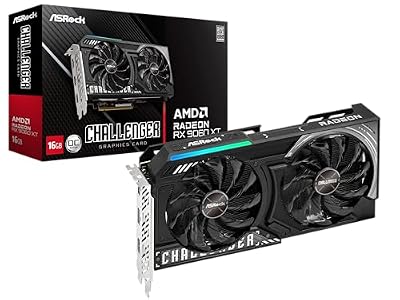
GIGABYTE Radeon RX 9070 XT Gaming OC 16G Graphics Card, PCIe 5.0, 16GB GDDR6, GV-R9070XTGAMING OC-16GD Video Card
How FSR Works and Why It Matters
FSR renders a game at a lower internal resolution and then upscales the result to your monitor’s resolution. The goal is to raise frame rates while keeping image quality close to native. Because FSR is a software technique built into the game and the driver, it can run on many GPUs, not only the newest ones. That breadth is its main advantage for buyers who want upscaling on a range of hardware.
FSR has moved through several versions. FSR 3.1 is a broadly used release that works across many games and hardware. FSR 4 is an AI-based upscaler that AMD supports on its RDNA 4 Radeon cards, which means its benefits depend on the card generation as well as the game.
FSR 3.1 and broad compatibility
FSR 3.1 is the version to expect in many current titles. Because it works across a wide range of GPUs, it is a useful fallback if you own an older card or a card from a different vendor. Its quality depends on the game’s implementation, so check reviews and screenshots for the titles you play most.
FSR 4 and RDNA 4 hardware
FSR 4 uses machine learning to improve image quality, and AMD supports it on RDNA 4 cards such as the RX 9070 series. If you buy an RDNA 4 card, check whether the games you play support FSR 4, because the newest image-quality gains only show up in supported titles.
AMD FSR Card Comparison Table
The table below compares the classes of card you are likely to see when shopping for FSR-friendly hardware. Ranges are broad, and prices change with stock and promotions.
| Card class | FSR support | Best for | Typical price range |
|---|---|---|---|
| RDNA 4 high-end card (RX 9070 class) | FSR 3.1 and FSR 4 in supported titles | 1440p high settings with upscaling | Check current price |
| RDNA 4 mainstream card (RX 9060 class) | FSR 3.1 and FSR 4 in supported titles | 1080p and light 1440p gaming | Check current price |
| Older RDNA card with FSR 3.1 | FSR 3.1 in supported titles | Budget upgrades and used-market buys | Check current price |
| Non-AMD card running FSR 3.1 | FSR 3.1 in supported titles | Buyers who want FSR on other hardware | Check current price |
For the RDNA 4 cards in more depth, read our RX 9070 XT review and our RX 9060 XT review. Both show how these cards fit into the upscaling picture.

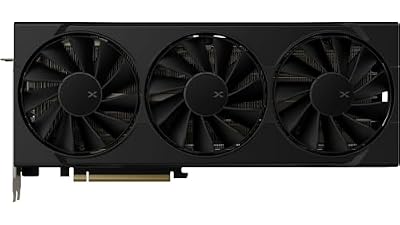
XFX Swift AMD Radeon RX 9070XT Triple Fan Gaming Edition with 16GB GDDR6 HDMI 3xDP, AMD RDNA 4 RX-97TSWF3BA



As an Amazon Associate we earn from qualifying purchases. Product prices and availability are accurate as of the date/time indicated.
Matching FSR to Your Games and Monitor
FSR is a per-game feature, so the benefit depends on the list of titles you play. Check each game’s graphics menu for FSR options, and check the version it uses. Newer versions generally improve image quality, but the difference depends on the implementation and on the settings you choose.
Match the upscaling strategy to your monitor. A 1440p or 4K monitor benefits most from upscaling, because the rendering load is higher. A 1080p monitor may need less upscaling, and sometimes native rendering looks better. Test the options in your own games, then choose the mode that balances image quality with frame rate.
Variable refresh and frame pacing
FreeSync and other variable refresh technologies smooth the display when frame rates change. That matters more when upscaling and frame generation are in use, because frame times can fluctuate. Check that your monitor supports a compatible variable refresh standard.
Memory and Resolution Planning
Upscaling lowers the rendering load but does not remove the memory requirement. A card with 8GB can run many FSR titles at 1080p, but demanding games with large textures need more room. For 1440p, 16GB gives you a comfortable margin. Our guide to the best GPU for 1440p gaming lists options that match that resolution.
If you are comparing an FSR-friendly AMD card with a rival, the memory question is often where the choice becomes clear. Our RX 9070 vs RTX 5070 comparison looks at that trade-off in more detail.
GIGABYTE Radeon RX 9070 XT Gaming OC 16G Graphics Card, PCIe 5.0, 16GB GDDR6, GV-R9070XTGAMING OC-16GD Video Card


As an Amazon Associate we earn from qualifying purchases. Product prices and availability are accurate as of the date/time indicated.
Power, Cooling and Build Fit
Power and cooling follow the same rules as any mid-to-high graphics card. Choose a quality power supply with headroom, check the listing’s stated requirement and make sure your case has airflow for the card. Our guide to the best power supply for gaming explains which ratings and connectors matter.
If you buy a card with a large custom cooler, measure your case first. A large card that does not fit is a return, and a card that runs hot will lose boost clocks. Our guide to the best gaming PC case covers airflow and clearance, and the points there apply to any card in this range.
For cooling considerations on the processor side of the build, our piece on air versus AIO cooling explains how to choose a cooler that keeps a complete system quiet.
Who Should Choose an FSR-Friendly Card
1. Buyers who want the newest FSR image quality
An RDNA 4 card is the right choice if you want FSR 4 in supported titles. It suits 1440p players who play several games that support the newest upscaler and who plan to keep the card for a number of years.
2. Buyers who want strong value at 1080p
An RDNA 4 mainstream card gives you FSR 3.1 and a solid 1080p experience at a lower price. It is a practical choice for a value-focused build.
3. Buyers who want upscaling on a budget or on another vendor’s hardware
FSR 3.1 runs across many GPUs, so an older card or a non-AMD card can still gain upscaling in supported games. This is useful if you already own a card and want a frame rate boost without an upgrade.
Frequently Asked Questions
Does FSR work on NVIDIA cards?
FSR 3.1 is designed to run across many GPUs, including NVIDIA cards, in games that support it. FSR 4 is limited to AMD’s RDNA 4 cards.
What is the difference between FSR 3.1 and FSR 4?
FSR 4 uses an AI-based upscaler and is supported on RDNA 4 cards. FSR 3.1 is broader in hardware support. The image quality difference depends on the game.
Should I always turn on upscaling?
Not always. Upscaling gives a frame rate boost, but it can soften fine detail. Test native rendering and the upscaling modes in your games, and choose the mode that looks best at your resolution.
Is an AMD card better than an NVIDIA card for FSR?
AMD cards support FSR natively, and FSR 4 is an advantage on RDNA 4. NVIDIA cards also run FSR 3.1 in supported games. Compare the actual results in your titles.
Final Recommendation
Our ranked advice for FSR buyers is as follows. First, choose an RDNA 4 card if you want FSR 4 in supported games and you play at 1440p, because the newest upscaler is only available on that generation. Second, pick an RDNA 4 mainstream card if you want strong value at 1080p with FSR 3.1. Third, use FSR 3.1 on the hardware you already own if an upgrade is not in your plans. Compare the hero listing and the alternatives on memory, warranty and cooler, and confirm the exact model before ordering. For a broader view of the vendors, our AMD vs NVIDIA buyers guide shows where each brand leads.





