
RX 9070 vs RTX 5070 Comparison 2026: Memory, Upscaling and Price Compared
The Radeon RX 9070 and the GeForce RTX 5070 are two of the most common mid-to-high choices for 1440p gaming in the current generation, and they often sit close together on price. The decision is rarely about raw speed alone. It depends on how much memory you want for future games, which upscaling ecosystem your favourite titles support, whether you use features such as ray tracing heavily, and how the specific card you buy is cooled and priced.
This guide lays out those trade-offs. The hero listing below is a card in the RX 9070 or RTX 5070 class, so read its title and specification table before you buy to confirm the exact model, memory size and warranty. We have not run our own benchmarks for this article. The guidance uses published specifications, typical use cases and buying logic.


GIGABYTE Radeon RX 9070 XT Gaming OC 16G Graphics Card, PCIe 5.0, 16GB GDDR6, GV-R9070XTGAMING OC-16GD Video Card
The Headline Difference: Memory
The clearest specification difference is memory. The RX 9070 carries 16GB of GDDR6, while the standard RTX 5070 carries 12GB of GDDR7. The Radeon has more capacity, and the GeForce has faster memory. Those two numbers pull in opposite directions, and the right answer depends on the games you play.
Capacity matters most in titles that load large texture sets. A card with 16GB has room to keep high-resolution textures in memory without stutter, and that headroom tends to age well. Faster memory helps when a game is bandwidth-limited, which is common at high frame rates. For most buyers, the extra capacity is the more visible advantage over a long ownership period, because texture budgets in newer games keep growing.
Why capacity can matter more than speed
If you plan to keep a card for four or five years, memory capacity protects you against the moment a game’s texture budget exceeds what the card can hold. Once that happens, the game may still run, but you will see lower texture quality or stutter when assets stream in. A 16GB card reduces that risk more than a faster 12GB card does.
Why speed still counts
GDDR7 gives the RTX 5070 a bandwidth advantage in many workloads. That can translate into better frame rates in titles where memory bandwidth is the limit. The benefit is real, but it is narrower than the capacity question, because it only shows up in certain games and settings.
RX 9070 vs RTX 5070: Comparison Table
The table below compares the two cards and the variants you may see in the same listings. Ranges are broad because prices move with stock, promotions and regional tax.
| Card class | Typical memory | Best for | Typical price range |
|---|---|---|---|
| RX 9070 (RDNA 4) | 16GB GDDR6 | 1440p high settings, texture-heavy games | Check current price |
| RTX 5070 (Blackwell) | 12GB GDDR7 | 1440p high settings, DLSS 4 titles | Check current price |
| Premium custom RX 9070 board | 16GB GDDR6 | Quieter cooling, higher factory clocks | Check current price |
| Premium custom RTX 5070 board | 12GB GDDR7 | Better cooling and quieter operation | Check current price |
For more on each card, read our RX 9070 review and our RTX 5070 review. Those articles cover the cards individually, while this page focuses on the choice between them.
Upscaling: FSR, DLSS and Frame Generation
Upscaling is where the two ecosystems differ most in practice. NVIDIA’s DLSS is available only on GeForce cards, and it is supported in a large library of games. The RTX 5070 supports the DLSS 4 feature set, including the transformer-based super resolution model and the multi-frame generation options the RTX 50 series introduced. AMD’s FSR works across a wider range of hardware, and FSR 4 is an AI-based upscaler that AMD supports on its RDNA 4 cards.
The practical question is which upscaler each of your games supports well. Check the game’s graphics menu, the vendor’s support list and reviews that compare image quality in the titles you play. Upscaling quality varies by game, so a feature list is not enough on its own.
Frame generation
Frame generation adds generated frames to increase the displayed frame rate. It is available on both vendors in different forms, and it is not supported in every game. Frame generation can make a game look smoother, but it adds some input latency and can introduce artefacts in fast motion. Test the feature in your own games before you rely on it.
Ray Tracing and Path Tracing
NVIDIA has a long track record in ray tracing, and its RTX cards remain strong in titles that lean heavily on ray-traced effects. AMD’s RDNA 4 architecture improved its ray tracing hardware compared with earlier generations, which narrows the gap, but the outcome still varies by game. If you plan to enable path-traced modes in newer titles, read reviews that test those exact modes on each card, because the result depends on the implementation.
If ray tracing is a low priority for you, the RX 9070’s larger memory pool may be the more relevant advantage. If ray tracing is central to how you play, the RTX 5070 deserves a close look.

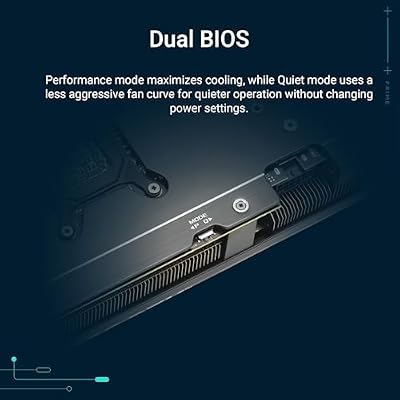
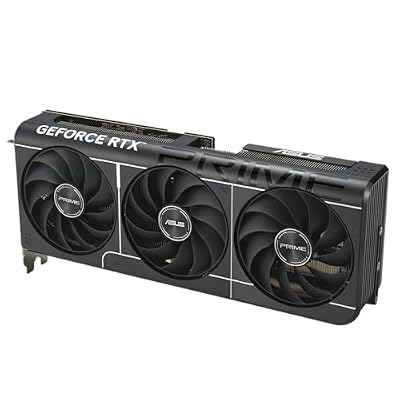
ASUS PRIME GeForce RTX 5070 12GB GDDR7 OC Edition Gaming Graphics Card | SFF-Ready, PCIe 5.0, HDMI/DP 2.1, 2.5-slot, Axial-tech Fans, Dual BIOS






As an Amazon Associate we earn from qualifying purchases. Product prices and availability are accurate as of the date/time indicated.
Power, Cooling and Build Fit
Both cards are aimed at a 1440p build, and both benefit from a quality power supply with enough headroom. Check the listing’s stated power requirement, choose a unit with a native 12V-2×6 connector or a matching adapter, and avoid cheap units with weak 12V rails. Our guide to the best power supply for gaming explains the ratings that matter.
Cooling and noise are a function of the specific board, not the chip alone. Larger coolers keep fan speeds low, and cases with good airflow help any card run quieter. Read reviews that report noise and hotspot temperatures for the model you are considering, and check the card’s length against your case.
Pair the card with a monitor that matches its output. A 1440p high-refresh panel is the natural partner for either card. Our guide to the best 1440p monitor for gaming helps you find one that suits a card in this class.
Which Card Fits Which Buyer
1. Buyers who want the most memory for the money
The RX 9070 is the better choice if you want 16GB at this price and you expect to keep the card for several years. Extra capacity gives you a buffer against future texture budgets, and it lets you run high-resolution assets without tight limits.
2. Buyers who rely on DLSS and the GeForce feature set
The RTX 5070 is the better choice if your favourite games use DLSS 4 well, or if you place a high value on NVIDIA’s ray tracing performance and frame generation support. If your library is heavy with DLSS titles, that advantage can outweigh the memory difference.
3. Buyers who want the quietest build
Choose whichever card has the better premium cooler at a price you accept. Cooler design affects noise more than the chip brand does, so compare the specific models.
Frequently Asked Questions
Is the RX 9070 better than the RTX 5070?
It depends on your priorities. The RX 9070 has more memory, which helps in texture-heavy games. The RTX 5070 has faster memory and stronger DLSS and ray tracing support in many titles.
Is 12GB enough for 1440p gaming?
For many current games, yes, with reasonable settings. Over a longer period, 16GB gives more room for high-resolution textures, so the risk of running out of memory is lower with the larger pool.
Does FSR work on NVIDIA cards?
FSR is designed to work across a range of hardware, including NVIDIA cards, in games that support it. Results vary by game, so compare the upscaling options in the titles you play.
Which card is better for ray tracing?
NVIDIA has the longer track record in ray tracing, and the RTX 5070 often leads in ray-traced titles. Test the specific games you care about, because results vary.
Final Recommendation
Our ranked choice depends on your library. First, if you want the most memory for the money and expect to keep the card for several years, the RX 9070 is the stronger buy. Second, if your games rely on DLSS 4 and heavy ray tracing, the RTX 5070 is the better fit. Third, if the price gap between the two is small, pick the card with the better cooler and the clearer warranty. Compare the hero listing and the alternatives on memory, cooler and price, and confirm the exact model before you order. For a wider view of how the two vendors compare, our AMD vs NVIDIA buyers guide is a useful next read, and our RDNA 4 vs Blackwell architecture explainer covers the design differences behind these two cards. For a 1440p build around either card, our best GPU for 1440p gaming list places both in context, and our best GPU for gaming guide covers the wider market.


